Canva Pro vs VistaCreate Pro vs Adobe Express 2026: Best Design Tool for Solopreneurs?
Canva Pro — $15/month (Standard)
Canva Pro vs VistaCreate Pro vs Adobe Express 2026: Best Design Tool for Solopreneurs?

created by author using AI
Canva Pro — $15/month (Standard)
What it does: Think of this as the shortcut to professional design. It basically replaces about 90% of what most of us would usually need Photoshop for, minus the steep learning curve. It’s a powerhouse for social posts, client decks, and quick brand assets.
Best for: Freelancers, social media managers, and small business owners who need high-quality visuals quickly without a degree in graphic design.
Key features:
- Save your logos, fonts, and colors for one-click branding across all designs.
- AI tools to switch layouts, generate images from text, and expand photos instantly.
- Instantly turn an Instagram post into a LinkedIn banner or a flyer.
Pros:
- Access to millions of premium stock photos, videos, and elements that would cost thousands elsewhere.
- The drag-and-drop interface is so intuitive that anyone can start designing in minutes.
- The one-click background removal tool is a huge time saver for product photos and headshots.
Cons:
- It’s so popular that many templates can start to look generic if you don’t customize them enough.
- Lacks the advanced vector and photo manipulation tools found in professional suites like Adobe.
- While good for quick edits, complex layout work is much harder on the mobile version compared to the desktop.
Rating: 4.7/5 stars on G2
Learn more: https://www.canva.com
VistaCreate Pro — $10/month (Standard)
What it does: VistaCreate is a professional-grade design platform built for speed. It serves as a comprehensive toolkit for anyone who needs to produce high-end marketing materials without touching complex software. It’s particularly strong for social media content, animated ads, and high-quality print assets.
Best for: Social media managers, boutique brand owners, and entrepreneurs who want a high-fashion or editorial look for their visuals without hiring a full-time designer.
Key features:
- Store multiple sets of logos, specific brand fonts, and color palettes to instantly apply your identity to any project.
- Because it’s part of the Vista family, you can design a flyer or business card and send it straight to professional printing with one click.
- Features like the AI Image Generator, Object Remover, and AI Background Remover handle the heavy lifting of photo editing automatically.
Pros:
- Access to over 170 million royalty-free photos, videos, and vectors, which is a massive cost saving on stock photography.
- It offers a huge selection of motion-based templates that look like they were custom-made by a motion graphics artist.
- The Pro plan allows you to add up to 10 team members, making it easy to review and edit designs together in real-time.
Cons:
- While the library is huge (200k+ templates), some very specific business niches might find fewer options compared to more general categories.
- The web experience is incredibly smooth, but the mobile app can sometimes feel a bit more limited for complex, multi-layered layouts.
- With so many assets, the search filters can sometimes take a few extra tries to find that exact specific icon or element you have in mind.
Rating: 4.5/5 stars on G2
Learn more: https://vistacreate.com
Adobe Express Premium — $9.99/month (Standard)
What it does: Think of this as the pro bridge between simple templates and the full Adobe ecosystem. It packs the heavyweight power of Firefly AI and Photoshop Lite tools into a simple web interface. It’s a powerhouse for social video, complex PDFs, and high-end brand consistency.
Best for: Creators who want the Adobe look without the Adobe complexity, and freelancers already familiar with the massive Adobe Stock library.
Key features:
- Use advanced AI to generate high-res images, use Generative Fill to add/remove objects, and create text-to-template creations instantly.
- Upload your logos, fonts, and hex codes to instantly apply your brand to any project or video.
- Access to 195+ million royalty-free photos, videos, and music tracks that usually cost a fortune individually.
Pros:
- You can pull in linked assets from the big apps, meaning if you update a logo in Illustrator, it updates in your Express design automatically.
- Includes better video editing features than most browser tools, like auto captioning and Animate from Audio.
- The Premium plan gives you 100GB of cloud storage, which is huge for backing up video-heavy projects.
Cons:
- Most premium features use Generative Credits. If you’re a heavy AI user, you might run out of monthly fast credits before the month ends.
- Because it’s so feature-rich, the editor can feel a bit slower or laggy on older laptops compared to lighter alternatives.
- With so many Adobe Stock assets and deep customization menus, it can take a few extra minutes to find exactly what you need.
Rating: 4.5/5 stars on G2
Learn more: https://www.adobe.com/express/
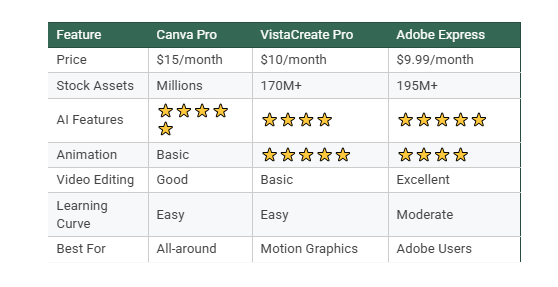
created by author using AI
My Take: You don’t need to be a design pro anymore; you just need the right tool in your pocket. Canva is still the king of ease, but I’m really impressed with VistaCreate for budget-friendly motion graphics and Adobe Express for its insane AI features. At the end of the day, it’s not about which tool is better. It’s about which one makes your life easier. Choose the one that feels right for your creative flow and just start creating.
See you next Sunday.
The Simple Stack
Frequently Asked Questions
Which is easiest to learn?
Canva Pro and VistaCreate Pro tie for easiest. Adobe Express has a slight learning curve but is still beginner-friendly.
Which has the best AI features?
Adobe Express and Canva Pro both have powerful AI tools. Adobe wins for Generative Fill; Canva wins for overall ease of use.
Which is best for animation?
VistaCreate Pro excels at motion graphics and animated social media content.
Which is cheapest?
Adobe Express at $9.99/month, followed by VistaCreate Pro at $10/month.
Can I try them free?
Yes! All three offer free versions or trials.
P.S. Want my complete spreadsheet with 30 essential tools for service solopreneurs (organized by category)? Download it free: https://the-simple-stack.short.gy/30Essential
메타데이터
- post_id
- bb2825db8539
- slug
- canva-pro-vs-vistacreate-pro-vs-adobe-express-2026-best-design-tool-for-solopreneurs-bb2825db8539
- url
- https://medium.com/illumination/canva-pro-vs-vistacreate-pro-vs-adobe-express-2026-best-design-tool-for-solopreneurs-bb2825db8539
- canonical_url
- https://medium.com/illumination/canva-pro-vs-vistacreate-pro-vs-adobe-express-2026-best-design-tool-for-solopreneurs-bb2825db8539
- author_url
- https://medium.com/@elegant.you2021
- status
- ok
- fetched_at
- 2026-07-13 08:38:37