Streaming Custom API Logs to SAP Event Mesh — A Fire-and-Forget Pattern in SAP API Management
How we can give a utility a durable, latency-free audit trail over its customer-facing APIs — straight from the API proxy.
Streaming Custom API Logs to SAP Event Mesh — A Fire-and-Forget Pattern in SAP API Management
How we can give a utility a durable, latency-free audit trail over its customer-facing APIs — straight from the API proxy.
The real-time problem
A utility goes live with self meter-read and outage-reporting APIs, fronted by SAP API Management and calling S/4HANA (IS-U) in the background. Everyone’s happy — until compliance asks who called what, and when? and operations wants a live count during a storm.
The tempting fix — logging to a database inline on every call — is the wrong one. It bolts a slow, failure-prone side-effect onto a customer-facing API. If the log store stumbles, the customer’s meter read fails.
So I did the opposite: fire-and-forget. The proxy serves the customer first, then quietly publishes a custom log event to SAP Event Mesh — off the critical path, durable, and consumable by many.
The scenario
A mid-size electricity & water utility routes its portal, IVR and Salesforce channels through APIM into S/4HANA. Two requirements shaped the design:
- Zero latency impact — audit logging must never slow or fail a genuine transaction.
- Durable, replayable, decoupled — a storm can push thousands of outage reports in minutes; nothing may be lost, and compliance, the SOC and ops must each consume the same log independently.
That’s the exact sweet spot of Event Mesh: asynchronous, persistent queues, publish-once/consume-many.
API proxy flow or sequence
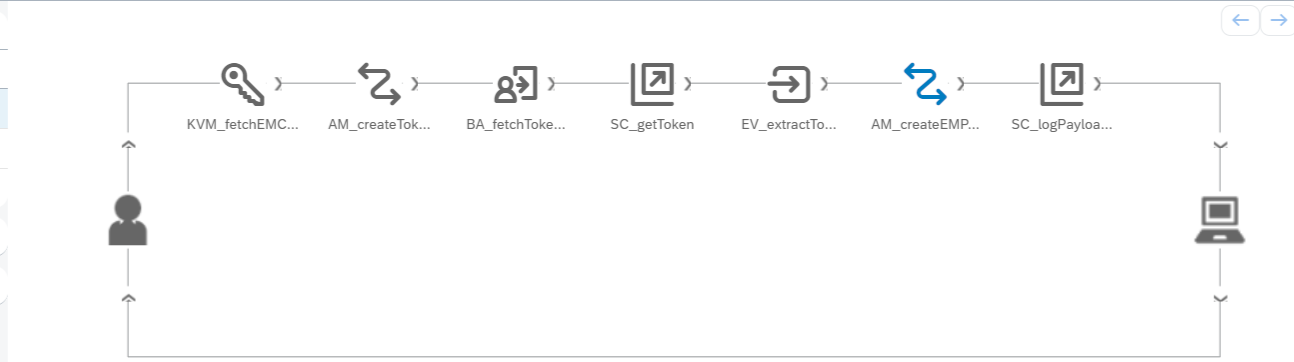
API proxy flow / policy sequence
The policy chain
All logging policies sit in the PreFlow (ProxyEndPoint). The sequence:
1- Key Value Map (KVM) — fetch the Event Mesh clientid and clientsecret.
<KeyValueMapOperations mapIdentifier="{KVM-Identifier}" async="true" continueOnError="false" enabled="true" xmlns="http://www.sap.com/apimgmt">
 <!-- PUT stores the key value pair mentioned inside the element -->
 <Get assignTo="private.client_id" index="1">
        <Key>
            <Parameter>client_id</Parameter>
        </Key>
    </Get>
    <Get assignTo="private.client_secret" index="1">
        <Key>
            <Parameter>client_secret</Parameter>
        </Key>
    </Get>
 <!-- the scope of the key value map. Valid values are environment, organization, apiproxy and policy -->
 <Scope>environment</Scope>
</KeyValueMapOperations>
2- Assign Message — build the OAuth token request (grant_type=client_credentials).
<!-- This policy can be used to create or modify the standard HTTP request and response messages -->
<AssignMessage async="false" continueOnError="false" enabled="true" xmlns='http://www.sap.com/apimgmt'>

 <!-- Sets a new value to the existing parameter -->
 <Set>
  <Headers>
      <Header name="Content-Type">application/x-www-form-urlencoded</Header>
  </Headers>
        <FormParams>
            <FormParam name="grant_type">client_credentials</FormParam>
        </FormParams>
    </Set>
 <IgnoreUnresolvedVariables>false</IgnoreUnresolvedVariables>
 <AssignTo createNew="true" type="request" transport="http">tokenRequest</AssignTo>
</AssignMessage>
3- Basic Authentication — encode the client credentials into the Authorization header.
<BasicAuthentication async='true' continueOnError='false' enabled='true' xmlns='http://www.sap.com/apimgmt'>
 <Operation>Encode</Operation>
 <IgnoreUnresolvedVariables>false</IgnoreUnresolvedVariables>
 <User ref='private.client_id'></User>
 <Password ref='private.client_secret'></Password>
  <AssignTo createNew="false">tokenRequest.header.Authorization</AssignTo>
</BasicAuthentication>
4- Service Callout — call the Event Mesh OAuth token endpoint.
<!-- this policy lets you call to an external service from your API flow -->
<ServiceCallout async="true" continueOnError="false" enabled="true" xmlns="http://www.sap.com/apimgmt">
 <!-- The request that gets sent from the API proxy flow to the external service -->
 <Request variable="tokenRequest"/>
 <!-- the variable into which the response from the external service should be stored -->
 <Response>EM_TOKEN</Response>
 <!-- The time in milliseconds that the Service Callout policy will wait for a response from the target before exiting. Default value is 120000 ms -->
 <Timeout>30000</Timeout>
 <HTTPTargetConnection>
  <!-- The URL to the service being called -->
  <URL>{placeholder-for-Event-Mesh-token-url}</URL>
    </HTTPTargetConnection>
      <!-- The SSL reference to be used to access the https url -->
</ServiceCallout>
5- Extract Variables — read the access_token from the token response into a variable.
<!-- Extract content from the request or response messages, including headers, URI paths, JSON/XML payloads, form parameters, and query parameters -->
<ExtractVariables async="true" continueOnError="false" enabled="true" xmlns='http://www.sap.com/apimgmt'>
 <!-- the source variable which should be parsed -->
 <Source>EM_TOKEN</Source>
 <!-- Specifies the XML-formatted message from which the value of the variable will be extracted -->
 <JSONPayload>
     <Variable name="em.access_token">
         <JSONPath>$.access_token</JSONPath>
     </Variable>
     <Variable name="em.token_type">
         <JSONPath>$.token_type</JSONPath>
     </Variable>
 </JSONPayload>
</ExtractVariables>
6- Assign Message — construct the custom log payload (and attach the bearer token). (More relevant details can be added as business need, I have just created a dummy log)
<!-- This policy can be used to create or modify the standard HTTP request and response messages -->
<AssignMessage async="false" continueOnError="false" enabled="true" xmlns='http://www.sap.com/apimgmt'>

 <!-- Sets a new value to the existing parameter -->
 <Set>
  <Headers>
      <Header name="Authorization">Bearer {em.access_token}</Header>
      <Header name="Content-Type">application/json</Header>
      <Header name="x-qos">1</Header>
  </Headers>
      <Payload contentType="application/json">
          {
          "eventType":"sap.apim.audit.log",
          "source":"apimgmt",
          "timestamp":"{system.timestamp}",
          "proxyName":"{apiproxy.name}",
          "requestId":"{messageid}"
          }
      </Payload>
    </Set>
 <IgnoreUnresolvedVariables>false</IgnoreUnresolvedVariables>
 <AssignTo createNew="true" type="request" transport="http">EMPublishRequest</AssignTo>
</AssignMessage>
7- Service Callout — POST the log to the Event Mesh messaging HTTP endpoint (the queue).
<!-- this policy lets you call to an external service from your API flow -->
<ServiceCallout async="true" continueOnError="false" enabled="true" xmlns="http://www.sap.com/apimgmt">
 <!-- The request that gets sent from the API proxy flow to the external service -->
 <Request variable="EMPublishRequest"/>
 <!-- the variable into which the response from the external service should be stored -->
 <Response>EM_LOG_RES</Response>
 <!-- The time in milliseconds that the Service Callout policy will wait for a response from the target before exiting. Default value is 120000 ms -->
 <Timeout>30000</Timeout>
 <HTTPTargetConnection>
  <!-- The URL to the service being called -->
  <URL>{placeholder-for-Event-Mesh-rest-uri}/messagingrest/v1/queues/{placeholder-for-queue-name}/messages</URL>
    </HTTPTargetConnection>
      <!-- The SSL reference to be used to access the https url -->
</ServiceCallout>
💡 Tip — URL-encode the
/in your queue name as%2f. Event Mesh queue names are hierarchical (e.g.io.utl.audit/api.log), but when that name goes into the messaging REST URL, every/must be encoded as%2f— otherwise the broker reads each segment as a new path and you get a cryptic 404/405 instead of a clean publish. Soio.utl.audit/api.logbecomesio.utl.audit%2Fapi.login the endpoint. Learn from the hours I burned staring at a "correct-looking" URL that wasn't. 🙂
Pushing to Event Mesh
The final Service Callout posts the payload to the queue’s messaging REST endpoint, secured by the token from step 5:
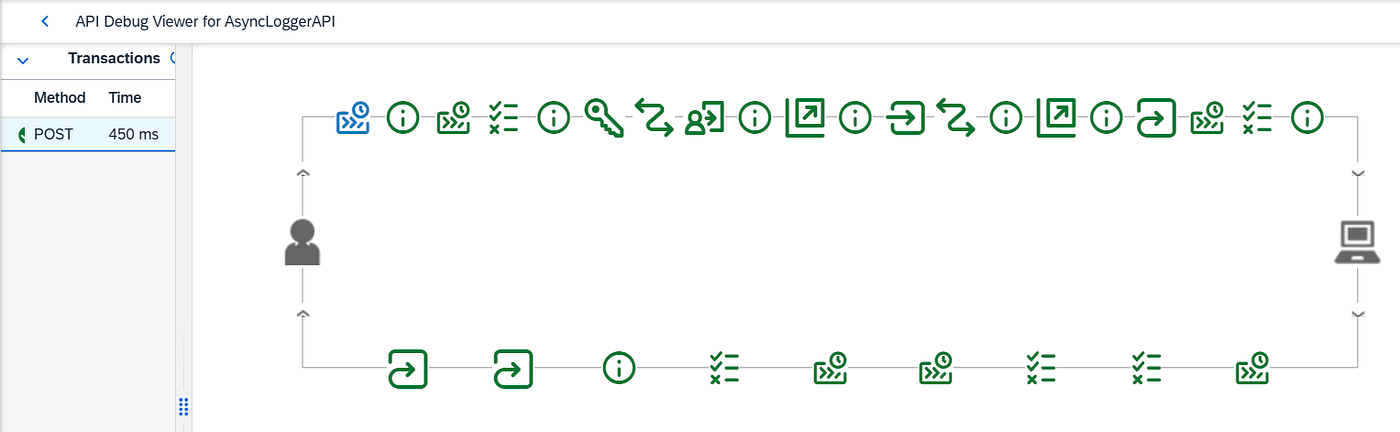
Logs pushed to Event Mesh queue succesfully

Messages queued in Event Mesh
Because this runs in the PostClientFlow, a slow or failed publish never touches the customer’s response — that’s what makes it fire-and-forget.
What it delivered
- Zero-latency audit — the customer is served before the event is emitted.
- Storm-proof durability — 4,000 outage reports become 4,000 persisted events; nothing lost even if the SIEM is busy.
- One source, many consumers — add or retire a subscriber without touching the proxy.
- Negligible cost — Event Mesh meters ~100 outbound events as a single transaction.
Lessons learned
- You can’t read the endpoint URL from a KVM in the Service Callout — hardcode it. I tried storing the Event Mesh (and token) endpoint in a KVM and referencing it as the Service Callout target URL. It doesn’t work: the Service Callout resolves its HTTP target URL at design/deploy time, not from a runtime KVM variable, so the call silently fails or misroutes. Keep only credentials in the KVM; the endpoint URLs must be hardcoded — in case you try to fetch it form KVM you will get error as missing protocol since it tries to check deployment runtime itself.
Closing thought
The elegance isn’t the code — it’s the discipline of separation. The proxy’s one job is to serve the consumer fast; observability rides behind it, never on the critical path. In utilities, where a storm turns a quiet API into a firehose overnight, that separation is the difference between an audit trail you can trust and a blind spot you find at 2 a.m.
Have you built fire-and-forget logging differently? I’d love to hear your trade-offs.
Found this useful? Follow along for more content drawn from real-world experience with SAP APIM, Integration Suite, Event Mesh, and beyond.
메타데이터
- post_id
- bb42898d5c83
- slug
- streaming-custom-api-logs-to-sap-event-mesh-a-fire-and-forget-pattern-in-sap-api-management-bb42898d5c83
- url
- https://medium.com/@tripathisachin/streaming-custom-api-logs-to-sap-event-mesh-a-fire-and-forget-pattern-in-sap-api-management-bb42898d5c83
- canonical_url
- https://medium.com/@tripathisachin/streaming-custom-api-logs-to-sap-event-mesh-a-fire-and-forget-pattern-in-sap-api-management-bb42898d5c83
- author_url
- https://medium.com/@tripathisachin
- status
- ok
- fetched_at
- 2026-08-16 16:21:09




