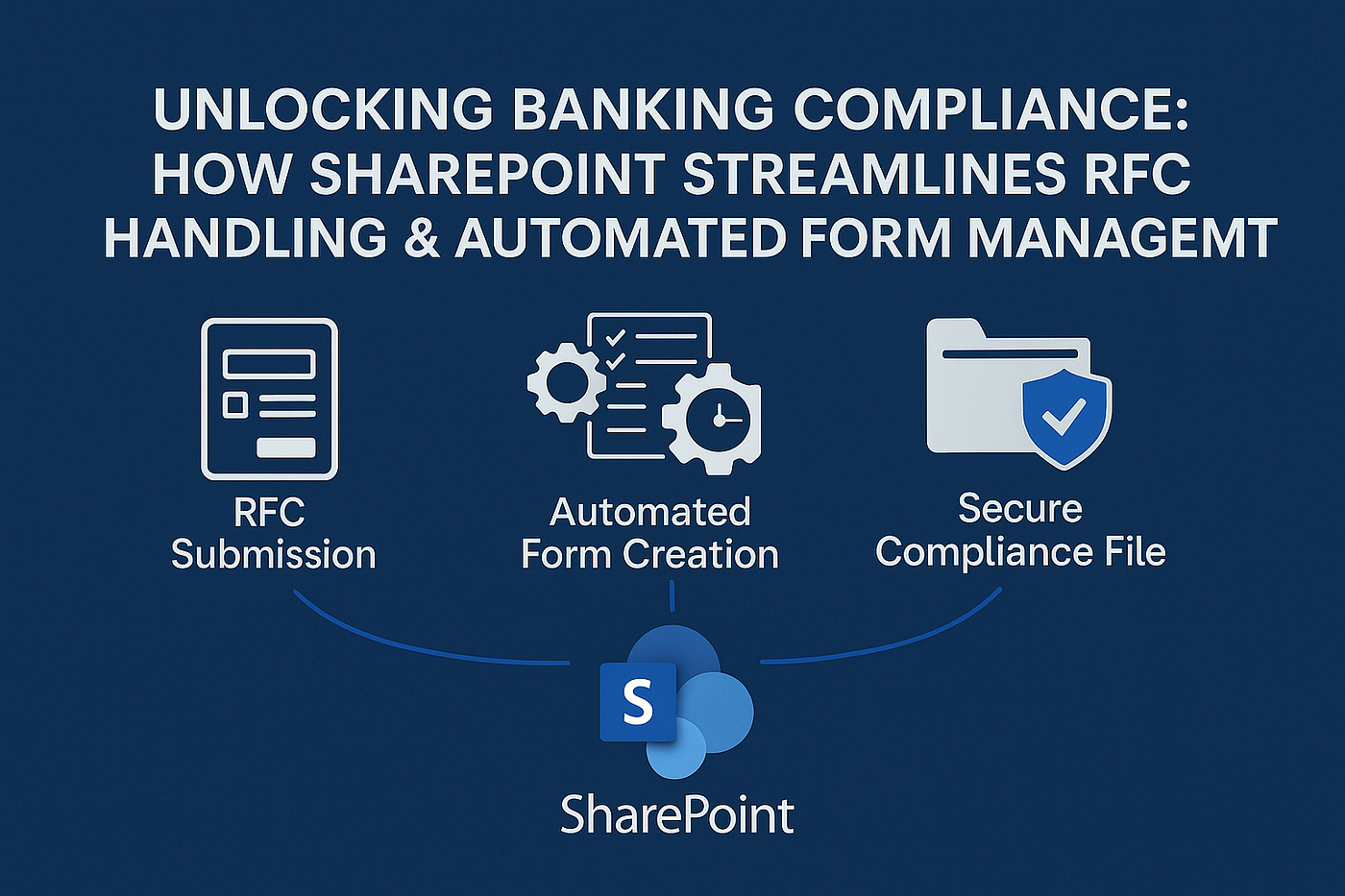
Unlocking Banking Compliance Excellence: How SharePoint Streamlines RFC Handling & Automated Form…
Discover how Microsoft SharePoint empowers banking and fintech compliance officers to manage partner RFCs, automate secure form…
Unlocking Banking Compliance Excellence: How SharePoint Streamlines RFC Handling & Automated Form Management
Discover how Microsoft SharePoint empowers banking and fintech compliance officers to manage partner RFCs, automate secure form submissions, and centralize regulated documentation — reducing risk and saving countless staff hours.
1. The Compliance Challenge in Modern Banking
Whether you oversee a challenger bank, a payment‐rail platform, or a B2B fintech like ZilMoney, staying ahead of regulatory requests for comment/change (RFC), vendor audits, and ever‑evolving data‑privacy mandates is a daily battle. Manual email threads, scattered spreadsheets, and unsecured file shares expose your institution to:
- Regulatory penalties for missed deadlines or incomplete filings
- Operational drag as staff chase versions and approvals
- Data‑breach risks from uncontrolled document access
Microsoft SharePoint Online — part of the Microsoft 365 security and compliance ecosystem — offers a low‑code, highly governed environment tailor‑made to solve these problems.
- Why SharePoint Is a Natural Fit for Banking & Fintech Compliance
3. End‑to‑End RFC Lifecycle on SharePoint
- Submission — Bank partner triggers an RFC via a secure Power Apps form embedded on your SharePoint portal.
- Validation — Required fields (e.g., FINRA ref #, SOC control IDs) are enforced at submission; attachments are virus‑scanned in real time.
- Automated Routing — Power Automate reads metadata (department, risk score) and routes the RFC to compliance specialists or legal counsel.
- Collaborative Review — Stakeholders co‑author inside Microsoft Word Online while threaded Teams chats capture decision rationales linked back to the source RFC.
- Approval & Digitally Signed PDF — The final document is locked, watermarked, and e‑signed; SharePoint writes back status (“Approved,” “Rejected,” “Needs Info”).
- Retention & Reporting — A banking‑specific retention label (e.g., “BankSecrecyAct‑7yrs”) is auto‑applied, ensuring deletion or hold per policy. Dashboards surface KPIs: average RFC turnaround, SLA breaches, outstanding actions.
4. Automating Form Creation & Submission
Traditional PDF or InfoPath forms are clunky, unsearchable, and error‑prone. Replace them with Power Apps‑driven forms hosted in SharePoint:
- Dynamic fields: Show/hide sections based on partner type (issuer, sponsor bank, payment processor).
- Inline validation: Regex patterns for ABA numbers, dropdowns for FinCEN category, etc.
- Attachment controls: Accept only whitelisted file types; auto‑encrypt at rest.
- Instant receipts: Submitters receive a timestamped confirmation and link to track status.
Pro tip: Leverage Lists Templates for “Regulatory Filings” to inherit columns like Submission Deadline and trigger escalation flows two weeks before due dates.
5. Securing the Compliance File Room
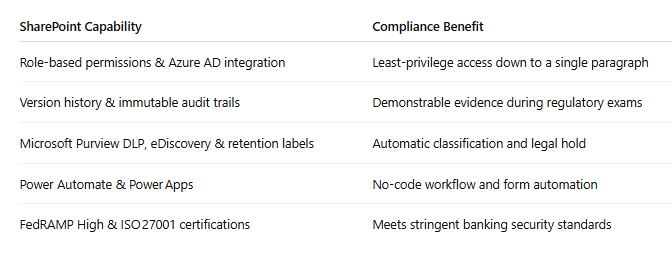
SharePoint’s security stack ensures that even the most sensitive CAMELS scores and SAR documentation stays airtight:
- Label‑Based Encryption — Apply AIP sensitivity labels (e.g., “Highly Confidential — Regulated”) for end‑to‑end encryption, even when the file is downloaded.
- Granular Permissions — Use unique permissions on each RFC library; integrate with Conditional Access to block downloads on unmanaged devices.
- Immutable Records — Enable “record mode” so files cannot be modified once finalized, satisfying SEC Rule 17a‑4(f) requirements.
- Comprehensive Audit Logs — Every view, edit, or permission change is captured for up to 10 years
6. Implementation Roadmap
- Stakeholder Workshop — Map current RFC and form workflows; identify choke points.
- Information Architecture — Design a site collection hierarchy: Compliance Hub → RFC Library → Vendor Audits.
- Governance Policies — Define naming conventions, retention rules, and escalation SLAs.
- Migrate & Classify — Bulk‑import legacy files with SharePoint Migration Tool; apply metadata/taxonomy.
- Automate & Test — Build Power Automate flows; conduct UAT with business users and external partners.
- Train & Roll Out — Host micro‑learning sessions; publish job aids directly in the SharePoint knowledge base.
7. Integrating SharePoint with Your Fintech Stack
- Teams & Viva Connections — Surface RFC dashboards in Teams where compliance staff already work.
- ServiceNow or Jira — Push critical RFC tickets into IT service‑management systems.
- DocuSign / Adobe Sign — Collect legally binding signatures without leaving the portal.
- Core Banking & ERP — Use pre‑built connectors or Azure Logic Apps to sync approval data to Oracle, SAP, or cloud native cores.
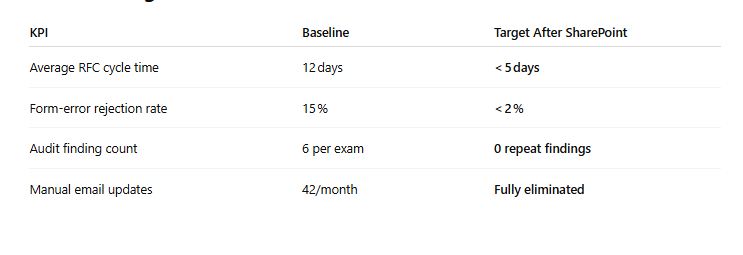
8. Measuring Success
10. Conclusion & Next Steps
By unifying RFC intake, automated form submission, and ironclad document governance on Microsoft SharePoint, banking and fintech compliance officers gain a 360° view of regulatory obligations — while slashing manual effort and audit anxiety.
메타데이터
- post_id
- bb5538775e6f
- slug
- unlocking-banking-compliance-excellence-how-sharepoint-streamlines-rfc-handling-automated-form-bb5538775e6f
- url
- https://medium.com/@new2026/unlocking-banking-compliance-excellence-how-sharepoint-streamlines-rfc-handling-automated-form-bb5538775e6f
- canonical_url
- https://medium.com/@new2026/unlocking-banking-compliance-excellence-how-sharepoint-streamlines-rfc-handling-automated-form-bb5538775e6f
- author_url
- https://medium.com/@new2026
- status
- ok
- fetched_at
- 2026-06-09 15:37:30