Rust/Axum: TOTP-based Two Factor Authentication (2FA) Server
Implement with Rust/Axum! Step By Step!
Rust/Axum: TOTP-based Two Factor Authentication (2FA) Server

Passwords are probably never enough to keep something secure!
I meant, of course, there aren’t a single approach to promise security, but we can make improvements little by little!
In this article, we will be checking out the basics of Time-Based One-Time Passwords (TOTP), one of the method used by Two-factor authentication (2FA), and how we can implement it with Rust/Axum! Step By Step!
Like always, everything on my ***GitHub***!
Start!
Introduction to 2FA & TOTP
Two Factor Authentication
Two-factor authentication (2FA) is an authentication method that adds an additional security layer by requiring an extra confirmation on user’s identity in addition to the traditional username/password.
That can be
- Time-based One-Time Password (TOTP): what we will be making in this article
- Biometric authentication such as facial recognition
- With Physical devices such as NFC Tags
- One-time SMS codes send via email or messages
Now, as I have mentioned, 2FA is to be used on top of the traditional password-based authentication, if you want to get rid of those passwords entirely, you might be interested in one of my previous article about ***Passkey: PassKey Authentication + Server Implementation in Detail*** where passwords are eliminated entirely!
TOTP Authentication
TOTP, Time-based One-Time Password, is a code, or a ***One-time password***, generated by an authentication app such as Google Authenticator that uses the current time as a source of uniqueness and refresh every 30 seconds.
There is a shared TOTP secret key between the authenticator app and the server so that the app and the server can generate the same TOTP code (token) at the same point in time, which allows us to send the code obtained from the app to the service to verify our identify.
Flow to Enable TOTP
Assuming the user is already signed in with their password, here is the flow to enable TOTP-based 2FA for the user.
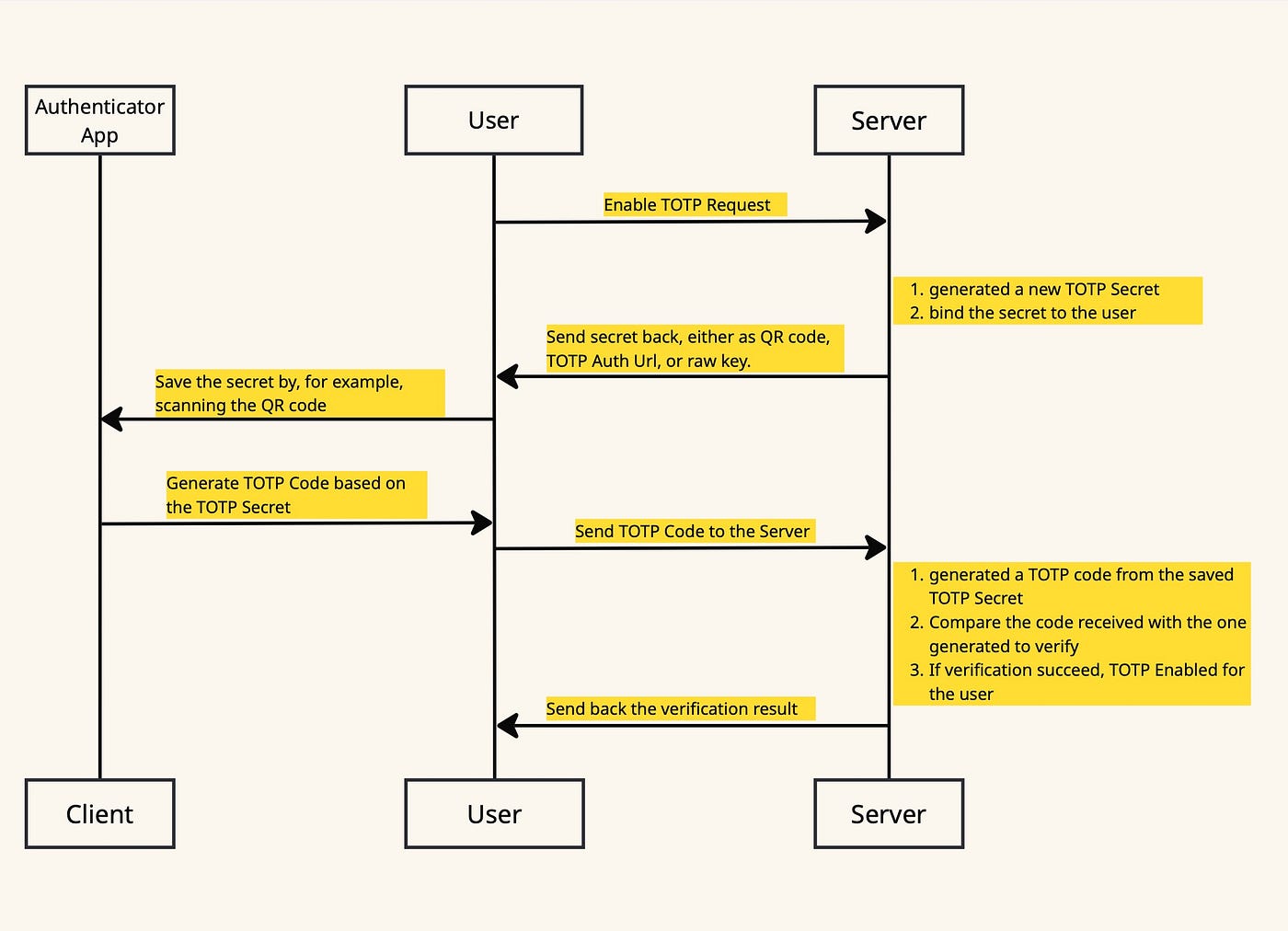
You could combine the flow above with the sign up process to force the user to enable TOTP while registering, but in this article, I will implement those separately!
Sign In Flow
Now that the user has TOTP-base 2FA enabled, the next time they try to sign in with their password, they should be asked for a TOTP code for that extra layer of verification.

Server Implementations!
Enough text!
Let’s get our hands dirty on some code!
Again, feel free to grab the full code from my ***GitHub ***and let’s start!
Dependencies
Let’s add the following to our Cargo.toml.
[dependencies]
axum = "0.8.4"
tokio = {version = "1.46.1" , features = ["full"] }
tower-sessions = "0.14.0"

anyhow = "1.0.98"
serde = { version = "1.0.219", features = ["derive"] }
serde_json = "1.0.140"

totp-rs = { version = "5.7.0", features = ["qr", "gen_secret"] }
All the ones above should look pretty familiar if you have ever used axum to create an API Server, probably except for this [**totp-rs](https://crates.io/crates/totp-rs)**, our main dish for today!
[axum](https://docs.rs/axum/latest/axum/): Our API Server[tokio](https://docs.rs/tokio/1.45.1/x86_64-unknown-linux-gnu/tokio/index.html): runtime[tower-sessions](https://docs.rs/tower-sessions/latest/tower_sessions/): for managing user’s signed-in state using session[anyhow](https://docs.rs/anyhow/latest/anyhow/): Error handling[serde](https://docs.rs/serde/latest/serde/) and[serde_json](https://docs.rs/serde_json/latest/serde_json/): serializing and deserializing data structures
And!
[totp-rs](https://crates.io/crates/totp-rs)!
We are using it for generating TOTP secret, TOTP Token that holds informations on how should authorization code be generated and validated, ***otp auth URLs ***that can be used to generate QR code, QR code itself, and more!
In addition to the features I have added above, there are also
otpauthto support parsing the TOTP parameters from anotpauthURLserde_supportthat makes library-defined types[TOTP](https://docs.rs/totp-rs/latest/totp_rs/struct.TOTP.html) andAlgorithmDeserialize-ableandSerialize-able. This can be useful if, for example, instead of saving anotp_secretlike what we had above, you want to save the entireTOTPa structure that holds informations on how should authorization code be generated and validated. We will be creating an instance of this type every time we need it in this article.zeroize: Securely zero secret information when the TOTP struct is dropped.steam: Add support for Steam TOTP tokens.
Models
Database-related
A simple User model to store some identification-related data, and an AppState to behave as a dummy database.
use serde::{Deserialize, Serialize};
use serde_json::{json, Value};

#[derive(Debug, Deserialize, Serialize, Clone)]
pub struct User {
    pub email: String,
    pub password: String,

    // base32 encoded secret string
    pub otp_secret: Option<String>,
    pub otp_verified: Option<bool>,
}

impl User {
    pub fn to_response_value(&self) -> Value {
        return json!({
            "email": self.email,
            "otp_enabled": self.otp_verified == Some(true)
        });
    }
}

use std::sync::Arc;
use tokio::sync::Mutex;

use crate::models::user::User;

/// A dummy database
#[derive(Clone, Default)]
pub struct AppState {
    pub db: Arc<Mutex<Vec<User>>>,
}
Here, I have a otp_verified field within my User model to use as a flag indicating whether the otp_secret saved is verified or not. (Because the user might decide to send the enable OTP request, without actually finishing it by sending back the code generated by the app.)
An alternative approach here will be to save the otp_secret to the session upon receiving the enable OTP request, and only add it to the database when it is verified.
If what I am talking here doesn’t make much sense for now, don’t worry, I promise it will as we implement those handlers!
Handler-related
// POST /auth/register
#[derive(Debug, Deserialize)]
pub struct RegisterSignInBodyParameter {
    pub email: String,
    pub password: String,
}

// GET /auth/otp/enable
#[derive(Debug, Deserialize)]
pub struct OTPResponseTypeQueryParameter {
    pub response_type: Option<OTPResponseType>,
}

// POST /auth/otp/verify
#[derive(Debug, Deserialize)]
pub struct VerifyOTPParameter {
    pub otp_token: String,
}

#[derive(Debug, Deserialize, PartialEq, Eq)]
#[serde(rename_all = "SCREAMING_SNAKE_CASE")]
pub enum OTPResponseType {
    // secret key
    SecretKey,
    // This URL can be encoded as a QR code and scanned by authenticator apps
    Url,
    QrPng,
    QrBase64,
}

#[derive(Debug, Deserialize, Serialize, Clone)]
pub struct SessionUserModel {
    pub email: String,
    pub signed_in: bool,
}
Handlers
Endpoints Overview
Here are the endpoints we have for our server.
POST /auth/register: sign up new userPOST /auth/signin: sign in existing userGET /auth/signout: sign out- ⭐
GET /auth/otp/enable: enable TOTP-based 2FA GET /auth/otp/disable: disable TOTP-based 2FA- ⭐
POST /auth/otp/verify: verify TOTP code generated by authenticator apps
I have put those ⭐-s there just so that we get an idea of where those important stuff are actually at!
In addition to the ones above, I also have two extra here.
GET /index.htmlGET /index.js
Yes!
I am too lazy to create a beautiful React App so I will be serving a super simplified frontend with literarily no styling with pure HTML/Javascript just for demonstrating how a web app can call the server endpoints we have above!
You can totally ignore it if you get your own awesome frontend!
POST /auth/register
Nothing special about this one here as I have mentioned above, I am separating out the enable-TOTP flow from the sign up flow.
Take in an email, a password, add it to our dummy database, and set the user session.
pub async fn register_handler(
    session: Session,
    State(state): State<AppState>,
    Json(params): Json<RegisterSignInBodyParameter>,
) -> Response {
    print_green!("POST /auth/register");
    println!("email: {}, password: {}", params.email, params.password);

    let mut current_users = state.db.lock().await;

    let existing: Vec<User> = current_users
        .clone()
        .into_iter()
        .filter(|u| u.email.to_lowercase() == params.email.to_lowercase())
        .collect();

    if !existing.is_empty() {
        return build_error_response(anyhow::anyhow!("User with email {} exists.", params.email));
    }

    let new = User {
        email: params.email.clone(),
        password: params.password,
        otp_secret: None,
        otp_verified: None,
    };

    current_users.push(new.clone());

    if let Err(error) = session
        .insert(
            USER_KEY,
            SessionUserModel {
                email: new.email.clone(),
                signed_in: true,
            },
        )
        .await
    {
        return build_error_response(anyhow::anyhow!("Error saving user into session: {}", error));
    };

    return build_json_response(&json!({
        "error": false,
        "user": new.to_response_value()
    }));
}
⭐ GET /auth/otp/enable
Now that the user is registered and signed in, they might decide (hopefully) to enable the TOTP-based 2FA.
So!
Here we go!
First important part for today!
We generate a new TOTP secret for the user!
// GET /auth/otp/enable
pub async fn enable_otp_handler(
    session: Session,
    State(state): State<AppState>,
    Query(params): Query<OTPResponseTypeQueryParameter>,
) -> Response {
    print_green!("GET /auth/otp/enable");

    let mut current_users = state.db.lock().await;

    let session_user = match session.get::<SessionUserModel>(USER_KEY).await {
        Ok(u) => match u {
            Some(u) => u,
            None => {
                return build_error_response(anyhow::anyhow!(
                    "No user found for the current session."
                ))
            }
        },
        Err(error) => {
            return build_error_response(anyhow::anyhow!(error));
        }
    };

    let Some(user) = current_users
        .iter_mut()
        .find(|user| user.email == session_user.email)
    else {
        return build_error_response(anyhow::anyhow!(
            "User with email {} does not exists.",
            session_user.email
        ));
    };

    let otp = match generate_otp(&user, None) {
        Ok(otp) => otp,
        Err(error) => {
            return build_error_response(anyhow::anyhow!("Error generating otp: {}", error))
        }
    };

    let otp_secret: String = otp.get_secret_base32(); // equivalent to secret.to_encoded()

    user.otp_secret = Some(otp_secret);
    user.otp_verified = Some(false);

    return build_otp_response(otp, params.response_type);
}

fn generate_otp(user: &User, secret: Option<Secret>) -> anyhow::Result<TOTP> {
    let secret = secret.unwrap_or(Secret::generate_secret());

    let totp = TOTP::new(
        Algorithm::SHA1,
        6,
        1,
        30,
        secret.to_bytes()?,
        Some(ISSUER.to_string()),
        user.email.to_owned(),
    )?;

    Ok(totp)
}

fn build_otp_response(otp: TOTP, response_type: Option<OTPResponseType>) -> Response {
    let response_type = response_type.unwrap_or(OTPResponseType::Url);
    match response_type {
        OTPResponseType::SecretKey => {
            return build_json_response(&json!({
                "otp_key": otp.get_secret_base32()
            }));
        }
        OTPResponseType::Url => {
            return build_json_response(&json!({
                "otp_auth_url": otp.get_url()
            }));
        }
        OTPResponseType::QrPng => {
            let Ok(bytes) = otp.get_qr_png() else {
                return build_error_response(anyhow::anyhow!("Error generating QR code."));
            };
            let mut bytes_header = HeaderMap::new();
            bytes_header.insert(CONTENT_TYPE, "image/png".parse().unwrap());
            return (bytes_header, bytes).into_response();
        }
        OTPResponseType::QrBase64 => {
            let Ok(base64) = otp.get_qr_base64() else {
                return build_error_response(anyhow::anyhow!("Error generating QR code."));
            };
            return build_json_response(&json!({
                "otp_qr_base64": base64
            }));
        }
    }
}
Here, I have used the [generate_secret](https://docs.rs/totp-rs/latest/totp_rs/enum.Secret.html#method.generate_secret) function, available on crate feature gen_secret to generate the TOTP secret, but we can totally do it by ourselves like following, base32 encoded with algorithm set to Rfc4648.
let mut data = rand::rng().random::<[u8; 21]>();
let base32_string = base32::encode(base32::Alphabet::Rfc4648Hex { padding: false }, &data);
let secret = Secret::Encoded(base32_string);
We then created our [TOTP](https://docs.rs/totp-rs/latest/totp_rs/struct.TOTP.html) instance.
algorithm. SHA-1 is the most widespread algorithm used, and for TOTP purposes, SHA-1 hash collisions are not a problem as HMAC-SHA-1 is not impacted.digits: The number of digits composing the auth code. If you are testing using authenticator App such as Google Authenticator or Microsoft Authenticator, leave this as the default6digits because those apps ignore this value and just assume that it is6!skew: Number of steps allowed as network delay. 1 would mean one step before current step and one step after are valid.step: Duration in seconds of a step, also known as the refresh period. Again, If you are testing using authenticator App such as Google Authenticator or Microsoft Authenticator, leave this as the default30seconds because those apps ignore this value!secret: our secret generated above as bytes.issuer(optional): Us!account_name(optional): User’s account name. In ourscenario, the email.
The response I am returning from this route will be based on the OTPResponseType requested.
SecretKey: Base32 encoded TOTP secret. Useful when users want to manually add the secret to their authenticatorUrl: ***otp auth URLs ***that can be used to generate QR codeQrPng: QR code as png bytesQrBase64: Base64 representation of the QR code
⭐ POST /auth/otp/verify
Hopefully our wonderful user will decide to add the generated secret to an authenticator app, by either scanning on the QR code or manually typing in those secrets, get the TOTP code generated, and send it back to us, so that we get to verify those!
Wait! They are not? Throw them away and go find someone else! If they don’t care about their own security, neither do us (or I)!
This handler can actually be used for both
- Token verification when user enable the 2FA, as well as
- Token verification on sign in if the user has TOTP-based 2FA enabled
// POST /auth/otp/verify
pub async fn verify_otp_handler(
session: Session,
State(state): State<AppState>,
Json(params): Json<VerifyOTPParameter>,
) -> Response {
print_green!("POST /auth/otp/verify");
println!("Verifying token: {}", params.otp_token);
let mut current_users = state.db.lock().await;
let session_user = match session.get::<SessionUserModel>(USER_KEY).await {
Ok(u) => match u {
Some(u) => u,
None => {
return build_error_response(anyhow::anyhow!(
"No user found for the current session."
))
}
},
Err(error) => {
return build_error_response(anyhow::anyhow!(error));
}
};
let Some(user) = current_users
.iter_mut()
.find(|user| user.email == session_user.email)
else {
return build_error_response(anyhow::anyhow!(
"User with email {} does not exists.",
session_user.email
));
};
let Some(saved_otp) = user.otp_secret.clone() else {
return build_error_response(anyhow::anyhow!("User does not have otp enabled."));
};
let secret = Secret::Encoded(saved_otp);
let otp = match generate_otp(&user, Some(secret)) {
Ok(otp) => otp,
Err(error) => {
return build_error_response(anyhow::anyhow!("Error generating otp: {}", error))
}
};
let is_valid = match otp.check_current(¶ms.otp_token) {
Ok(b) => b,
Err(error) => {
return build_error_response(anyhow::anyhow!("Error validating otp: {}", error))
}
};
// do not need to do anything if not valid
// - if the user is already signed in, they are calling this handler for setting up otp and we should leave them as signed in
// - if the user is not signed in, there is also nothing to update
// - Also, we don't need to update otp_verified even when verification fails.
if is_valid {
user.otp_verified = Some(true);
// sign in the user
if let Err(error) = session
.insert(
USER_KEY,
SessionUserModel {
email: user.email.clone(),
signed_in: true,
},
)
.await
{
return build_error_response(anyhow::anyhow!("Error signning in user: {}", error));
};
}
return build_json_response(&json!({
"otp_verified": is_valid,
"user": if !is_valid { Value::Null } else { user.to_response_value() }
}));
}To verify the code generated by the authenticator app, we retrieve the TOTP secret we have saved for the user, create a [TOTP](https://docs.rs/totp-rs/latest/totp_rs/struct.TOTP.html) instance out fit, and call [check_current](https://docs.rs/totp-rs/latest/totp_rs/struct.TOTP.html#method.check_current) on it to check if token is valid by current system time, accounting [skew](https://docs.rs/totp-rs/latest/totp_rs/struct.TOTP.html#structfield.skew).
However, if you have used other algorithms other than SHA1, do note that some authenticator apps will accept the SHA256 and SHA512 algorithms but silently fallback to SHA1 which will make the [check](https://docs.rs/totp-rs/latest/totp_rs/struct.TOTP.html#method.check) function fail due to mismatched algorithms.
POST /auth/signin
Now that the user has TOTP-based 2FA set up, the next they sign in, they should be prompt to enter the code generated by the authenticator app.
As I have mentioned, to verify the code, we can use the same endpoint as above, our POST /auth/otp/verify!
So!
All we have to do here is when getting a sign in request with email and password, we check if the identifies are correct, if they are and if the user indeed has 2FA enabled, we ask them to enter the code.
pub async fn signin_handler(
    session: Session,
    State(state): State<AppState>,
    Json(params): Json<RegisterSignInBodyParameter>,
) -> Response {
    print_green!("POST /auth/signin");
    println!("email: {}, password: {}", params.email, params.password);

    let mut current_users = state.db.lock().await;

    // println!("current user: {:?}", current_users);

    let Some(user) = current_users
        .iter_mut()
        .find(|user| user.email == params.email)
    else {
        return build_error_response(anyhow::anyhow!(
            "User with email {} does not exists.",
            params.email
        ));
    };

    if user.password != params.password {
        return build_error_response(anyhow::anyhow!("Invalid credential."));
    }

    let otp_verification_required = user.otp_verified == Some(true);

    if let Err(error) = session
        .insert(
            USER_KEY,
            SessionUserModel {
                email: params.email,
                signed_in: !otp_verification_required,
            },
        )
        .await
    {
        return build_error_response(anyhow::anyhow!("Error saving user into session: {}", error));
    };

    return build_json_response(&json!({
        "error": false,
        "otp_verification_required": otp_verification_required,
        "user": if otp_verification_required { Value::Null } else { user.to_response_value() }
    }));
}
GET /auth/otp/disable
As simple as set the both otp_secret and otp_verified to None! For the signed-in user of course!
pub async fn disable_otp_handler(session: Session, State(state): State<AppState>) -> Response {
    print_green!("GET /auth/otp/disable");

    let mut current_users = state.db.lock().await;

    let session_user = match session.get::<SessionUserModel>(USER_KEY).await {
        Ok(u) => match u {
            Some(u) => u,
            None => {
                return build_error_response(anyhow::anyhow!(
                    "No user found for the current session."
                ))
            }
        },
        Err(error) => {
            return build_error_response(anyhow::anyhow!(error));
        }
    };
    if !session_user.signed_in {
        return build_error_response(anyhow::anyhow!("User has to sign in to disable 2FA."));
    }

    let Some(user) = current_users
        .iter_mut()
        .find(|user| user.email == session_user.email)
    else {
        return build_error_response(anyhow::anyhow!(
            "User with email {} does not exists.",
            session_user.email
        ));
    };

    user.otp_secret = None;
    user.otp_verified = None;

    return build_json_response(&json!({
        "error": false,
        "user": user.to_response_value()
    }));
}
GET /auth/signout
Simply remove user’s session. End!
pub async fn signout_handler(session: Session) -> Response {
    print_green!("GET /auth/signout");

    if let Err(error) = session.insert(USER_KEY, Value::Null).await {
        return build_error_response(anyhow::anyhow!("Error signing out user: {}", error));
    };

    return build_json_response(&json!({
        "error": false,
    }));
}
FrontEnd Handlers
Above are all we have for the actual server implementation! If you don’t need a frontend for testing, you can also just try those out with something like Postman or Insomnia!
But here are my index.html and index.js, as well as the handlers for returning those!
index.html
<html>

<head>
    <script src="index.js">

    </script>

</head>

<body>
    <div id="formContainer" style="display: block;">
        <br /><br />
        <label>Email: </label>
        <input type="text" value="email@example.com" id="email" name="email">
        <br /> <br />
        <label>Password: </label>
        <input type="text" value="password" id="password" name="password">
        <br /> <br />
        <button type="button" onclick="register()">Register(POST /auth/register)</button>
        <button type="button" onclick="signIn()">Sign In(POST /auth/signin)</button>
    </div>

    <div id="signedInContainer" style="display: none;">
        <br /><br />
        <p>User: </p>
        <p id="signedInEmail"></p>

        <br />
        <p>OTP: </p>
        <button type="button" onclick="enableOTP()" id="enableOTPButton" style="display: none;">Enable OTP(GET
            /auth/otp/enable)</button>
        <button type="button" onclick="disableOTP()" id="disableOTPButton" style="display: none;">Disable OTP(GET
            /auth/otp/disable)</button>

        <br />

        <button type="button" onclick="SignOut()">Sign Out(GET
            /auth/signout)</button>

    </div>

    <div id="otpTokenContainer" style="display: none">
        <br /><br />
        <!-- only display QrCode on enabling otp -->
        <img src="" id="otpQRCode" style="display: none; width: 160px; height: 160px;" />

        <label>OTP token from Authenticator: </label>
        <input type="text" value="" id="otpToken" name="otpToken">
        <br /> <br />
        <button type="button" onclick="verifyOTPToken()">Verify(POST /auth/otp/verify)</button>
    </div>

    <br /><br /><br /><br />
</body>

</html>
index.js
async function register() {
    const email = document.getElementById("email").value
    const password = document.getElementById("password").value
    console.log("register for ", email, password)

    const url = "/auth/register"
    try {
        const response = await fetch(url, {
            method: "POST",
            body: JSON.stringify({
                email: email,
                password: password,
            }),
            headers: {
                "Content-Type": "application/json"
            }
        })

        try {
            const json = await response.json()

            console.log(json)
            if (!response.ok) {
                alert(`Error: Response status: ${response.status}, message: ${json.message}`)
                return
            }

            document.getElementById("signedInEmail").innerText = json.user.email
            document.getElementById("signedInContainer").style.display = "block"
            document.getElementById("formContainer").style.display = "none"

            if (json.user.otp_enabled == true) {
                document.getElementById("enableOTPButton").style.display = "none"
                document.getElementById("disableOTPButton").style.display = "block"
            } else {
                document.getElementById("enableOTPButton").style.display = "block"
                document.getElementById("disableOTPButton").style.display = "none"
            }

        } catch {
            const text = response.text()
            console.log(text)
            if (!response.ok) {
                throw new Error(`Response status: ${response.status}, message: ${text}`)
            }
        }
    } catch (error) {
        alert(error.message)
    }
}

async function signIn() {
    const email = document.getElementById("email").value
    const password = document.getElementById("password").value
    console.log("signin for ", email, password)

    const url = "/auth/signin"
    try {
        const response = await fetch(url, {
            method: "POST",
            body: JSON.stringify({
                email: email,
                password: password,
            }),
            headers: {
                "Content-Type": "application/json"
            }
        })

        try {
            const json = await response.json()

            console.log(json)
            if (!response.ok) {
                alert(`Error: Response status: ${response.status}, message: ${json.message}`)
                return
            }

            if (json.otp_verification_required == false) {
                document.getElementById("signedInEmail").innerText = json.user.email
                document.getElementById("signedInContainer").style.display = "block"
                document.getElementById("formContainer").style.display = "none"

                if (json.user.otp_enabled == true) {
                    document.getElementById("enableOTPButton").style.display = "none"
                    document.getElementById("disableOTPButton").style.display = "block"
                } else {
                    document.getElementById("enableOTPButton").style.display = "block"
                    document.getElementById("disableOTPButton").style.display = "none"
                }
                return
            }

            document.getElementById("otpQRCode").src = ""
            document.getElementById("otpQRCode").style.display = "none"
            document.getElementById("otpTokenContainer").style.display = "block"

        } catch {
            const text = response.text()
            console.log(text)
            if (!response.ok) {
                throw new Error(`Response status: ${response.status}, message: ${text}`)
            }
        }
    } catch (error) {
        alert(error.message)
    }
}

async function verifyOTPToken() {
    const otpToken = document.getElementById("otpToken").value
    console.log("verify token: ", otpToken)

    const url = "/auth/otp/verify"
    try {
        const response = await fetch(url, {
            method: "POST",
            body: JSON.stringify({
                otp_token: otpToken,
            }),
            headers: {
                "Content-Type": "application/json"
            }
        })

        try {
            const json = await response.json()

            console.log(json)
            if (!response.ok) {
                alert(`Error: Response status: ${response.status}, message: ${json.message}`)
                return
            }

            const isValid = json.otp_verified
            if (!isValid) {
                alert("Invalid token. Please try again.")
                return
            }

            document.getElementById("signedInEmail").innerText = json.user.email
            document.getElementById("signedInContainer").style.display = "block"
            document.getElementById("formContainer").style.display = "none"
            document.getElementById("otpTokenContainer").style.display = "none"

            document.getElementById("enableOTPButton").style.display = "none"
            document.getElementById("disableOTPButton").style.display = "block"

            document.getElementById("otpToken").value = ""

        } catch {
            const text = response.text()
            console.log(text)
            if (!response.ok) {
                throw new Error(`Response status: ${response.status}, message: ${text}`)
            }
        }
    } catch (error) {
        alert(error.message)
    }

}

async function SignOut() {
    const url = "/auth/signout"
    try {
        const response = await fetch(url, {
            method: "GET"
        })

        try {
            const json = await response.json()

            console.log(json)

            if (!response.ok) {
                alert(`Error: Response status: ${response.status}, message: ${json.message}`)
                return
            }

            document.getElementById("signedInEmail").innerText = ""
            document.getElementById("signedInContainer").style.display = "none"
            document.getElementById("otpTokenContainer").style.display = "none"
            document.getElementById("formContainer").style.display = "block"

        } catch {
            const text = response.text()
            console.log(text)
            if (!response.ok) {
                throw new Error(`Response status: ${response.status}, message: ${text}`)
            }
        }
    } catch (error) {
        alert(error.message)
    }

}

async function enableOTP() {
    const url = "/auth/otp/enable?response_type=QR_BASE64"
    try {
        const response = await fetch(url, {
            method: "GET"
        })

        try {
            const json = await response.json()

            console.log(json)

            if (!response.ok) {
                alert(`Error: Response status: ${response.status}, message: ${json.message}`)
                return
            }

            document.getElementById("otpQRCode").src = `data:image/png;base64, ${json.otp_qr_base64}`
            document.getElementById("otpQRCode").style.display = "block"
            document.getElementById("otpTokenContainer").style.display = "block"

        } catch {
            const text = response.text()
            console.log(text)
            if (!response.ok) {
                throw new Error(`Response status: ${response.status}, message: ${text}`)
            }
        }
    } catch (error) {
        alert(error.message)
    }

}

async function disableOTP() {
    const url = "/auth/otp/disable"
    try {
        const response = await fetch(url, {
            method: "GET"
        })

        try {
            const json = await response.json()

            console.log(json)

            if (!response.ok) {
                alert(`Error: Response status: ${response.status}, message: ${json.message}`)
                return
            }

            document.getElementById("enableOTPButton").style.display = "block"
            document.getElementById("disableOTPButton").style.display = "none"

        } catch {
            const text = response.text()
            console.log(text)
            if (!response.ok) {
                throw new Error(`Response status: ${response.status}, message: ${text}`)
            }
        }
    } catch (error) {
        alert(error.message)
    }

}
Handlers
use axum::{
    http::{header::CONTENT_TYPE, HeaderMap},
    response::{Html, IntoResponse, Response},
};

pub async fn html_handler() -> Html<&'static str> {
    let html = include_str!("../frontend/index.html");
    return Html(html);
}

pub async fn javascript_handler() -> Response {
    let javascript = include_str!("../frontend/index.js");
    let mut header = HeaderMap::new();
    header.insert(CONTENT_TYPE, "text/javascript".parse().unwrap());
    return (header, javascript).into_response();
}
Main
Last but not least, our fn main to set up the session, set up the handlers, and start the server!
#[tokio::main]
async fn main() -> anyhow::Result<()> {
    let session_store = MemoryStore::default();
    let session_layer = SessionManagerLayer::new(session_store)
        .with_name("itsuki.sid")
        .with_http_only(true)
        .with_secure(false)
        .with_expiry(Expiry::OnInactivity(Duration::hours(1)));

    let state = AppState::default();

    let otp_router = Router::new()
        .route("/enable", get(enable_otp_handler))
        .route("/disable", get(disable_otp_handler))
        .route("/verify", post(verify_otp_handler));

    let auth_router = Router::new()
        .route("/register", post(register_handler))
        .route("/signin", post(signin_handler))
        .route("/signout", get(signout_handler))
        .nest("/otp", otp_router);

    let app = Router::new()
        .route("/index.html", get(html_handler))
        .route("/index.js", get(javascript_handler))
        .nest("/auth", auth_router)
        .layer(session_layer) // layer to store user's session
        .with_state(state);

    let listener = tokio::net::TcpListener::bind("0.0.0.0:3000").await?;
    axum::serve(listener, app).await?;

    Ok(())
}
**Cargo runtime!**
Open a browser, navigate to **http://localhost:3000/index.html** and check it out!
References
Thank you for reading!
Hope you enjoyed my super old fashion (like 30-years-ago) HTML!
Again, feel free to grab everything from my ***GitHub***!
Happy TOTP-authenticating!
메타데이터
- post_id
- bb5829f6c3a3
- slug
- rust-axum-totp-based-two-factor-authentication-2fa-server-bb5829f6c3a3
- url
- https://levelup.gitconnected.com/rust-axum-totp-based-two-factor-authentication-2fa-server-bb5829f6c3a3
- canonical_url
- https://levelup.gitconnected.com/rust-axum-totp-based-two-factor-authentication-2fa-server-bb5829f6c3a3
- author_url
- https://medium.com/@itsuki.enjoy
- status
- ok
- fetched_at
- 2026-06-26 21:52:29




