Signs You Need Better Hosting
Better hosting is not always the first answer to a slow website. Many performance problems can be improved with basic cleanup. Images can…
Signs You Need Better Hosting
Better hosting is not always the first answer to a slow website. Many performance problems can be improved with basic cleanup. Images can be compressed, unused plugins removed, caching enabled, scripts delayed, and heavy pages simplified. These steps matter, and they should usually come before a hosting upgrade.
But there is a point where optimization stops solving the real problem. The site may already be reasonably clean, yet it still feels unstable. Pages may load quickly one day and slowly the next. The admin area may become frustrating. Traffic may expose problems that never appeared during quiet periods. At that stage, the question changes from “What else can I optimize?” to “Is the hosting environment strong enough for what this website has become?”
That is the situation this article is about. Better hosting does not mean buying the most expensive plan because one speed test looks bad. It means recognizing practical signs that your current setup no longer matches the size, complexity, traffic, or business role of your website.
If you are still trying to understand the difference between useful optimization and deeper infrastructure limits, this related guide gives useful context: https://volodymyrzh.medium.com/when-website-optimization-is-not-enough-e2b0aec1ac7e
Your site is slow even after basic optimization
One of the clearest signs you may need better hosting is simple: the obvious fixes have already been done, but the site still feels slow.
This does not mean every score must be perfect. Many websites still have design issues, tracking tools, large media files, or frontend problems. But when the biggest waste has been removed and the website is still slow to respond, the server side deserves attention.
A site may need better hosting when you have already handled things like:
- compressed and resized large images;
- removed unused themes, plugins, and scripts;
- enabled reasonable caching;
- cleaned up obvious database clutter;
- reduced unnecessary page elements;
- checked that one plugin is not causing the entire slowdown.
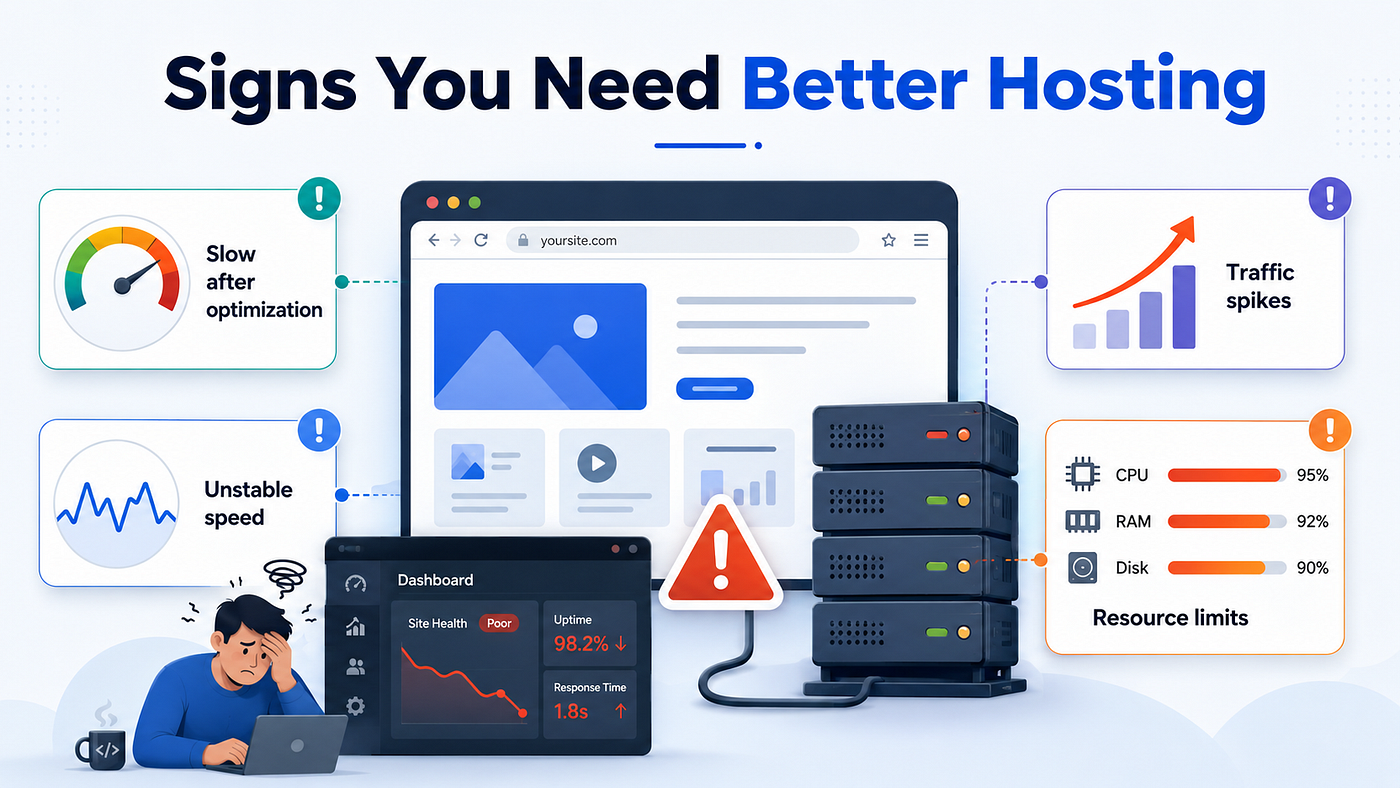
If those steps improve the site only slightly, the bottleneck may sit deeper. The server may not have enough CPU power to process requests quickly. Memory may be too tight for WordPress, WooCommerce, or plugin-heavy pages. The database may respond slowly because too many sites share the same resources. The plan may work for a brochure site but not for a growing website with more content, forms, users, and background tasks.
This is where many site owners get stuck. They keep looking for one more plugin, one more setting, or one more compression trick. Sometimes that helps. But sometimes the website is already asking for more resources than the hosting plan can reliably provide.
The site becomes slow at unpredictable times
A website that is always slow is easier to diagnose than a website that is randomly slow. Intermittent performance is more confusing because the site may look fine during one test and feel terrible during real use.
This can happen when the hosting environment is shared, overloaded, or inconsistent. Your website may not be the only one using the same resources. Other sites on the same environment can create pressure. Backup jobs, security scans, cron events, traffic spikes, or database activity can all make performance unstable.
Common signs of inconsistent hosting performance include:
- pages opening quickly in the morning but slowly later in the day;
- the admin dashboard feeling fine sometimes and frozen at other times;
- speed tests showing very different results without major site changes;
- forms, checkout, or login pages becoming slow during busy periods;
- visitors reporting problems that you cannot reproduce immediately.
This type of problem often leads to the wrong conclusion. A site owner may assume the website is “fine” because one test looks good. But real visitors do not experience averages. They experience the specific moment when they click. If the hosting environment cannot provide stable response times, the site may feel unreliable even if some tests look acceptable.
Better hosting is not only about maximum speed. It is also about consistency. A slightly faster site is useful, but a more predictable site can be even more valuable. Visitors should not get a different experience depending on the hour, traffic level, or server pressure.
For a deeper explanation of why optimization can reach a limit, this article explains the problem from another angle: https://volodymyrzh.medium.com/why-website-optimization-stops-working-and-what-it-really-means-b3ed89ddc031
The admin area becomes painfully slow
Frontend speed matters because visitors feel it directly. But the admin area also tells you a lot about hosting quality.
A slow WordPress dashboard is often an early warning sign. It may not affect every visitor immediately, but it shows that the server is struggling with dynamic work. The admin area usually cannot be treated like a cached page. It often loads plugin settings, database queries, analytics widgets, order data, media libraries, content lists, and background processes.
You may notice problems such as:
- posts taking too long to save;
- the media library loading slowly;
- plugin settings pages freezing;
- WooCommerce orders or reports opening slowly;
- updates timing out or failing;
- the dashboard feeling heavy after adding more content.
This matters because a slow admin area increases operational friction. Simple tasks take longer. Publishing becomes annoying. Store management becomes stressful. Support, content updates, product changes, and maintenance become harder than they should be.
It also matters because admin slowness can reveal limits that caching hides from visitors. A cached homepage may look fast, while the uncached backend is struggling. That does not mean the website is healthy. It only means the cache is covering part of the problem.
The site struggles when traffic increases
A website can feel fine when only a few people visit it at the same time. That does not prove the hosting is strong. It only proves the site can survive low pressure.
Traffic changes the test. More visitors mean more simultaneous requests, database activity, PHP processing, form submissions, cart actions, searches, and background work. Even if each visitor creates only a small amount of load, many visitors together can expose weak hosting quickly.
This is especially important for websites that depend on campaigns, SEO growth, social media, newsletters, ads, seasonal demand, or launches. A site that works during normal traffic may fail when it matters most.
You may need better hosting if traffic increases cause:
- slower page generation;
- server errors;
- timeouts;
- delayed form submissions;
- checkout instability;
- database connection problems;
- temporary resource limit warnings.
The key point is not that every traffic spike requires expensive hosting. The key point is that growth changes what the site needs. A plan that was acceptable when the site was small may become a bottleneck once the website starts doing its real job.
Optimization changes only help for a short time
Another sign you may need better hosting is when every improvement works only briefly.
You clean the database, and the site feels better for a few days. You remove a plugin, and the dashboard becomes smoother for a while. You adjust caching, and the homepage looks faster in tests. Then the same problems slowly return.
This pattern often means optimization is reducing waste, but it is not increasing the real capacity of the hosting setup. The server still has the same CPU limits, memory limits, database constraints, and shared resource pressure. As the website grows, those limits become visible again.
A useful question is simple: are you solving the same performance problem again and again? If yes, the issue may not be one broken setting. It may be a mismatch between the website and the resources behind it.
Important pages feel slower than simple pages
Not all website pages create the same amount of server work.
A simple blog post may load quickly because it can often be cached. But important business pages may behave differently. Contact pages, login pages, search results, account areas, checkout pages, booking pages, and filtered product pages often need more live processing.
This matters because weak hosting may hide behind fast simple pages. A homepage or static article can look fine, while the pages that support leads, sales, or user actions feel slow.
Watch the pages that matter most:
- contact forms;
- quote request pages;
- checkout pages;
- cart pages;
- account pages;
- product filtering pages;
- internal search pages.
If these pages are slow, the business impact can be much larger than a poor score on a less important page. Visitors may hesitate before submitting a form. Buyers may abandon checkout. Returning users may avoid logging in. A slow high-value page can quietly reduce the return from traffic you already worked hard to attract.
You keep reaching resource limits
Some hosting problems are visible in reports, dashboards, or support messages.
Your host may show warnings about CPU usage, memory usage, entry processes, database activity, or bandwidth. Some plans also slow down or restrict websites after they hit certain limits. The site may not go offline completely, but it can become slower, unstable, or harder to manage.
Warning signs include:
- repeated CPU limit messages;
- memory errors;
- frequent 500 or 503 errors;
- slow database queries;
- PHP processes reaching limits;
- backup or update tasks failing.
These signals should not be ignored. They are often clearer than a speed score because they show what is happening inside the hosting environment. If the site is regularly hitting limits during normal use, more frontend optimization may not be enough.
More traffic exposes weak hosting
Traffic is one of the simplest ways to reveal whether hosting is strong enough.
A weak setup can appear acceptable when only a few people visit the site. But when more users arrive at the same time, the server has to process more requests, generate more dynamic pages, handle more database activity, and respond more consistently. If the hosting plan has limited resources, this pressure can turn into slow pages, failed requests, or unstable sessions.
This can happen during newsletter sends, paid ad campaigns, social media posts, seasonal demand, product launches, search traffic growth, promotions, or viral mentions. The frustrating part is that hosting problems often appear when the website has an opportunity to grow.
If this pattern sounds familiar, this related article explains how traffic can break websites that were only tested under low pressure: https://volodymyrzh.medium.com/why-traffic-breaks-websites-before-owners-expect-it-9b4d4780a11c
You spend too much time managing performance problems

Another practical sign is not technical at all: the website starts taking too much of your attention.
A healthy website still needs maintenance. But it should not constantly pull you into speed issues, plugin conflicts, failed updates, support tickets, cache clearing, database cleanup, and emergency fixes. When performance becomes a recurring distraction, the real cost is higher than the monthly hosting price.
This is where cheap or weak hosting can become expensive over time. You may save money on the plan itself but lose time, focus, traffic quality, conversions, and confidence. For a business site, those hidden costs can matter more than the visible invoice.
This guide looks at that hidden cost more directly: https://volodymyrzh.medium.com/why-cheap-hosting-becomes-expensive-over-time-79f6f83c9816
When better hosting becomes the logical next step
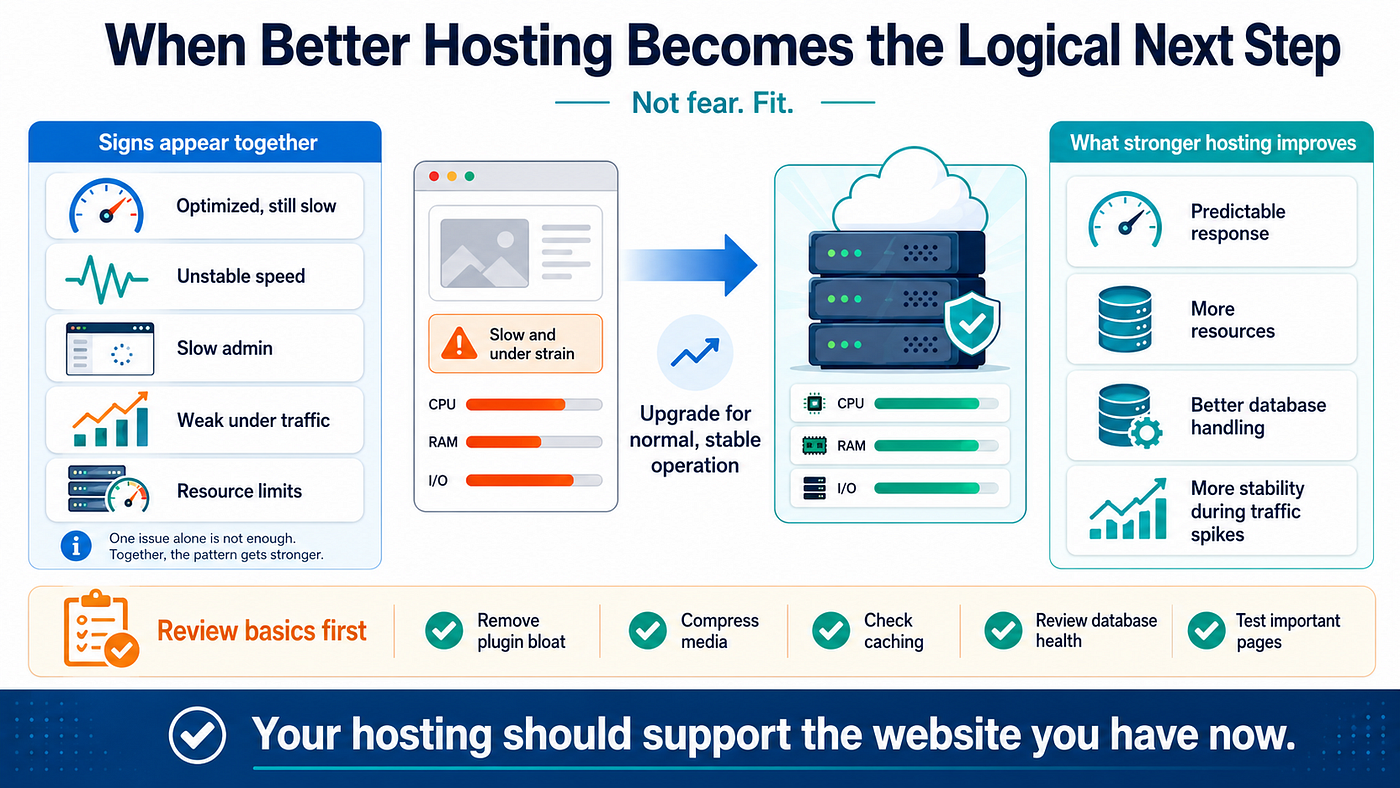
Better hosting becomes logical when the same signs appear together.
One slow page is not enough. One bad speed test is not enough. One heavy plugin may still be the real issue. But when your site is already optimized, still inconsistent, slow in the admin area, weak under traffic, and regularly hitting limits, the pattern becomes stronger.
At that point, upgrading hosting is not about chasing perfect scores. It is about giving the website enough room to operate normally. A stronger setup can provide more predictable server response, better resource availability, improved database handling, and more stability during traffic increases.
Before upgrading, it still makes sense to review the basics:
- remove obvious plugin bloat;
- compress large media files;
- check caching settings;
- review database health;
- test important pages, not only the homepage.
The best hosting decision is not based on fear. It is based on fit. A small site needs one level of support. A growing content site needs another. A WooCommerce store, membership site, booking site, or campaign-driven business may need more again.
The goal is simple: your hosting should support the website you actually have now, not the smaller website you had when you first launched it.
FAQ
Does a slow website always mean I need better hosting?
No. Many slow websites have basic optimization problems. Better hosting becomes more likely when those issues have already been reviewed and the site still feels slow, unstable, or limited.
Should I upgrade hosting before optimizing my website?
Usually no. Basic optimization should come first because it removes waste and makes the site easier to run. But if the site is already reasonably clean and still struggles with response time, traffic, admin speed, or resource limits, hosting may be the next practical step.
Is cheap hosting bad for every website?
No. Cheap hosting can be acceptable for small, simple, low-traffic websites. The problem begins when the website grows beyond what the plan can reliably support.
메타데이터
- post_id
- bb7e01106951
- slug
- signs-you-need-better-hosting-bb7e01106951
- url
- https://medium.com/@volodymyrzh/signs-you-need-better-hosting-bb7e01106951
- canonical_url
- https://medium.com/@volodymyrzh/signs-you-need-better-hosting-bb7e01106951
- author_url
- https://medium.com/@volodymyrzh
- status
- ok
- fetched_at
- 2026-06-09 14:34:10