Understanding AI Hardware: GPU vs. VRAM & FLOPS vs. GB/s
If you have ever wondered why an expensive graphics card screams at 100% load during model training but seems to idle comfortably while…
Understanding AI Hardware: GPU vs. VRAM & FLOPS vs. GB/s
If you have ever wondered why an expensive graphics card screams at 100% load during model training but seems to idle comfortably while generating text, the answer lies in understanding these two distinct hardware pairings — GPU v/s VRAM (Video Random Access Memory).
1. Core Architecture: GPU vs. VRAM
The GPU and its accompanying VRAM serve two entirely distinct operational roles.
- GPU (Processing Brain): GPU is a highly parallel silicon architecture packed with thousands of microscopic computing cores (such as NVIDIA’s CUDA and Tensor Cores). Its sole task is execution — performing the massive matrix multiplications required by machine learning layers.
- VRAM (Workspace): Video Random Access Memory is ultra-high-speed storage sitting centimeters away from the GPU chip. It holds the active data required for immediate calculation, including model weights, structural activations, and your context history (the KV Cache).
The Kitchen Analogy
Think of your graphics card as a professional kitchen:
GPU is the Chef: Fast, hyper-efficient, and capable of slicing ingredients at lightning speed.
VRAM is the Kitchen Counter: The physical workspace.
No matter how fast the chef can chop, they can only process ingredients that physically fit on the counter. If the counter is too small, you cannot prepare a large feast (Out of Memory Error). If the model doesn’t fit in VRAM, it cannot run smoothly.
2. Metrics of Speed: FLOPS vs. GB/s
To accurately measure how fast your system handles an AI workload, you must monitor two separate hardware physical speed limits: computing speed and data transit speed.
FLOPS (Floating-Point Operations Per Second)
FLOPS measures raw arithmetic horsepower. Because deep learning models consist almost entirely of decimal-based mathematics, a GPU’s computational performance is rated in Teraflops (TFLOPS) or Petaflops (PFLOPS). It tells you how many trillions of mathematical formulas the processor can crunch in a single second once it has the data in its hands.
GB/s (Gigabytes per Second)
GB/s measures Memory Bandwidth. This is the physical rate at which data can travel over the memory bus from the VRAM chips into the GPU’s internal cache. Even if a processor can do math instantaneously, it must wait for data to slide down the conveyor belt from storage.
3. Application to LLMs: Prefill vs. Token Generation
The interaction between these two metrics explains the split personality of modern Large Language Models during inference. LLM execution happens in two completely different phases, each governed by a different bottleneck.
Phase 1: Prefill / Training Phase (Compute-Bound)
During model Training or the Prefill Phase (when you send a massive prompt to an LLM and it reads all your text at once), the system is Compute-Bound.
The GPU streams a dense block of data from VRAM and performs thousands of continuous matrix calculations on every single byte. Because the computational density is incredibly high, the memory bus easily keeps up, and the processor itself becomes the bottleneck. Performance here scales directly with your GPU’s FLOPS.
Phase 2: Token Generation Phase (Memory-Bound)
During sequential Token Generation (the familiar typewriter effect where the model spits out one word at a time), the paradigm flips entirely. The system becomes heavily Memory-Bound.
To generate a single new token, the GPU must look at every single weight in the model. For a 7-billion parameter model, the GPU has to pull all 7 billion parameters from the VRAM, calculate the single next word, and finish. To generate the next token, it must read all 7 billion parameters from the VRAM all over again.
Because the mathematical workload per token is trivial, a powerful GPU finishes the math instantly and spends 95% of its time sitting idle, waiting for the VRAM memory bus to finish streaming the next round of weights. Therefore, your text generation speed (tokens per second) is dictated almost entirely by VRAM Bandwidth (GB/s), not its FLOPS.
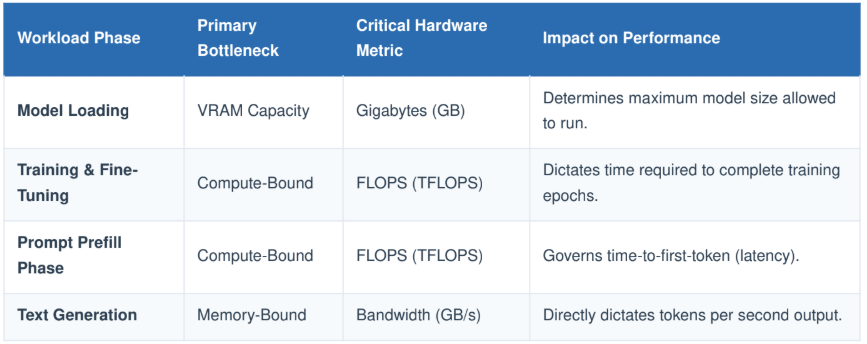
Summary Hardware Selection Matrix
Key Takeaway:
If you want to run larger models, buy more VRAM Capacity (GB).
If you want faster response generation out of your model, optimize for Memory Bandwidth (GB/s).
If you want faster training, optimize for GPU Compute (FLOPS).
Bonus read
Speculative Decoding is a powerful optimization technique designed to mitigate the heavy latency cost inherent to autoregressive models, where generating each individual token traditionally requires a full forward pass through the entire network.
In the standard autoregressive approach, a massive GPU sits idle most of the time. The processing cores must continuously pause, waiting for the memory bus to reload the entire model’s weights from VRAM just to predict a single token.
Speculative Decoding elegantly solves this memory-bandwidth bottleneck by pairing the large target model with a much smaller, ultra-fast draft model. The draft model rapidly speculates a sequence of future tokens using a fraction of the memory footprint. The target model then evaluates the entire sequence simultaneously in a single parallel forward pass, accepting the longest valid chain of tokens. This maximizes the GPU’s available compute (FLOPS) and drastically reduces overall inference latency.
메타데이터
- post_id
- bb989c50ebea
- slug
- understanding-ai-hardware-gpu-vs-vram-flops-vs-gb-s-bb989c50ebea
- url
- https://medium.com/@shashankag14/understanding-ai-hardware-gpu-vs-vram-flops-vs-gb-s-bb989c50ebea
- canonical_url
- https://medium.com/@shashankag14/understanding-ai-hardware-gpu-vs-vram-flops-vs-gb-s-bb989c50ebea
- author_url
- https://medium.com/@shashankag14
- status
- ok
- fetched_at
- 2026-06-22 00:13:37