Malware Analysis: Snake Keylogger/Snake Stealer
Hi all.
Malware Analysis: Snake Keylogger/Snake Stealer
generated by ChatGPT
Hi all.
This report provides a technical analysis of a Snake keylogger/stealer sample found on Malware Bazaar. Stealer malware is designed to covertly extract sensitive information from infected systems, including stored credentials, browser data, cryptocurrency wallets, and other personal or financial information.
This sample employs several evasion techniques, such as reflective code loading, steganography, multiple obfuscation and encryption approaches, to evade static and dynamic analysis. It combines the characteristics of both a Dropper and a Loader.
The analyzed file has the SHA256 hash
5d15d1f4fc9001ab14cfd8fc7acc86aaaf6ddd51e1054dd6cdc387544b657559
and can be found on Malware Bazaar.
First, I will provide a brief executive summary. Then, the technical analysis will start for each stage of the entire infection chain until the final payload is revealed. For each stage, I will highlight results of the static and dynamic analysis performed. Finally, I will present indicators of compromise (IoCs) and indicators of behavior (IoBs), as well as Sigma and Yara rules, and a mapping of tactics, techniques, and procedures (TTPs) in the MITRE ATT&CK matrix.
Note: This analysis was conducted in a controlled environment using static and dynamic techniques to safely observe the malware’s behavior and dissect its components. To ensure safety during the analysis, a simulated internet connection was used instead of a real one, so nothing I did could connect back to the real world. Later stages of the entire chain statically reference some functionalities, but execution of these capabilities was not observed in the current analysis environment. This may depend on external triggers or execution context.
Executive Summary
The analyzed malware sample is a stealthy keylogger and infostealer that leverages specific techniques to load additional code to prepare exifiltration of sensitive data. Used techniques aim to evade detection, thwart static and dynamic analysis and to maintain persistence with the goal, to be executed whenever the targeted user logs in on the infected machine. Delivered via a phishing campaign, the user is tricked into executing the file because it is disguised as a legitimate PDF file. After the initial execution, the malware stays hidden from the clueless user to perform its malicious tasks nearly invisible. Stolen credentials are sent encrypted to the threat actor and can be used to prepare additional attacks afterwards. Example for stolen data are stored credentials and visited pages in Google Chrome or Microsoft Edge, E-Mail credentials for various mail clients like Outlook or Thunderbird and cookies for multiple browsers. Additionally, the malware takes screenshot periodically and logs keystrokes.
A technical deep dive into the capabilities and strategies used by the malware follows below.
Stage 0 — initial delivered file: qDIB.exe
Static analysis
With tools like peStudio, capa or DetectItEasy it quickly becomes clear, that the file isn’t a PDF file, but a 32bit .NET executable with odd timestamps.

masqueraded icon

basic information
Capa shows some interesting capabilities of the malware, particularly noteworthy the Defense Evasion technique Reflective Code Loading.
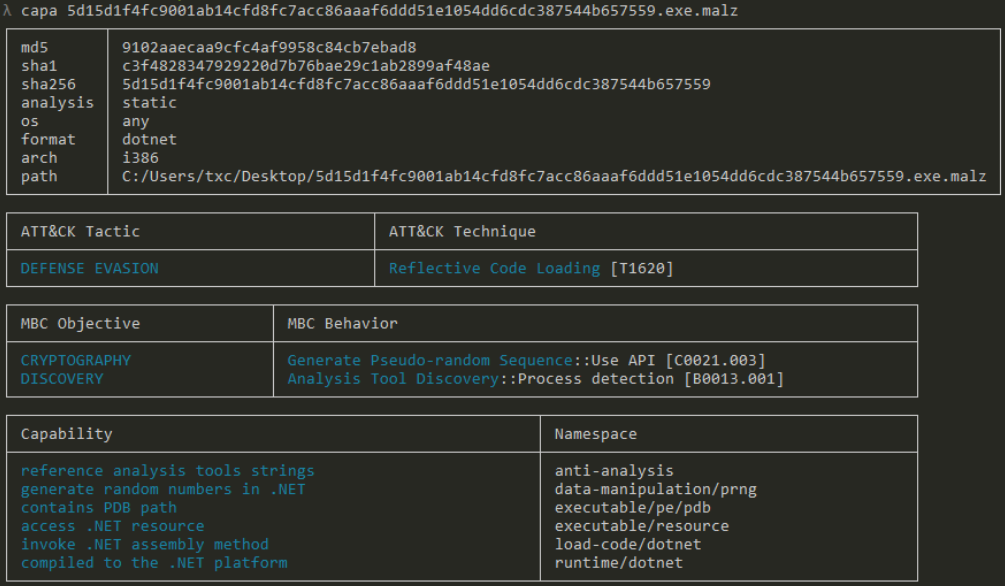
capa output
Using a Disassembler/Debugger like dnSpy, it is possible to learn more about the functionalities of the initial delivered file. The .NET file contains several classes and methods to initialize an app with capabilities of a calculator, calendar and so on. However, some of the lines of code used to initialize the calculator object look pretty strange, because these lines use several if-clauses, assign and manipulate string variables or perform XORing. Additionally, these lines load an image located in the resource section (object FT) of the .NET file and manipulate the bytes resp. pixels to create a DLL file. Around line 983 this file is invoked with three parameters.

code to prepare reflective DLL loading and steganography
Dynamic analysis
Dynamic analysis with set breakpoints can be used to obtain the executable content of the picture. The picture below shows interesting information that will be used in the next stage, which is the reflective loading of the DLL:
- variable list contains the decrypted bytes
- called method: R2.wJ.kf
- three parameters: string 56676661, string 617977, string Micro_Toolkit

results of debugging
The contents of the variable list can be dumped to analyze the called method statically.
Detonating the malware in a VM, gives some additional details about the capabilities of the next stages:

creation of a scheduled task Updates\XliQgkhKEbiZ for persistence with a dropped file in AppData\Roaming

Malware copies itself into AppData\Roaming. File executes itself via scheduled task

dropped .tmp file used to create scheduled task via schtasks.exe. .tmp file will be deleted afterwards

trigger of Scheduled task

creation of a new child process of itself
Via a simulated internet connection, some network based indicators could be identified:

informing attacker about infection
Gathered cookies sent via mail to the attacker:

cookies sent via email

connection to SMTP server

queried Registry keys
Stage 1 — Reflectively loaded DLL: MechMatrix Pro.dll
Deobfuscation and Static Analysis
Analyzing the extracted DLL with DetectItEasy shows, that this stage is protected with Smart Assembly.

output DetectItEasy
With Simply Assembly Explorer it is possible to deobfuscate the file to make analysis a lot easier.

Deobfuscation with Simple Assembly Explorer

comparison of capa output. Top: before deobfuscation; Below: after deobfuscation

Decompilation comparison
From the Dynamic Analysis of Stage 0 it becomes clear, that the method R2.wJ.kf is called with the following parameters: string 56676661, string 617977, string Micro_Toolkit.

R2.wJ.kf method after deobfuscation and manual renaming
This method uses the three parameters to load a specific resource and decrypting it with a string. Before this happens, the malware decodes the first two hex strings into Vgfa and ayw. Vgfa is used as a resource to extract an image from Micro_ToolKit.Properties.Resources.resources. This resource exists within the initial executable.

encrypted picture for the next stage (steganography used again).
Afterwards, at line 427, the malware uses several functions to extract a specific part of the image, convert the pixels to bytes, decrypt them using the key ayw, load an Assembly object, and invoke a specific type and method.

getting the called type and method of the decrpted next stage DLL
The below script can be used to create the next stage without debugging the DLL. The above mentioned resources must be saved before manually.
using System;
using System.Drawing;
using System.Text;
using System.Reflection;

namespace ImageProcessor
{
    class Program
    {
        static void Main(string[] args)
        {
            string encrKey = "617977";
            string inputImagePath = "Vgfa";
            Bitmap original = new Bitmap(inputImagePath);

            string key = createStringFromInt(encrKey);
            Console.WriteLine("Key: " + key);

            Bitmap cropped = cropImage(original, 150, 150);
            byte[] pixelData = convertPixel(cropped);
            byte[] finalData = decryption(pixelData, key);

            Assembly asm = Assembly.Load(finalData);
            Type t = asm.GetTypes()[20];
            MethodInfo mi = t.GetMethods()[29];

            string outputPath = "output.bin";
            System.IO.File.WriteAllBytes(outputPath, finalData);
            Console.WriteLine("Data written to: " + outputPath);
            Console.WriteLine("First 10 bytes: " + finalData);
            Console.WriteLine("Type: " + t);
            Console.WriteLine("method: " + mi);
            Console.WriteLine("Press any key to exit...");
            Console.ReadKey();

        }
        public static string createStringFromInt(string p0)
  {
   int num = 0;
   StringBuilder stringBuilder = new StringBuilder();
   do
   {
    int num2 = Convert.ToInt32(p0.Substring(num, 2), 16);
    stringBuilder.Append((char)num2);
    num += 2;
   }
   while (num < p0.Length);
   return stringBuilder.ToString();
  }

        public static Bitmap cropImage(Bitmap p0, int p1, int p2)
  {
   Color color = default(Color);
   int num = 0;
   int num2 = p0.Width - p1;
   int num3 = p0.Height - p2;
   Bitmap bitmap = new Bitmap(num2, num3);
   int num4 = 0;
   int num5 = num;

   check:
   if (num4 >= num3)
   {
    return bitmap;
   }
   for (int i = 0; i < num2; i++)
   {
    color = p0.GetPixel(i, num4);
    bitmap.SetPixel(i, num4, color);
   }
   num4++;
   goto check;

  }

        public static byte[] convertPixel(Bitmap p0)
  {
            Color color = default(Color);
            int num = 0;
            int num2 = 0;
            byte[] array = null;
            int num3 = 0;
            int num4 = 1;
            int num5 = num4;

            for (;;)
            {
                switch (num5)
                {
                    default:
                        array = new byte[num3 * num3 * 4];
                        num2 = 0;
                        num = 0;
                        num5 = 2;
                        break;

                    case 1:
                        num3 = p0.Width;
                        num5 = 0;
                        break;

                    case 2:
                        while (num < num3)
                        {
                            for (int i = 0; i < num3; i++)
                            {
                                Array.Copy(BitConverter.GetBytes(p0.GetPixel(num, i).ToArgb()), 0, array, num2, 4);
                                num2 += 4;
                            }
                            num++;
                        }
                        num5 = 3;
                        break;

                    case 3:
                        byte[] array2 = new byte[BitConverter.ToInt32(array, 0)];
                        Array.Copy(array, 4, array2, 0, array2.Length);
                        return array2;
                }
            }
    }

  public static byte[] decryption(byte[] p0, string p1)
  {
   byte[] array = null;
   int num = 0;
   byte[] bytes = Encoding.BigEndianUnicode.GetBytes(p1);
   int num2 = (int)(p0[p0.Length - 1] ^ 112);
   byte[] array2 = new byte[p0.Length + 1];
   int num3 = 2;
   for (;;)
   {
    switch (num3)
    {
    default:
    {
     int num4 = bytes.Length;
     int num5 = p0.Length;
     int num6 = 0;
     for (int i = 0; i < num5; i++)
     {
      int num7 = (int)p0[i];
      int num8 = (int)bytes[num6];
      int num9 = num7 ^ num2 ^ num8;
      array2[i] = (byte)num9;
      if (num6 == num - 1)
      {
       num6 = 0;
      }
      else
      {
       num6++;
      }
     }
     array = new byte[num5 - 1];
     num3 = 3;
     break;
    }
    case 1:
     return array;
    case 2:
     num = p1.Length;
     num3 = 0;
     break;
    case 3:
     Array.Copy(array2, array, array.Length);
     num3 = 1;
     break;
    }
   }
  }
    }
}
Dynamic Analysis
With the knowledge of the Static Analysis of this stage, debugging becomes easier. Although the next stage was extracted with the above script, I decided to continue debugging, because Stage 2 — PharmaCare Manager.dll is heavily obfuscated and uses a lot of different techniques to decrypt strings or load additional APIs during runtime. After the picture has been decrypted and the DLL has been loaded into memory I set a breakpoint (before invocation!) on the called class to be sure to catch further execution.
Stage 2 — Reflectively loaded DLL: PharmaCare Manager.dll
Static Analysis
peStudio and capa show some interesting capabilities of Stage 2:

capa output

peStudio: notable imports

peStudio: interesting strings
Based on the information gathered from these tools, Stage 2 interacts heavily with the system. For example, the outputs of capa and peStudio give the impression, that this stage discovers accounts, enumerates processes, creates new processes and threads or downloads additional files. Examining this DLL in both, DetectItEasy and dnSpy, reveals information about the obfuscation used.

Output from DetectItEasy

Static constructor of the called type
Although the usage of Smart Assembly Explorer simplifies the initial analysis, the DLL relies heavily on string encryption and decryption during runtime to perform malicious tasks. Additionally, this stage loads extra system DLLs and APIs during runtime, to use them for process hollowing for example.

One of various string decryption methods (here: obfuscated)

One of various string decryption methods (here: deobfuscated)
Instead of reversing and rewriting the code of different algorithms used to decrypt the strings, I decided to let the malware to perform these tasks and switched over to Dynamic Analysis.
Dynamic Analysis
After the type and method to be called have been loaded during the execution of Stage 1, the static constructor of Stage’s 2 DLL is called first. Later, the malware uses these information to perform additional tasks like creating the scheduled task we saw before, creating a child process of the initial executable and performing process hollowing on this child process, injecting decrypted code.
Static constructor In the picture below we see the results of the work performed by the static constructor.

manual renaming after decryption has been performed
Some of the results are:
- decryption of a string (eWXFijaktyd) that is later used as a decryption key
- decryption of a string (uJkeg) that is later used to access a resource of the DLL
- decryption of a string (XliQgkhKEbiZ) that is later used to create a scheduled task
- assigning integers to static fields (used for control flow obfuscation; example follows in Process Hollowing section)
- decryption of various strings to get the names of extra DLLs and APIs to be loaded dynamically to perform process hollowing. The returned function pointers are wrapped in delegates via
Marshal.GetDelegateForFunctionPointerand stored in static fields for later use, such as performing process hollowing

getting function pointers via calls to LoadLibraryA and GetProcAddress
Creation of a scheduled task After the static constructor finished its work, the malware jumps to the called method of the previous stage and continues with the creation of a scheduled task to ensure persistence. Therefore, that malware first copies the full path of the initial executable into a static field.

getting the full path
Later, the malware creates the file C:\Users\USERNAME\AppData\Roaming\XliQgkhKEbiZ.exe and copies the content of the initial executable into it. Then the malware calls a method to create the scheduled tasks, with the task name/file name and the full path of the dropped executable as parameters.

initial executable drops itself into a directory before creation of a scheduled task

deobfuscated method to create the scheduled task
The scheduled task is created via an encrypted, base64 encoded XML file, that is decrypted and decoded during runtime and saved into a .tmp file under C:\Users\USERNAME\AppData\Local\Temp*.tmp

getting the plain text XML file

content of .tmp file
In the end, the malware starts the schtasks.exe process to create the scheduled task in a hidden windows.

schtasks.exe process with written XML file as parameter
Process Hollowing After the scheduled task has been created, the malware continues with a process injection, process hollowing to be more precise, to execute the next stage of the infection. At first, the malware decrypts an Assembly object stored in the resources, writes the content into a static field and then uses this static field to continue the injection.

decryption of an Assembly object, stored in the Resources
For the decryption, the malware uses the previously decrypted string as a key and the encrypted blob of bytes from the resources.

decryption algorithm

MZ header visible after decryption
Since the malware heavily relies on Control Flow Obfuscation, the code jumps around to perform the process injection.

Control Flow Obfuscation
The method responsible for process hollowing sits inside the highlighted method in the above picture. Process injection starts with getting the full path of the initial executable. It is used as a parameter (1st) for the method that performs process hollowing, along with the static field containing the previously decrypted bytes (2nd parameter) from the resource.

beginning of process hollowing
At first, the malware creates two structs (STARTUPINFO and PROCESS_INFORMATION) that are used to create a child process. Next, kernel32!CreateProcessA is called, with the full path of the initial executable as first parameter.

used structs
The sixth parameter of kernel32!CreateProcessA is 134217732U, which is converted to 0x08000004. This value represents the combination of the creation flags CREATE_NO_WINDOW (0x08000000) and CREATE_SUSPENDED (0x00000004). Especially the flag CREATE_SUSPENDED is a telltale sign of process hollowing.

suspended thread of the child process
Afterwards, the malware uses a combination of function calls to ntdll!ZwUnmapViewOfSection, kernel32!VirtualALlocExand kernel32!WriteProcessMemoryto write the content of the second parameter (decrypted bytes) into the hollowed child process. The writing happens in multiple rounds, until the whole content has been transferred into the child process. The suspended thread is executed via a combination of kernel32!SetThreadContext and kernel32!ResumeThread in the end.

called kernel32!ResumeThread function to execute child process’ main thread
Stage 3 — Hollowed Process: Remington.exe
Basic Static Analysis
Static analysis of this stage gives the impression, that this is the final payload. The capa output lists a huge list of different capabilities, that allows malware to steal information and send them in an encrypted format to the attacker.

capa output: Capabilities Stage3
Analysis with peStudio strengthens the impression: a lot of imports are flagged and suggest the usage of Windows DLLs and exported functions to perform various malicious tasks, grabbing the clipboard, keylogging and communication with an attacker controlled infrastructure.

flagged imports by peStudio
By observing included strings (e.g., with floss), we can see the decoded directories that were accessed to steal information.

some targeted directories within C:\Users (here: various browsers)

Outlook targeted
Advanced Static Analysis
Deobfuscating this stage with Smart Assembly Explorer in combination with the a more detailed capa output (json format with capa explorer) allows to dive deeper into some capabilities and how the malware achieves its goals. It is worth mentioning, that the entry point of this stage is NS008.c00000b.Main (after deobfuscation). In this section, I will just describe some core capabilities:
Static constructor The static constructor sets up some prerequisites for this malware to work. In addition to the features listed below in italics, the static constructor assigns strings to static fields, sets up an array with several URLs or creates a random, unique ID starting with the string ‘ZyiAEnXWZP’ (line 56).

static constructor
Creation of timer objects The static constructor begins with the creation of multiple timer objects, each one with a different purpose. These timers have in common, that they periodically call a specific method.

setup of a timer object
For example, the timer object in the picture above periodically calls a method, responsible for sending gathered and saved keystrokes to the attacker. The attribute [DebuggerBrowsable(DebuggerBrowsableState.Never)] is used as an anti-debugging technique to prevent a debugger from showing the field during debugging.
Similar timer objects are created to send gathered screenshots, browser history, collected passwords, credit card info or browser cookies periodically via similar called methods.

various methods to send collected data to attacker
Get running processes The malware creates an array of all running processes on the infected system via a call to the method Process.GetProcesses(). The array is later used to find and kill running browser processes.
Gathering basic system information In lines 37 and 38 the malware collects some basic system information, for example the computer name, date and time (also a timestamp of the infection) and geolocation information.
Get country and public IP The malware collects information about the geolocation of the infected host. Therefore, it gathers the public IP by accessing http[:]//checkip.dyndns[.]org/ using the user agent Mozilla/4.0 (compatible; MSIE 6.0; Windows NT 5.2; .NET CLR1.0.3705;).

concatenation of geolocation information

getting public IP
This public IP is used afterwards, to collect various geolocation information about the infected host, like country and city. The malware connects to https[:]//reallyfreegeoip[.]org/xml/<PUBLICIP> and searches the reply for needed information (image below: CountryName — line 833).

getCountryFromPublicIP() method
The gathered public IP address is later used to perform a check against various hardcoded IP addresses to determine whether a bot is analyzing the malware.

checkBot() method
In the end of the Main function (see below), the malware calls a method to check if a bot was detected and if various static fields have been filled during information gathering like harvesting cookies or browser history.

call in the end of the main function

checkBotAndFill() method
However, only gathered passwords and cookies will be send via this approach to the attacker.
Dynamic analysis of this stage wasn’t possible in a strictly isolated environment, because the Stream object is null and will result in an unhanded exception in the highlighted line below.

unhanded exception
Running the malware with an internet simulation on the other hand, ensures a continuation of the code.
Decryption of strings At the end of the static constructor, the malware decrypts multiple strings. It creates an MD5 hash from the string (BsrOkyiChvpfhAkipZAxnnChkMGkLnAiZhGMyrnJfULiDGkfTkrTELinhfkLkJrkDExMvkEUCxUkUGr) and saves the first 8 bytes of the MD5 hash into an array, that used as the decryption key. Then the malware uses DES in ECB mode to decrypt given Base64 encoded strings.

DES decryption method

several decryption calls
Some decrypted results are: smartyok4# smtp[.]zoho[.]com 587 inquirysmtp@zohomail[.]com recovery@tmcksa[.]com
Unused static fields/placeholders It should also be noted, that the malware uses several placeholders that cannot be decrypted or unused static fields. During analysis, it wasn’t able to determine if these values change during runtime.

unused array of hard coded domains (usage wasn’t observed)

unused static fields
Main function

snippet of main function
Important: the malware uses numerous similar functions to collect cookies, browser history, stored credential or top visited sites for different browsers.
*Inform attacker about infection* The first function notifies the attacker when the delivered file is executed. This behavior was observed after the initial executable was executed (see above).

inform attacker

access Telegram API to inform attacker about infection
Kill browser processes The malware tries to kill running processes for the browsers Chrome, Firefox, Edge and Brave. Therefore, the malware enumerates all running processes in the static constructor and iterates later through the array to find hard coded strings of targeted browsers. If found, the process is killed.

kill running browser processes
Steal stuff The malware uses many methods, each targeting a different application and stealing different information. For example, I demonstrate how the malware sends captured screenshots and gathered keystrokes to the attacker, as well as how it steals Chrome cookies and Outlook information. Methods, targeting different browsers or email programs, work in a similar manner. To send stolen information, the malware uses the above mentioned timer objects.

timer objects to send keystrokes and screenshots to the attacker
Screen capture
The malware uses a timer object, periodically calling the (renamed) method takeAndSendScreenshot(), to send screenshots taken to the attacker.

takeAndSendScreenshot()
At first, the malware assigns two strings to local variables and creates the directory C:\All Users\<USERNAME>\My Documents\VIPRecovery. Then, if the directory exists, the malware creates an empty file and a Bitmap object. After the call to CopyFromScreen() the malware saves the content into the previously created file and calls the method sendScreenshots() to actually send the screenshot to the attacker. Afterwards it deletes the previously created folder. If the folder doesn’t exist, the malware creates it (else condition) before taking and sending screenshots.
The malware tries several procedures to send captured screenshots to the attacker: FTP, E-Mail, Telegram Server and Discord webhook URL. However, with the current analysis setup the FTP server, Telegram server and the Discord webhook URL cannot be determined.

FTP
If a specific flag (%is_FTP%) is set to true, the malware will enter the condition to send captured screenshots via FTP STOR method to the attacker. But it could not be determined if and where this flag is changed.

Sending stolen information via E-Mail looks better. The malware uses previously decrypted strings (see above) to send SMTP messages. Basically, the malware sends the screenshots as attachment via mail with the following indicators: FROM: inquirysmtp@zohomail[.]com TO: recovery@tmcksa[.]com SMTP server: smtp[.]zoho[.]com Port: 587 Authentication: inquirysmtp@zohomail[.]com — smartyok4#
Afterwards the VIPRecovery folder is deleted.

Telegram server
Sending to a telegram server is not possible at time of analysis because line 71 will return false.

Discord webhook URL and unreachable code (Telegram API)
Again, the malware checks if a specific flag (%is_Discord%) is set to true and continues with the execution until it sends data via HTTP POST request to a registered Discord webhook URL. Afterwards the malware returns, leaving unreachable code behind (yellow box) responsible for sending data via POST request to a Telegram API.
Keylogging
Various imported Windows APIs indicate some sort of user-space keylogging.

peStudio: imported keylogging APIs
This malware uses hooking to register pressed keys. Basically, the APIs are used to create hooks in order to get a notification, whenever a key is pressed. The Windows API SetWindowsHookExA() is used to achieve this goal (Practical Malware Analysis, p. 239ff).
The malware uses SetWindowsHookExA() to monitor low-level keyboard events (first parameter 13 => WH_KEYBOARD_LL). Additionally, the hook procedure resp. hook callback is defined as second parameter, defining what to do when a key is pressed. The last parameter, 0, specifies that all running threads should be observed.

setting up keylogging
When a key is pressed, the callback function gets active to process the key and identify which key has been pressed. This happens via virtual key codes.

ProcessKey() method

IdentifyKey() method
The method to translate the virtual key code to the actual key pressed uses various Windows APIs to get the keyboard layout of the active window in order to translate the key code to the key pressed in a proper way.

VKCodeToUnicode() method
The gathered keys pressed are sent to the attacker, identically to the method responsible for sending gathered screenshots.

sent keystrokes to attacker (here: via FTP)
The StringBuilder object is referenced in a specific method (appendKeystrokes()), responsible for concatenating strings to this object. This method is in turn used in other methods (keyPressedDown() and keyPressedUp()), responsible for catching the active windows via the CurrentWindow property of the previously created keylogger object of the Keylogger class (object creation described at start of this section).

usage of Stringbuilder object to log keystrokes

calls to appendKeystrokes() method
Chrome cookies

stealChromeCookies() method
At first, this method writes a hard coded file path into a variable and checks if it exists. If true, the method continues with the creation of an object of the class c00001c, which allows to apply various implemented class methods onto the object. These methods parse the SQL database of the cookies file, extract various values (yellow box) and write these values into local string variables. Later, a new string is created to concatenate the gathered information. In the end, the method adds this string to a local field. This local field is accesses and read by similar methods to write stolen cookies and send them later via another method. All of this happens in a for-loop. If the hard coded file path doesn’t, this method is skipped.
Sending of gathered cookies happens similar to the method described above and works the same for other targeted browsers.
Outlook information

stealOutlookAccounts() method
The method begins with initializing a list object to store recovered application accounts. After recovering of Outlook accounts (see below), the malware concatenates the gathered information and writes it into a static field. This field is used by multiple methods, including those that send data to the attacker. This approach is similar to the method used to steal browser cookies.

begin of method recoverOutlookInfo()
The method called to recover Outlook credentials begins with the initialization of hard coded Registry keys and values, that the malware targets to extract stored data:
IMAP Password POP3 Password HTTP Password SMTP Password Software\Microsoft\Office\15.0\Outlook\Profiles\Outlook\9375CFF0413111d3B88A00104B2A6676 Software\Microsoft\Windows NT\CurrentVersion\Windows Messaging Subsystem\Profiles\Outlook\9375CFF0413111d3B88A00104B2A6676 Software\Microsoft\Windows Messaging Subsystem\Profiles\9375CFF0413111d3B88A00104B2A6676 Software\Microsoft\Office\16.0\Outlook\Profiles\Outlook\9375CFF0413111d3B88A00104B2A6676
The malware checks if the opened keys exist, one by one with a foreach loop. If true, the malware tries to open the subkeys and checks, if specific values exists (line 8684). Then, the malware opens these values to extract data and decrypt the bytes.

gather mail address and SMTP server
Additionally, the malware extracts the stored email address and SMTP server address. All three pieces of information — the URL, username resp. email address and the passwords — are then added to the list object created earlier and later used to prepare the exfiltration.
Conclusion
In summary, this malware analysis has provided a comprehensive overview of the malware’s behavior, capabilities, and potential impact. Through static and dynamic analysis, we identified key indicators of compromise (IOCs), understood the malware’s execution flow, used TTPs and evaluated its persistence mechanisms and evasion techniques.
IOCs
Network based
https[:]//reallyfreegeoip[.]org/xml/ http[:]//51.38.247[.]67:8081/send.php?L https[:]//api.telegram[.]org/bot http[:]//checkip.dyndns[.]org/ Mozilla/4.0 (compatible; MSIE 6.0; Windows NT 5.2; .NET CLR1.0.3705;) application/x-www-form-urlencoded smtp[.]zoho[.]com:587 inquirysmtp@zohomail[.]com recovery@tmcksa[.]com
Host based
Scheduled task: Updates\XliQgkhKEbiZ Folder: C:\User\All Users\My Documents\VIPRecovery
Detection
Sigma
title: Suspicious Scheduled Task Creation Involving Temp Folder
status: experimental
description: Detects the creation of scheduled tasks that involves a temporary folder and runs only once
references:
    - https://discuss.elastic.co/t/detection-and-response-for-hafnium-activity/266289/3
    - https://github.com/SigmaHQ/sigma/blob/master/rules/windows/process_creation/proc_creation_win_schtasks_creation_temp_folder.yml
    - https://medium.com/@0x747863/malware-analysis-snake-keylogger-snake-stealer-bbcc91705089
author: Florian Roth (Nextron Systems)
date: 2021-03-11
modified: 2025-08-03
modified by: txc
tags:
    - attack.execution
    - attack.persistence
    - attack.t1053.005
logsource:
    category: process_creation
    product: windows
detection:
    selection:
        Image|endswith: '\schtasks.exe'
        CommandLine|contains|all:
            - ' /create '
            - '\Temp\'
    condition: selection
falsepositives:
    - Administrative activity
    - Software installation
level: high
removed ‘ /sc once ‘ from selection.
title: Suspicious Process Creation from AppData\Roaming as Scheduled task
status: experimental
description: Detects svchost.exe spawning a process via an executable, located in the AppData\Roaming directory, which is an indicator of an infection with Snake Keylogger resp. Snake stealer.
author: txc
references:
    - https://medium.com/@0x747863/malware-analysis-snake-keylogger-snake-stealer-bbcc91705089
date: 2025/08/03
logsource:
  category: process_creation
  product: windows
detection:
  selection:
    ParentImage|endswith: '\svchost.exe'
    Image|contains: '\AppData\Roaming\'
  condition: selection
fields:
  - Image
  - ParentImage
  - User
falsepositives:
  - Rare legitimate software installed in AppData
level: high
tags:
  - attack.defense_evasion
  - attack.execution
  - attack.t1055.012
  - attack.t1053.05
Yara
import "pe"
import "math"

rule Detect_SnakeKeylogger
{
    meta:
        description = "Detect first stage .NET binary of Snake keylogger infection"
        author      = "txc"
        date        = "2025-08-03"
        reference   = "https://medium.com/@0x747863/malware-analysis-snake-keylogger-snake-stealer-bbcc91705089"

    strings:
        $clr_header  = { 42 53 4A 42 }  // CLR metadata signature "BSJB"
        $latecall   = { 11 14 14 72 59 03 00 70 18 8D 16 00 00 01 25 16 16 8C 4C 00 00 01 A2 25 17 11 12 A2 14 14 28 88 00 00 0A } // latecall used to reflectivly load next stage DLL

    condition:
        uint16(0) == 0x5A4D and
        $clr_header and
        $latecall and

        for any i in (0..pe.number_of_sections - 1): // high entropy in .text section
            (
                pe.sections[i].name == ".text" and
                math.entropy(pe.sections[i].raw_data_offset, pe.sections[i].raw_data_size) >= 7.5
            )
}
Mitre Mapping

Resources:
Analyzed sample Deobfuscation of Smart Assembly Practical Malware Analysis Sigma Special directories class MyDocuments directory
메타데이터
- post_id
- bbcc91705089
- slug
- malware-analysis-snake-keylogger-snake-stealer-bbcc91705089
- url
- https://medium.com/@0x747863/malware-analysis-snake-keylogger-snake-stealer-bbcc91705089
- canonical_url
- https://medium.com/@0x747863/malware-analysis-snake-keylogger-snake-stealer-bbcc91705089
- author_url
- https://medium.com/@0x747863
- status
- ok
- fetched_at
- 2026-07-29 20:10:56