Twinmotion vs Lumion for Archviz in 2026: Which One Actually Fits Your Workflow?
I’ve used both on real client projects — from early design walkthroughs to final presentation renders. Here’s an honest comparison of…
Twinmotion vs Lumion for Archviz in 2026: Which One Actually Fits Your Workflow?
I’ve used both on real client projects — from early design walkthroughs to final presentation renders. Here’s an honest comparison of speed, quality, pricing, and the workflows that actually matter.
Last Updated: May 2026
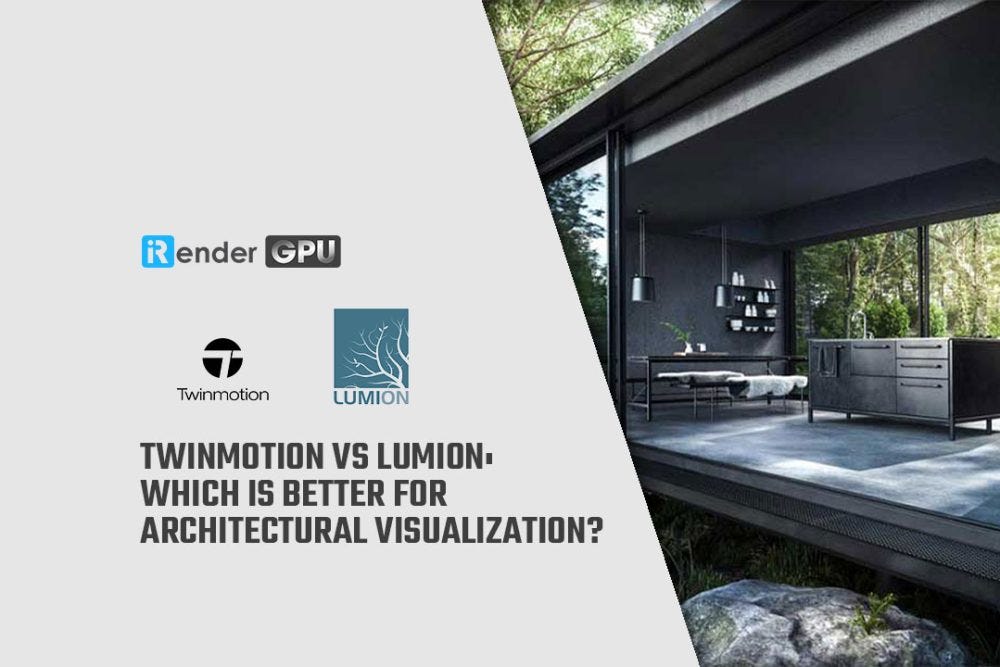
Twinmotion and Lumion are both real-time visualization tools built specifically for architects, but they serve different stages of the design process. Twinmotion (built on Unreal Engine, $445/year or free for companies under $1M revenue) excels at fast iteration, live sync with BIM tools, and interactive presentations. Lumion (starting at €199/year for View, €999/year for Pro) delivers stronger atmospheric realism and cinematic post-processing for final marketing visuals. This guide compares them across 7 categories based on actual project experience.
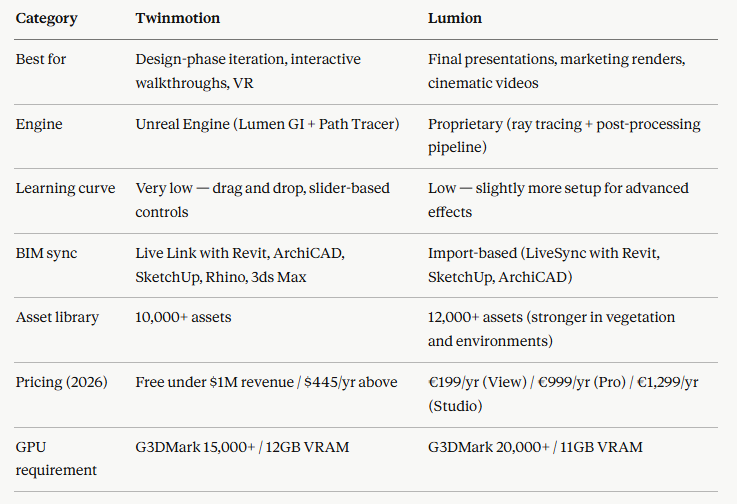
Quick comparison:
Which tool renders faster for archviz?
Twinmotion is faster in real-time interaction. Built on Unreal Engine, it uses Lumen for dynamic global illumination — meaning you get accurate, real-time light behavior without waiting for any render to complete. You move the camera, adjust the time of day, change a material, and the lighting updates instantly. For design review meetings and client walkthroughs, this responsiveness is game-changing.
Lumion takes a different approach: it stacks ray tracing, atmospheric effects, and a heavy post-processing pipeline to produce more cinematic output. The result looks richer — better volumetric fog, more dramatic skies, stronger atmospheric depth — but it comes at the cost of longer processing times for final renders. A 4K still in Lumion Pro can take 5–15 minutes depending on effects; a similar quality in Twinmotion with path tracing enabled takes roughly the same, but the real-time preview is substantially faster.
For animation, both tools can take hours on complex scenes. A 60-second walkthrough at 4K can easily consume 2–6 hours of render time on a single RTX 4090, regardless of which tool you use.
Which produces better-looking final images?
For atmospheric realism and cinematic mood — Lumion. Its post-processing effects, sky system, and vegetation rendering produce images that look ready for a marketing brochure with minimal tweaking. Lumion’s strength is making a scene look dramatic, emotional, and polished.
For lighting accuracy and physical correctness — Twinmotion with Lumen and Path Tracer. Lumen handles real-time GI with enough accuracy for design reviews, and when you need physically correct output for final stills, the Path Tracer delivers clean, accurate results. The trade-off: Twinmotion’s out-of-the-box output tends to look more “clean and technical” while Lumion’s tends to look more “cinematic and atmospheric.” Neither is objectively better — it depends on what your client expects.
How does each tool integrate with BIM software?
Twinmotion has a clear advantage here. Its Direct Link system provides live, bi-directional sync with Revit, ArchiCAD, SketchUp, Rhino, and 3ds Max. You make a change in Revit, it updates in Twinmotion within seconds without re-importing the model. For design-phase visualization where the model changes multiple times per day, this workflow is significantly faster.
Lumion uses LiveSync for Revit, SketchUp, ArchiCAD, and Rhino. The connection works well, but it’s closer to a one-way import with live updates rather than true bi-directional sync. For production workflows where the model is mostly finalized, this isn’t a limitation. For early design iteration with constant model changes, Twinmotion’s Direct Link is more efficient.
What about pricing in 2026?
This is where Twinmotion has a structural advantage that most comparison articles understate.
Twinmotion is completely free — with no watermark, no resolution restrictions, and full commercial use — for individuals and companies earning under $1 million USD in annual revenue. For companies above that threshold, it’s $445/year per seat, which includes Twinmotion Cloud and all updates. Students and educators get it free regardless of revenue.
Lumion moved to a tiered subscription model: Lumion View at approximately €199/year (lighter design-stage tool), Lumion Pro at approximately €999/year (full feature set), and Lumion Studio at approximately €1,299/year (team features). No free tier for commercial use at any revenue level.
For freelancers and small architecture firms — which is most of the archviz market — Twinmotion being genuinely free is a significant factor. You can deliver client presentations, render marketing stills, and create walkthrough videos without any software cost.
What are the hardware requirements?
Both tools are GPU-dependent, but Lumion demands more. Lumion recommends a GPU with G3DMark score of 20,000+ and 11GB VRAM. Twinmotion recommends G3DMark 15,000+ and 12GB VRAM. Both want 64GB RAM for complex scenes.
In practice, both run well on an RTX 4070 Ti for most projects. An RTX 4090 gives comfortable headroom for large scenes with heavy vegetation and complex lighting.
When projects exceed what my local machine handles comfortably — large master plan animations, 8K panoramic renders, or multiple camera sequences under tight deadlines — I offload to iRender’s cloud machines. Both Twinmotion and Lumion run on their RTX 4090 servers through RDP, which means I can switch between tools depending on the project without maintaining two high-end local workstations. The hourly pricing makes more sense than upgrading hardware when the heavy rendering only happens a few times per month.
Which should you choose?
If you’re an architect or designer who needs visualization during the design process — quick client reviews, design iterations, interactive walkthroughs — Twinmotion is the better fit. The BIM live sync, free pricing, and Lumen real-time GI make it ideal for design-phase work.
If you’re producing final marketing materials — hero images for brochures, cinematic flythrough videos, atmospheric sunset renders — Lumion delivers stronger results with less post-production work. The cinematic effects pipeline is more mature and the asset library (especially vegetation) is richer.
The honest answer for most architecture firms: you’ll probably want both. Twinmotion for the design phase (free), Lumion Pro for final deliverables (€999/year). The total cost is still less than most single render engine licenses, and you get best-in-class tools for each stage of the project.
Speed Up Your Twinmotion and Lumion Projects with iRender Farm
**iRender powers up your creativity with unlimited GPU rendering resources. Our GPU render farm houses the most powerful 3D rendering machines. Configure from 1 to 8 GPUs with top-tier RTX 4090, Threadripper Pro CPUs, 256GB RAM, and 2TB SSD storage — iRender’s machines can handle any 3D project demands. We support all 3D software and every render engine, including Vray, Redshift, Fstorm, Corona.**
Once renting our machines, you will own them as your personal workstations. Therefore, you can install and use any render engines, plugins, and/or other 3D software of all versions (even the newly released ones). All our servers are equipped:
- AMD Ryzen™ Threadripper™ PRO 3955WX (3.9–4.2GHz) or
- AMD Ryzen™ Threadripper™ PRO 5975WX (3.6–4.5GHz)
- 1/2/4/6/8x — 4090
- 256GB RAM
- 2TB NVMe SSDs
Let’s see our latest performance test on our servers!
[embed]
Enjoy our FREE TRIAL to try our RTX 4090 machines and boost your rendering now!
For more detailed information, please contact us via Live chat 24/7 or WhatsApp: +(84) 912–785–500 or Email: support@irender.net.
iRender — Happy Rendering!
메타데이터
- post_id
- bbd7dd4522a0
- slug
- twinmotion-vs-lumion-for-archviz-in-2026-which-one-actually-fits-your-workflow-bbd7dd4522a0
- url
- https://medium.com/@irenderofficial/twinmotion-vs-lumion-for-archviz-in-2026-which-one-actually-fits-your-workflow-bbd7dd4522a0
- canonical_url
- https://medium.com/@irenderofficial/twinmotion-vs-lumion-for-archviz-in-2026-which-one-actually-fits-your-workflow-bbd7dd4522a0
- author_url
- https://medium.com/@irenderofficial
- status
- ok
- fetched_at
- 2026-07-11 09:29:00