Create a PrestaShop Product from an Image with ChatGPT in Store Manager
Automating catalog upkeep is easy when you pair your PrestaShop store with the “Create with Vision” wizard available in Store Manager. The…
Create a PrestaShop Product from an Image with ChatGPT in Store Manager
Automating catalog upkeep is easy when you pair your PrestaShop store with the “Create with Vision” wizard available in Store Manager. The tool converts product images — whether stored locally or synced from Google Drive, Dropbox, and similar services — into complete listings. Follow these six steps (and grab the free trial if you haven’t installed the software yet) to create a new product with me.
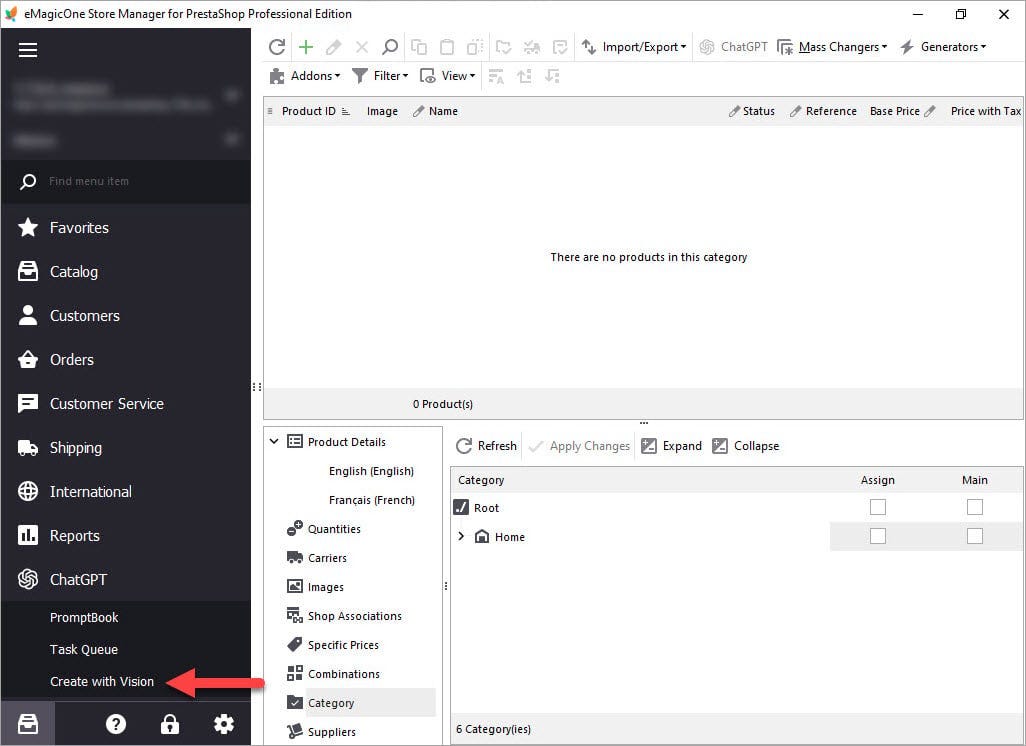
1. Launch “Create with Vision”
Open ChatGPT > Create with Vision to start the wizard that will pull data from your images.
2. Choose an Image Folder
Select Folder icon and point to the directory that holds your product photos, then click Next.

3. Pre-fill Key Fields
Specify default quantity, price, and the target Category; these values create a draft product before AI generates the full listing. Press Next.

4 Select & Test Prompts
Pick or tweak prompts that shape titles, descriptions, and specs. Run a quick test to ensure the tone matches your brand, then hit Create. Tasks are queued for ChatGPT.

5. Monitor the Task Queue
In Task Queue, watch each field’s status. Once every task shows Generated, review the content and click Apply All (or Pause All if corrections are needed).

6. Review Products Manually
Locate the new items under Catalog > Categories & Products, inspect each listing for accuracy, adjust if required, and toggle Status > Enabled to publish.

Using ChatGPT Vision cuts listing time dramatically while letting you keep final editorial control. Test prompts regularly and verify generated data to maintain high-quality, conversion-ready product pages.
메타데이터
- post_id
- bbee47f902e9
- slug
- create-a-prestashop-product-from-an-image-with-chatgpt-in-store-manager-bbee47f902e9
- url
- https://medium.com/@alexandra_kold/create-a-prestashop-product-from-an-image-with-chatgpt-in-store-manager-bbee47f902e9
- canonical_url
- https://medium.com/@alexandra_kold/create-a-prestashop-product-from-an-image-with-chatgpt-in-store-manager-bbee47f902e9
- author_url
- https://medium.com/@alexandra_kold
- status
- ok
- fetched_at
- 2026-07-28 14:29:26



