FedEx Declared Value and Liability Coverage: Protect Your WooCommerce Shipments
Shipping with FedEx is a popular choice for WooCommerce merchants looking to reach customers across the globe. But with that opportunity…
FedEx Declared Value and Liability Coverage: Protect Your WooCommerce Shipments
Shipping with FedEx is a popular choice for WooCommerce merchants looking to reach customers across the globe. But with that opportunity comes risk, especially when you’re sending high-value items. That’s where FedEx Declared Value and liability coverage step in: they offer a safety net for your most valuable orders, giving both you and your customers peace of mind.
In this guide, you’ll learn how these protections differ, how to apply them within WooCommerce, and smart strategies to manage claims and safeguard your shipments.
Understanding Declared Value & Liability Coverage
Every FedEx shipment includes standard liability coverage, but this protection is limited and not enough for more expensive packages. To avoid heavy losses if something goes wrong, it helps to understand the difference between declared value and liability coverage.
- Declared Value is the amount you assign to the shipment. It sets the maximum your merchant can be reimbursed by FedEx if the package is lost or damaged.
- Liability Coverage refers to the default protection FedEx offers. It may not match the value of costly shipments, which is why high-value orders need additional coverage via declared value.
Key Differences at a Glance
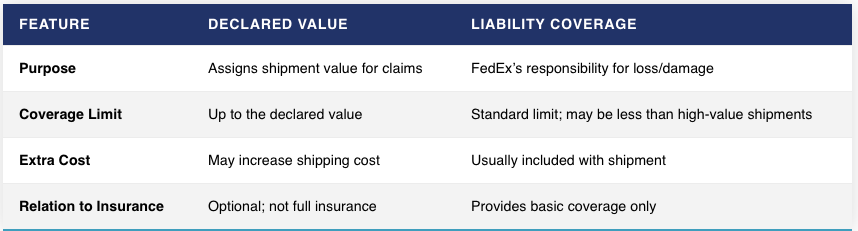
Note: Declaring a higher value increases shipment cost, and in case of claims, you’ll need documentation like receipts. Keep in mind that some categories like artwork or jewellery are capped (often around $1,000).
Easily Apply Declared Value in WooCommerce
For merchants shipping valuable products, relying solely on FedEx’s default $100 coverage can be risky. Using the WooCommerce FedEx Shipping Plugin with Print Label, you can apply higher protection effortlessly.
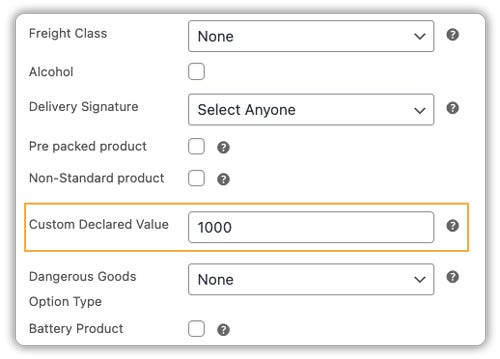
- Declare value per product: In the product page, enter its worth. The plugin sends this info to FedEx and auto-adjusts rates.
- Enable Third-Party Insurance : Add Third-Party Insurance to cover the full shipment value. FedEx Ground® Economy includes only $100 by default, but this option protects high-value WooCommerce orders end-to-end.

- You can also set a minimum order threshold: Apply third-party insurance only to orders above a set amount for better cost control.
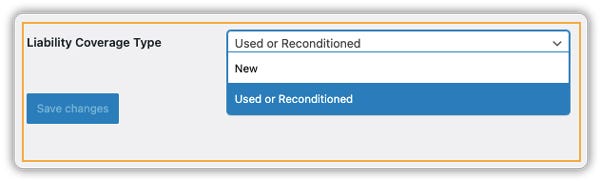
- For freight shipments: Choose a Liability Coverage Type under the Freight tab to ensure larger orders are protected.
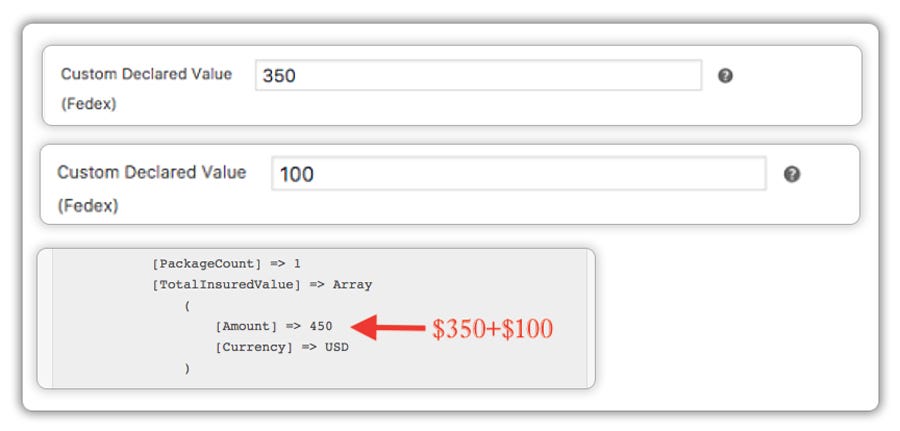
- Handle multiple products: The plugin totals declared values for multi-item orders and calculates shipping accordingly.
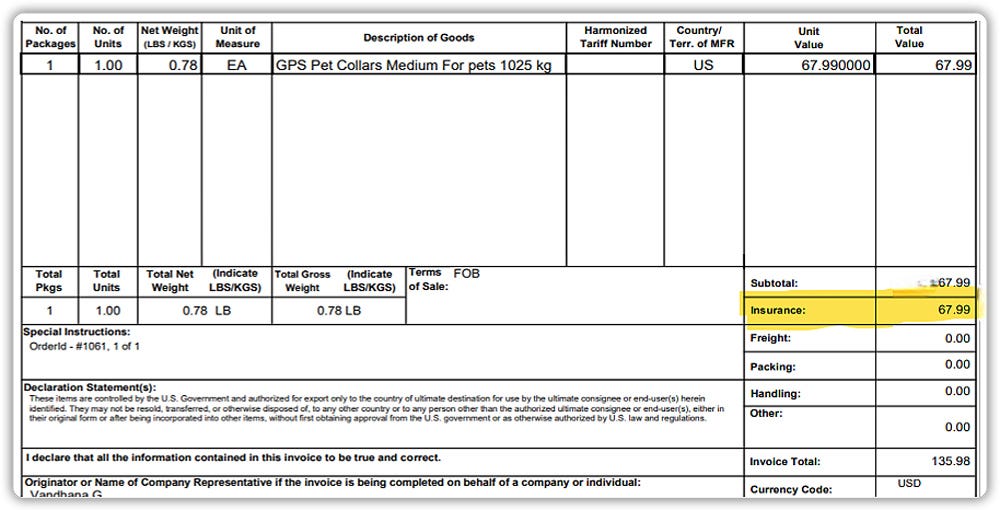
- Generate documents automatically: Create shipping labels and commercial invoices complete with value and insurance details for smoother customs and claims.
Here’s the detailed guide on FedEx Declared Value.
Smart Tips for WooCommerce Merchants
Shipping high-value products needs extra protection. With FedEx Declared Value and the WooCommerce FedEx Shipping Plugin, you can safeguard orders more effectively. Keep these tips in mind:
- Declare high-value orders: Always declare shipments over $100 to avoid undercoverage.
- Use insurance for costly or fragile items: Enable third-party insurance for complete protection.
- Keep proof of value: Store invoices or receipts — FedEx requires them for claims.
- Know product limits: Items like jewelry or artwork have maximum declared values, so check restrictions before shipping.
Following these best practices reduces risks, simplifies claims, and builds customer trust in your WooCommerce store.
Final Thoughts
Protecting your WooCommerce shipments with FedEx Declared Value and liability coverage is a practical way to reduce risk and build trust. The [WooCommerce FedEx Shipping Plugin](http://WooCommerce FedEx Shipping Plugin with Print Label) makes this easy you can declare values, enable insurance, and generate all necessary shipping documentation automatically.
Need help setting this up? PluginHive’s support team is just a click away.
메타데이터
- post_id
- bc52cdfe09ff
- slug
- fedex-declared-value-and-liability-coverage-protect-your-woocommerce-shipments-bc52cdfe09ff
- url
- https://medium.com/pluginhive/fedex-declared-value-and-liability-coverage-protect-your-woocommerce-shipments-bc52cdfe09ff
- canonical_url
- https://medium.com/pluginhive/fedex-declared-value-and-liability-coverage-protect-your-woocommerce-shipments-bc52cdfe09ff
- author_url
- https://medium.com/@vandhana_22442
- status
- ok
- fetched_at
- 2026-08-01 06:06:59