‘Dropy’ and the engineering behind price tracking extensions
Price drop alerts sound simple. But scraping thousands of retail sites reliably, detecting fake discounts, and delivering real-time…
‘Dropy’ and the engineering behind price tracking extensions
Price drop alerts sound simple. But scraping thousands of retail sites reliably, detecting fake discounts, and delivering real-time notifications is a genuinely hard engineering problem. Here’s how it works.
Last week on Product Hunt, Dropy — a Chrome extension for tracking prices across Amazon, eBay, AliExpress, and thousands of other stores, caught my attention. Not because price trackers are new, but because I wanted to understand what it actually takes to build one that works at scale. Turns out there’s more going on under the hood than a simple “check the price every hour” script.
The core architecture problem
A price tracking extension has to solve three distinct, non-trivial engineering problems simultaneously:
- Data extraction — scraping structured price data from wildly inconsistent HTML across thousands of websites.
- Change detection — efficiently knowing when a price has changed without hammering every site continuously.
- Delivery — pushing notifications reliably to a user in near-real time across sessions.
Each of these has interesting constraints. Let’s unpack them.
Layer 1: How price data is extracted
Modern e-commerce sites are not friendly to scrapers. They use dynamically rendered JavaScript (React, Next.js, Angular storefronts), bot detection middleware, and anti-scraping CAPTCHAs. A naive approach, fetching raw HTML and parsing it, fails immediately on most major retail pages.
Tools like Dropy almost certainly use a combination of approaches:
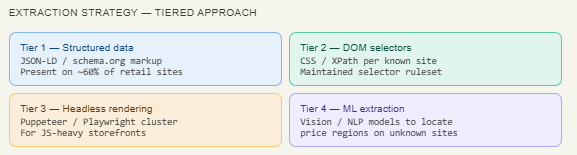
The cleanest path is JSON-LD structured data. Google mandated schema.org markup for rich snippets, so many retail sites embed product price as machine-readable JSON directly in the page <head>. Dropy's extension can read this from the DOM at page-load time without a backend round-trip.
// Runs inside the page context as a Chrome content script
function extractPrice() {
  const scripts = document.querySelectorAll('script[type="application/ld+json"]');

  for (const s of scripts) {
    try {
      const data = JSON.parse(s.textContent);
      const offer = data?.offers ?? data?.Offer;

      if (offer?.price) {
        return {
          price: parseFloat(offer.price),
          currency: offer.priceCurrency ?? 'USD',
          availability: offer.availability
        };
      }
    } catch (_) { continue; }
  }

  return null; // fall through to DOM selector tier
}
Imagine you walk into a store and want to know the price of something. You could either look at the price tag directly, or ask a store employee. JSON-LD is like a hidden “price tag” that websites stick in their code specifically for machines to read. Google uses it for search results, so most big retailers already have it.
This snippet is the extension’s eyes. When you land on a product page, it quietly reads that hidden price tag in the background. If it finds one, it grabs the number and the currency. If it doesn’t find one (not every site has it), it shrugs and says “okay, I’ll try something else” — that’s the
return nullat the end, which means "fall through to the next method."
When JSON-LD isn’t available, the extension falls back to a site-specific CSS selector ruleset — essentially a curated database of .price-now or #priceblock_ourprice selectors maintained per domain. This is brittle but fast. The really interesting engineering is in Tier 4: using ML to generalize across unknown sites by identifying price-like text nodes near "add to cart" buttons.
Layer 2 : The backend polling problem
Once a user adds an item to their watchlist, Dropy’s backend has to keep checking that URL for price changes. This sounds simple. It isn’t.
“If 100,000 users are tracking 5 items each, that’s 500,000 URLs your system has to check repeatedly, forever, without getting rate-limited or blocked.”
The smart approach here is deduplication. If 4,000 users are all tracking the same AirPods listing on Amazon, you only need to check that URL once per polling interval, not 4,000 times. The backend maintains a URL → [user_ids] map, and a single scrape result is fanned out to all interested subscribers.
Adaptive polling frequency
Checking every item every minute would be both expensive and easily blocked. A well-designed system uses adaptive polling, items with a history of frequent price changes are checked more often; stable items less so. This is essentially a lightweight time-series volatility model on each product’s price history.
Engineering Insight: Amazon’s product pages are heavily bot-protected. Tools like Dropy likely use a combination of residential proxy rotation, request throttling, and browser fingerprint randomization (via Puppeteer Stealth or similar) to avoid detection. Some services use Amazon’s official Product Advertising API for 1st party data — much more relaiable, but restricted to affiliate partners.
Layer 3: Detecting fake discounts (the real moat)
This is where Dropy’s value proposition goes beyond simple scraping. Retailers routinely inflate the “original price” before a sale to make discounts look larger. Amazon’s own research has shown that many “Lightning Deal” prices were not actually lower than the item’s average price in the preceding 30 days.
Dropy stores a rolling time-series of every price it has observed for a product. When displaying a “price drop,” it can compute whether the current price is genuinely below the 90-day moving average, not just below an inflated reference price set by the retailer.
function isGenuineDrop(history, currentPrice) {
  const last90 = history.filter(p =>
    p.timestamp > Date.now() - 90 * 24 * 3600 * 1000
  );

  const avg = last90.reduce((s, p) => s + p.price, 0) / last90.length;
  const allTimeMin = Math.min(...history.map(p => p.price));

  return {
    belowAverage: currentPrice < avg,
    nearAllTimeMin: currentPrice <= allTimeMin * 1.05,
    dropPercent: (((avg - currentPrice) / avg) * 100).toFixed(1)
  };
}
This answers the question: “Is this price drop genuine, or did the retailer just inflate the price last week to make today’s discount look good?”
It looks at the price history of the last 90 days, calculates the average price over that period, and then compares today’s price against it. It also checks if today’s price is close to the lowest price ever recorded. So instead of trusting the retailer’s own “was $99, now $59!” label, Dropy does its own maths and tells you independently whether this is actually cheap or just dressed up to look cheap.
The price history chart Dropy exposes to users is a direct byproduct of this data collection. It’s not just a visual nicety, it’s the output of the same time-series store the backend uses for deal verification.
Layer 4: Notification delivery
Chrome extensions have a lifecycle problem: service workers (the replacement for background pages) are terminated after ~30 seconds of inactivity. An extension cannot maintain a persistent WebSocket connection to receive server-push events. The browser simply won’t allow it.
The standard workaround is to use the Chrome Push API via Firebase Cloud Messaging (FCM). The extension registers a push subscription, and Dropy’s backend sends a Web Push notification through FCM’s infrastructure when a tracked price drops. The browser wakes the service worker, which handles the notification even if Chrome isn’t actively open.
If you were building this yourself
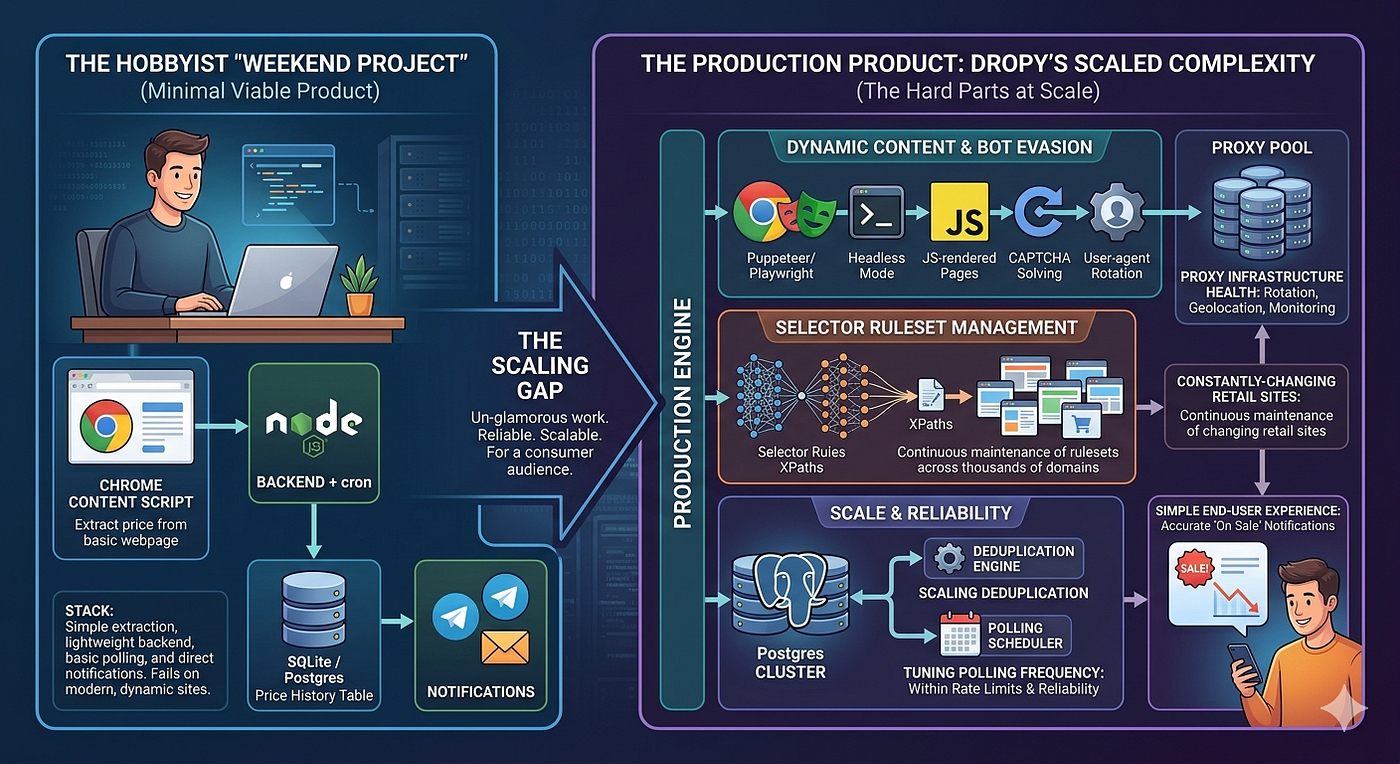
A minimal version of Dropy is a realistic weekend project for a developer. The stack would be: a Chrome content script to extract price from the current page, a lightweight backend (Node.js + cron) to poll stored URLs, a SQLite or Postgres table for price history, and a Telegram or email webhook for notifications. The hard parts like — handling JS-rendered sites, scaling deduplication, and bot evasion, are what separate a hobby tool from a production service.
What makes Dropy interesting as a product isn’t any single clever trick. It’s the unglamorous work of maintaining selector rulesets across thousands of constantly-changing retail sites, keeping proxy infrastructure healthy, and tuning polling frequency to stay within rate limits reliably, at scale, for a consumer audience that just wants a notification when something goes on sale.
메타데이터
- post_id
- bc54671d08ff
- slug
- dropy-and-the-engineering-behind-price-tracking-extensions-bc54671d08ff
- url
- https://medium.com/@shivangibitsp/dropy-and-the-engineering-behind-price-tracking-extensions-bc54671d08ff
- canonical_url
- https://medium.com/@shivangibitsp/dropy-and-the-engineering-behind-price-tracking-extensions-bc54671d08ff
- author_url
- https://medium.com/@shivangibitsp
- status
- ok
- fetched_at
- 2026-06-23 21:39:52