Document Conversion Tools for RAG Systems (with Sample Code)
The effectiveness of any RAG system heavily depends on how well its knowledge source is! And to create an efficient knowledge source, we…
Document Conversion Tools for RAG Systems (with Sample Code)
The effectiveness of any RAG system heavily depends on how well its knowledge source is! And to create an efficient knowledge source, we need to process unstructured documents and convert them into searchable vectors. The quality of this conversion directly impacts retrieval accuracy — poorly extracted or malformed content leads to semantic drift in the vector space and hence can impact the quality of the RAG system.
I’ve had the opportunity to experiment with several open-source tools and libraries, and I’d like to share my findings here. While this isn’t an exhaustive list, it offers a practical comparison of the popular tools I’ve tested personally i.e.:
- Docling
- Unstructured
- PyMuPDF
- docx2txt
- PyPDF2
UPDATE: I have shared the code for the said tool (opensource under MIT license) i.e. xdoc2json. Feel free to check, use and modify as per your requirements.

Git Repo :: https://github.com/nowusman/xdoc2json/tree/main
A typical document processing pipeline for RAG involves several stages:
- Document parsing
- Content extraction
- Cleaning
- Chunking
- Vectorization
Each stage presents unique challenges, from handling complex layouts in PDF, DOCX, PPTs to preserving semantic relationships in long-form content. The best approach is converting various documents into a standard format before applying processing (chunking, semantic translation) for better outcomes.
Tool Comparisons
1. IBM Docling
Docling is still new to me, but I am a big fan of Docing already. Docling is developed by IBM and released under an MIT license, represents one of the newest and most advanced open-source document conversion solutions available. What makes Docling stand out is its integration of specialized AI models for document understanding:
- DocLayNet for layout analysis
- TableFormer for table structure recognition
The toolkit processes documents into a unified, richly structured representation that preserves the semantic information crucial for effective RAG systems. Docling operates efficiently on commodity hardware with minimal resource requirements.
Docling’s modular architecture makes it easy to extend and customize, while its integration with popular frameworks like LangChain, LlamaIndex, and spaCy enhances its utility in the RAG ecosystem. You can use the Python package either through its API or as a command-line tool, providing flexibility for different implementation approaches.
2. Unstructured
The Unstructured library offers a robust toolkit specifically designed for ingesting and preprocessing diverse data formats. Its core strength lies in precise document extraction capabilities that handle various document element types and associated metadata.
Rather than relying on conventional text-based chunking methods, Unstructured leverages deep understanding of document formats to partition content into semantic units. This semantic partitioning preserves contextual relationships within documents, potentially improving retrieval precision in RAG systems.
If you’re interested in learning more, there’s an excellent course covering Unstructured overview and building a RAG system using Unstructured document extraction: Preprocessing Unstructured Data for LLM Applications
3. PyMuPDF
PyMuPDF (also known as Fitz) represents a mature and versatile solution for document processing, with particular strengths in handling PDF documents (only for PDF). This library enables you to extract text, images, and vector graphics from various document formats, supporting operations beyond simple text extraction.
PyMuPDF offers sophisticated capabilities for working with document structure, including handling complex layouts that challenge simpler extraction tools.
4. python-docx2txt
This is a pure Python-based utility to extract text from docx files (only for .docx files). It can extract text from document body, headers, footers, and hyperlinks. It can also extract embedded images from documents. For organizations dealing primarily with Microsoft Office documents, docx2txt provides a lightweight, focused solution that prioritizes text quality and formatting preservation without the overhead of more comprehensive document processing tools.
I initially used this alongwith PyMuPDF to extract text and images, then processed the images using Tesseract OCR (pytesseract). Its primary strength lies in its ability to preserve formatting and document structure.
5. PyPDF2
PyPDF2 provides fundamental PDF processing capabilities with a focus on basic text extraction. While it offers reliable functionality for reading and parsing PDF files, it may struggle with complex layouts in unstructured documents. The library allows you to access document structure and extract text from individual pages, but its capabilities are more limited compared to more advanced tools like PyMuPDF or Docling.
Feature Comparison
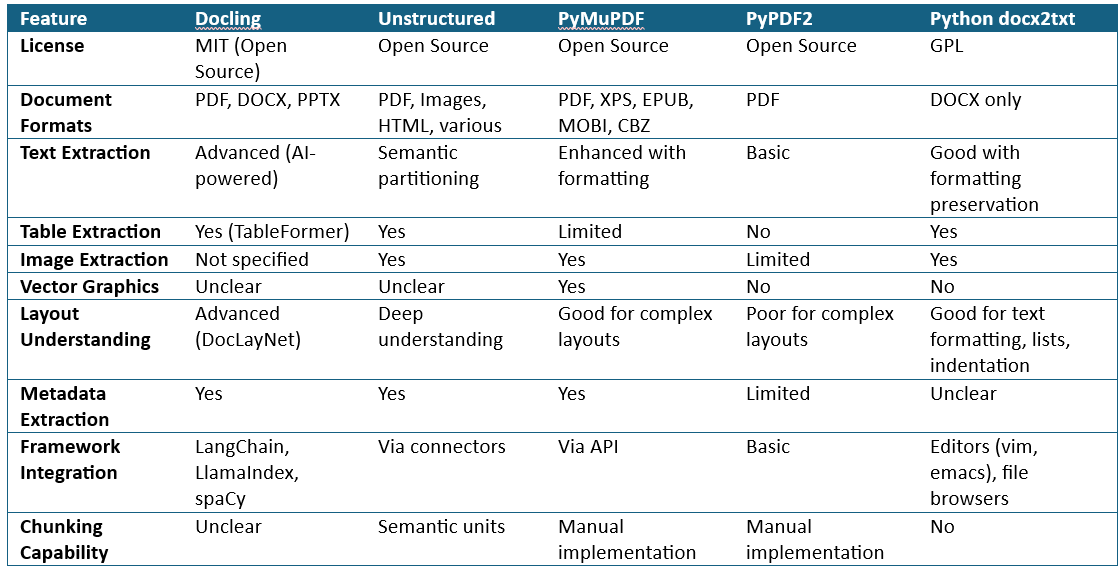
SUMMARY
- Docling and PyMuPDF appear fast, with Docling designed for efficiency and PyMuPDF optimized for PDFs
- Accuracy is likely high for Docling due to AI models for layout and tables
- Docling and Unstructured integrate well with RAG frameworks like LangChain and LlamaIndex, making them suitable for LLM workflows
Based on my testing and research, Docling appears to be the best option available at the time of writing this article. The right tool ultimately depends on your specific requirements, document types, and existing infrastructure. I hope this comparison helps you navigate the landscape of document conversion tools and choose the one that best fits your needs.
메타데이터
- post_id
- bc67a3ce3c29
- slug
- document-conversion-tools-for-rag-systems-bc67a3ce3c29
- url
- https://medium.com/@nowusman/document-conversion-tools-for-rag-systems-bc67a3ce3c29
- canonical_url
- https://medium.com/@nowusman/document-conversion-tools-for-rag-systems-bc67a3ce3c29
- author_url
- https://medium.com/@nowusman
- status
- ok
- fetched_at
- 2026-06-26 06:47:43





