Django: Encrypt + Decrypt data in Database ทำยังไงมาดูกัน
เชื่อว่าการเก็บ data แบบ plain ไว้ใน model เป็นสิ่งที่ Pythonist รู้จักอยู่แล้วใน Django นะคับ แต่ถ้าต้องการแบบให้ encrypt, decrypt…
Django: Encrypt + Decrypt data in Database ทำยังไงมาดูกัน

เชื่อว่าการเก็บ data แบบ plain ไว้ใน model เป็นสิ่งที่ Pythonist รู้จักอยู่แล้วใน Django นะคับ แต่ถ้าต้องการแบบให้ encrypt, decrypt ได้ด้วยล่ะ ในข้อมูลส่วนบุคคลที่มีความสำคัญ ต้องทำยังไงบ้าง เดี๋ยวผมจะเล่าให้ฟัง
5 Steps:
1. Install lib
2. Create encryption keys.
3. Config key in .env
4. Config keys in settings.py
5. Use EncryptedCharField + SearchField + EncryptedFileField in Models
ทำไมต้อง Encrypt ข้อมูลใน Database?
-
🔒 ป้องกันการเข้าถึงโดยไม่ได้รับอนุญาต: แม้ว่าจะมีคนเข้าถึง database ได้โดยตรง ก็ไม่สามารถอ่านข้อมูลจริงได้
-
📋 ปฏิบัติตาม PDPA: กฎหมายคุ้มครองข้อมูลส่วนบุคคลกำหนดให้ต้องมีมาตรการรักษาความปลอดภัยที่เหมาะสม
-
🛡️ Defense in Depth: เพิ่มชั้นความปลอดภัยเพิ่มเติมนอกเหนือจาก authentication และ authorization
-
💾 ป้องกัน Database Backup Leak: แม้ backup file หลุดออกไป ข้อมูลก็ยังปลอดภัย
Let’s get to the point โดย lib ที่เราจะใช้มี 2 ตัวนะคือ
**django-encrypted-filefield**: ใช้สำหรับเข้ารหัสไฟล์ (PDF, XML, CSV, etc.) ที่อัปโหลดเข้า Django**django-searchable-encrypted-fields**: ใช้สำหรับเข้ารหัส field ต่างๆ เช่น CharField, TextField, EmailField, IntegerField พร้อมความสามารถในการค้นหา (searchable) ต้องใช้ตอน get queryset ไง ไม่งั้นจะหาไม่เจอนะแจ๊ะ

Encryption Algorithm ที่ใช้:
**AES-256-GCM** (Advanced Encryption Standard with Galois/Counter Mode)- เป็น
**symmetric encryption** (เข้ารหัสแบบสมมาตรนะ) คือ ใช้ key เดียวทั้งตอน encrypt และ decrypt จึงทำงานได้รวดเร็วกวา asymmetric ที่ต้องใช้ 2 keys คือ public/private **GCM mode** ให้ทั้ง confidentiality และ authenticity
1. Install lib
pip install django-encrypted-filefield~=0.3.0
pip install django-searchable-encrypted-fields~=0.2.0
2. สร้าง encryption keys ขึ้นมานะ
- จริงๆไปสร้าง ที่นี่ ได้นะคับ หรือจะใช้ Python code ด้านล่างนี้ก็ได้เช่นกัน
import secrets

# สร้าง FIELD_ENCRYPTION_KEYS (32 bytes = 256 bits สำหรับ AES-256)
field_encryption_key = secrets.token_hex(32)
print(f"FIELD_ENCRYPTION_KEYS='{field_encryption_key}'")

# สร้าง HASH_KEY สำหรับ SearchField
hash_key = secrets.token_hex(32)
print(f"HASH_KEY='{hash_key}'")

# สร้าง DEFF_SALT และ DEFF_PASSWORD สำหรับ file encryption
deff_salt = secrets.token_urlsafe(32)
print(f"DEFF_SALT='{deff_salt}'")

deff_password = secrets.token_urlsafe(32)
print(f"DEFF_PASSWORD='{deff_password}'")
3. Config ใน .env เพื่อความปลอดภัย เพื่อเป็นการแยก key ออกจาก code นะ
- Key เราจะแยกเก็บใน
.envและไม่ commit เข้าไปใน repo นะคับ เพื่อความปลอดภัย โดยเก็บไว้ใน Secret Vault ของคุณได้เลย
# .env file

# Encryption (Not recommended to use default value for production)
FIELD_ENCRYPTION_KEYS='69641683eaad2d8a8722715f0294e6aa52293d4c6a639390163ec8a69eb5d86d'
DEFF_SALT='ki+pc2x!$h%h6+dcnhlv3z8746lk805_7sn74x95cw=p4%f^%e'
DEFF_PASSWORD='ki+pc2x!$h%h6+dcnhlv3z5u46lk997_7sn74x95cw=p4%f^%e'
HASH_KEY='3262d715464c12e95519f005197988c5bd20065977f61e9a6105d1a1760028a9'
4. Config in settings.py
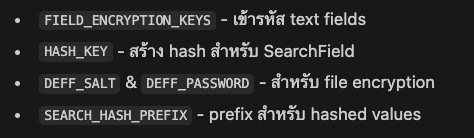
แต่ละ Key ทำหน้าที่ดังนี้นะ
**FIELD_ENCRYPTION_KEYS** : encrypt/decrypttext fields|EncryptedCharField,EncryptedTextField, etc.**HASH_KEY**: สร้าง hash สำหรับการค้นหาSearchField**DEFF_SALT**: Salt สำหรับ key derivationEncryptedFileField**DEFF_PASSWORD**: Password สำหรับ key derivationEncryptedFileField**SEARCH_HASH_PREFIX**: Prefix สำหรับแยก hashed valueSearchField (default: ‘xx’)
import environ

env = environ.Env()

# DB Encryption
FIELD_ENCRYPTION_KEYS = [
    env.str(
        var='FIELD_ENCRYPTION_KEYS',
        default='69641683eaad2d8a8722715f0294e6aa52293d4c6a639390163ec8a69eb5d86d',
    )
]

DEFF_SALT = env.str(
    var='DEFF_SALT',
    default='ki+pc2x!$h%h6+dcnhlv3z8746lk805_7sn74x95cw=p4%f^%e'
)

DEFF_PASSWORD = env.str(
    var='DEFF_PASSWORD',
    default='ki+pc2x!$h%h6+dcnhlv3z5u46lk997_7sn74x95cw=p4%f^%e'
)

DEFF_FETCH_URL_NAME = 'fetch'

SEARCH_HASH_PREFIX = env.str(var='SEARCH_HASH_PREFIX', default='xx')

HASH_KEY = env.str(
    var='HASH_KEY',
    default='3262d715464c12e95519f005197988c5bd20065977f61e9a6105d1a1760028a9'
)
5. ใช้งานกันโลด
5.1 ตัวอย่างการใช้งาน EncryptedCharField + SearchField
- เมื่อต้องการเข้ารหัสข้อมูลลูกค้า เช่น Tax ID, ชื่อ, ที่อยู่ แต่ยังต้องการค้นหาได้
# File: customers/models.py

from django.db import models
from django.utils.translation import gettext_lazy as _
from encrypted_fields import fields
from model_controller.models import AbstractSoftDeletionModelController

from xx.common.fields import SearchField
from xx.common.utils import callable_hash_key

class Customer(AbstractSoftDeletionModelController):
    # Encrypted field: เก็บข้อมูลที่เข้ารหัสแล้ว
    _tax_id = fields.EncryptedCharField(
        max_length=255,
        verbose_name=_('Encrypted Tax ID'),
        blank=True
    )
    # Search field: เก็บ hash สำหรับค้นหา
    tax_id = SearchField(
        hash_key=callable_hash_key,
        encrypted_field_name='_tax_id'
    )

    _name = fields.EncryptedCharField(
        default='',
        max_length=255,
        verbose_name=_('Encrypted Name')
    )
    name = SearchField(
        hash_key=callable_hash_key,
        encrypted_field_name='_name'
    )

    class Meta:
        constraints = (
            models.UniqueConstraint(
                fields=('tax_id', 'alive'),
                name='unique-customer-tax_id'
            ),
        )

    def __str__(self):
        return f'{self.name} {self.tax_id}'
การทำงาน:
**EncryptedCharFieldกับ (_tax_id,_name)**:
- เก็บข้อมูลที่เข้ารหัสด้วย AES-256-GCM
- ใช้ underscore prefix (
_) เป็น convention เพื่อบอกว่าเป็น internal field - ข้อมูลใน database จะเป็น binary data ที่เข้ารหัสแล้ว
**SearchFieldกับ (tax_id,name)**:
- เก็บ SHA-256 hash ของข้อมูล + HASH_KEY
- ใช้สำหรับการค้นหาและ indexing
- ไม่สามารถ reverse กลับเป็นข้อมูลจริงได้ (one-way hash)
**callable_hash_key**:
- เป็น function ที่ return HASH_KEY จาก settings
- ใช้ callable เพื่อให้สามารถเปลี่ยน key ได้โดยไม่ต้อง restart
# File: django/xx/common/utils.py

def callable_hash_key() -> str:
    return settings.HASH_KEY
เมื่อมีการสร้าง record ที่ table **Customer** ที่มีการใช้ Encrypted field และ Search field
# สร้าง Customer ใหม่
customer = Customer.objects.create(
    tax_id='1234567890123',  # เขียนข้อมูลปกติ
    name='บริษัท ตัวอย่าง จำกัด'
)

# อ่านข้อมูล
print(customer.name)  # 'บริษัท ตัวอย่าง จำกัด' (ถอดรหัสอัตโนมัติ)
print(customer.tax_id)  # '1234567890123'

# ค้นหาด้วย SearchField
customer = Customer.objects.get(tax_id='1234567890123')  # ใช้งานได้ปกติ
customers = Customer.objects.filter(name__icontains='ตัวอย่าง')  # ⚠️ ใช้ไม่ได้!

# ค้นหาแบบ exact match เท่านั้น
customer = Customer.objects.get(name='บริษัท ตัวอย่าง จำกัด')  # ✅ ใช้ได้
ข้อมูลใน Database จะเป็น:

หน้าตาของข้อมูลที่เก็บใน db
_tax_idและ_name: เป็น encrypted binary datatax_idและname: เป็น hashed string ที่ใช้สำหรับค้นหา
5.3 ตัวอย่างการใช้งาน EncryptedFileField — เข้ารหัสไฟล์นะ
เช่นเข้ารหัสไฟล์ PDF, XML, CSV ที่ upload เข้ามาในระบบ
การทำงานคือ
**EncryptedFileField**:
- เข้ารหัสไฟล์ก่อนบันทึกลง storage (disk หรือ S3)
- ใช้
DEFF_SALTและDEFF_PASSWORDในการสร้าง encryption key - ถอดรหัสอัตโนมัติเมื่ออ่านไฟล์
**upload_to**:
- กำหนด path ที่จะเก็บไฟล์
- ไฟล์ที่เก็บจะเป็น encrypted binary
# File: django/core/documents/models.py

from django.db import models
from model_controller.models import AbstractSoftDeletionModelController
from xx.common.fields import EncryptedFileField
from xx.common.constants import CAN_BE_BLANK_NULL

class DocumentImport(AbstractSoftDeletionModelController):
    celery_task = models.CharField(
        db_index=True,
        max_length=36,
        **CAN_BE_BLANK_NULL
    )
    document_type = models.CharField(
        max_length=50,
        choices=DocumentType.choices,
    )
    csv_name = models.CharField(
        max_length=255,
        **CAN_BE_BLANK_NULL
    )

    # Encrypted CSV file
    csv_file = EncryptedFileField(
        upload_to='./csv_file',
        null=True
    )

    result = models.JSONField(**CAN_BE_BLANK_NULL)
    error_message = models.JSONField(**CAN_BE_BLANK_NULL)

    def __str__(self) -> str:
        return f'#{self.pk} {self.csv_name}'

class Document(AbstractSoftDeletionModelController):
    invoice_number = models.CharField(
        max_length=35,
        db_index=True
    )

    # Encrypted PDF files
    reserved_pdf_file = EncryptedFileField(
        upload_to='./reserved_pdf_file',
        null=True
    )
    pdf_file = EncryptedFileField(
        upload_to='./pdf_file',
        null=True
    )

    # Encrypted XML file
    xml_file = EncryptedFileField(
        upload_to='./xml_file',
        null=True
    )

    version = models.IntegerField(default=1)
    issue_dt = models.DateTimeField(db_index=True)
การใช้งานในแบบต่างๆของไฟล์
from django.core.files.base import ContentFile

# อัปโหลดไฟล์ CSV
csv_content = b"name,tax_id\nCompany A,1234567890123"
doc_import = DocumentImport.objects.create(
    document_type='INVOICE',
    csv_name='import_2024.csv',
    csv_file=ContentFile(csv_content, name='import_2024.csv')
)

# อ่านไฟล์ (ถอดรหัสอัตโนมัติ)
with doc_import.csv_file.open('rb') as f:
    content = f.read()
    print(content)  # b"name,tax_id\nCompany A,1234567890123"

# อัปโหลด PDF
with open('invoice.pdf', 'rb') as f:
    document = Document.objects.create(
        invoice_number='INV-2024-001',
        pdf_file=ContentFile(f.read(), name='invoice.pdf')
    )

# ดาวน์โหลด PDF (ถอดรหัสอัตโนมัติ)
pdf_url = document.pdf_file.url  # URL สำหรับดาวน์โหลด
5.4 Custom EncryptedFileField Implementation
เป็นการ customize **EncryptedFileField **เพื่อให้ decrypt ผ่าน URL ได้
# File: django/xx/common/fields.py

from io import BytesIO
from django.db.models.fields.files import FieldFile, FileField
from django_encrypted_filefield.crypt import Cryptographer
from django_encrypted_filefield.fields import EncryptedFile
from xx.common.utils import build_absolute_url

class DecryptedFile(BytesIO):
    """Helper class สำหรับถอดรหัสไฟล์"""
    def __init__(self, content):
        self.size = content.size
        BytesIO.__init__(self, Cryptographer.decrypted(content.file.read()))

class EncryptionMixin(object):
    """Mixin สำหรับเข้ารหัสไฟล์ก่อน save"""
    def save(self, name, content, save=True):
        return FieldFile.save(
            self,
            name,
            EncryptedFile(content),  # เข้ารหัสก่อน save
            save=save
        )

    save.alters_data = True

class EncryptedFieldFile(EncryptionMixin, FieldFile):
    """Custom FieldFile ที่รองรับการถอดรหัสผ่าน URL"""
    @property
    def url(self):
        self._require_file()
        # สร้าง URL ที่มี decrypted=True parameter
        return build_absolute_url(self.name, decrypted=True)

class EncryptedFileField(FileField):
    """Custom FileField ที่ใช้ EncryptedFieldFile"""
    attr_class = EncryptedFieldFile
โดยมีการทำงานแบบนี้นะ
**Save**: เข้ารหัสไฟล์ด้วยEncryptedFileก่อนบันทึก**Read**: ถอดรหัสด้วยCryptographer.decrypted()เมื่อ read**URL**: สร้าง URL พิเศษที่มีdecrypted=Trueสำหรับ download ไฟล์ที่ถอดรหัสแล้ว
พอแค่นี้ก่อนนะคับ ยาวเกินล่ะ ไว้เจอ use case เด่วกลับมาเขียนเพิ่ม
References: - django-encrypted-filefield Documentation
If you think it’s useful for you, just clap your hands 👏 to be encouraged me.
메타데이터
- post_id
- bca0af7ddf2d
- slug
- django-encrypt-decrypt-data-in-database-ทำยังไงมาดูกัน-bca0af7ddf2d
- url
- https://medium.com/@grassrootengineer/django-encrypt-decrypt-data-in-database-%E0%B8%97%E0%B8%B3%E0%B8%A2%E0%B8%B1%E0%B8%87%E0%B9%84%E0%B8%87%E0%B8%A1%E0%B8%B2%E0%B8%94%E0%B8%B9%E0%B8%81%E0%B8%B1%E0%B8%99-bca0af7ddf2d
- canonical_url
- https://medium.com/@grassrootengineer/django-encrypt-decrypt-data-in-database-%E0%B8%97%E0%B8%B3%E0%B8%A2%E0%B8%B1%E0%B8%87%E0%B9%84%E0%B8%87%E0%B8%A1%E0%B8%B2%E0%B8%94%E0%B8%B9%E0%B8%81%E0%B8%B1%E0%B8%99-bca0af7ddf2d
- author_url
- https://medium.com/@grassrootengineer
- status
- ok
- fetched_at
- 2026-07-13 06:23:13