How Amazon S3 Practically Eliminates Data Loss
The insane tech behind the “11 nines” durability
How Amazon S3 Practically Eliminates Data Loss
The insane tech behind the “11 nines” durability
Waking Up to a Worst-Case Scenario
Imagine this: you’re the engineer at a fast-growing startup. One morning, disaster hits — your storage server is fried. Gone. Years of customer data? Wiped in seconds. It’s every company’s nightmare.
Now enter Amazon S3 — where this kind of panic is engineered out of existence as S3 offers 99.999999999% durability — that’s eleven nines. Translated: if you stored 10 million files, you’d statistically lose just one file every 10,000 years.
Sounds wild? Let’s unpack how they pull it off.
Understanding Durability vs. Availability
Quick distinction:
- Availability: Can you access your data right now?
- Durability: Will your data still exist tomorrow, next year, or next decade?
S3 is built with durability as its top priority. It doesn’t just keep files online. It makes sure they never silently vanish or rot.
Rule #1: Never Trust a Single Copy
Hard drives fail — constantly. They’re cheap, massive, and mortal.
S3 doesn’t store just one copy. It instantly replicates your data across:
- Multiple drives
- Separate servers
- And crucially — different physical data centers (availability zones)
Each zone has its own power, network, cooling — a total failure in one zone won’t touch your data.
It’s like keeping your will in safes across different cities. One explodes? You’re still covered.
Beyond Replication: Erasure Coding
Replication is good. But S3 goes next level with erasure coding.
Here’s how it works:
- Your data is split into chunks (shards)
- S3 adds extra parity shards using smart math
- Even if a few chunks disappear (drive failure, network glitch), S3 rebuilds the original from what’s left
This is far more efficient and resilient than traditional RAID. And it works across racks, zones, even cities.
I wrote a beginner-friendly breakdown on this: Erasure Coding 101 on Medium
Nonstop Health Checks and Lightning Rebuilds
Redundancy is only useful if problems get fixed quickly. S3 constantly monitors for trouble:
- Always-On Monitoring: S3 checks drive health, temperature, and error rates on thousands of disks around the clock.
- Automatic Fixes: When something goes wrong, S3 immediately swings into action — identifying bad drives, retrieving data from healthy ones, and restoring it to fresh hardware.
- Parallel Processing: By keeping some space free on every disk, S3 can harness a swarm of devices to recover data fast — minimizing the risk of secondary failures during recovery.
It’s like dozens of emergency mechanics working in sync to fix your car before you even notice an issue.
Handling “Multiple Disasters” at Once
Suppose an exceptional event — heatwave, equipment meltdown — causes several drives to crash simultaneously. S3 is designed for that, too:
- Detects spikes in failures instantly and ramps up repair jobs and bandwidth across the fleet.
- Fires up extra “fire trucks” to keep recoveries fast and ahead of any new failures.
The golden rule: the speed of recovery must always outpace the rate of hardware failures.
How S3 Blocks Silent Data Rot
Data loss isn’t always dramatic. Sometimes, a single bit silently flips due to hardware aging or cosmic rays.
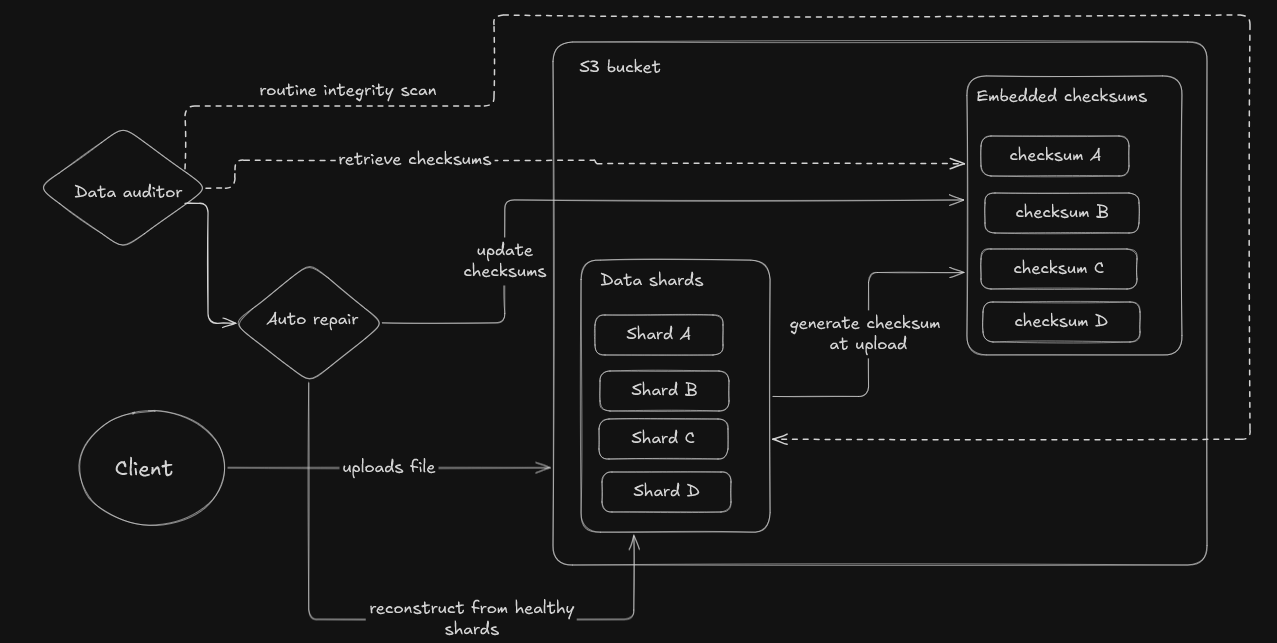
Health checks of data through checksum and data auditor service
- Checksums are generated for every object and each data shard — like a digital fingerprint.
- S3 continually checks these fingerprints in the background.
- If anything doesn’t match up, self-healing kicks in to automatically rebuild the damaged chunk — using healthy data from elsewhere.
Nothing Passes Without Verification: Bracketing
Instead of simply accepting a file write as “done”, S3 takes one extra, crucial step:
- After uploading, S3 instantly tries to reconstruct your file from its distributed shards.
- Only if this test is flawless does S3 return a “success” back to you.
- This process of breaking data into shards and reconstructing it back then and there is called bracketing
It’s a small behind-the-scenes check that makes a huge difference in long-term confidence.
Why Metadata Gets Special Treatment
S3 keeps your file data and metadata (file names, timestamps, access info) in entirely separate storage systems:
- Metadata sits in a high-durability, highly available store built for low-latency lookups.
- Raw object data is kept in vast, throughput-optimized clusters.
This separation means that if a hiccup ever happens in one, the other is untouched — providing both better performance and higher safety.
Disaster-Proofing at Planet Scale
S3 doesn’t just spread data across disks. It replicates across regions — physically distant zones. These are called availability zones.

Geographically separated fault tolerance system at S3
Even if:
- An entire building catches fire
- A region-wide outage occurs
- Someone pulls the wrong cable at the wrong time
Your data still lives. This is how fault isolation at infrastructure level is done
Even Humans Can’t Wreck It (Much)
Not all data is lost due to hardware failures. Some of it is lost due to human errors and it’s more common than you think

fault tolerance system against human errors
S3 gives you:
- Versioning: every overwrite/delete keeps the old version
- Object Lock: even admins can’t delete files during retention windows
- Cross-Region Replication: critical data lives in another part of the world
Durability by Design — and by Culture
S3’s reliability isn’t just code. At Amazon, every single change is reviewed through the lens of durability. New features, configuration tweaks, or hardware updates all undergo strict scenario planning and “what could break?” simulations.
- AWS teams run constant drills and stress-tests to model failures and keep raising the bar.
- If anything endangers the eleven 9s promise, the architecture is adjusted. Durability isn’t just a metric — it’s a company-wide obsession.
The Bottom Line
When you upload to S3, your data gets the VIP treatment:
- Replicated
- Verified
- Fingerprinted
- Watched 24/7
- Healed if damaged
- Protected from regions going down
- Even guarded from yourself
That’s why Amazon S3 has never lost a file it wasn’t supposed to.
Quick Food for thought : At this point, more than 350 trillion objects are stored in AWS S3. Think about how big that number is.
Thanks for giving your time to read my blog. If you like this, please show your appreciation by giving a clap.
My LinkedIn profile : https://www.linkedin.com/in/shuklax/
Github : https://github.com/Shuklax
Twitter : https://x.com/Shuklaax
메타데이터
- post_id
- bcacaf73dbb7
- slug
- how-amazon-s3-practically-eliminates-data-loss-bcacaf73dbb7
- url
- https://medium.com/@harshshuklaa/how-amazon-s3-practically-eliminates-data-loss-bcacaf73dbb7
- canonical_url
- https://medium.com/@harshshuklaa/how-amazon-s3-practically-eliminates-data-loss-bcacaf73dbb7
- author_url
- https://medium.com/@harshshuklaa
- status
- ok
- fetched_at
- 2026-07-27 11:43:05


