What actually happens when you click login?
A detailed look at how password authentication work behind the scenes
What actually happens when you click login?
If you missed my first article in this series, **Why Your Password Is a Military Asset**, I’d recommend starting there. It explains how something as personal as a login credential can become a weapon in modern conflict.
Now, before we get into how attackers break in, we need to understand what they’re breaking. Because if you don’t understand the process, you can’t really see where the blind spots are.
So, let’s fix that.
Most people imagine the logging system to be something like a lock and key. You type your password, the system checks it, the door opens. Well, that’s kind of true, but there is more to it:
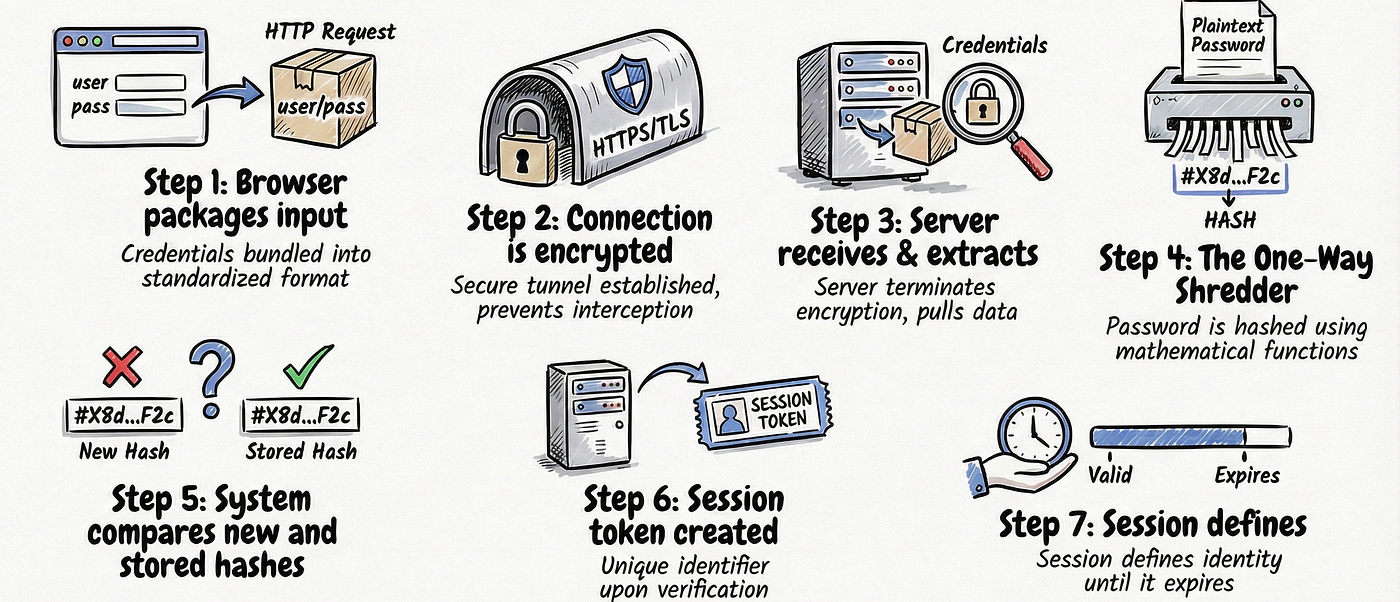
Step 1: Your browser packages your input. When you type your username and password and click submit, your browser wraps that information into an HTTP request and sends it over the internet to the website’s server.
Step 2: The connection is encrypted in transit. If the site uses HTTPS, the data is encrypted using TLS before it leaves your device. This means anyone intercepting the traffic on a coffee shop Wi-Fi network sees scrambled noise, not your password.
Step 3: The server receives the request and extracts your credentials. On the other side, the web server unwraps the request, reads your username, and hands the password off to the authentication system.
Step 4: The system hashes your input and compares it to a stored hash. This is the part most people don’t know. The server takes the password you just typed, runs it through a one-way mathematical function called a hash function, and produces a fixed-length string of characters.
Step 5: It compares that output to a stored hash. When you originally created your account and set a password, the system performed the same process in step 4 and stored only the result (the hash) and not the password itself. Now it compares the hash it just generated from your login attempt to the original one on the database. If they match: you’re in. If they don’t: access denied.
Step 6: A session is created. The moment your credentials are verified, the system generates a session token. From that point on, your browser presents that token with every page request. The server doesn’t re-check your password instead it checks the token.
Step 7: The session defines your identity until it expires. Every action you take is tied to that session.
Now I know that was a lot of terms and you’re probably wondering: what even are all of these? Let’s go through each of them and make it clear:
What is HTTP and HTTPS?
When your browser talks to a website, it uses a set of rules for how that conversation happens, which is called HTTP aka HyperText Transfer Protocol. Every time you visit a page, load an image, or submit a form, HTTP is the protocol making that exchange possible.
The problem is that plain HTTP is an open conversation. Anyone positioned between you and the server on the same Wi-Fi network can read exactly what’s being said. Your username, your password, your session data. All of it, in plain text.
HTTPS is HTTP with a lock on it. The “S” stands for Secure, and what makes it secure is a layer called TLS aka Transport Layer Security. TLS establishes an encrypted tunnel between your browser and the server before any of your data moves, which means that even if someone intercepts the traffic, what they see is indecipherable noise.
This is why the padlock in your browser’s URL bar matters. It’s telling you that the tunnel is active, and your data is protected in transit. This is actually a layer of protection you influence because not all sites use it. If you land on a site running plain HTTP, that encryption disappears entirely, and your credentials travel in readable text.

The padlock next to the URL
What are hash functions?
A hash function is a mathematical algorithm that takes any input like a word, a sentence, a file, a password and converts it into a fixed-length string of characters called a hash or digest.
What makes it useful for security, is that it works in only one direction. You can feed a password into a hash function and get an output instantly. But you cannot work backwards. Given only the output, there is no mathematical operation that reliably recovers the original input.
A few other properties of a good hash function are:
- Deterministic which means the same input always produces the same output.
password123will always produce the same hash, every single time, on every machine running the same function. - Fixed length so regardless of whether you hash a single character or an entire novel, the output is always the same length.
- Avalanche effect which means changing one character in the input completely changes the output.
password123andPassword123produce entirely different hashes, with no visible relationship between them.
Different hash functions exist for different security needs:
MD5 was once the standard but now retired for security use. It produces a 128-bit hash and was designed for speed. That speed became its downfall as modern hardware can compute billions of MD5 hashes per second, making brute-force attacks very easy. MD5 hashes are still found in legacy systems and old database breaches.

MD5 hash for password123 in terminal
SHA-1 is an improvement over MD5, producing a 160-bit hash, but also now considered cryptographically weak. Researchers demonstrated practical collision attacks where two different inputs produced the same hash, breaking the fundamental assumption of uniqueness. Major browsers and certificate authorities stopped trusting SHA-1 signatures years ago.

sha-1 hash for password123 in terminal
SHA-256 is the current general-purpose standard. It produces a 256-bit hash and is used everywhere from TLS certificates to blockchain verification.

sha-256 hash for password123 in terminal
Alongside these general-purpose hash functions, there are also specialized hashing algorithms designed specifically for password security. bcrypt is one of the most widely used examples. Unlike fast cryptographic hashes, bcrypt is intentionally slow. This slows down attackers who attempt to guess passwords at scale, making brute-force attacks more expensive. It also includes a configurable cost factor, allowing systems to increase difficulty as computing power improves over time.

bcrypt hash for password123 in terminal
Argon2 is the most modern and recommended password hashing algorithm today. It was designed to resist not only brute-force attacks but also attacks using specialized hardware such as GPUs and ASICs. Its key feature is that it is memory-hard, meaning it requires a significant amount of memory to compute each hash. This makes large-scale password cracking extremely inefficient and expensive.

argon2 hash for password123 in terminal
What are session tokens?
Once your credentials are verified, the password’s job is finished. The system doesn’t keep asking you to re-enter it every time you click a link. Instead, it issues you a session token which is a long, randomly generated string of characters that acts as a temporary identity card for the duration of your visit. This token gets stored in your browser as a cookie which is a small piece of data that your browser automatically attaches to every subsequent request to that site. The server checks it, confirms it’s valid and not expired, and grants access.

you can see the cookie in the request headrs on the right
So those were all the main terms. If you’re still unsure about anything, leave a comment and I’ll explain it better :>
Before you read on, open your browser settings and check how many saved passwords you have.
Now ask: how many of those passwords are the same password, or close variations of it?
If the answer is more than zero, you’re exposed to a risk we’ll get to shortly. Keep that number in your head.
Let’s Go back to Step 4. The server doesn’t check if your password is correct. It checks if it can reproduce the same hash.
Think about what that means: the system has no memory of what your password looks like. It only knows what the output should be. So, when an attacker wants in, they don’t need to steal your password directly. They just need to find an input that produces the same output.
This is usually done by taking lists of the most common passwords in the world, millions of them, compiled from years of real data breaches, hash every single one, and build a lookup table. They then simply compare your hash with their pre-computed table. If a hash matches one in their precomputed data, they immediately know the original password. These pre-computed tables have a name: rainbow tables. They exist for every predictable password pattern you can imagine like dictionary words, names with numbers at the end, keyboard walks like qwerty123, common substitutions like @ for a. If your password follows any pattern a human would find memorable, there is a reasonable chance its hash is already in a table somewhere. This only works on unsalted or weakly implemented systems. Modern password systems use salts to defeat this.
So, what actually makes your password secure? A secure password is one that's hard to match. This is done not by special characters or capital letters alone, but by Entropy, the unpredictability of the total combination.
The word correct-horse-battery-staple is longer and harder to reproduce than P@ssw0rd!, even though the second one "looks" more complex.
Try typing your current password into HaveIBeenPwned.com, This checks if it appears in known breach databases. It’s safe, it hashes before checking. See what comes back.
But strong passwords are only one part of the story. Because even with a strong password, there’s still another attack path: online password cracking. This is where attackers don’t rely on leaked databases instead they target the login system itself.
You log in safely. You did everything right. And they still get in. So, if attackers don’t need breached data and can brute force their way in, how do you secure yourself? I’ll answer that fully in one of my next articles
Now you can see why best practices are direct responses to specific failure points in the process you just read.
Once that login is accepted, the system stops asking questions. It trusts the token. It trusts the session. It trusts what was presented. Your job is to make sure only you can present it.
Found this article useful? Share it with someone who thinks their password is “good enough”.
메타데이터
- post_id
- bcaed7d99a57
- slug
- what-actually-happens-when-you-click-login-by-sanistaramphal-bcaed7d99a57
- url
- https://medium.com/@Sanistaramphal/what-actually-happens-when-you-click-login-by-sanistaramphal-bcaed7d99a57
- canonical_url
- https://medium.com/@Sanistaramphal/what-actually-happens-when-you-click-login-by-sanistaramphal-bcaed7d99a57
- author_url
- https://medium.com/@Sanistaramphal
- status
- ok
- fetched_at
- 2026-08-15 13:32:51

