Hugo — How to integrate Disqus to your site
5 minutes are all it takes
Hugo — How to integrate Disqus to your site
5 minutes are all it takes
#1 — Register an Disqus Site
Go to https://disqus.com/admin/create/, and fill in the details

You can optionally configure your site’s setting to your liking. For example:

#2 — Take note of your site’s shortname

#3 — Configure Disqus in Hugo
Locate your Hugo configuration file, then enter Disqus shortname to the services.disqus.shortname key. If you are using a .toml config file, here’s an example:

#4 — Pick a place to display the Disqus comment
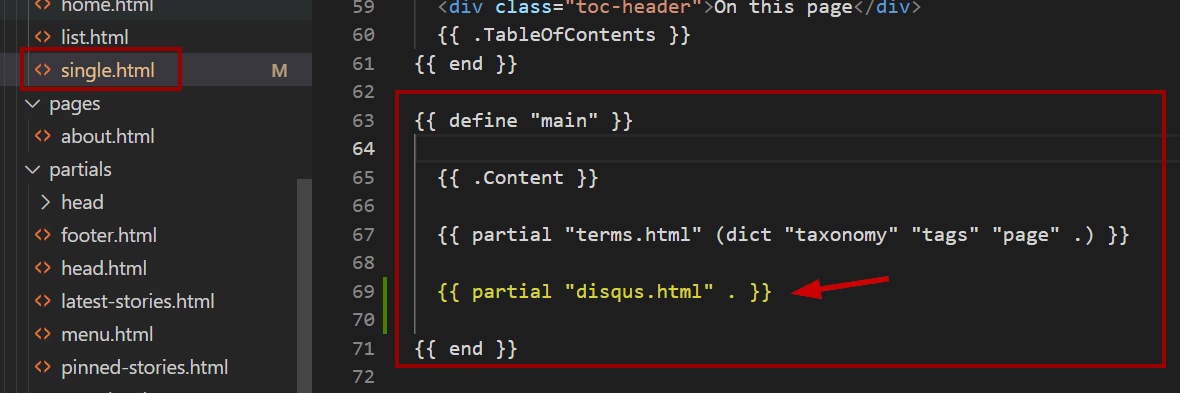
Locate where you would like to display the Disqus, then use the built-in disqus.html partial to render the comment UI
This depends on which theme you are using or if you have any customization done to them.
For my https://geraldnguyen.github.io/ site, I put the Disqus partial here:
#5 — Build and test
As Disqus does not load on localhost, we need to deploy the changes to a live site to test.
If you haven’t a live site, give GitHub Page a try:
Once the changes are done, the Disqus UI appear nicely. For example:

References
메타데이터
- post_id
- bcb3e15ed397
- slug
- hugo-how-to-integrate-disqus-to-your-site-bcb3e15ed397
- url
- https://levelup.gitconnected.com/hugo-how-to-integrate-disqus-to-your-site-bcb3e15ed397
- canonical_url
- https://levelup.gitconnected.com/hugo-how-to-integrate-disqus-to-your-site-bcb3e15ed397
- author_url
- https://medium.com/@geraldnguyen
- status
- ok
- fetched_at
- 2026-07-18 17:42:15




