Windows Internals: Process Management - Part 2
We will discussing Process creation in Windows, loading DLL’s & see EPROCESS and other process related structures using WinDBG.
Windows Internals: Process Management - Part 2
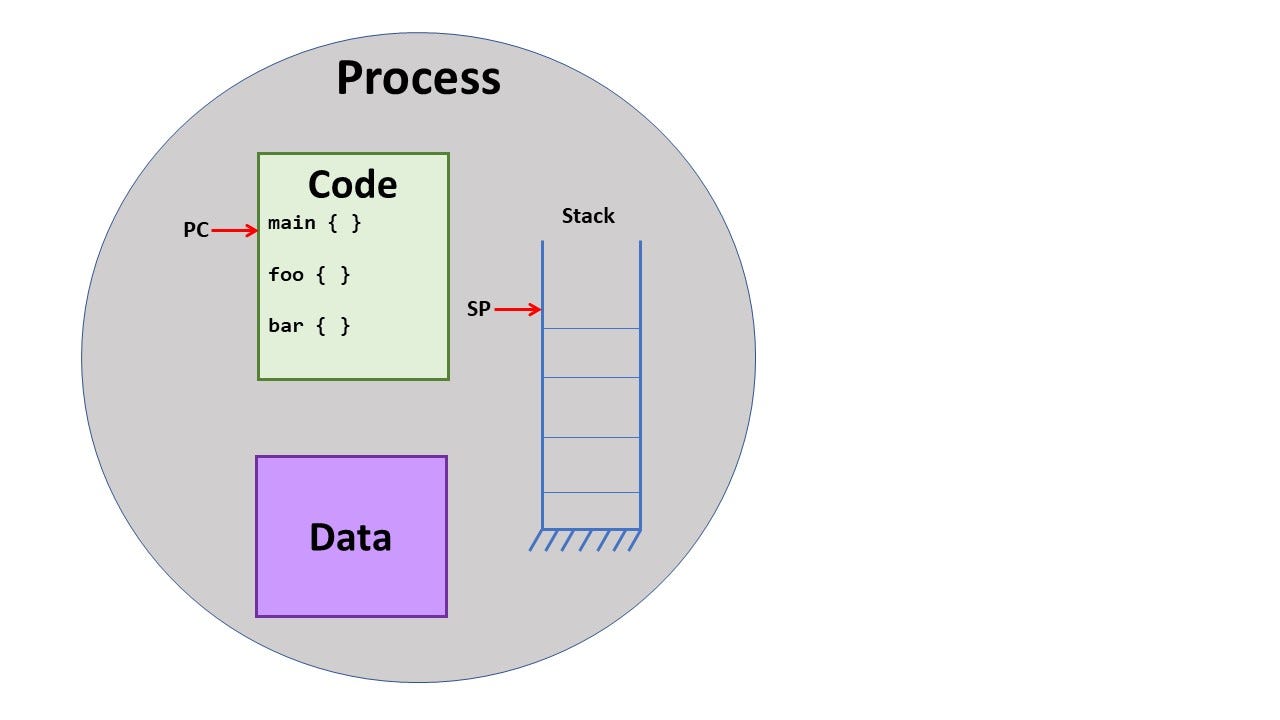
Reference: cs.wisc.edu
We will be discussing Process creation in Windows, loading DLL’s & see EPROCESS and other process related structures using WinDBG. This will be a lengthy blog, so let’s start :)
Prerequisites:
- Read our previous blog on Windows process creation flow:
- We will be using C++ , Visual studio and WinDBG
Table of Contents:
CreateProcess()& an example- DLL loading techniques (Implicit & Explicit linking)
- Process termination API’s (
ExitProcess()&TerminateProcess()) EPROCESS& process related structures likePEBand others using WinDBG
Process Creation
CreateProcess() it is Windows API used to create new process & it allows us to launch any executable.
Prototype :
BOOL CreateProcessW(
 LPCWSTR lpApplicationName,
 LPWSTR lpCommandLine,
 LPSECURITY_ATTRIBUTES lpProcessAttributes,
 LPSECURITY_ATTRIBUTES lpThreadAttributes,
 BOOL bInheritHandles,
 DWORD dwCreationFlags,
 LPVOID lpEnvironment,
 LPCWSTR lpCurrentDirectory,
 LPSTARTUPINFOW lpStartupInfo,
 LPPROCESS_INFORMATION lpProcessInformation
);
If you are interested in learning more about the CreateProcess() & it’s parameters, please refer :
Example:
launching notepad process with CreateProcess()
#include <windows.h>
#include <iostream>

int main()
{
    STARTUPINFOW si;
    PROCESS_INFORMATION pi;

    ZeroMemory(&si, sizeof(si));
    si.cb = sizeof(si);
    ZeroMemory(&pi, sizeof(pi));

    // Command line
    wchar_t cmdLine[] = L"notepad.exe";

    // Create the process
    if (!CreateProcessW(
            NULL,           // Application name
            cmdLine,        // Command line
            NULL,           // Process security attributes
            NULL,           // Thread security attributes
            FALSE,          // Inherit handles
            0,              // Creation flags
            NULL,           // Environment
            NULL,           // Current directory
            &si,            // Startup info
            &pi))           // Process information
    {
        std::wcerr << L"CreateProcess failed. Error: " << GetLastError() << std::endl;
        return 1;
    }

    std::wcout << L"Notepad launched successfully!" << std::endl;
    std::wcout << L"PID: " << pi.dwProcessId << L" TID: " << pi.dwThreadId << std::endl;

    // Wait until Notepad exits
    WaitForSingleObject(pi.hProcess, INFINITE);

    // Close process and thread handles
    CloseHandle(pi.hProcess);
    CloseHandle(pi.hThread);

    return 0;
}
Output:
When you run this, it will launch Notepad, wait until you close it, and then exit. See below :)

Notes:
If you pass
*NULLto `lpApplicationName*, the first token inlpCommandLine` must be full path or a resolvable executable.
Always check for error codes via
*GetLastError()*.
Unicode (
*CreateProcessW) is better than ANSI (`CreateProcessA`*) for modern Windows.
DLL Implicit & Explicit Linking
Dynamic-Link Library (DLL) is a binary file (using PE format), is a reusable module that can be loaded & linked at runtime into processes. We saw this in our previous blog that, before running main()how loader will load necessary DLL’s
An example, DLL code:
// AddFunction.cpp
#include <windows.h>

// Exported function
extern "C" __declspec(dllexport) int Add(int a, int b)
{
    return a + b;
}

// Optional: DllMain (entry point)
BOOL APIENTRY DllMain(HMODULE hModule,
                      DWORD  ul_reason_for_call,
                      LPVOID lpReserved)
{
    switch (ul_reason_for_call)
    {
    case DLL_PROCESS_ATTACH:
    case DLL_THREAD_ATTACH:
    case DLL_THREAD_DETACH:
    case DLL_PROCESS_DETACH:
        break;
    }
    return TRUE;
}
In Visual studio once you build this, it will generate AddFunction.dll & AddFunction.lib (used for import library).
Now, we have our reusable module, where and how can we use this ?
DLL Implicit Linking :
Once we have the above DLL, let’s link to our executable using Implicit Linking
// Our executable main.cpp
#include <windows.h>
#include <iostream>

// Import declaration
__declspec(dllimport) int Add(int a, int b);

int main()
{
    int result = Add(5, 7);
    std::cout << "5 + 7 = " << result << std::endl;
    return 0;
}
We need to add the lib file (that was generated) to our executable before building it. We can use multiple methods
- Adding the lib file as a reference in VS
- Link in properties->Linker->Dependencies
- Using
#pragma Comment(lib, “<location of the lib file>”)
DLL Explicit Linking (Dynamic Linking) :
This is a technique to add the DLL during runtime, meaning, we need to explicit call the loader to map this DLL into our process memory at runtime. Let’s see how we can do this -
// Our executable main.cpp
#include <windows.h>
#include <iostream>

typedef int (*AddFunc)(int, int); // Function pointer

int main()
{
    HMODULE hDLL = LoadLibrary(L"MyMathDLL.dll"); // full path can be specified
    if (!hDLL)
    {
        std::cout << "Failed to load DLL." << std::endl;
        return 1;
    }

    // "Add" is the exported DLL function using extern 'C'
    // NOTE: the above should be defined in a header file of that method/function
    // to avoid name mangling.
    AddFunc Add = (AddFunc)GetProcAddress(hDLL, "Add");
    if (!Add)
    {
        std::cout << "Failed to get Add function." << std::endl;
        FreeLibrary(hDLL);
        return 1;
    }

    int result = Add(10, 20);
    std::cout << "10 + 20 = " << result << std::endl;

    FreeLibrary(hDLL);
    return 0;
}LoadLibrary()callsLdrLoadDllinntdll.dll.- Windows loader maps the DLL into memory.
GetProcAddress()resolves exported function address.
Instead of this complex function pointers & conversions —
AddFunc Add = (AddFunc)GetProcAddress(hDLL, “Add”);
Here, we can add the header file of lib, into our executable main.cpp & add this (C++ 11 or more)
auto add = (decltype(Add)*)GetProcAddress(hDLL, “Add”);
DLL Implicit Linking vs Explicit Linking:

Process Termination API’s
ExitProcess()
#include <windows.h>
#include <iostream>

int main()
{
    std::cout << "Process running..." << std::endl;

    // Gracefully exit with exit code 0
    ExitProcess(0);

    // This code will never be reached
    std::cout << "This won't print" << std::endl;
    return 0;
}
TerminateProcess()
#include <windows.h>
#include <iostream>

int main(int argc, char* argv[])
{
    if (argc != 2) {
        std::cout << "Usage: TerminatePID.exe <PID>" << std::endl;
        return 1;
    }

    DWORD pid = atoi(argv[1]);
    // Should a proper & powerful handle to terminate any process
    HANDLE hProcess = OpenProcess(PROCESS_TERMINATE, FALSE, pid);
    if (hProcess == NULL) {
        std::cout << "Failed to open process. Error: " << GetLastError() << std::endl;
        return 1;
    }

    if (!TerminateProcess(hProcess, 1)) {
        std::cout << "Failed to terminate process. Error: " << GetLastError() << std::endl;
        CloseHandle(hProcess);
        return 1;
    }

    CloseHandle(hProcess);
    std::cout << "Process " << pid << " terminated successfully." << std::endl;
    return 0;
}
Usage : TerminatePID.exe 1234
Differences between ExitProcess() & TerminateProcess() :

Process Related Data Structures
Kernel-mode Structures:
EPROCESSis the executive process objectKPROCESSis the first member ofEPROCESS, It’s similar to Process Control Block(PCB)- All processes linked as Doubly Linked-List
LIST_ENTRYmember isActiveProcessLinks- Root/head is
PsActiveProcessHeadkernel variable
This structures can be used to get processes list from the system.
User-mode Structure:
- Process Environment Block (PEB)
Let’s check this structures in WinDBG :
Listing all the processes !process 0 0
PROCESS fffffa8001234560 SessionId: 1 Cid: 1f4c    Notepad.exe
    ...
PROCESS fffffa80012789a0 SessionId: 1 Cid: 2200    Explorer.exe
    ...
General EPROCESSStructure
> dt nt!_EPROCESS
nt!_EPROCESS
   +0x000 Pcb              : _KPROCESS
   +0x2d8 ProcessLock      : _EX_PUSH_LOCK
   +0x2e0 RundownProtect   : _EX_RUNDOWN_REF
   +0x2e8 UniqueProcessId  : Ptr64 Void
   +0x2f0 ActiveProcessLinks : _LIST_ENTRY
   +0x300 Flags2           : Uint4B
   +0x304 Flags            : Uint4B
   +0x308 CreateTime       : _LARGE_INTEGER
   +0x310 ExitTime         : _LARGE_INTEGER
   +0x318 InheritedFromUniqueProcessId : Ptr64 Void
   +0x320 Session          : Ptr64 Void
   +0x328 ImageFileName    : [15] UChar
   +0x338 ActiveThreads    : Uint4B
   +0x33c ThreadListHead   : _LIST_ENTRY
   +0x348 HandleTable      : Ptr64 Void
   +0x350 ObjectTable      : Ptr64 Void
   +0x358 Token            : _EX_FAST_REF
   +0x360 WorkingSetPage   : Uint8B
   +0x368 AddressSpace     : Ptr64 _MM_AVL_TABLE
   +0x370 Peb              : Ptr64 _PEB
   +0x378 ExitStatus       : Int4B
   +0x380 VadRoot          : _RTL_AVL_TREE
   +0x388 VadHint          : Ptr64 Void
   +0x390 ThreadListHead   : _LIST_ENTRY
   ...
Sample output of notepad.exe’s EPROCESS
> !process fffffa8001234560 1
PROCESS fffffa8001234560
    SessionId: 1  Cid: 0x0abc    Peb: 00000000`7ffde000  ParentCid: 0x0340
    DirBase: 00000002`10e3f000  ObjectTable: fffff8a000f7d040  HandleCount: 98.
    Image: notepad.exe

    VadRoot fffffa8004567890 Vads 22 Clone 0 Private 120. Modified 0. Locked 0.
    DeviceMap fffff8a00000f0c0
    Token                             fffff8a000aa05b0
    ElapsedTime                       00:01:23.456
    UserTime                          00:00:00.015
    KernelTime                        00:00:00.031
    QuotaPoolUsage[PagedPool]         123456
    QuotaPoolUsage[NonPagedPool]      78910
    Working Set Sizes (now,min,max)  (2345, 50, 3456) (9376KB, 200KB, 13824KB)
    PeakWorkingSetSize                4567
    VirtualSize                       123 MB
    PeakVirtualSize                   125 MB
    PageFaultCount                    234
    MemoryPriority                    BACKGROUND
    BasePriority                      8
    CommitCharge                      3456

THREAD fffffa800111aaa0  Cid 0abc.04f4  Teb: 00000000`7ffdd000 Win32Thread: fffff900c01588d0 WAIT: (WrUserRequest) UserMode Non-Alertable
    fffffa8001234b00  SynchronizationEvent
IRP List:
    No IRPs

THREAD fffffa800111bbb0  Cid 0abc.0a34  Teb: 00000000`7ffdb000 Win32Thread: fffff900c01590d0 WAIT: (WrQueue) UserMode Non-Alertable
    fffffa8001234d00  QueueObject

THREAD fffffa800111ccc0 Cid 0abc.0c10 Teb: 00000000`7ffda000 Win32Thread: fffff900c01598d0 READYCidProcess ID (PID = 0x0abc → decimal 2748)
PebPointer to user-mode PEB

To get KPROCESS, we can click on Pcboutput, it will look like below

Let’s look at User-mode PEB structure

Now, let’s take a look at Processes list & LIST_ENTRYdata structure

This will be it for Process Management ! Next, we will cover Threads (Thread objects, Scheduling, CreateThread(), Synchronization, etc.)
Thanks for reading. Please share with your friends who has same curiosity !
Cheers !!
References :
[embed]Pavel Yosifovich | Profile Edit descriptionapp.pluralsight.com
메타데이터
- post_id
- bcecdcc53589
- slug
- windows-internals-process-management-part-2-bcecdcc53589
- url
- https://medium.com/windows-os-internals/windows-internals-process-management-part-2-bcecdcc53589
- canonical_url
- https://medium.com/windows-os-internals/windows-internals-process-management-part-2-bcecdcc53589
- author_url
- https://medium.com/@osdev
- status
- ok
- fetched_at
- 2026-07-19 10:57:29



