The One-Line Flag That Beat My Whole MoE Inference Engine — and the Auto-Tuner I Built Around It
How I spent weeks building a custom expert-offloading engine, then discovered a flag Ollama already shipped beats it by 2.3× — and what…
The One-Line Flag That Beat My Whole MoE Inference Engine — and the Auto-Tuner I Built Around It
How I spent weeks building a custom expert-offloading engine, then discovered a flag Ollama already shipped beats it by 2.3× — and what auto-tuning that flag across four MoE models revealed about why sliding-window attention is the real hero of long-context inference on small GPUs.
TL;DR — I’d been trying to run a 26B mixture-of-experts model on an 8 GB GPU faster than Ollama, and losing. Then I measured
llama-server's--n-cpu-moeflag — which controls how many layers' experts stay on the CPU — and it hit 17.9 tok/s, beating both Ollama's default (14.8) and my entire custom engine (7.8). Ollama had the flag internally but didn't expose it, so I sent a PR. Then I built an auto-tuner for it and ran it across four MoE models. Findings:

- The optimum is a boundary, not a peak. Throughput and VRAM are both monotonic in the number of CPU-offloaded layers, so the best config is always “the lowest offload that still fits in VRAM.” Tuning is a binary search for the OOM cliff — ~6 model loads, not a grid sweep.
- The KV cache and your GPU-resident experts fight over the same VRAM. A longer context grows the KV cache, which forces more experts onto the CPU, which slows decode. The optimal flag value is context-dependent — and most tuning guides ignore this.
- Sliding-window attention is the single biggest factor for long-context MoE offloading. Gemma 4’s SWA keeps its KV cache nearly context-independent, so it fits 200k tokens on 8 GB while dense-attention models of similar size can’t even fit 32k.
- Expert granularity dominates CPU cost. Mixtral’s 8 big experts (top-2) run at ~5 tok/s on the CPU; Gemma’s 128 tiny experts (top-8) run 3–4× faster. Count isn’t the story; per-expert size is.
The backstory: I built the wrong thing
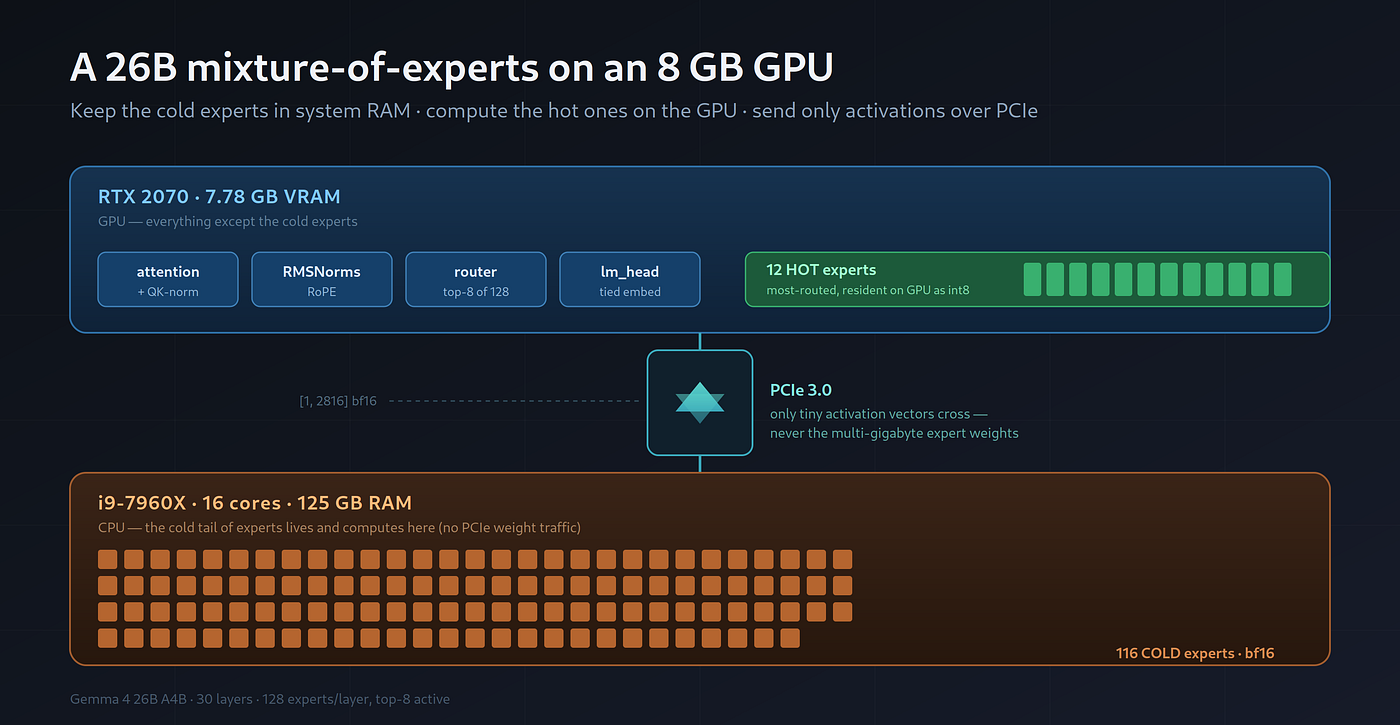
In a previous post I described my attempt to beat Ollama at running Gemma 4 26B A4B — a 128-expert MoE — on a humble RTX 2070 (7.78 GB VRAM) paired with a 16-core i9–7960X and 125 GB of RAM. My approach: keep cold expert weights in system RAM and compute them on the CPU, keep the hottest experts on the GPU as int8, and overlap the two. After a lot of torch.compile surgery I reached 7.8 tok/s — roughly half of Ollama's 14.8.
I’d concluded the gap was structural and moved on to writing it up. But a reader-style question nagged at me: my custom Triton kernel aside, was there anything in llama.cpp’s own toolbox I’d never actually tried?
There was. And it embarrasses me a little.
--n-cpu-moe: the flag I should have started with
llama.cpp (which Ollama wraps) has a flag, --n-cpu-moe N, added in PR #15077. It does exactly what my engine did — keep the expert (FFN) tensors of the first N layers on the CPU, everything else on the GPU — except it's implemented in hand-tuned C++/CUDA instead of my Python.
Here’s the thing: Ollama bundles a new-enough llama.cpp to have this flag, but doesn’t expose it. When a model doesn’t fit, Ollama’s auto-placement heuristic offloads whole layers (attention + router + norms + experts together) to the CPU until it fits — a blunter instrument than offloading just the big expert tensors.
So I benchmarked the flag directly against the bundled llama-server binary, same model, same GPU, 256-token prompt, greedy decode:
ConfigVRAMdecode tok/sOllama default (auto-offload heuristic)6824 MiB15.5--n-cpu-moe 196836 MiB16.5 (1.06×)--n-cpu-moe 187244 MiB17.3 (1.11×)--n-cpu-moe 177652 MiB17.9 (1.15×)--n-cpu-moe 16—OOM
Two punches to the gut, in sequence:
- The flag beats Ollama’s default by 15%. The default heuristic stops at 6.8 GB and leaves nearly a gigabyte of VRAM unused.
--n-cpu-moelets you spend that headroom keeping more expert layers on the GPU. - 17.9 tok/s beats my entire custom engine (7.8) by 2.3×. Weeks of kernel work, out-thought by a one-line flag that already existed.
The right response to that is not to sulk; it’s to make the flag usable. I wrote a PR to Ollama exposing it as a num_cpu_moe option (via the API, Modelfile, and /set parameter). It mirrors the existing num_gpu plumbing exactly; because Ollama's option parsing is reflection-based, it needed zero new parsing code.
But that raised the obvious question: what value of N should you actually use?
The optimum is a cliff, not a hill
Look at that table again. Two things move monotonically as N decreases (fewer layers offloaded to CPU, more experts on GPU):
- Throughput goes up — every expert layer you move from CPU to GPU removes a slow CPU matmul from the critical path.
- VRAM goes up — those expert tensors now occupy GPU memory.
And at some point — N=16 here — you run out of VRAM and the model OOMs.
There’s no interior peak to hunt for. The fastest config is always the smallest N that still fits in VRAM. That turns auto-tuning from a grid search into a one-dimensional feasibility search: binary-search for the OOM cliff, then back off by one layer for safety.
def tune(model, ctx):
    lo, hi = 0, num_layers          # N=num_layers (all experts on CPU) always fits
    while lo < hi:                  # binary search for the lowest feasible N
        mid = (lo + hi) // 2
        if probe(model, N=mid, ctx).fits:  hi = mid
        else:                              lo = mid + 1
    return lo + safety_margin       # lowest N that fits, plus headroom
That’s ~log₂(layers) ≈ 5–6 model loads instead of trying every value. The full tool resolves an Ollama model name to its GGUF via the local manifest, reads the layer count straight from the GGUF header, drives the bundled llama-server exactly as Ollama does (including the GGML_BACKEND_PATH env var that loads the CUDA backend — miss that and it silently runs CPU-only), and prints a ready-to-paste PARAMETER num_cpu_moe N.
The one trap: loading is not fitting
My first version checked “did the server come up?” and called that feasible. It lied. The model weights would allocate fine, then the KV cache would OOM on the first token:
ggml_backend_cuda_buffer_type_alloc_buffer: cudaMalloc failed: out of memory
llama_init_from_model: failed to allocate buffer for kv cache
So the probe has to actually generate a few tokens, forcing the KV cache to allocate at the target context, before declaring N feasible. Which leads directly to the most interesting finding.
The KV cache and your experts are fighting over the same VRAM
When llama-server loads, GPU memory goes to three things:
- Non-expert weights (attention, norms, router, embeddings) — small, always resident.
- Expert weights — the big consumer.
num_cpu_moe Nevicts N layers' worth to CPU RAM. - The KV cache — allocated after weights, from whatever VRAM is left, and it grows with context length.
So the budget is:
VRAM_free ≥ non_expert_weights + expert_weights_on_gpu(N) + kv_cache(context)A longer context grows the KV cache, which shrinks the room left for experts, which forces a higher N (more experts on CPU), which slows decode. The optimal flag value is a function of your context length — and that’s exactly what the auto-tuner exposes when you sweep it:
contextrecommended num_cpu_moedecode tok/s40961818.181921817.3163841916.4327681916.7
(Gemma 4 26B A4B, RTX 2070, prefill ≈ half the context.)
This is why a num_cpu_moe value someone posts online for their context length may OOM or underperform on yours. Tune it for your actual usage.
Four models, four very different shapes
I pulled three more MoE models and ran the auto-tuner across all of them at four context lengths. The recommended num_cpu_moe and the resulting decode speed:
ModelSliding-window?Layers4k8k16k32kdeepseek-v2:16bNo27N9 / 29.8N13 / 19.7N21 / 10.5OOMqwen3:30b-a3bNo48N31 / 13.3N32 / 12.4N35 / 11.3N39 / 10.1gemma4–26b-a4bYes30N18 / 18.1N18 / 17.3N19 / 16.4N19 / 16.7mixtral:8x7bNo32N26 / 4.8N26 / 4.2N28 / 5.3N30 / 5.4
(cells: recommended num_cpu_moe / decode tok/s on an 8 GB RTX 2070, q4 GGUF)
Three stories jump out.
1. Sliding-window attention is the long-context hero
Watch how the recommended N moves with context:
- deepseek-v2 (dense attention): N climbs 8 → 13 → 21, then can’t fit 32k at all. Its KV cache grows linearly with context until it eats the entire GPU.
- qwen3 (dense attention): N climbs 31 → 39 — eight more layers shoved onto the CPU just to make room for the bigger KV cache.
- Gemma 4 (sliding-window attention): N barely moves — 18 → 19 across an 8× context increase.
Why? Gemma 4 uses sliding-window attention: a 1024-token window, and only every 6th layer (5 of 30) uses full global attention. llama.cpp allocates a SWA-aware KV cache, so 25 of the 30 layers cap their cache at the window size regardless of context length:
KV(context) ≈ 5 global layers × context + 25 sliding layers × 1024 (fixed)The fixed term dominates. The practical payoff is dramatic: Gemma 4 fits a 200,000-token context on an 8 GB GPU (the tuner picks num_cpu_moe 27, sustaining 11.5 tok/s), while a dense model of similar size taps out before 32k. If you're doing long-context work on a small GPU, SWA isn't a nice-to-have — it's the difference between "works" and "OOM."
2. Expert granularity, not count, sets the CPU floor
Mixtral runs at ~5 tok/s no matter what N you pick — far slower than the others. It’s not VRAM-bound; it’s CPU-compute-bound. Mixtral is 8 experts, top-2, so each active expert is large (~178M params). Gemma 4 is 128 experts, top-8, but each is tiny (~6M params). Same rough active-parameter budget, wildly different CPU matmul cost: a few big matmuls are slower on a CPU than many small ones that parallelize across 16 cores. When you’re choosing an MoE to offload, fine-grained experts are your friend.
3. Small MoEs win at short context, lose at long
deepseek-v2:16b is the short-context champion (29.8 tok/s at 4k) — it’s small enough that most experts fit on the GPU (only 9 of 27 layers’ experts go to CPU). But it has no SWA, so its dense KV cache punishes it brutally as context grows, all the way to OOM at 32k. There’s no universally best model; it depends entirely on the context length you actually run.
What I’d build next
The auto-tuner currently optimizes one axis. The natural second axis is KV-cache quantization (OLLAMA_KV_CACHE_TYPE=q8_0), which roughly halves KV-cache VRAM — freeing room for a lower N (more experts on GPU) and thus faster decode. Co-optimizing num_cpu_moe and KV quant is an obvious follow-up, especially for the long-context cases where the KV cache is the binding constraint.
There’s also an upstream opportunity. The same VRAM accounting the tuner does empirically, Ollama’s scheduler should be able to do analytically — its current VRAM estimate doesn’t subtract CPU-resident experts, so it over-predicts and sometimes refuses configs that would actually fit. That’s a known follow-up to the num_cpu_moe PR.
The lesson I keep relearning
I built a whole inference engine to beat a number that a built-in flag beats by 2.3×. The flag was sitting in the bundled binary the entire time, undocumented at the Ollama layer. The highest-leverage thing I did in this whole project wasn’t the Triton kernel or the async expert pipeline — it was running the benchmark I’d assumed I already knew the answer to.
Measure the thing. Then measure the thing you were sure you didn’t need to measure.
The auto-tuner (autotune_ncmoe.py), the model×context matrix harness, and the benchmark scripts are in the companion repo. The Ollama num_cpu_moe PR is #16688.
메타데이터
- post_id
- bd03df2ad295
- slug
- the-one-line-flag-that-beat-my-whole-moe-inference-engine-and-the-auto-tuner-i-built-around-it-bd03df2ad295
- url
- https://medium.com/@coolraj9211/the-one-line-flag-that-beat-my-whole-moe-inference-engine-and-the-auto-tuner-i-built-around-it-bd03df2ad295
- canonical_url
- https://medium.com/@coolraj9211/the-one-line-flag-that-beat-my-whole-moe-inference-engine-and-the-auto-tuner-i-built-around-it-bd03df2ad295
- author_url
- https://medium.com/@coolraj9211
- status
- ok
- fetched_at
- 2026-06-21 07:44:09