15 Hacks to Never Hit Claude’s Limit
Claude keeps cutting you off? Here are 15 proven hacks to stretch your usage limits, manage context windows, and stay productive longer.
15 Hacks to Never Hit Claude’s Limit
Claude keeps cutting you off? Here are 15 proven hacks to stretch your usage limits, manage context windows, and stay productive longer.

Most people blame Claude when they hit the limit.
I blamed Claude, too. For months
Then I opened my usage stats and realized something that changed everything: Claude doesn’t count your messages. It counts your tokens.
That single realization flipped how I use Claude. I went from hitting my limit every single day by 11 AM to finishing full workdays, sometimes two, without seeing the rate limit screen once.
The difference wasn’t a better plan. It wasn’t a hack. It was understanding one equation:
Your token cost per message = every previous message in the conversation + your new message + Claude’s response.
Every. Single. Turn.
That means message 30 in a conversation costs 31 times as much as message 1. Not a typo. 31 times more expensive for the same quality response.
Once I understood this, I rebuilt my entire workflow around it. Here are the 15 changes that made the difference, with the math, mechanics, and exact steps so you can do the same.
Before we dive further into the details, follow me for easy-to-read content on AI in Public.
At the end of reading this whole content, you will be in the top 1% to dominate with Claude without hitting the limits. So please help me spread the word about my work to the world.
Part 1: The Token Math You Need to Understand First
Before we get to the tactics, you need to understand why your limits disappear so fast.
How Claude Actually Counts Your Usage
Claude’s usage system is cost-based, not message-based. Every token you send (input) and every token Claude generates (output) has a price. That price varies by model:
- Haiku: Cheapest. Roughly 1x baseline cost.
- Sonnet: Medium. Roughly 3x the cost of Haiku.
Opus: Most powerful. Roughly 5x the cost of Haiku.
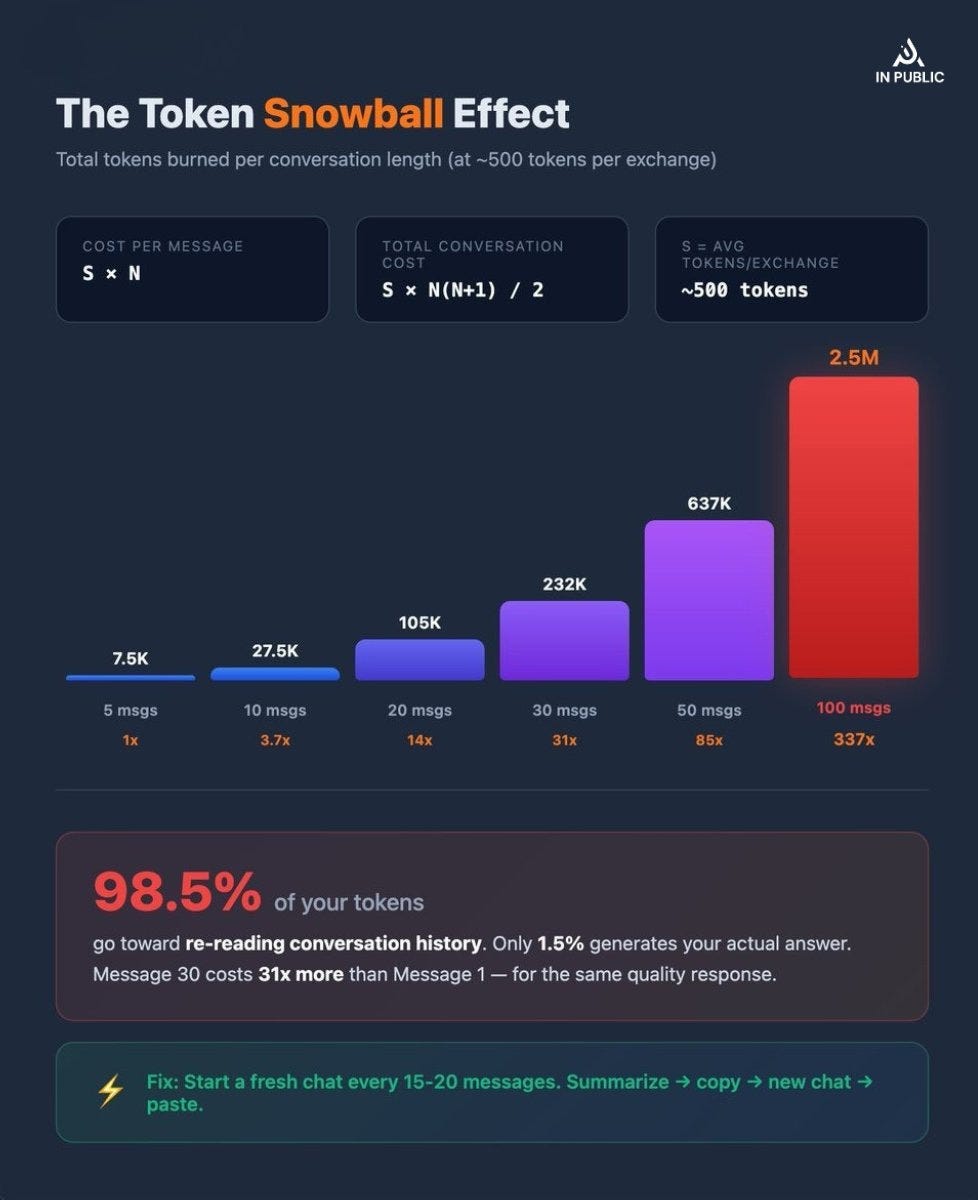
When you send your 10th message in a conversation, Claude re-reads all 9 previous exchanges before generating a response. Your “short follow-up” isn’t short at all; it carries the weight of every message before it.
The Snowball Formula
Here’s the actual math. If each exchange (your message + Claude’s response) averages S tokens, and you’re on message N:
Token cost of message N = S × N
Total tokens for an entire conversation of N messages = S × N × (N+1) / 2
At an average of 500 tokens per exchange:
Messages Total Tokens Burned Cost of Last Message 5 7,500 2,500 10 27,500 5,000 20 105,000 10,000 30 232,500 15,000 50 637,500 25,000 100 2,525,000 50,000
One developer tracked his real usage and found that 98.5% of his tokens were spent re-reading conversation history. Only 1.5% went toward generating the actual response.
That’s the leak. Now let’s fix it.
Part 2: The 15 Changes you must keep in mind
1. Edit Your Prompt - Never Send a Correction
When Claude misunderstands you, your instinct is to send a follow-up:
“No, I meant this…” “That’s not right, try again with…” “Ugh, not what I wanted. Here’s what I actually need…”
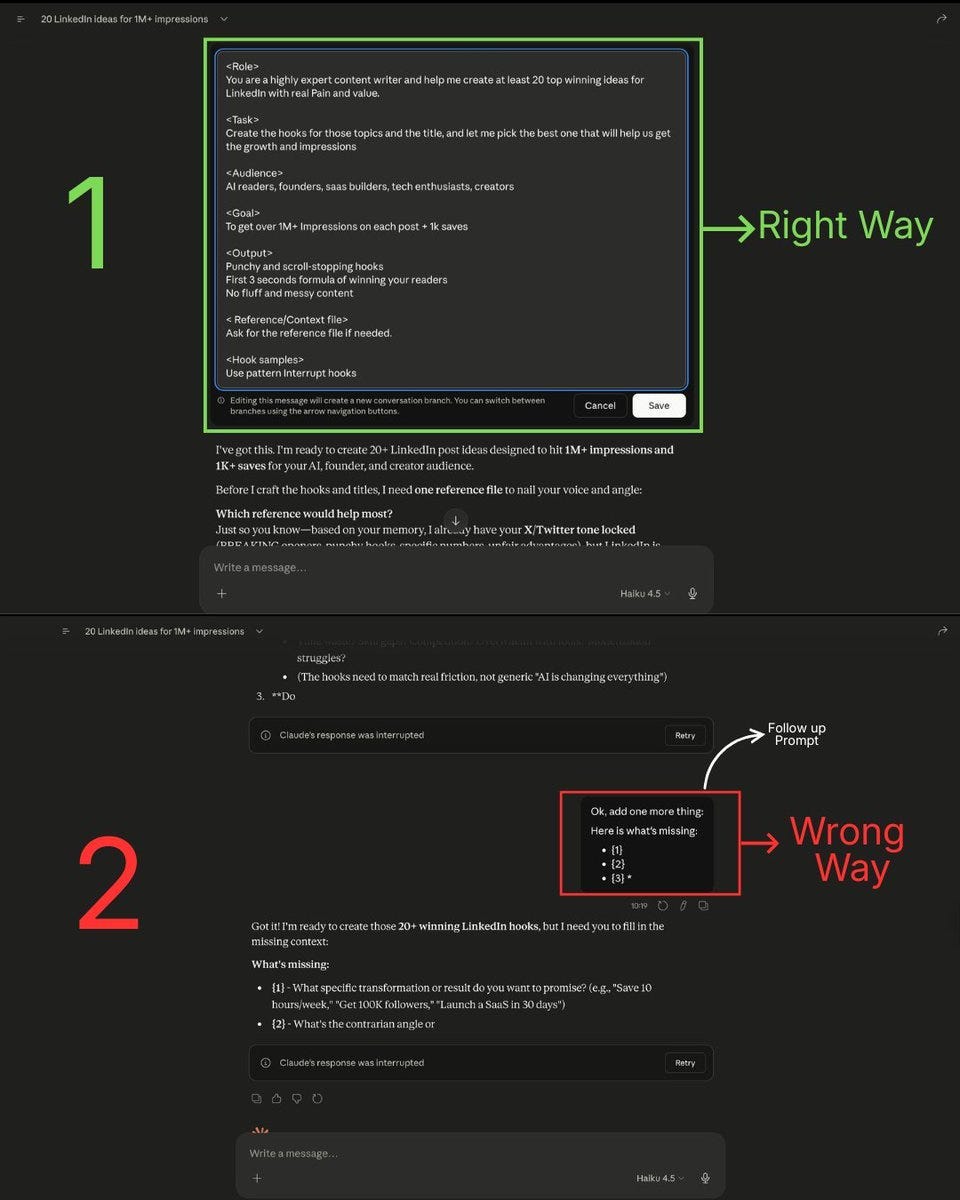
Every single one of those messages gets permanently stacked into your conversation history. Claude will re-read your mistake, your correction, its wrong answer, and the corrected answer on every future turn.
The fix: Click the edit button on your original message. Rewrite it. Regenerate. The bad exchange gets replaced, not stacked.
This single habit can cut your token usage by 20–30% in conversations where you’d normally send 2–3 corrections.
Fix the prompt, don’t feed the history. Every correction you send becomes a tax on every future message.
2. Start a Fresh Chat Every 15–20 Messages
This is the most impactful rule on the list.
At message 15, you’ve already burned roughly 60,000 tokens (at 500 tokens per exchange). By message 30, you’re at 232,500. By message 50, you’ve crossed 637,500 tokens, most of it spent re-reading old context that’s no longer relevant.
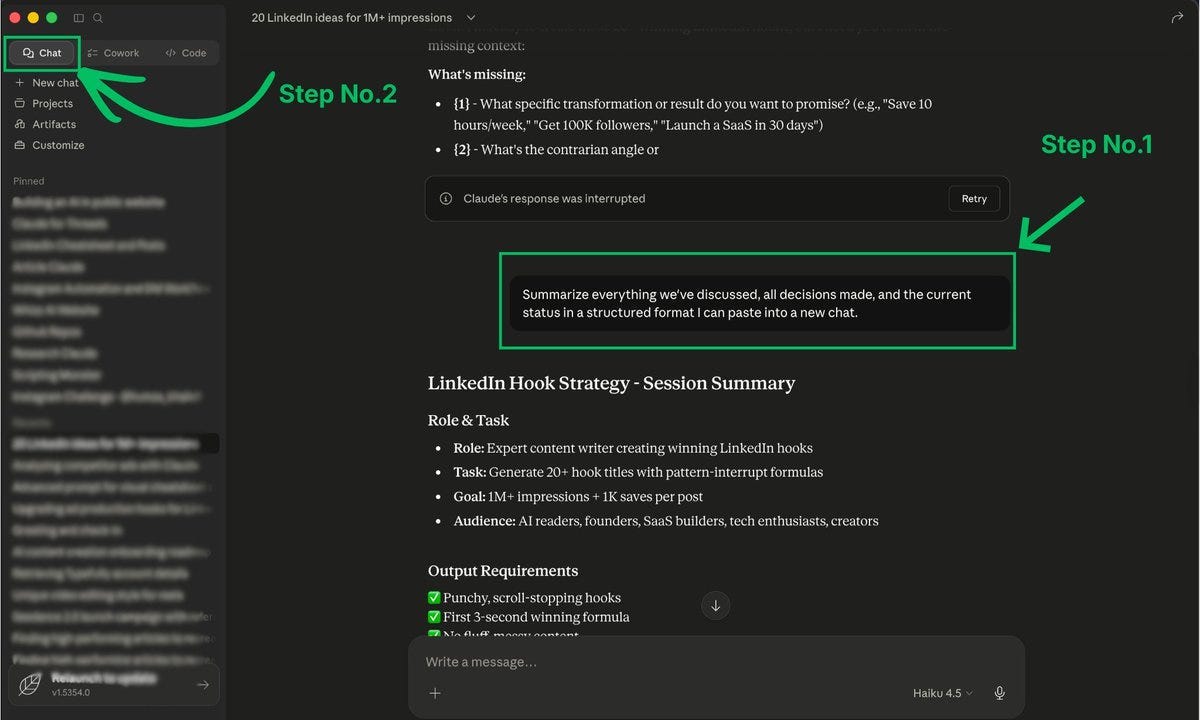
The protocol:
- When you hit 15–20 messages, pause.
- Ask Claude: “Summarize everything we’ve discussed, all decisions made, and current status in a structured format I can paste into a new chat.”
- Copy that summary.
- Start a new conversation.
- Paste the summary as your first message with your next question.
You just compressed 15+ messages of context into one message. Your “message 1” in the new chat carries the knowledge of the old chat at a fraction of the token cost.
The most expensive habit in AI isn’t a bad prompt. It’s a long conversation.
3. Batch Your Questions Into One Message
Three separate messages with one question each = three full context loads.
One message with three questions = one context load.
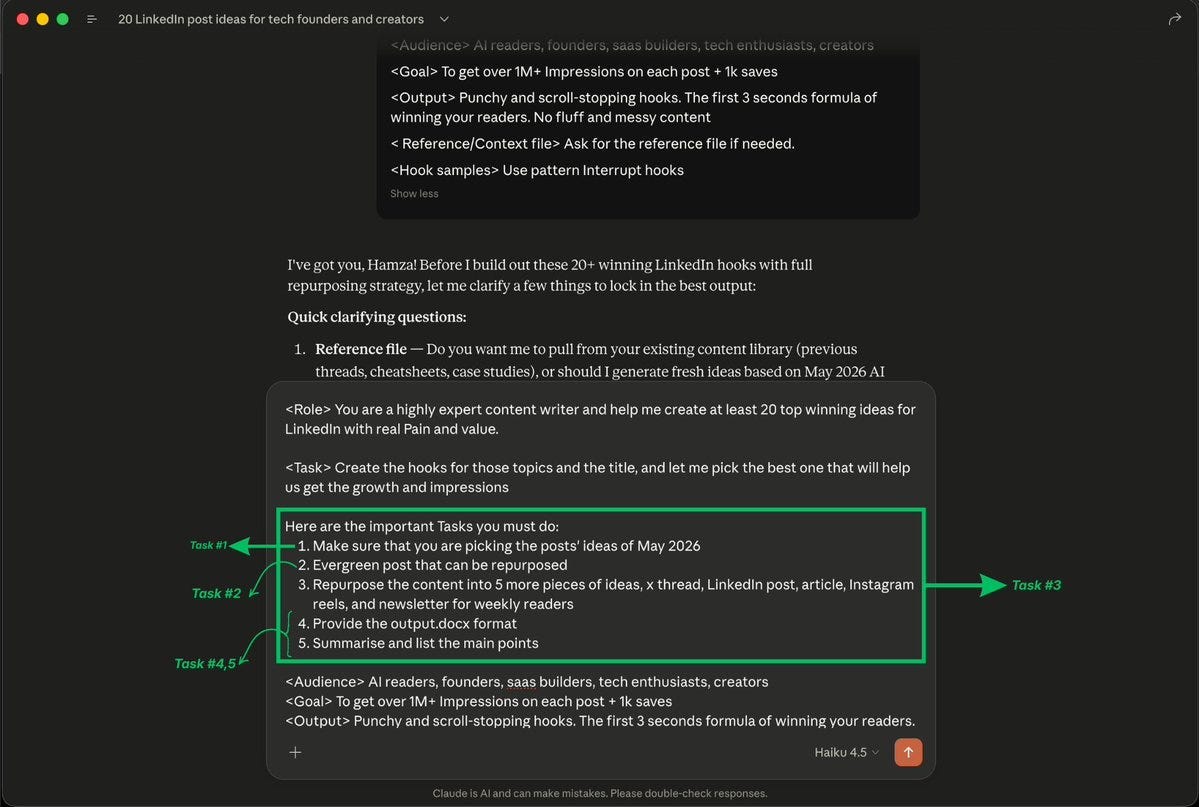
Instead of:
- Message 1: “Summarize this article.”
- Message 2: “Now list the main points.”
- Message 3: “Suggest a headline.”
Write: “Summarize this article, list the main points, and suggest a headline.”
You save tokens twice: fewer context reloads, and you stay further from hitting your limit. The answers often come out better, too, because Claude sees the full picture of what you need and can make the pieces work together.
“Three questions. One prompt. Always. Your token budget will thank you.”
4. Upload Recurring Files to Projects
If you upload the same PDF, style guide, contract template, or reference doc to multiple chats, Claude re-tokenizes that entire document every single time.
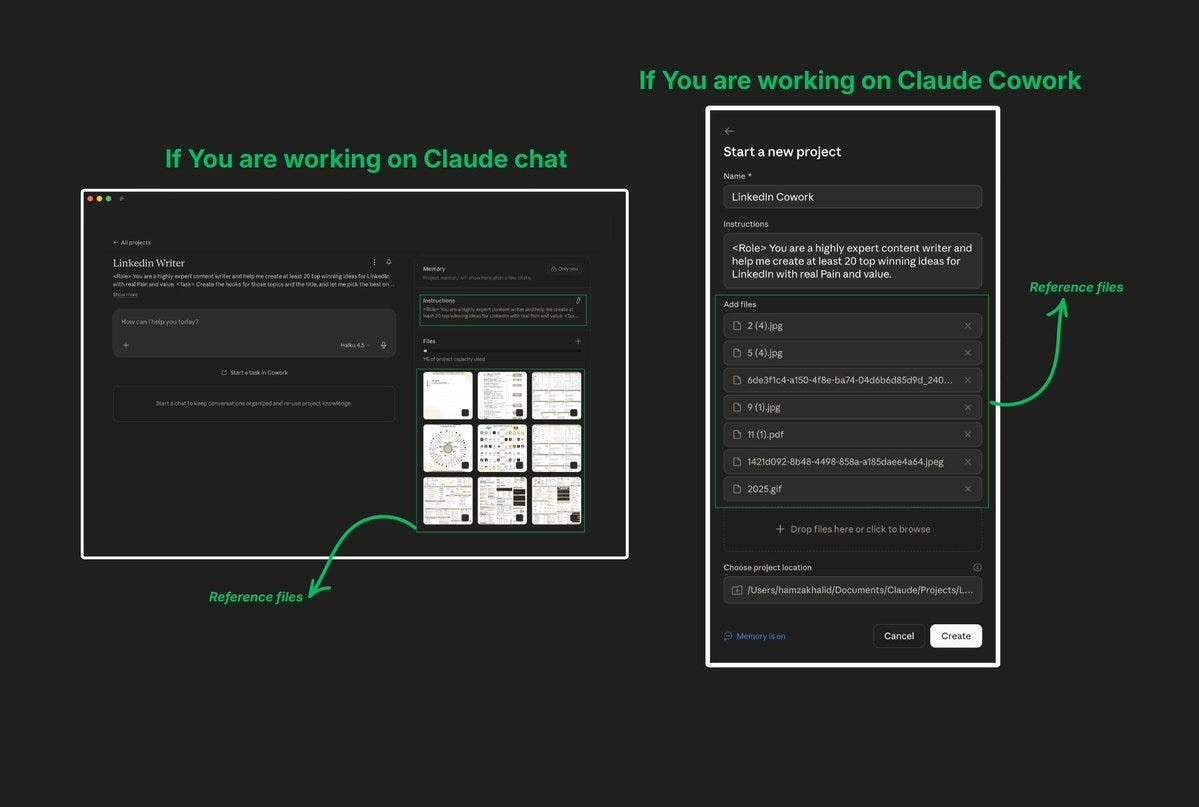
The fix: Use Projects.
Upload your file once into a Project. Every new conversation inside that project references the cached version. The project’s knowledge base uses retrieval-augmented generation (RAG) - Claude only pulls in the relevant portions when needed, rather than loading the entire document into every message.
What to put in Projects:
- Style guides and brand voice documents
- Contract templates and legal boilerplate
- Product documentation and specs
- Research papers you reference repeatedly
- Code repositories and technical docs
If you work with any document longer than 5 pages that you reference more than twice, it belongs in a Project.
5. Set Up Memory and Custom Instructions
Every new chat without saved context wastes 3–5 messages on setup:
“I’m a marketer. I write in a casual tone. I prefer short paragraphs. My audience is tech-savvy founders. Please don’t use corporate jargon…”
That’s 200–500 tokens burned on repeat, every single conversation, forever.
The fix: Go to Settings → Memory and User Settings. Save your role, communication style, preferences, and constraints once. Claude applies them automatically to every new conversation.
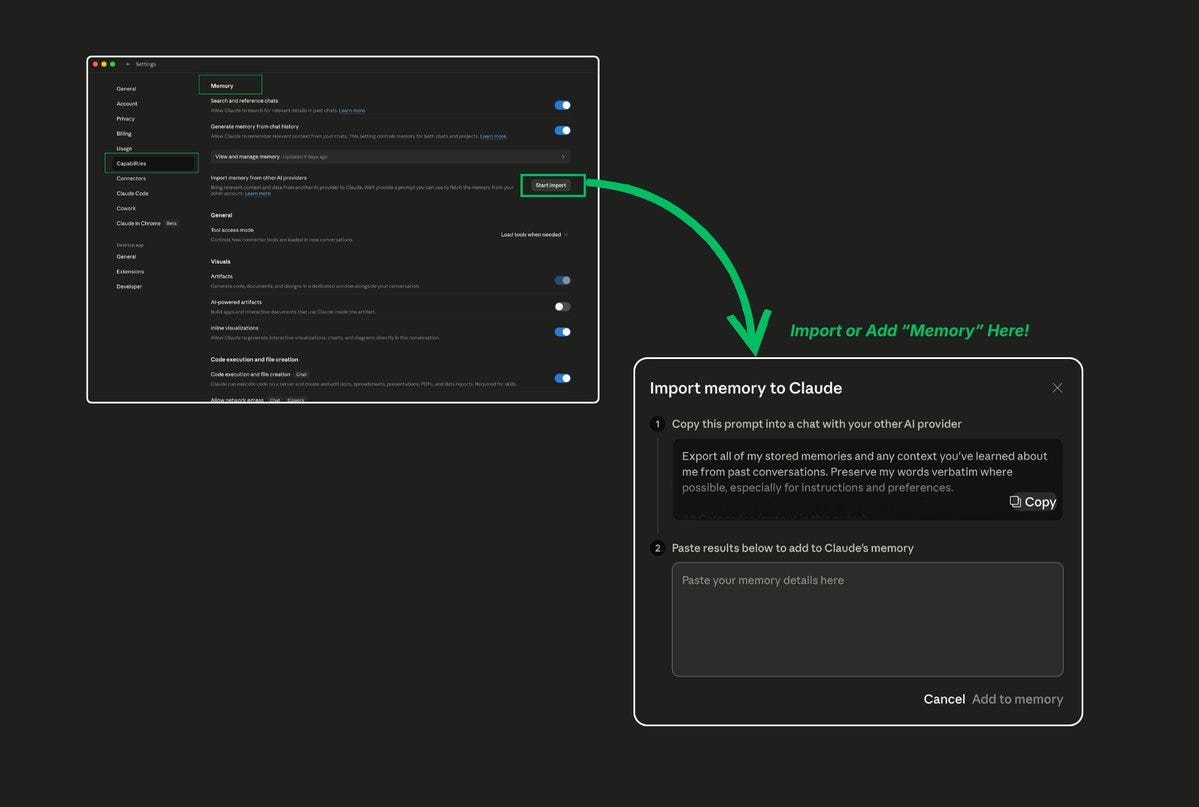
What to save:
- Your role and expertise level
- Your preferred writing style and tone
- Your audience and their characteristics
- Common constraints (word count, format, etc.)
- Things Claude should always do or never do
This isn’t just about saving tokens. It’s about getting better results from message 1 instead of message 5.
6. Turn Off Features You’re Not Using
This one surprises people. Features like web search, connectors, and advanced analysis tools add system-level tokens to every single response, even if you didn’t ask for them.
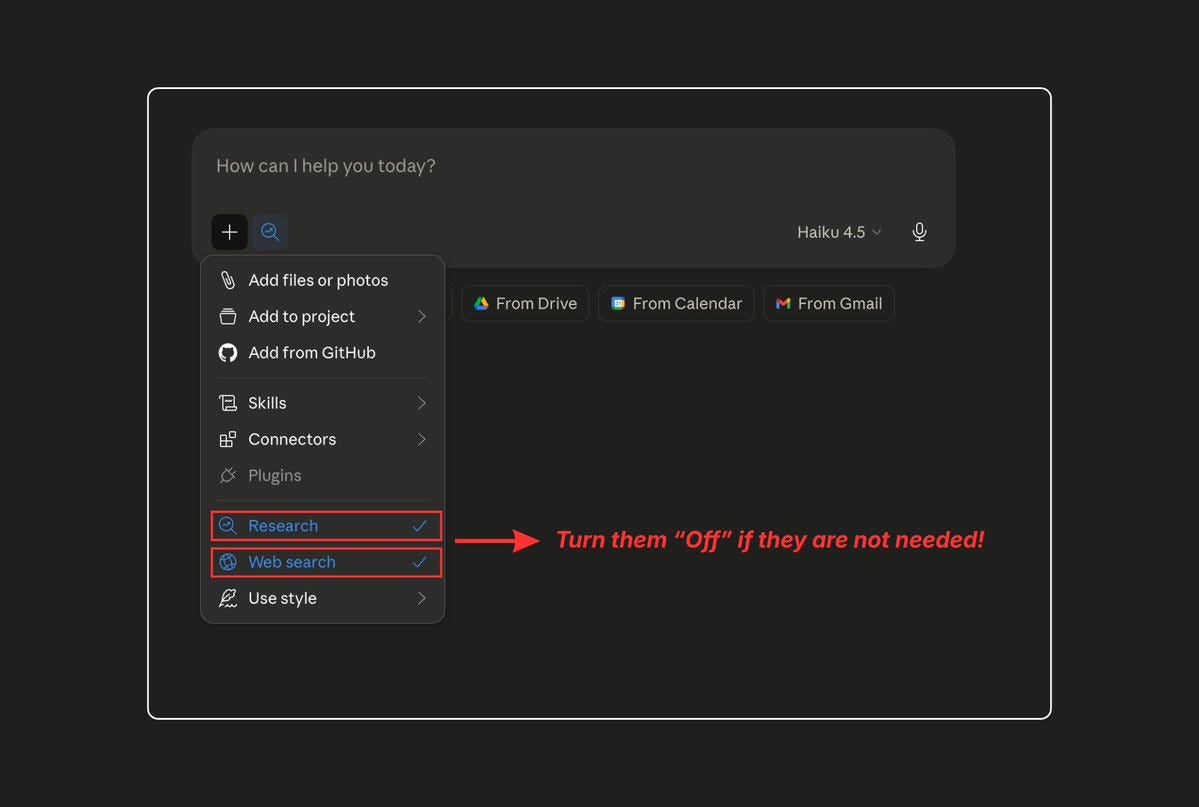
The audit:
- Web Search / Search and Tools: Turn off when writing original content, brainstorming, or editing. You don’t need web results for these tasks.
- Extended Thinking: This is powerful but expensive. Keep it off by default. Turn it on only when Claude’s first attempt at a complex reasoning task isn’t good enough.
- Artifacts / Canvas: Useful when you need them, but they add overhead. Close them when you’re done.
The rule: If you didn’t intentionally turn a feature on for this specific task, turn it off.
Every feature you leave on is a token tax you’re paying without realizing it.
7. Choose the Right Model for the Right Task
This is the single highest-leverage decision you make with Claude every day, and most people get it wrong.
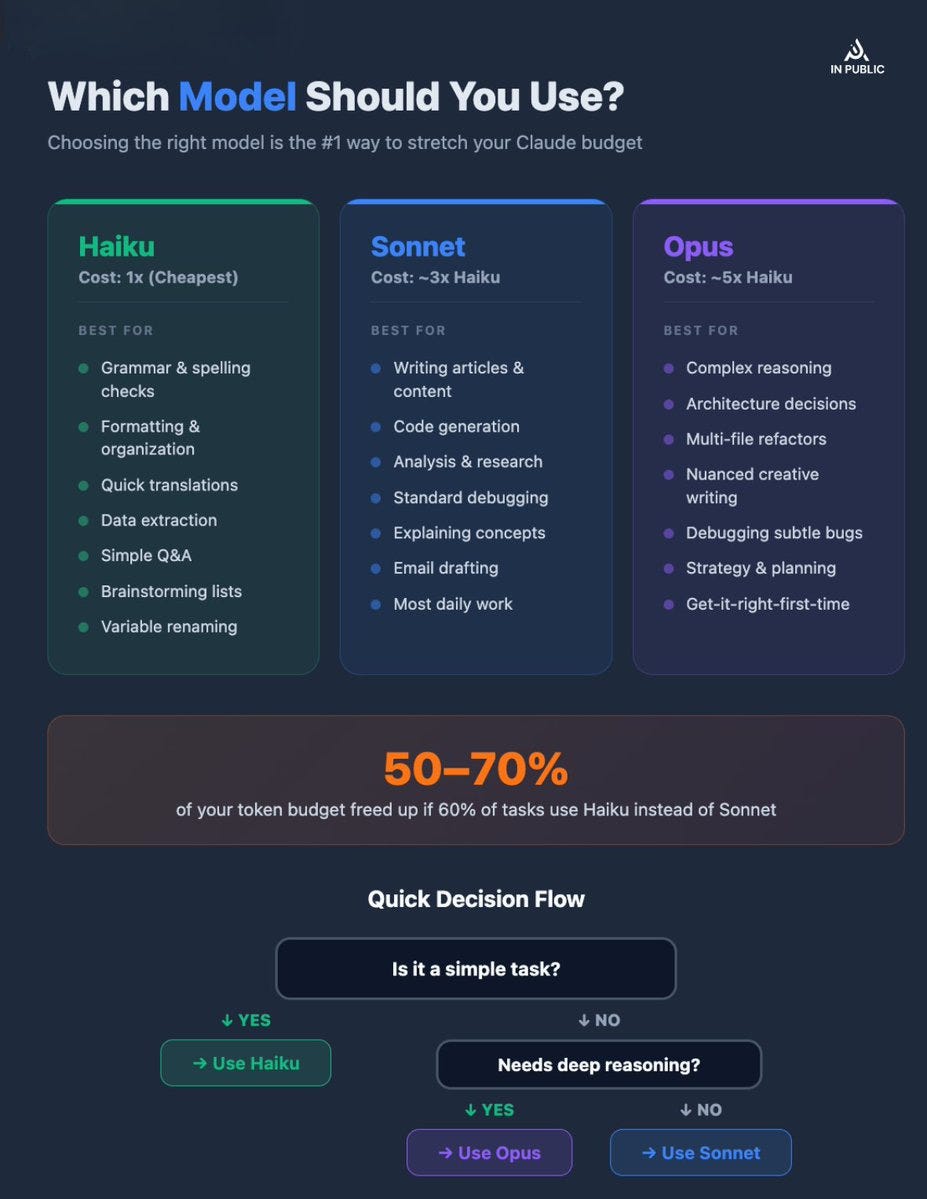
Here’s the mental model:
- Haiku: The Workhorse Use for: Grammar checking, formatting, brainstorming, quick translations, data extraction, simple Q&A, short summaries, renaming variables, repetitive tasks. Cost: Baseline (1x)
- Sonnet: The All-Rounder Use for: Writing content, code generation, analysis, most daily work, explaining concepts, debugging straightforward issues. Cost: ~3x Haiku
- Opus: The Deep Thinker Use for: Complex multi-step reasoning, architectural decisions, nuanced creative writing, debugging complex systems, tasks where the first attempt needs to be right. Cost: ~5x Haiku
The math: If 60% of your tasks can be handled by Haiku instead of Sonnet, you free up roughly 50–70% of your token budget for the tasks that actually need heavier models.
Most people run Sonnet or Opus for everything. That’s like driving a semi truck to pick up groceries.
The best model isn’t the most powerful one. It’s the one that matches your task.
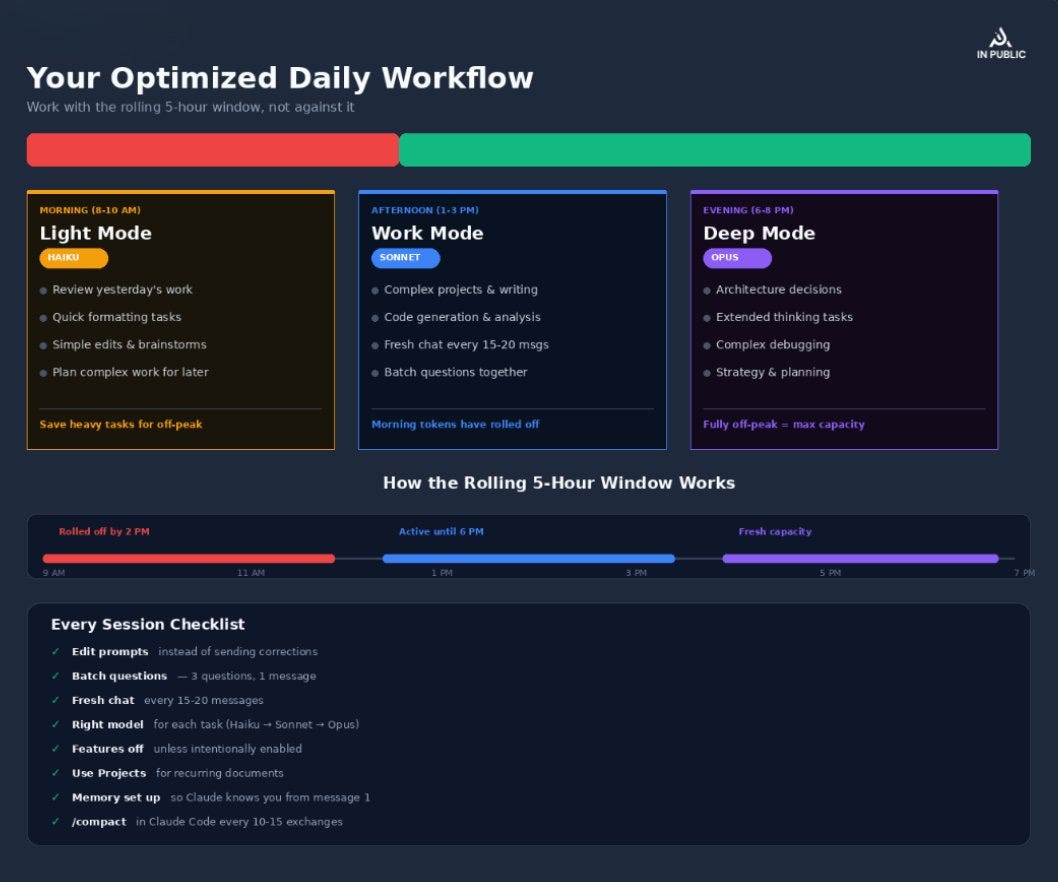
8. Spread Your Work Across the Day
Claude’s limit system uses a rolling 5-hour window.
This is critical to understand because it does not reset at midnight. It gradually restores.
Messages sent at 9:00 AM no longer count against your limit by 2:00 PM. Messages sent at 2:00 PM are free up by 7:00 PM.
The problem: If you do all your Claude work in a single 3-hour morning session, you use up your entire window and then sit idle while the rest of the day’s potential limit goes unused.
The fix: Split your work into 2–3 sessions:
- Morning session (8–10 AM): High-priority, complex work with Sonnet/Opus
- Afternoon session (1–3 PM): Follow-ups, revisions, moderate tasks with Sonnet
- Evening session (6–8 PM): Simple tasks, brainstorming, prep for tomorrow with Haiku
By the time you start your afternoon session, your morning usage has partially rolled off. By evening, your morning usage is completely gone.
9. Work During Off-Peak Hours
Since March 2026, Anthropic has used your 5-hour session limit more aggressively during peak hours:
Peak hours: Weekdays, 5:00 AM - 11:00 AM Pacific / 8:00 AM - 2:00 PM Eastern
During peak hours, the same query burns through your limit faster. Your weekly limit stays the same, but how it’s distributed across the day has changed.
The strategy:
- Schedule resource-intensive tasks (long prompts, Opus usage, extended thinking) for evenings or weekends
- Use peak hours for quick, lightweight interactions
- If you’re outside the US, calculate when peak hours fall in your timezone. For Europe, Latin America, and Asia, peak hours may actually align with your afternoon
Timezone Reference:
- Your Location Peak Hours (Local Time)
- US Pacific 5:00 AM - 11:00 AM
- US Eastern 8:00 AM - 2:00 PM UK (BST) 1:00 PM - 7:00 PM
- Central Europe 2:00 PM - 8:00 PM
- India (IST) 5:30 PM - 11:30 PM
- Japan (JST) 9:00 PM - 3:00 AM
- Australia (AEST) 10:00 PM - 4:00 AM
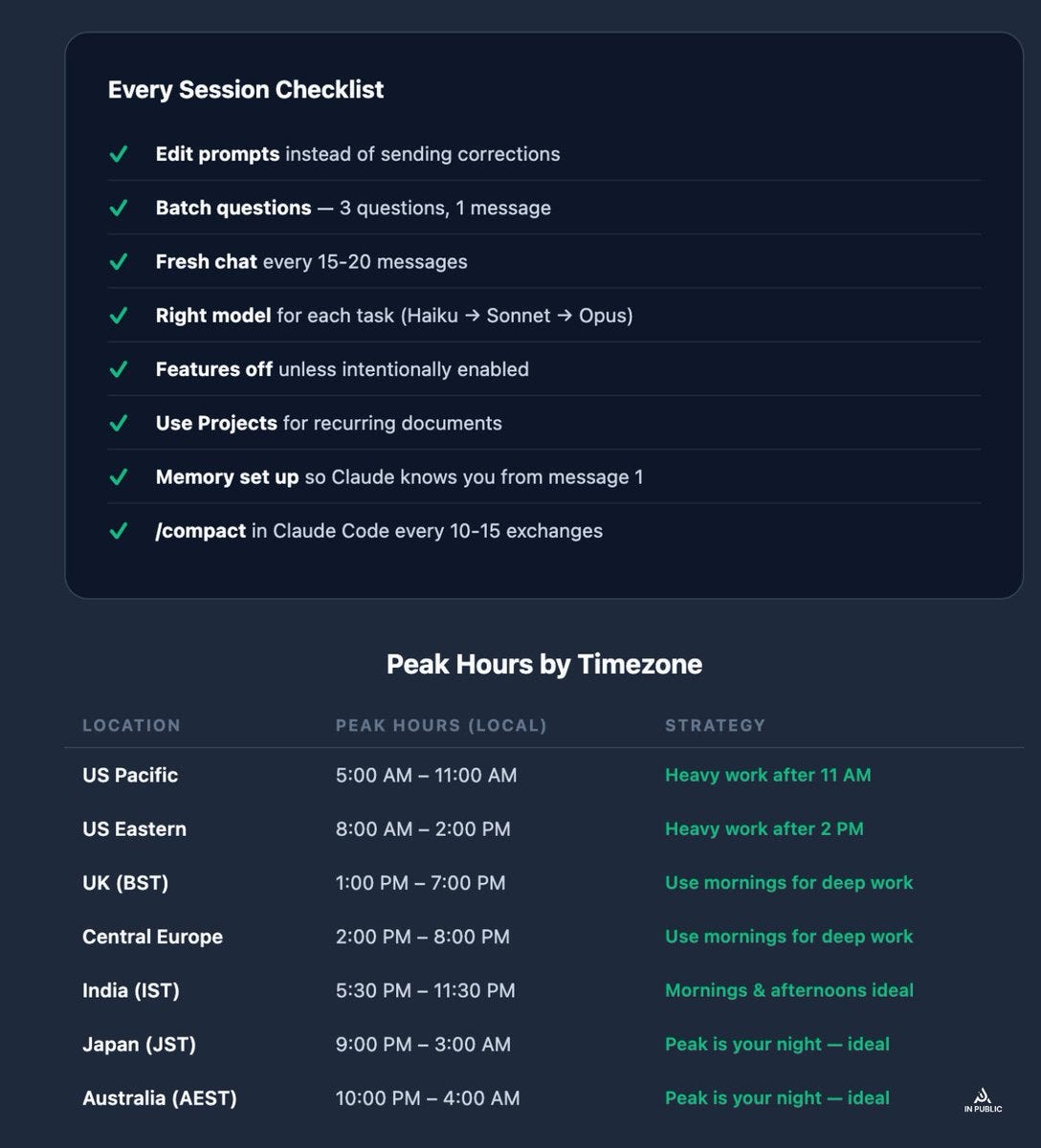
Same prompt. Same model. Same chat. But during off-peak hours, it costs your limit significantly less.
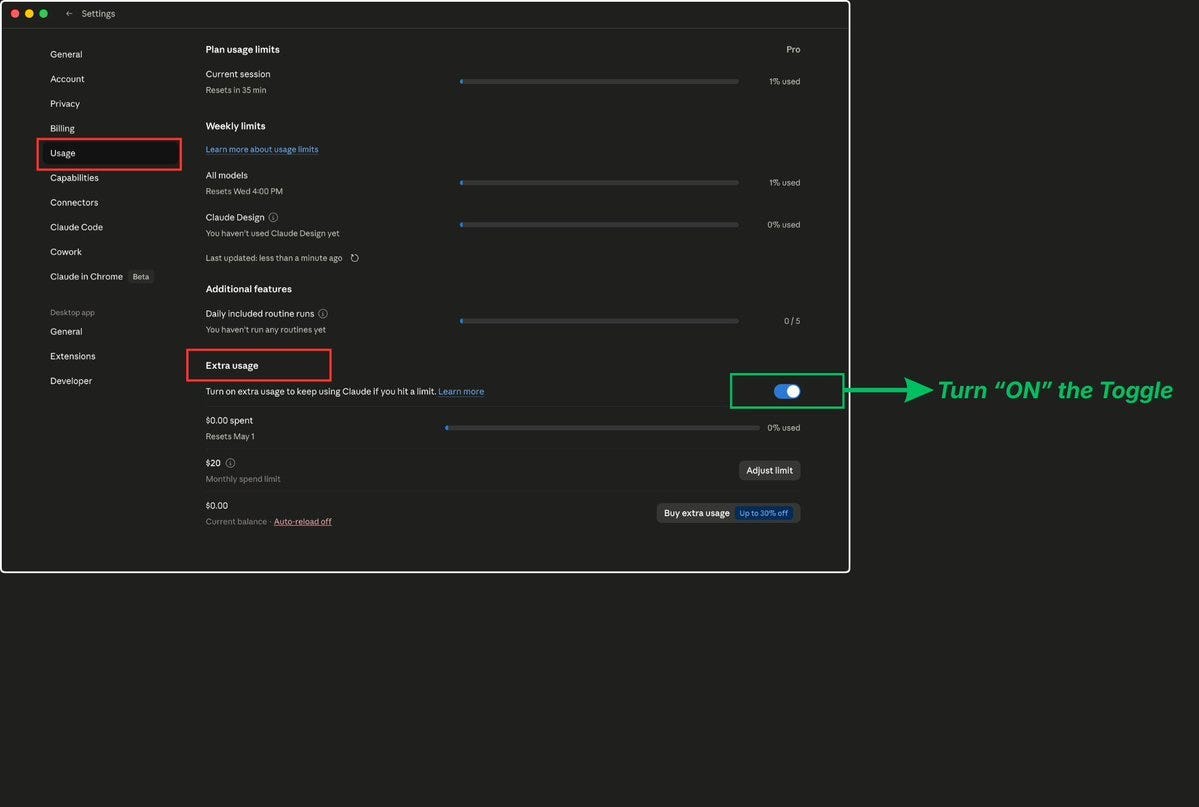
10. Enable Extra Usage as a Safety Net
If you’re on Pro ($20/mo), Max 5x ($100/mo), or Max 20x ($200/mo), go to Settings → Usage and enable the Extra Usage feature.
When your session limit is reached, Claude doesn’t block you. Instead, it switches to pay-as-you-go billing at standard API rates. You set a monthly spending cap so there are no surprise charges.
Why this matters: It’s not about spending more money. It’s about not losing your work at the worst possible moment. If you’re mid-project, mid-deadline, mid-thought, hitting a hard wall is worse than paying a few dollars to finish.
Setup steps:
- Go to Settings → Usage
- Enable Extra Usage
- Set a monthly spending cap (start with $10–20 to test)
- Enable usage alerts so you know when it kicks in
11. Use the /compact Command in Claude Code
If you’re using Claude Code (the CLI tool), this is a game-changer.
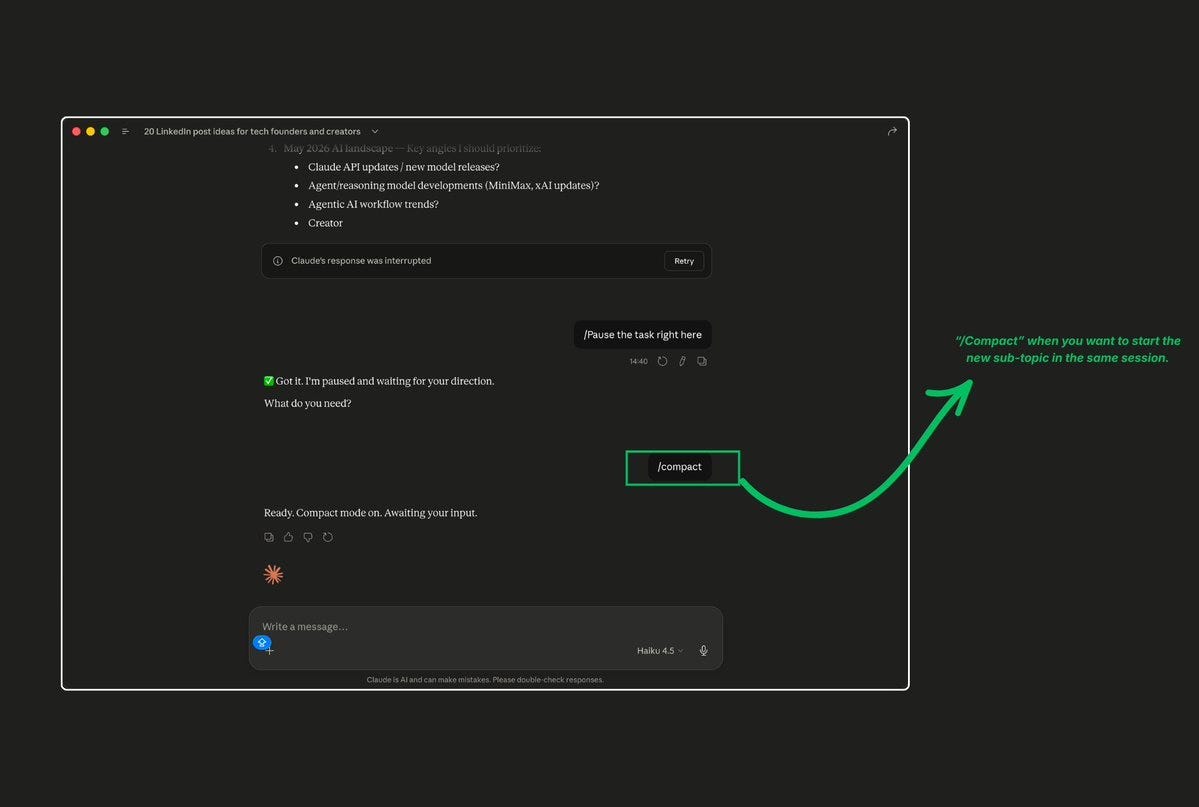
The /compact command summarizes your entire conversation history and replaces it with a compressed version. This frees up massive amounts of context window space without losing the important decisions and context.
When to use it:
- Every 10–15 exchanges in Claude Code
- Before starting a new subtask in the same session
When you notice Claude getting slower or less accurate (a sign of context overload)
The workflow:
- Finish a logical unit of work
- Run /compact
- Continue with your next task
You can also use /clear to completely reset the conversation when switching to entirely unrelated work. Use /rename before clearing so you can find and /resume the session later if needed.
12. Keep Your CLAUDE. md File Lean (Claude Code)
Your CLAUDE. md file loads into Claude’s context at the start of every single session. Every token in that file is consumed every time.
Many developers treat CLAUDE. md like an encyclopedia, stuffing in project history, detailed workflows for every scenario, comprehensive coding standards, and documentation that Claude can discover by reading source files.
Keep CLAUDE. md under 500 tokens (roughly 200 lines). Think of it as “an email with links,” not “a 2,000-page employee handbook.”
What belongs in CLAUDE. md:
- 5–7 essential rules and preferences
- Pointers to relevant files Claude should read when working on specific areas
- Project structure overview (2–3 sentences)
- Key naming conventions
What doesn’t belong:
- Full project history
- Detailed workflow documentation (move to separate files, Claude reads on demand)
- Documentation that exists in your codebase
- Information Claude can discover by exploring your repo
Your CLAUDE. md should be a compass, not a map. Point Claude in the right direction. Let it explore from there.
13. Use .claudeignore to Block Irrelevant Files (Claude Code)
Claude Code reads your codebase to understand context. Without guidance, it might tokenize your entire node_modules, build artifacts, test fixtures, and generated files, burning tokens on content that’s never useful.
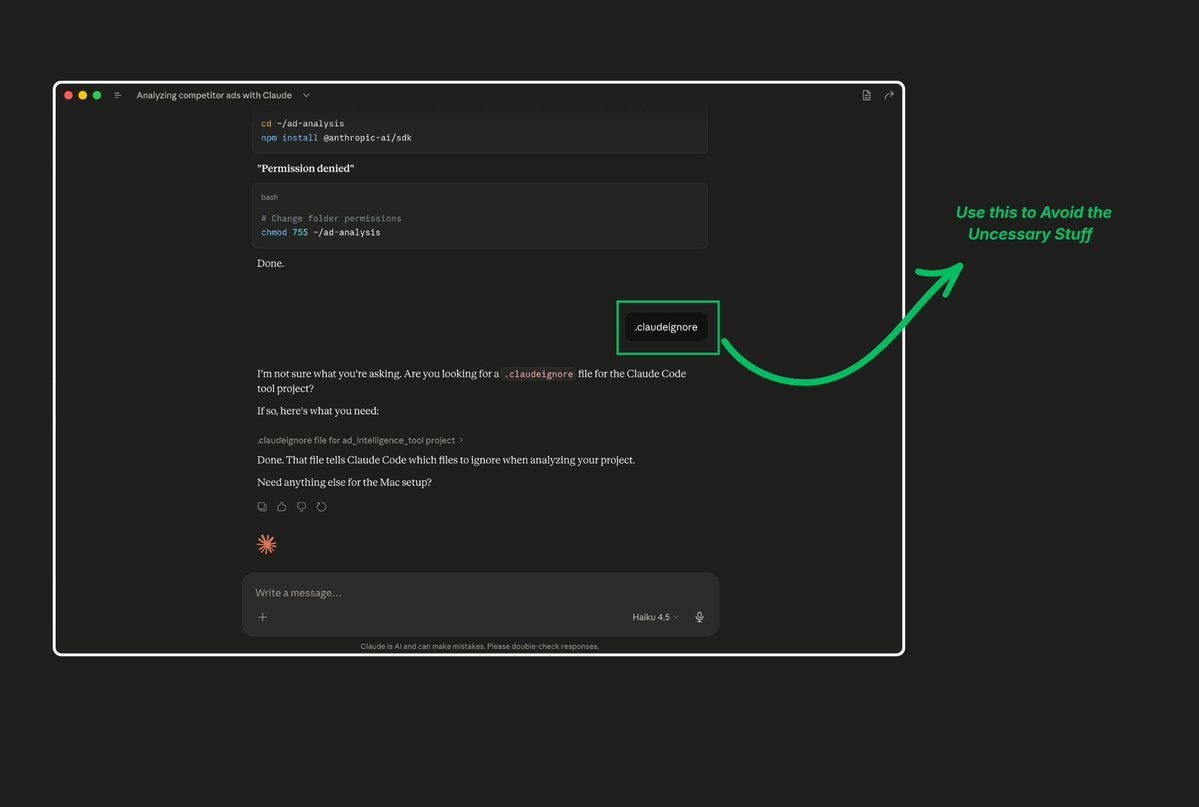
Create a .claudeignore file in your project root (works like .gitignore):
node_modules/ dist/ build/ .next/ coverage/ .min.js .map .lock pycache/ .pyc .env
This is a one-time setup that improves every session. Developers report a 30–50% reduction in initial context loading after adding a proper .claudeignore.
14. Switch Models Mid-Conversation Based on Task Complexity
Most people pick a model at the start and stick with it. That’s leaving tokens on the table.
On Claude ai you can select your model per conversation. In Claude Code, you can switch models mid-session with the /model command.
The strategy:
- Start complex architectural work with Opus
- Switch to Sonnet for implementation
- Drop to Haiku for formatting, renaming, and repetitive edits
- Switch back to Sonnet or Opus when you hit a tricky bug
This isn’t about being cheap. It’s about being strategic. Running Opus for a simple rename is like chartering a private jet to go across the street.
15. Control Extended Thinking Intentionally
Extended Thinking (Claude’s deep reasoning mode) is extremely powerful and extremely expensive. Each thinking session can use thousands of additional tokens that count against your limit.
The protocol:
- Default: Off. Keep extended thinking disabled for standard tasks.
- First attempt without it. Give Claude a shot at your complex problem with standard reasoning.
- Turn it on if needed. If the first attempt fails or misses nuance, enable thinking for the retry.
- Reduce the budget when possible. In Claude Code, you can set MAX_THINKING_TOKENS=8000 to cap thinking costs, or use /effort to lower the reasoning intensity.
When extended thinking is worth it:
- Complex multi-step logic problems
- Debugging subtle issues across multiple files
- Architectural decisions with many trade-offs
- Tasks where getting it right the first time saves more than the thinking tokens cost
When it’s a waste:
- Writing content or copy
- Simple code changes
- Formatting and organization
- Questions with straightforward answers
Claude doesn’t count messages. It counts tokens. And tokens grow exponentially with conversation length, not linearly.
The people who never hit their limits aren’t doing less work.
They’re doing the same work with dramatically fewer wasted tokens.
They edit instead of correcting.
They start fresh instead of pushing through.
They choose the right model instead of defaulting to the most expensive one.
They batch instead of fragmenting.
They work with the system instead of fighting it.
Every tip in this article is free to implement. Most take under 60 seconds to set up. And together, they can easily 3–5x how much real work you get out of your Claude plan.
Stop blaming the tool. Start optimizing the workflow.
Claude doesn’t have a limit problem. You have a token efficiency problem. Fix the workflow, and the limits disappear.
메타데이터
- post_id
- bd93e72ca8a3
- slug
- 15-hacks-to-never-hit-claudes-limit-bd93e72ca8a3
- url
- https://medium.com/@hamzaakhalid/15-hacks-to-never-hit-claudes-limit-bd93e72ca8a3
- canonical_url
- https://medium.com/@hamzaakhalid/15-hacks-to-never-hit-claudes-limit-bd93e72ca8a3
- author_url
- https://medium.com/@hamzaakhalid
- status
- ok
- fetched_at
- 2026-07-11 06:47:20