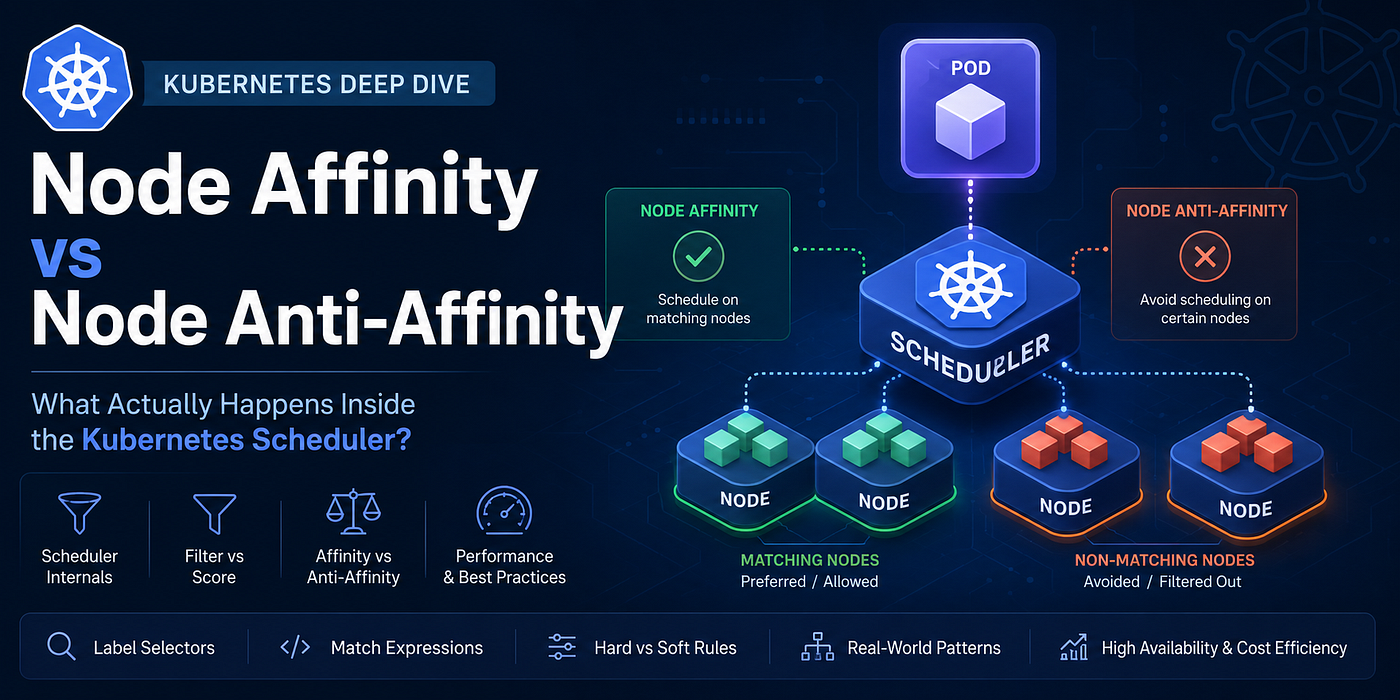
Node Affinity vs Node Anti-Affinity: What Actually Happens Inside the Kubernetes Scheduler?
Kubernetes Scheduling Deep Dive for Platform Engineers, SREs, and Cluster Operators
Node Affinity vs Node Anti-Affinity: What Actually Happens Inside the Kubernetes Scheduler?
Kubernetes Scheduling Deep Dive for Platform Engineers, SREs, and Cluster Operators
Most Kubernetes engineers eventually learn Node Affinity.
Many learn Node Anti-Affinity.
Very few understand how Kubernetes actually evaluates them during scheduling.
As a result, I regularly see clusters where:
- Pods remain Pending forever
- GPU nodes sit underutilized
- Spot and On-Demand workloads mix unexpectedly
- Expensive dedicated nodes remain idle
- Scheduler latency increases dramatically at scale
The root cause is usually not Kubernetes itself.
It’s misunderstanding how scheduling constraints are processed internally.
In this article, we’ll go beyond definitions and examine:
- Scheduler internals
- Filter vs Score phases
- Hard vs soft rules
- Scheduler plugins involved
- Performance implications
- Production design patterns
- Common scheduling failures
By the end, you’ll understand what happens inside the scheduler every time a Pod is created.
Kubernetes Scheduling Refresher
When a Pod is submitted:
kubectl apply -f pod.yamlThe Pod enters:
status:
  phase: Pending
At this point the kube-scheduler begins evaluating candidate nodes.
Modern Kubernetes scheduling follows multiple phases:
  Pending Pod
      │
      ▼
   PreFilter
      │
      ▼
    Filter
      │
      ▼
    Score
      │
      ▼
Normalize Score
      │
      ▼
   Reserve
      │
      ▼
    Bind
Affinity and anti-affinity primarily influence:
Filter Phase
Score Phase
Understanding this distinction is crucial.

What Is Node Affinity?
Node Affinity tells Kubernetes:
“Schedule this Pod only on nodes that match specific labels.”
Example:
nodeSelector:
  node-type: gpu
Node Affinity is the more expressive evolution of nodeSelector.
Example:
affinity:
  nodeAffinity:
    requiredDuringSchedulingIgnoredDuringExecution:
      nodeSelectorTerms:
      - matchExpressions:
        - key: node-type
          operator: In
          values:
          - gpu
Scheduler interpretation:
Only consider nodes where:

node-type=gpu
Every other node is eliminated.
Node Affinity Internals
Internally, the scheduler uses the:
NodeAffinity PluginThis plugin participates in:
PreFilter
Filter
Score
The process looks like:
All Nodes
   │
   ▼
NodeAffinity Filter
   │
   ▼
Matching Nodes
Imagine:
ClusterNode-1 gpu
Node-2 gpu
Node-3 cpu
Node-4 cpuPod requirement:
node-type=gpuFilter result:
Node-1 ✔
Node-2 ✔
Node-3 ✖
Node-4 ✖
Only Node-1 and Node-2 proceed further.
Required vs Preferred Affinity
This is where many engineers get confused.
Kubernetes supports:
Hard Requirement
requiredDuringSchedulingIgnoredDuringExecutionSoft Preference
preferredDuringSchedulingIgnoredDuringExecutionHard Requirement
Example:
affinity:
  nodeAffinity:
    requiredDuringSchedulingIgnoredDuringExecution:
      nodeSelectorTerms:
      - matchExpressions:
        - key: workload
          operator: In
          values:
          - production
Scheduler behavior:
No matching node?

→ Pod remains Pending
No exceptions.
Soft Preference
Example:
affinity:
  nodeAffinity:
    preferredDuringSchedulingIgnoredDuringExecution:
    - weight: 100
      preference:
        matchExpressions:
        - key: zone
          operator: In
          values:
          - us-east-1a
Scheduler behavior:
Prefer zone us-east-1a

If unavailable:
Schedule elsewhere
The pod still runs.
How Scoring Works Internally
After filtering:
Node-A
Node-B
Node-C
Scheduler computes scores.
Example:
preferredDuringSchedulingIgnoredDuringExecution:
- weight: 50
Results:
Node-A 90
Node-B 70
Node-C 40
Highest score wins.
This occurs inside the:
NodeAffinity Score PluginThe score is combined with other scheduler plugins:
NodeResourcesFit
ImageLocality
TopologySpread
InterPodAffinity
NodeAffinity
Final score:
NodeAffinity Score
+
Resource Score
+
Spread Score
+
Image Score
=
Winning Node
Affinity is only one input among many.
What Is Node Anti-Affinity?
A common misconception:
Node Anti-Affinity is NOT the opposite of Node Affinity.
Node Anti-Affinity means:
Avoid scheduling on certain nodes.Example:
affinity:
  nodeAffinity:
    requiredDuringSchedulingIgnoredDuringExecution:
      nodeSelectorTerms:
      - matchExpressions:
        - key: instance-type
          operator: NotIn
          values:
          - spot
Interpretation:
Never place workload on spot nodesThis is effectively node anti-affinity behavior using negative matching.
Understanding Negative Matching
Operators include:
In
NotIn
Exists
DoesNotExist
Gt
Lt
Example:
- key: lifecycle
  operator: NotIn
  values:
  - spot
Scheduler result:
spot node      ✖
on-demand node ✔
This becomes an exclusion filter.
Internal Scheduler Flow
Imagine:
ClusterNode-1 lifecycle=spot
Node-2 lifecycle=spot
Node-3 lifecycle=on-demand
Node-4 lifecycle=on-demandPod:
operator: NotIn
values:
- spot
Filter phase:
Node-1 ✖
Node-2 ✖
Node-3 ✔
Node-4 ✔
Remaining nodes continue through scheduling.
Node Affinity vs Pod Anti-Affinity
This is where many production incidents begin.
Engineers often say:
“I configured anti-affinity.”
But they actually configured:
nodeAffinityinstead of:
podAntiAffinityHuge difference.
Node Affinity evaluates:
Node LabelsPod Anti-Affinity evaluates:
Existing PodsExample:
Node-1
 ├─ app=a
 ├─ app=a
Node-2
 ├─ empty
Pod Anti-Affinity can force:
New app=a Pod
     ↓
Node-2
Node Affinity cannot.
Scheduler Cost Comparison
Not all scheduling rules are equally expensive.
Node Affinity
Checks:
Pod
  vs
Node Labels
Complexity roughly:
Pods × NodesVery efficient.
Pod Anti-Affinity
Checks:
 Pod
  vs
 Node
  vs
Existing Pods
Complexity:
Pods × Nodes × Existing PodsMuch more expensive.
This is why large clusters often experience scheduling slowdowns from excessive Pod Anti-Affinity rules.
Node Affinity scales significantly better.
Production Pattern 1: GPU Isolation
Dedicated AI nodes:
gpu=trueWorkload:
requiredDuringSchedulingIgnoredDuringExecution:
  nodeSelectorTerms:
  - matchExpressions:
    - key: gpu
      operator: In
      values:
      - "true"
Benefits:
- Protects GPU capacity
- Prevents accidental scheduling
- Improves utilization
Production Pattern 2: Spot vs On-Demand
Node labels:
capacity=spot
capacity=ondemand
Critical services:
operator: NotIn
values:
- spot
Outcome:
Databases
Ingress
Kafka
→ On-Demand Nodes
while:
Batch Jobs
ML Training
→ Spot Nodes
Production Pattern 3: Compliance Workloads
Financial systems often require isolation.
Node labels:
pci=trueScheduling rule:
operator: In
values:
- "true"
Result:
PCI workloads remain on approved nodesUseful for regulated environments.
Why Pods Stay Pending
One of the most common scheduler messages:
0/25 nodes are availableExample:
25 nodes checked
0 matched node affinity
Causes:
Label typo
gpu=trueNode:
gup=trueNo matching nodes
zone=us-east-1aCluster:
us-east-1b
us-east-1c
Contradicting rules
In: gpu
NotIn: gpu
Unschedulable forever.
Debugging Affinity Problems
First:
kubectl describe podLook for:
Events:
0/15 nodes are available
Then inspect labels:
kubectl get nodes --show-labelsInspect scheduler logs:
kubectl logs \
-n kube-system \
scheduler-pod
For deeper analysis:
kubectl get events \
--sort-by=.lastTimestamp
This usually reveals the exact affinity failure.
When Not To Use Node Affinity
Node Affinity is powerful, but overusing it can fragment clusters.
Bad example:
Team-A → node-a
Team-B → node-b
Team-C → node-c
Result:
Idle resources
Poor bin packing
Higher cloud costs
Instead:
Use:
- Taints & Tolerations
- Topology Spread Constraints
- Resource Quotas
- Namespace Isolation
when appropriate.
Final Thoughts
Node Affinity is fundamentally a node filtering mechanism.
Node Anti-Affinity is usually implemented through negative node matching rules that exclude specific nodes from consideration.
Internally, both rely heavily on the scheduler’s NodeAffinity plugin, participating in the Filter and Score phases of scheduling.
The key lesson is that affinity is not merely a placement rule.
It is part of the scheduler’s decision engine.
Every affinity rule influences:
- Scheduling latency
- Cluster utilization
- High availability
- Cost efficiency
- Workload isolation
The best Kubernetes operators don’t just know how to write affinity rules.
They understand how the scheduler evaluates them, scores them, and ultimately decides where every Pod lives.
Kubernetes #CloudNative #PlatformEngineering #DevOps #SRE #KubernetesScheduler #ContainerOrchestration #K8s #CloudArchitecture #InfrastructureAsCode #SiteReliabilityEngineering #PlatformOps #CloudComputing #CNCF #Kubectl #EngineeringLeadership #AegisOps #NodeAffinity #KubernetesInternals #DistributedSystems
메타데이터
- post_id
- bdc53ebdf262
- slug
- node-affinity-vs-node-anti-affinity-what-actually-happens-inside-the-kubernetes-scheduler-bdc53ebdf262
- url
- https://medium.com/aegisops/node-affinity-vs-node-anti-affinity-what-actually-happens-inside-the-kubernetes-scheduler-bdc53ebdf262
- canonical_url
- https://medium.com/aegisops/node-affinity-vs-node-anti-affinity-what-actually-happens-inside-the-kubernetes-scheduler-bdc53ebdf262
- author_url
- https://medium.com/@cloudsignal
- status
- ok
- fetched_at
- 2026-06-25 07:00:49