Stop Fighting Bot Detection: How Manus Turns Your Local Browser into an AI-Controlled Agent
A deep dive into the architecture and dataflows of Manus AI’s Browser Operator, designed for ML engineers and AI practitioners.
Stop Fighting Bot Detection: How Manus Turns Your Local Browser into an AI-Controlled Agent
A deep dive into the architecture and dataflows of Manus AI’s Browser Operator, designed for ML engineers and AI practitioners.
The Manus AI Browser Operator bypasses bot detection by bridging cloud AI reasoning with local browser execution.
Summary
💡 Intuition: Traditional AI agents struggle with web authentication and bot detection. Manus solves this by turning your local browser into an intelligent agent, using your existing sessions and residential IP to navigate the web seamlessly.
🎯 Problem: Cloud-based AI agents operating from data center IPs frequently fail when attempting to access premium platforms, CRMs, or social media networks due to CAPTCHAs and strict bot-detection mechanisms.
🛠️ Solution: Manus employs a Dual Browser Architecture, utilizing a local Chrome extension (the Browser Operator) that acts as a Model Context Protocol (MCP) server. This allows the cloud-based AI to execute precise Chrome DevTools Protocol (CDP) commands locally, extracting DOM and visual data while bypassing security hurdles.

The “What”: Rethinking AI Web Automation
As ML engineers building multi-agent systems, we often hit a wall when our agents need to interact with the authenticated web. You build a brilliant planner, equip it with headless Puppeteer, and watch it immediately get blocked by Cloudflare or LinkedIn’s login screen.
The Manus AI Browse Connector (officially known as the Browser Operator) represents a significant architectural shift. Rather than relying solely on isolated cloud environments or headless browser forks, it transforms a user’s local browser into an active, intelligent agent [1].
Manus employs a Dual Browser Architecture to handle both general research and authenticated tasks.
Manus achieves this through a Dual Browser Architecture:
- Cloud Browser (Default): A sandboxed Chromium instance running inside an E2B Firecracker microVM in the cloud. Ideal for general web research and data extraction at scale [2].
- Browser Operator (Local): A Chrome extension installed on the user’s machine that allows the Manus agent to “take over” a dedicated tab. This leverages the user’s residential IP address, existing cookies, and authenticated sessions [3].
The “How”: Deep Dive into the Architecture
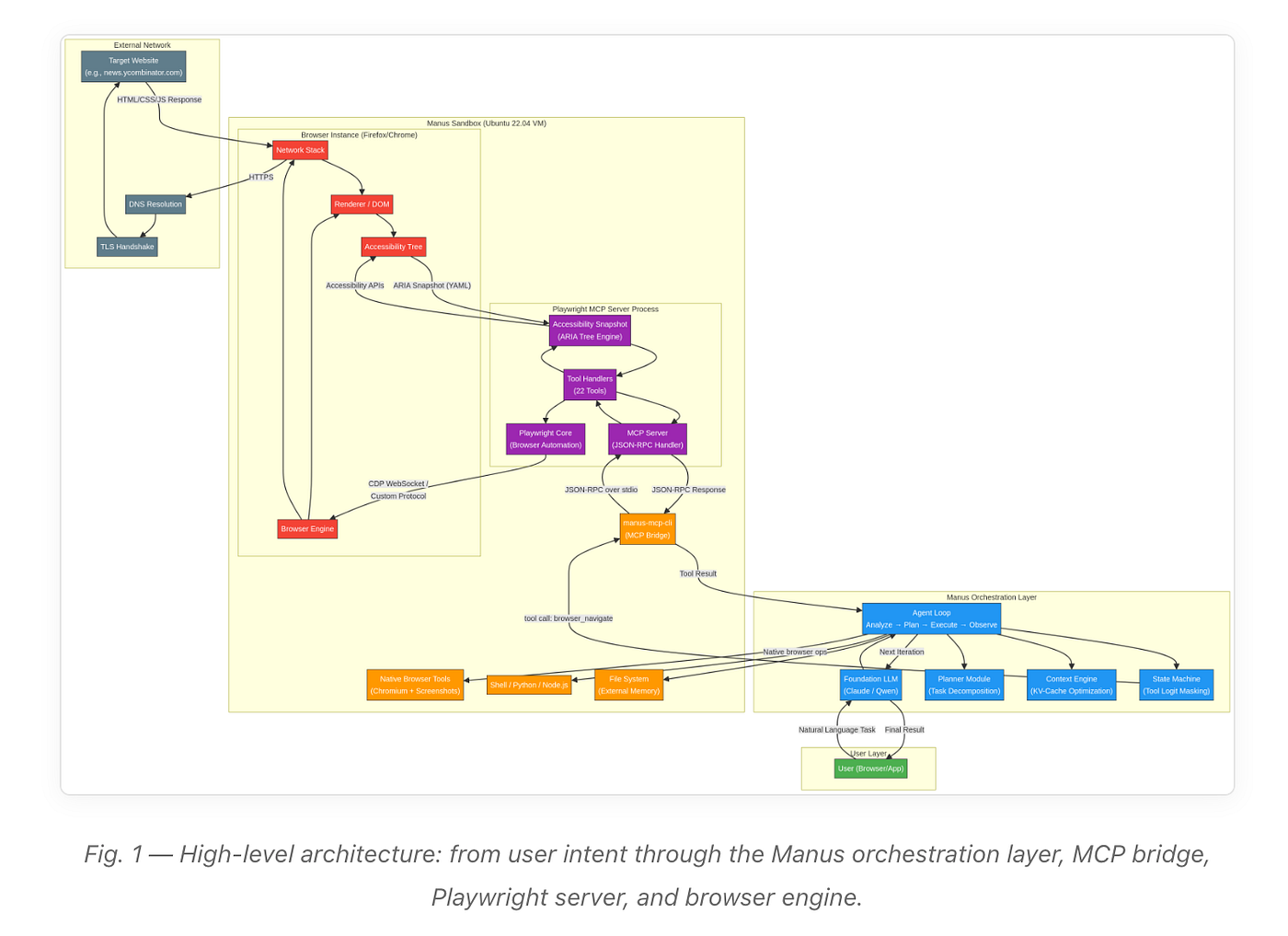
Let’s look under the hood. The architecture of the Manus Browse Connector is built upon a remote control loop pattern, connecting the cloud infrastructure to the local client using the Model Context Protocol (MCP).

How Manus components map to the Model Context Protocol (MCP) framework.
The Manus Browser Operator is a unique implementation that adapts the MCP conceptual model to a local browser extension, rather than a traditional HTTP-based remote server [4]. Here is how the roles map out:
MCP RoleManus ComponentFunctionMCP HostManus AI Platform (Cloud)The orchestrator/planner agent running in the cloud. It manages the overall task and coordinates multiple clients.MCP ClientManus BackendA component dedicated to managing the connection with the user’s specific browser extension.MCP ServerChrome Extension (Local)The Browser Operator installed on the desktop. It exposes tools like browser_navigate and browser_click.
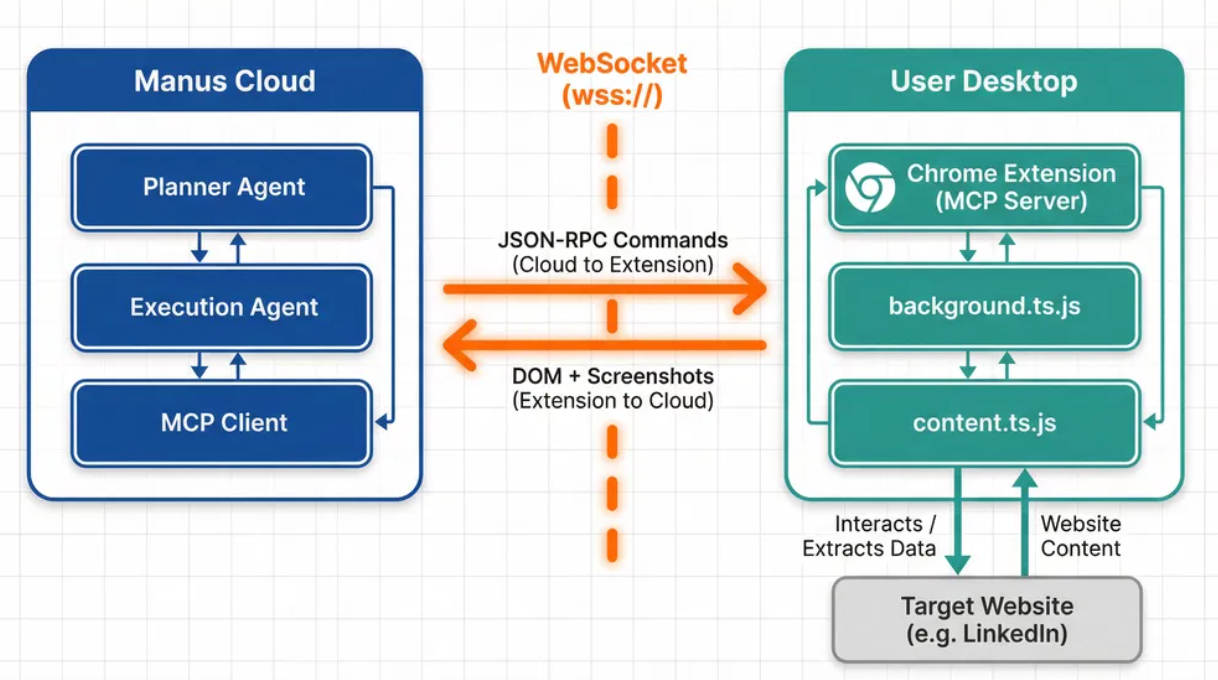
Unlike standard MCP servers that use stdio or HTTP POST/SSE, the Browser Operator uses a persistent bidirectional WebSocket connection (wss://api.manus.im). The protocol running over this WebSocket is JSON-RPC 2.0, strictly adhering to the MCP data layer specification for tool invocation [5].

The Execution Loop: A LinkedIn Example
To understand the dataflow, let’s trace a practical example. Imagine a user asks Manus: “Extract the contact information for the last person who messaged me on LinkedIn.”
The continuous, closed-loop system of the Manus Browser Operator.
Phase 1: Server-Side Planning
The Manus Planner analyzes the request and generates a step-by-step plan. The Execution Agent decides to use the browser_navigate tool. The Manus MCP Client formats this into a JSON-RPC 2.0 request and sends it down the WebSocket [6].
Phase 2: Client-Side Execution via CDP
The Chrome extension’s background script (background.ts.js) receives the payload. It translates the abstract tool call into a concrete Chrome DevTools Protocol (CDP) command and executes it using the chrome.debugger API [7].
Because this happens in the user’s local browser, the request to LinkedIn automatically includes the user’s active session cookies. LinkedIn sees a legitimate request from a residential IP address.
Phase 3: Hybrid State Observation
Once the page loads, the agent needs to “see” the result. Manus employs a Hybrid Automation Approach, combining DOM and Vision [8]:
- DOM Extraction: The injected content.ts.js script uses Readability.js to parse the DOM and Turndown.js to convert the HTML into clean Markdown.
- Visual Extraction: The background script uses CDP to capture a screenshot of the viewport.
Phase 4: Data Exfiltration and Iteration
Because screenshots are large binary files, the extension requests a pre-signed S3 URL, uploads the image directly, and gets a URL back. It then packages the Markdown and the screenshot URL into a JSON-RPC 2.0 response and sends it back up the WebSocket [9]. The cloud agent analyzes this observation and initiates the next loop iteration (e.g., clicking a specific message thread).
The complete end-to-end architecture and dataflow between the Manus Cloud and the User Desktop.
Conclusion for Practitioners
The Manus Browse Connector elegantly maps the standardized Model Context Protocol onto a custom WebSocket transport layer. By treating a local Chrome extension as an MCP Server and utilizing the chrome.debugger API, Manus achieves a seamless, bidirectional remote control loop.
For ML engineers building agents, the takeaway is clear: bridging the gap between advanced cloud AI reasoning and the authenticated, stateful reality of a user’s local environment is not just possible — it’s the key to unlocking true agentic autonomy on the web.
References
[1] Manus AI. “Browser Operator — Manus Documentation.” https://manus.im/docs/features/browser-operator
[2] Manus AI. “Cloud browser — Manus Documentation.” https://manus.im/docs/features/cloud-browser
[3] Manus AI. “Introducing Manus Browser Operator.” https://manus.im/blog/manus-browser-operator
[4] Model Context Protocol. “Architecture overview.” https://modelcontextprotocol.io/docs/learn/architecture
[5] Model Context Protocol. “Tools Specification.” https://modelcontextprotocol.io/specification/draft/server/tools
[6] GitHub Gist. “In-depth technical investigation into the Manus AI agent.” https://gist.github.com/renschni/4fbc70b31bad8dd57f3370239dccd58f
[7] Chrome for Developers. “chrome.debugger API.” https://developer.chrome.com/docs/extensions/reference/api/debugger
[8] Joe Seifi. “AI Browser Automation: 5 Layers Every Agent Builder Should Know.” https://dev.to/joeseifi/ai-browser-automation-5-layers-every-agent-builder-should-know-72n
[9] Mindgard. “Manus Rubra: The Browser Extension With Its Hand in Everything.” https://mindgard.ai/blog/manus-rubra-full-browser-remote-control
메타데이터
- post_id
- be09e3e9e38f
- slug
- stop-fighting-bot-detection-how-manus-turns-your-local-browser-into-an-ai-controlled-agent-be09e3e9e38f
- url
- https://medium.com/@huguosuo/stop-fighting-bot-detection-how-manus-turns-your-local-browser-into-an-ai-controlled-agent-be09e3e9e38f
- canonical_url
- https://medium.com/@huguosuo/stop-fighting-bot-detection-how-manus-turns-your-local-browser-into-an-ai-controlled-agent-be09e3e9e38f
- author_url
- https://medium.com/@huguosuo
- status
- ok
- fetched_at
- 2026-06-21 07:44:09