SwiftUI: Simple On-Device Video Analysis with Media Intelligence
Extracting the best moment. Evaluating the engagement levels.
SwiftUI: Simple On-Device Video Analysis with Media Intelligence
Extracting the best moment. Evaluating the engagement levels.
Honestly speaking, I don’t understand why Apple made ***Media Intelligence into a separate framework but not part of [Vision](https://developer.apple.com/documentation/Vision)***…It analyze images, analyze videos…
But!
It provides some really nice features that we can add as a little additional touch to a video editing / viewing app!
And! Just like all the other AI-related frameworks Apple has, all about user privacy!
So!
Let’s check out how we can use it to
- Extract a single best moment (frame) of a video
- Get the most interesting /engaging moments of a video
Feel free to grab the little demo from my ***GitHub*** and let’s start!
Basic Steps
It is so simple! So easy to use! Three steps!
- Create a
[MediaIntelligenceVideoAsset](https://developer.apple.com/documentation/mediaintelligence/mediaintelligencevideoasset) with a File URL pointing to the video on disk - Create an analysis request.
[KeyFrameAnalysisRequest](https://developer.apple.com/documentation/mediaintelligence/keyframeanalysisrequest) for extracting the single best moment, and[HighlightAnalysisRequest](https://developer.apple.com/documentation/mediaintelligence/highlightanalysisrequest) for getting both the most engaging segments of a video as well as an engagement level for all video segments. - Call
[analyze(_:for:)](https://developer.apple.com/documentation/mediaintelligence/videoanalyzer/analyze(_:for:)) on the request
Extract Key Frame
Starting with extracting keyframe here.
The [KeyFrameAnalysisRequest](https://developer.apple.com/documentation/mediaintelligence/keyframeanalysisrequest) returns a [timestamp](https://developer.apple.com/documentation/mediaintelligence/keyframeanalysisrequest/result/timestamp) of the frame the framework selects as the best representative of the video.
We could then, for example, pass this[CMTime](https://developer.apple.com/documentation/CoreMedia/CMTime) to a [AVAssetImageGenerator](https://developer.apple.com/documentation/AVFoundation/AVAssetImageGenerator) to generate a thumbnail, add a little button for the user to seek to this frame directly.
func extractKeyframe(_ videoURL: URL) async throws -> (CGImage, CMTime) {
    let asset = try self.createAsset(from: videoURL)
    let request = KeyFrameAnalysisRequest()
    let result = try await VideoAnalyzer.shared.analyze(asset, for: request)

    var timestamp: CMTime
    switch result {
    case .success(let keyframe):
        timestamp = keyframe.timestamp
    case .failure(let error):
        print("Fail to extract keyframe: \(error.localizedDescription)")
        throw error
    }

    return try await generateFrame(from: videoURL, at: timestamp)
}

private func createAsset(from videoURL: URL) throws
    -> MediaIntelligenceVideoAsset
{
    // MediaIntelligenceVideoAsset.Kind.url(_:) requires a file URL pointing to a video on disk
    guard videoURL.isFileURL else {
        throw VideoAnalysisError.invalidURL
    }

    let assetID = UUID().uuidString
    let asset = MediaIntelligenceVideoAsset(
        id: MediaIntelligenceVideoAsset.ID(assetID),
        kind: .url(videoURL)
    )
    return asset
}

private func generateFrame(from videoURL: URL, at time: CMTime)
    async throws
    -> (CGImage, CMTime)
{
    print("request time: \(time.seconds)")
    let asset = AVURLAsset(url: videoURL)
    let generator = AVAssetImageGenerator(asset: asset)

    // Retain correct video orientation
    generator.appliesPreferredTrackTransform = true

    // Set tolerances to zero for precise frame capturing.
    // Without this, AVFoundation may return an approximate keyframe for speed.
    generator.requestedTimeToleranceBefore = .zero
    generator.requestedTimeToleranceAfter = .zero

    do {
        let (cgImage, actualTime) = try await generator.image(at: time)
        return (cgImage, actualTime)
    } catch (let error) {
        print("Error generating frame: \(error.localizedDescription)")
        throw error
    }
}

enum VideoAnalysisError: Error, LocalizedError {
    case invalidURL

    var errorDescription: String? {
        return switch self {
        case .invalidURL:
            "The provided URL is not a valid file URL."
        }
    }
}
Now, as you might know, the [QLThumbnailGenerator](https://developer.apple.com/documentation/quicklookthumbnailing/qlthumbnailgenerator) from the ***Quick Look Thumbnailing framework can also generate thumbnails for videos. (If you need a catch-up on that, feel free to check out one of my previous articles: [SwiftUI + QuickLook: Preview & Edit Files In App! Generate Thumbnails For Files! On the fly!](https://medium.com/@itsuki.enjoy/swiftui-quicklook-preview-edit-files-in-app-generate-thumbnails-for-files-on-the-fly-18bcc7e475db)***).
Both are async, both throws.
I wonder how well (or maybe not so well) the [KeyFrameAnalysisRequest](https://developer.apple.com/documentation/mediaintelligence/keyframeanalysisrequest) works in comparison. Unfortunately, Apple is not being really transparent on the underlying algorithm on neither of those…But I really hope that [KeyFrameAnalysisRequest](https://developer.apple.com/documentation/mediaintelligence/keyframeanalysisrequest)is better? I mean, the framework gets the name intelligence!
Engagement By Segments
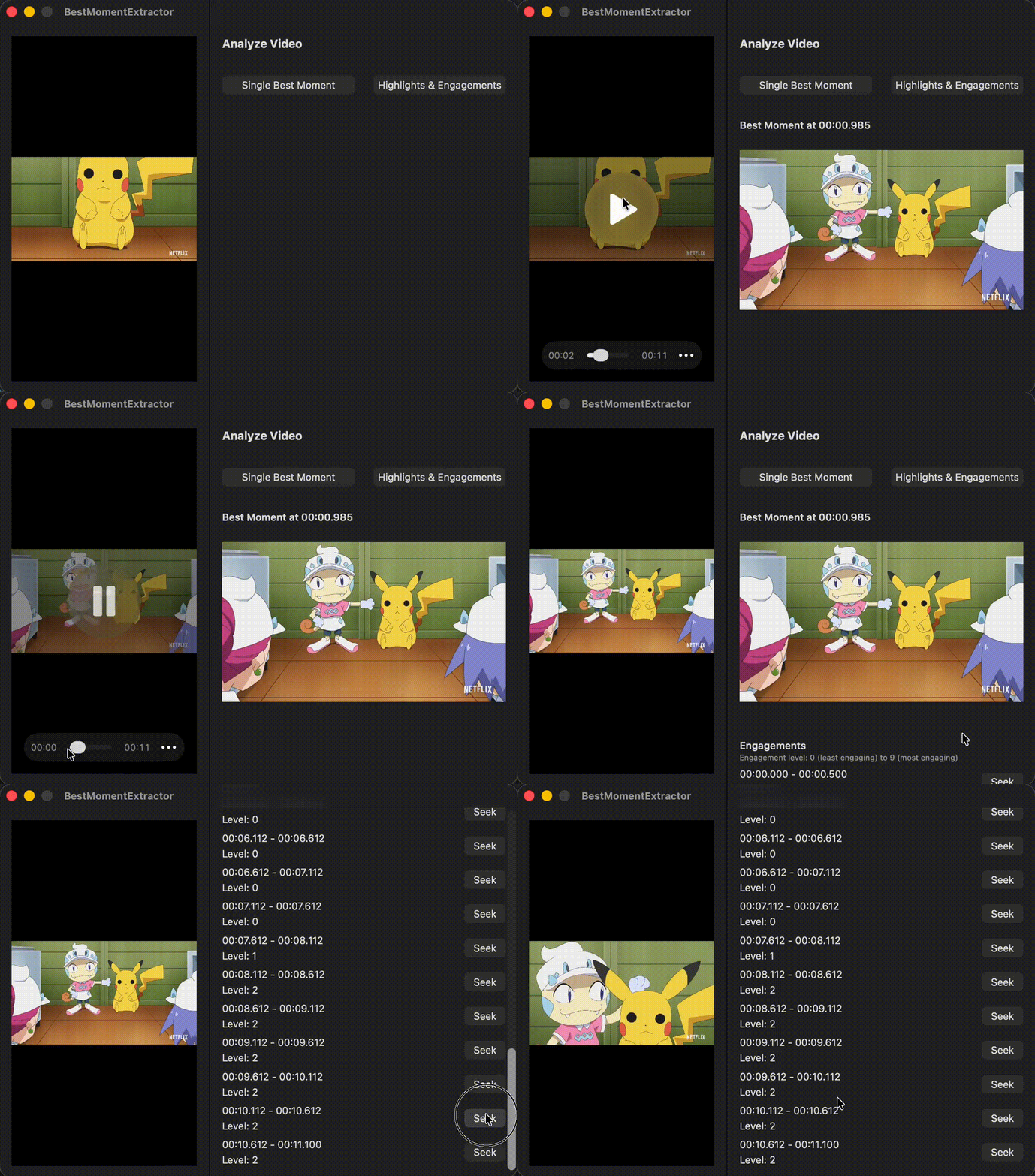
[HighlightAnalysisRequest](https://developer.apple.com/documentation/mediaintelligence/highlightanalysisrequest) tells the [VideoAnalyzer](https://developer.apple.com/documentation/mediaintelligence/videoanalyzer) to find the highlight segments of a video as well as calculate an engagement score, ranging from 0 (least engaging) to 9 (most engaging), for every segment.
func extractHighlights(_ videoURL: URL) async throws -> (
    highlights: [CMTimeRange],
    engagementLevels: [(timeRange: CMTimeRange, level: Float)]
) {
    let asset = try self.createAsset(from: videoURL)
    let request = HighlightAnalysisRequest()
    let result = try await VideoAnalyzer.shared.analyze(asset, for: request)

    switch result {
    case .success(let analysis):
        return (analysis.highlights, analysis.levels)
    case .failure(let error):
        print("Fail to extract highlights: \(error.localizedDescription)")
        throw error
    }
}
The [highlights](https://developer.apple.com/documentation/mediaintelligence/highlightanalysisrequest/result/highlights) returned by the framework could be empty, but the [levels](https://developer.apple.com/documentation/mediaintelligence/highlightanalysisrequest/result/levels) will cover every segment in the video, not just the highlighted ones.
A Simple View
Let’s give it a try.
import AVFoundation
import AVKit
import MediaIntelligence
import SwiftUI
struct ContentView: View {
@State private var manager = VideoAnalysisManager()
@State private var url: URL? = Bundle.main.url(
forResource: "pikachu",
withExtension: "mp4"
)
@State private var error: Error?
@State private var extractingKeyframe: Bool = false
@State private var keyframe: (Image, CMTime)?
@State private var extractingHighlights: Bool = false
@State private var highlights: [CMTimeRange] = []
@State private var engagementLevels:
[(timeRange: CMTimeRange, level: Float)] = []
@State private var player = AVPlayer()
var body: some View {
HSplitView {
VStack {
VideoPlayer(player: self.player)
if let error {
Text(error.localizedDescription)
.foregroundStyle(.red)
}
}
.frame(width: 240)
.frame(maxHeight: .infinity)
.padding()
ScrollView {
VStack(alignment: .leading, spacing: 32) {
Text("Analyze Video")
.font(.title3)
.fontWeight(.bold)
if let url {
HStack(spacing: 24) {
Button(
action: {
Task {
self.extractingKeyframe = true
self.keyframe = nil
defer {
self.extractingKeyframe = false
}
do {
let (image, time) =
try await manager
.extractKeyframe(
url
)
self.keyframe = (
Image(
decorative: image,
scale: 1.0
),
time
)
} catch (let error) {
print(error)
self.error = error
}
}
},
label: {
HStack {
Text("Single Best Moment")
if extractingKeyframe {
ProgressView().controlSize(.small)
}
}
.frame(maxWidth: .infinity)
}
)
.disabled(extractingKeyframe)
Button(
action: {
Task {
self.highlights = []
self.engagementLevels = []
self.extractingHighlights = true
defer {
self.extractingHighlights = false
}
do {
let (highlights, engagements) =
try await manager
.extractHighlights(
url
)
self.highlights = highlights
self.engagementLevels = engagements
} catch (let error) {
print(error)
self.error = error
}
}
},
label: {
HStack {
Text("Highlights & Engagements")
if extractingHighlights {
ProgressView().controlSize(.small)
}
}
.frame(maxWidth: .infinity)
}
)
.disabled(extractingKeyframe)
}
}
if let keyframe {
VStack(alignment: .leading) {
Text("Best Moment at \(keyframe.1.formatted)")
.fontWeight(.semibold)
keyframe.0
.resizable()
.scaledToFit()
.frame(height: 240)
}
.frame(maxWidth: .infinity, alignment: .leading)
}
if !self.highlights.isEmpty {
VStack(alignment: .leading) {
Text("Highlights")
.fontWeight(.semibold)
Text(
"Engagement level: 0 (least engaging) to 9 (most engaging)"
)
.font(.caption)
.foregroundStyle(.secondary)
ForEach(highlights.enumerated(), id: \.offset) {
_,
highlight in
let level = self.engagementLevels.first(where: {
$0.timeRange == highlight
})
self.highlightRow(
range: highlight,
engagementLevel: level?.level
)
}
}
.frame(maxWidth: .infinity, alignment: .leading)
}
let engagements = self.engagementLevels.filter({
!self.highlights.contains($0.timeRange)
})
if !engagements.isEmpty {
VStack(alignment: .leading) {
Text("Engagements")
.fontWeight(.semibold)
Text(
"Engagement level: 0 (least engaging) to 9 (most engaging)"
)
.font(.caption)
.foregroundStyle(.secondary)
ForEach(engagements.enumerated(), id: \.offset) {
_,
engagement in
self.highlightRow(
range: engagement.timeRange,
engagementLevel: engagement.level
)
}
}
.frame(maxWidth: .infinity, alignment: .leading)
}
}
.frame(maxHeight: .infinity, alignment: .topLeading)
.padding()
}
.frame(width: 400)
.frame(maxHeight: .infinity, alignment: .topLeading)
}
.frame(height: 480)
.fixedSize()
.onAppear {
if let url {
self.player.replaceCurrentItem(with: .init(url: url))
}
}
}
@ViewBuilder
private func highlightRow(range: CMTimeRange, engagementLevel: Float?)
-> some View
{
HStack {
VStack(alignment: .leading, spacing: 4) {
Text(
"\(range.start.formatted) - \(range.end.formatted)"
)
.frame(maxWidth: .infinity, alignment: .leading)
.multilineTextAlignment(.leading)
if let engagementLevel {
Text(
"Level: \(Int((engagementLevel)))"
)
}
}
Button(
action: {
self.player.seek(to: range.start)
},
label: {
Text("Seek")
}
)
}
}
}
extension CMTime {
var formatted: String {
let totalSeconds = CMTimeGetSeconds(self)
let totalMilliseconds = Int(totalSeconds * 1000)
let hours = totalMilliseconds / 3_600_000
let minutes = totalMilliseconds / 60_000
let seconds = (totalMilliseconds / 1000) % 60
let milliseconds = totalMilliseconds % 1000
if hours > 0 {
return String(
format: "%d:%02d:%02d.%03d",
hours,
minutes,
seconds,
milliseconds
)
} else {
return String(
format: "%02d:%02d.%03d",
minutes,
seconds,
milliseconds
)
}
}
}Like always, my favorite Pikachu!
Thank you for reading!
I really appreciate how easy the framework is to work with. However, I will appreciate more if we get to know what Apple is doing under hood, or maybe some benchmarks, so that we can decide whether it is going to be enough!
Anyway!
Happy extracting those best moments!
메타데이터
- post_id
- be0f75e16a41
- slug
- swiftui-simple-on-device-video-analysis-with-media-intelligence-be0f75e16a41
- url
- https://medium.com/@itsuki.enjoy/swiftui-simple-on-device-video-analysis-with-media-intelligence-be0f75e16a41
- canonical_url
- https://medium.com/@itsuki.enjoy/swiftui-simple-on-device-video-analysis-with-media-intelligence-be0f75e16a41
- author_url
- https://medium.com/@itsuki.enjoy
- status
- ok
- fetched_at
- 2026-07-15 19:28:09






