A Twitter/X API for AI Agents: Search, Monitor, Route, and React to Tweets in Real Time
AI agents are only as useful as the inputs they can react to.
A Twitter/X API for AI Agents: Search, Monitor, Route, and React to Tweets in Real Time
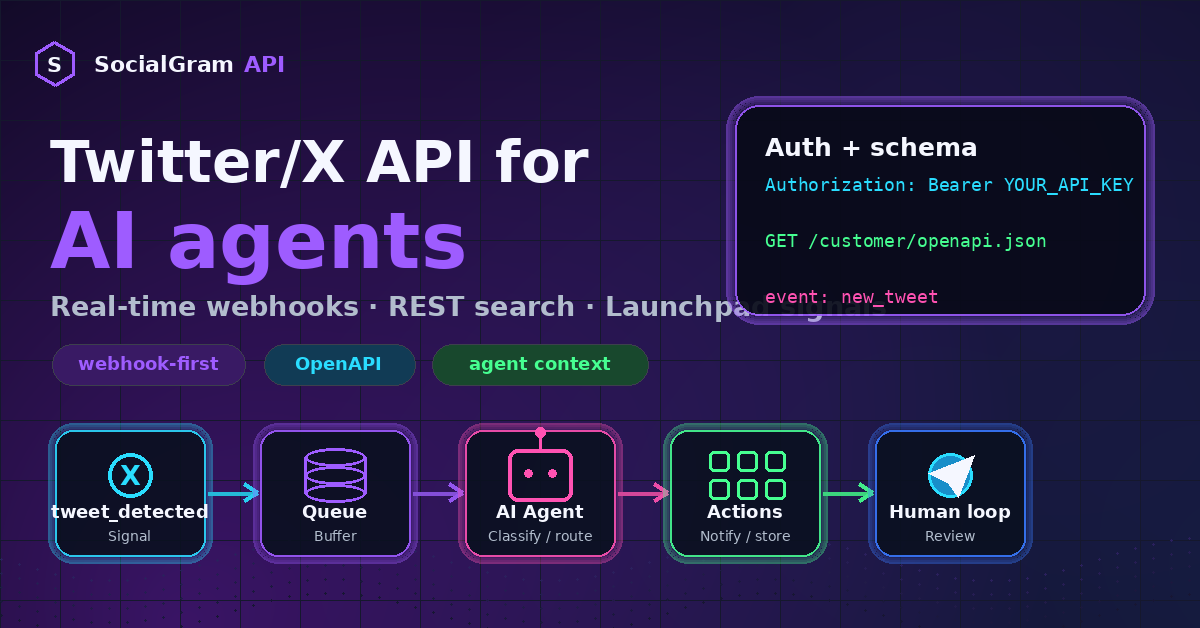
SocialGram API gives AI agents a real-time X/Twitter data layer with webhooks, REST search, launchpad signals, and automation-ready event routing.
AI agents are only as useful as the inputs they can react to.
A trading-signal agent can pre-filter social events. A brand-monitoring agent can decide which mentions need human attention.
But all of those workflows hit the same problem: the agent needs fresh signals.
Static data is not enough. A screenshot is not enough. A manually pasted tweet is not enough. For many automation workflows, the important moment is the moment something new happens.
That is why AI-agent builders should think about X/Twitter data as an event layer, not just as a search endpoint.
SocialGram API is a webhook-first Twitter/X API infrastructure layer for developers who want agents, bots, dashboards, and automations to receive structured X/Twitter events in real time. It supports webhook monitoring for new tweets, REST search and lookups for enrichment, launchpad monitoring for crypto workflows, and an OpenAPI schema for field-level integration work.
Create your SocialGram API key in Telegram bot:
https://t.me/SocialGramAPI_bot
This article shows how SocialGram can act as the real-time X/Twitter data layer for AI agents.
What is SocialGram API for AI agents?
SocialGram API is a real-time Twitter/X API with webhook push delivery and pay-as-you-go REST access.
For AI agents, the key idea is simple:
SocialGram turns X/Twitter activity into structured events that your agent can consume.Instead of making an agent repeatedly poll a REST endpoint to check whether something changed, you can create a monitor and let SocialGram push an event to your webhook receiver.
Your app can then queue the event, dedupe it, enrich it, and pass the clean JSON payload to an agent.
A typical agent workflow looks like this:
X/Twitter signal
  → SocialGram monitor
  → webhook event
  → your receiver
  → queue / background worker
  → AI agent
  → action or human review
Actions can include summarizing, classifying, routing, alerting, storing, enriching, escalating, or starting a follow-up workflow.
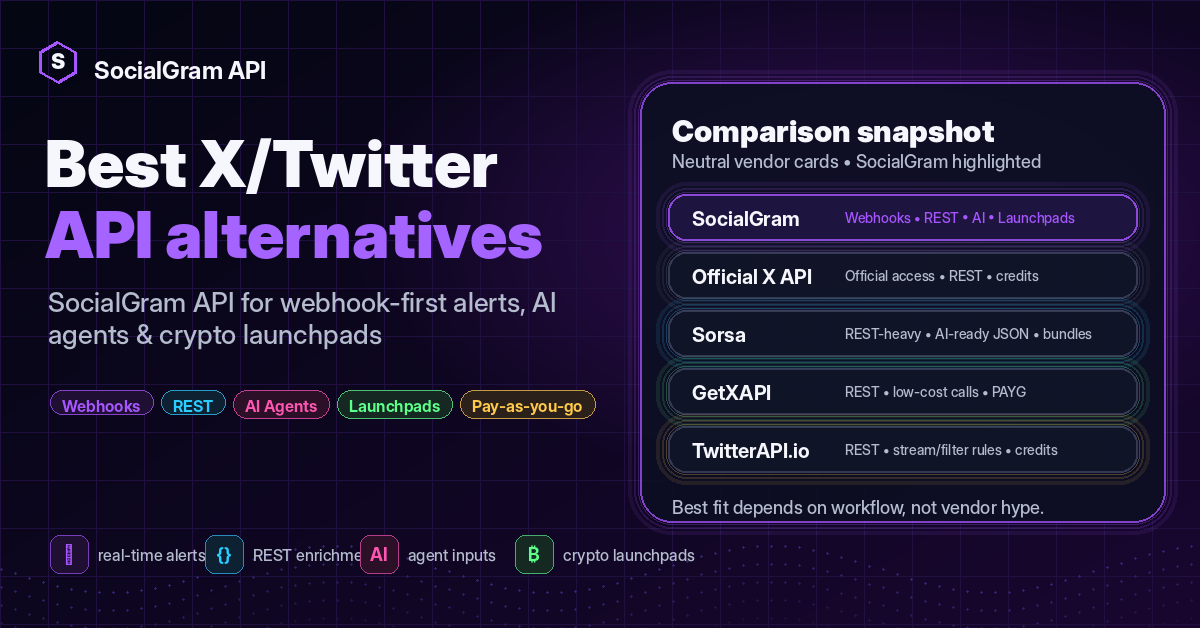
Some X/Twitter API competitors already use language like “AI-ready JSON.” That is useful. Clean JSON matters.
But agent-ready infrastructure should go further.
An AI coding agent needs to understand the integration surface. It needs to know which endpoint to use, what event types exist, how authentication works, how to store IDs safely, how webhooks should be acknowledged, and where to find the OpenAPI schema.
That is where SocialGram’s agent context approach matters. The SocialGram markdown file can be dropped into an AI coding-agent workspace so the agent can ingest the integration rules before generating code.
Why AI agents need real-time social data
AI agents are often described as tools that can reason, plan, and act. But in production systems, the most useful agents are usually event-driven.
They wake up when something happens.
For X/Twitter workflows, those events might be:
- a monitored account posts a new tweet
- a tweet mentions a brand, ticker, product, token, or competitor
- a launchpad-related signal appears
- a KOL account posts an update
- a customer complains publicly
- a community narrative starts moving
- a keyword or hashtag needs review
- a profile needs enrichment before being added to a watchlist
Agents can use social data in several ways.
New tweets as triggers
A new tweet can trigger a summary, classification, risk check, alert, database write, queue event, or human review.
For example:
Monitored account posts → SocialGram webhook → agent classifies → Telegram alert if importantSearch and backfill
Agents do not only need live triggers. Sometimes they need context.
REST search can help an agent answer questions like:
- What has this account said about this topic recently?
- How often has this ticker been mentioned?
- What was the surrounding conversation before this alert?
- Are there earlier tweets that explain the current signal?
SocialGram supports REST search through:
GET /twitter/searchProfile context
A tweet is more useful when the agent understands the author.
Before acting on a tweet, an agent may need to retrieve the profile behind it, resolve a username, or look up users in batches.
Useful SocialGram endpoints include:
GET /twitter/user/{user_id}
GET /twitter/user/screen_name/{username}
POST /twitter/users-by-id
Follower, following, and list context
Some AI-agent workflows need network context.
For example, a KOL due-diligence agent may want to inspect follower/following relationships before trusting a signal or adding an account to a watchlist.
SocialGram includes endpoints for followers, following, lists, list members, and community memberships.
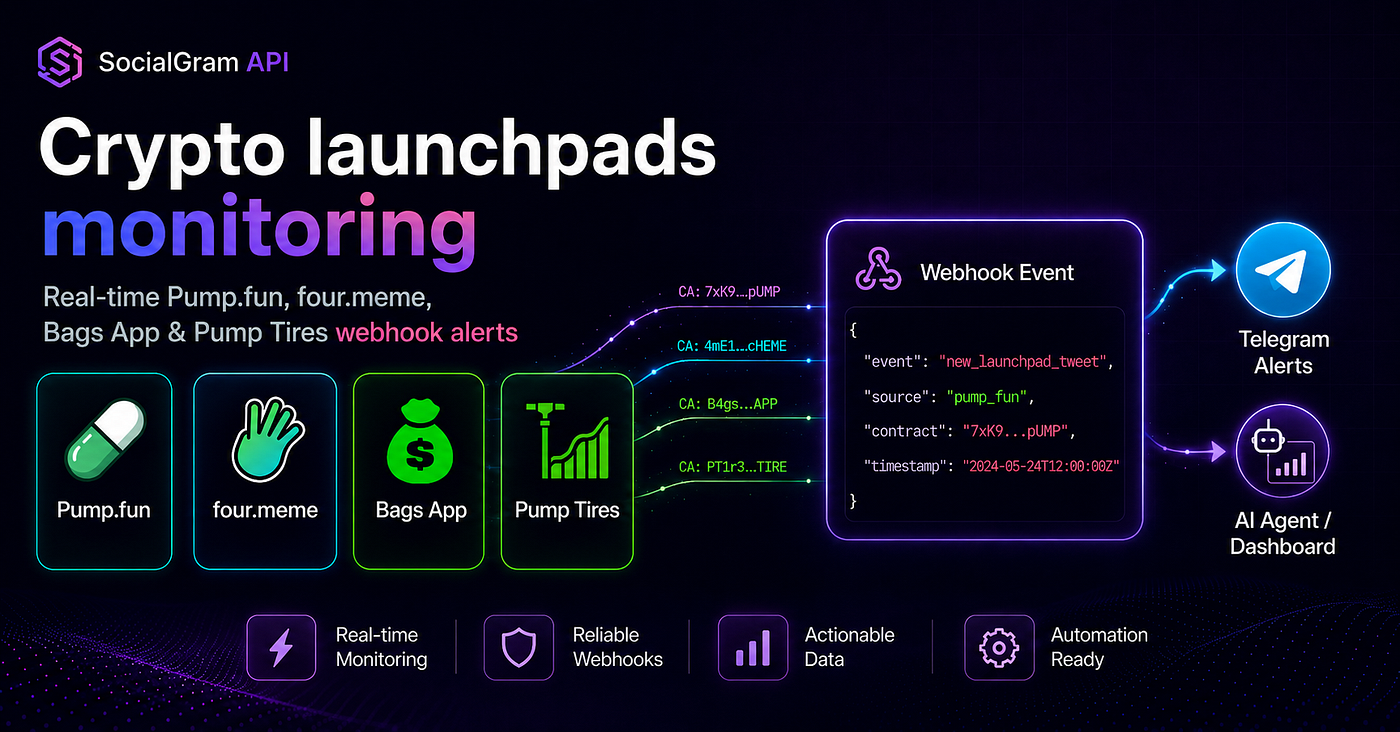
Crypto launchpad signals
Crypto teams often need specialized social triggers.
SocialGram supports launchpad monitor endpoints for:
POST /monitors/stream-pump-fun
POST /monitors/stream-fourdotmeme
POST /monitors/stream-bags-app
POST /monitors/stream-pump-tires
These deliver new_launchpad_tweet events with launchpad metadata under meta.crypto.
That makes SocialGram useful for launchpad alert classifiers, contract-address feeds, Telegram crypto alert bots, and internal monitoring workflows.
This is infrastructure content, not financial advice. Agents should treat crypto-related events as inputs that require downstream validation, risk controls, and human-defined execution rules.
Brand mentions and spike monitoring
Brand-monitoring agents can use SocialGram search and webhook workflows to track mentions, summarize important posts, classify sentiment, or escalate only the events that need a human response.
The agent does not need to read every post manually. It can receive events, filter them, and route the ones that matter.
What SocialGram gives an AI agent
SocialGram gives agents two complementary surfaces:
- Webhook monitoring for real-time push events.
- REST endpoints for search, lookups, backfills, and enrichment.
At a practical level, an AI-agent system can use SocialGram for:
- real-time webhook events
- REST search
- user lookups
- profile enrichment
- follower and following context
- list and list-member context
- launchpad events
- OpenAPI schema validation
- Telegram-first API-key onboarding
- pay-as-you-go monitor and REST usage
Agent workflow architecture

SocialGram gives AI agents a real-time X/Twitter input layer: monitor an event, push it to your webhook, queue it, and let the agent summarize, classify, route, or alert.
A good SocialGram agent workflow separates the webhook handler from the agent logic.
The webhook receiver should be fast. It should parse the payload, do minimal validation, optionally dedupe, enqueue the event, and return 200 OK.
The agent should run after the webhook is acknowledged.
That gives you a cleaner production architecture:
X/Twitter
  → SocialGram monitor
  → webhook POST
  → fast HTTPS receiver
  → queue / background worker
  → AI agent
  → Telegram, Slack, database, dashboard, CRM, or human review
The AI agent can then decide what to do with the event:
- summarize the tweet
- classify the topic
- detect a ticker or token address
- check whether the author is on a watchlist
- enrich the author profile
- route the event into Telegram or Discord
- update a dashboard
- create a research task
- notify a human reviewer
- push a normalized event into another internal system
Give your AI agent real-time X/Twitter inputs instead of making it poll.
https://t.me/SocialGramAPI_bot
Event types agents can use
SocialGram webhook payloads use a simple top-level envelope:
{
  "event": "new_tweet",
  "data": {},
  "meta": {}
}
Agents can route behavior based on the event field.

SocialGram gives agents three useful webhook events: early detection, full tweet delivery, and launchpad-aware tweet delivery.
tweet_detected
tweet_detected is an early lightweight webhook signal when fast_lane is enabled.
Use it when the agent needs an early signal before the full tweet event arrives.
Good uses:
- pre-filtering
- queue priming
- fast classification
- early user feedback
- trading-signal pre-checks
- deciding whether the full event should be enriched later
A tweet_detected payload can include fields such as:
data.id_str
data.id
data.tweet_created_at
data.full_text
data.user
meta.monitor_id
Important note: tweet_detected is unavailable for profiles with X’s official Automated label. For those profiles, use new_tweet as the reliable event.
new_tweet
new_tweet is the authoritative full tweet delivery event for user-tweets monitors.
Use it for durable agent logic:
- writing to a database
- formatting Telegram or Discord alerts
- feeding a tweet into a summarizer
- classifying the full text
- enriching author context
- updating dashboards
- routing to a human
The full tweet object lives in data, and monitor metadata lives in meta.
new_launchpad_tweet
new_launchpad_tweet is the launchpad-aware event.
It includes the tweet object in data and launchpad metadata under:
meta.cryptoUse it for:
- Pump.fun alerts
- four.meme alerts
- Bags App alerts
- Pump Tires alerts
- token-address routing
- launchpad classifiers
- crypto Telegram alert bots
- internal contract-feed workflows
A launchpad-aware AI agent might classify the event, extract token metadata, check internal rules, and route it to a human review queue.
REST endpoints agents can use
Webhook events are the trigger layer. REST endpoints are the enrichment layer.
SocialGram’s customer polling surface includes endpoints for search, user lookup, follower/following lists, lists, list members, and community membership timeline access.
Useful REST endpoints for agents include:
GET /twitter/search
POST /twitter/users-by-id
GET /twitter/user/{user_id}
GET /twitter/user/screen_name/{username}
GET /twitter/followers/list
GET /twitter/friends/list
GET /twitter/lists/show
GET /twitter/lists/members
GET /twitter/user/{user_id}/communities/memberships-timeline
Common agent patterns:
Search after a webhook event
A new tweet arrives. The agent uses /twitter/search to fetch related context.
new_tweet → search same ticker / phrase / account context → summarize with surrounding postsEnrich the author
A tweet arrives from a monitored account. The agent looks up the author profile and adds it to the reasoning context.
new_tweet → user lookup → profile context → classificationInspect a KOL network
Before adding a new account to a high-priority watchlist, the agent fetches followers, following, or list membership context.
username → profile lookup → followers/following/list context → due-diligence scoreBackfill for a research brief
A research agent receives a task like “summarize recent posts around this launch.” It can use REST search to collect relevant tweets, then generate a brief.
SocialGram API agent workflow
For an agentic system, SocialGram is not the entire product. It is the real-time input layer.
A durable agent workflow usually has these components:
- Monitor setup: create account monitors or launchpad monitors.
- Webhook receiver: receive SocialGram events over HTTPS.
- Fast acknowledgment: return
200 OKimmediately. - Dedupe layer: store
data.id_stras the canonical event ID. - Queue or background worker: keep AI calls out of the webhook handler.
- Agent/classifier: summarize, classify, route, or enrich.
- Action layer: Telegram, Slack, Discord, database, dashboard, CRM, or human review.
- Schema validation: use
/customer/openapi.jsonbefore finalizing types.
This is the key difference between a demo and a production workflow.
A demo can call an AI model directly inside a webhook handler.
A production system should not.
Copy-paste agent instruction block
Use this block when asking a coding agent to integrate SocialGram API.
You are integrating SocialGram API into an AI-agent workflow.Use the attached SocialGram API markdown as the source of truth.Important rules:
- Use Bearer token authentication: Authorization: Bearer YOUR_API_KEY.
- API keys come from the SocialGram Telegram bot.
- Prefer webhook delivery over polling for real-time account monitoring.
- For account monitoring, start with PUT /monitors/default-webhook and POST /monitors/user-tweets.
- For launchpad monitoring, use POST /monitors/stream-pump-fun, POST /monitors/stream-fourdotmeme, POST /monitors/stream-bags-app, or POST /monitors/stream-pump-tires.
- Supported webhook event types are tweet_detected, new_tweet, and new_launchpad_tweet.
- Webhook payloads use the envelope { event, data, meta }.
- Store id_str values as strings.
- Dedupe webhook deliveries on data.id_str plus event type.
- Return 200 OK immediately from the webhook handler, then process heavy work in a queue or background worker.
- Use /customer/openapi.json for exact schemas, enum values, request bodies, and response fields.Before writing code, ask me these three questions:
1. Which use case applies: polling, account webhooks, launchpad webhooks, or hybrid?
2. What runtime am I targeting: Python, Node.js, serverless, n8n, or something else?
3. What is the correct YOUR_BASE_URL for this account?That block turns the documentation into agent-ready context. It tells the coding agent how to behave before it starts generating code.
Example: AI agent receives tweet_detected
A latency-sensitive agent can use tweet_detected as the earliest lightweight signal.
For example:
tweet_detected arrives
  → extract id_str and text snippet
  → run a cheap pre-filter
  → mark event as interesting or ignore
  → wait for new_tweet before durable processing
This pattern is useful when you want a fast first pass but still want the full tweet object before writing to a database or sending the final alert.
Use tweet_detected for early filtering. Use new_tweet for durable agent logic.
Example builds

SocialGram can power AI tweet summarizers, launchpad classifiers, brand monitors, KOL due-diligence agents, Telegram alert agents, and no-code automation workflows
AI tweet summarizer
Monitor a set of accounts. When a new tweet arrives, the agent summarizes it and sends a concise brief to Slack, Telegram, Discord, or an internal dashboard.
Useful for:
- executive briefs
- research teams
- newsrooms
- market intelligence teams
- vertical communities
Launchpad alert classifier
Receive new_launchpad_tweet events, inspect meta.crypto, classify relevance, and route only the important events to a Telegram channel or internal queue.
Useful for:
- crypto builders
- crypto launchpad tweets watchers
- internal research teams
- token monitoring dashboards
This is infrastructure, not financial advice. Your downstream system should handle validation, risk controls, and execution rules.
Brand mention monitor
Use REST search and webhook monitoring to detect brand, product, or competitor mentions. An agent can classify sentiment, urgency, and routing destination.
Useful for:
- SaaS teams
- support teams
- community managers
- agencies
- product marketing teams
KOL due-diligence agent
Before adding an account to a watchlist, the agent can enrich the profile, inspect follower/following context, and generate a short research brief.
Useful for:
- influencer research
- partnership teams
- crypto KOL analysis
- community intelligence
Telegram alert agent
A Telegram alert agent can format events for a channel or group, apply user-specific filters, and notify humans only when a tweet passes your rules.
SocialGram handles the input event. Your product handles formatting, billing, user preferences, and routing.
No-code n8n workflow
A no-code builder can send SocialGram webhooks into n8n, Zapier-style tools, Airtable, Google Sheets, Slack, Telegram, or a database.
A simple no-code workflow might be:
SocialGram webhook → n8n webhook node → filter → AI summary → Telegram message → database rowExample implementation: FastAPI receiver plus agent classifier
The example below receives SocialGram webhook events, acknowledges quickly, and runs the agent/classifier outside the request path.
It is intentionally simple. In production, replace the in-memory seen set with Redis, Postgres, DynamoDB, or another durable idempotency store.
from fastapi import BackgroundTasks, FastAPI, Request, Response
from typing import Any
app = FastAPI()seen: set[str] = set()
async def classify_with_agent(payload: dict[str, Any]) -> None:
    event = payload.get("event")
    data = payload.get("data") or {}
    meta = payload.get("meta") or {}
tweet_id = str(data.get("id_str") or "")
text = data.get("full_text") or data.get("text") or ""
author = (data.get("user") or {}).get("screen_name", "unknown") # This is where you would call your AI agent, LLM workflow,
# rules engine, classifier, or no-code automation endpoint.
agent_input = {
"event": event,
"tweet_id": tweet_id,
"author": author,
"text": text,
"monitor_id": meta.get("monitor_id"),
"crypto": meta.get("crypto"),
} print("agent_input", agent_input) # Example decisions:
# - summarize text
# - classify urgency
# - detect ticker or contract address
# - enrich author profile
# - send Telegram alert
# - write to database
# - route to human review
@app.post("/socialgram-webhook")
async def receive_socialgram_webhook(
    request: Request,
    background_tasks: BackgroundTasks,
) -> Response:
    payload = await request.json()
event = payload.get("event")
if event not in {"tweet_detected", "new_tweet", "new_launchpad_tweet"}:
return Response(status_code=200) data = payload.get("data") or {}
tweet_id = str(data.get("id_str") or "") if not tweet_id:
return Response(status_code=200) dedupe_key = f"{event}:{tweet_id}"
if dedupe_key in seen:
return Response(status_code=200) seen.add(dedupe_key) # Do not call your AI agent directly in the webhook path.
# Queue the work and acknowledge quickly.
background_tasks.add_task(classify_with_agent, payload) return Response(status_code=200)A production version would usually add:
- Redis or database idempotency
- structured logs
- request signature validation if your architecture adds it
- queue infrastructure
- retries with bounded backoff
- dead-letter handling
- OpenAPI-generated types
- monitoring and alerting
Use the SocialGram markdown as your agent context, then validate schemas with /customer/openapi.json.
https://t.me/SocialGramAPI_bot
n8n and no-code automation pattern
SocialGram works well with no-code and low-code tools because webhook events are just HTTPS POST requests.
A no-code automation pattern might look like this:
1. Create a webhook URL in n8n.
2. Set that URL as your SocialGram default webhook or monitor-specific destination.
3. Receive new_tweet or new_launchpad_tweet events.
4. Add a filter node.
5. Send the event to an AI summarizer node.
6. Route the output to Telegram, Slack, Airtable, Google Sheets, Notion, or a database.
For AI automation builders, the important part is that SocialGram provides the trigger.
The workflow tool handles branching.
The agent handles interpretation.
Your product logic handles what happens next.
Production considerations
AI agents can make webhook systems feel magical, but production systems still need boring engineering discipline.
Return 200 OK fast
Your webhook handler should not wait for an LLM call, Telegram message, database-heavy transaction, or external API chain before acknowledging the event.
Parse the payload. Do minimal validation. Dedupe if cheap. Enqueue work. Return 200 OK.
Use idempotency
Webhook delivery systems should be treated as at-least-once.
Use an idempotency key like:
{event}:{data.id_str}This lets you process tweet_detected and new_tweet separately while avoiding duplicate downstream work for the same event type.
Store id_str as a string
Tweet IDs are large numeric identifiers.
Store tweet IDs, user IDs, list IDs, and monitor-linked IDs as strings in your own app and database.
This is especially important in JavaScript and TypeScript systems where large numeric IDs can lose precision.
Keep polling under control
SocialGram supports REST polling for search and lookups, but polling should not be uncontrolled bulk crawling.
Use REST for search, enrichment, backfills, and operator tooling. Use webhooks for real-time triggers.
Back off on temporary errors
For REST calls, handle temporary errors with bounded exponential backoff and jitter.
Treat rate limits and upstream timeouts as normal operational cases, not surprises.
Validate schemas with OpenAPI
Before finalizing request and response models, use:
/customer/openapi.jsonUse it for:
- exact field names
- enum values
- optional vs required attributes
- request body shapes
- response schemas
- generated client types
- validation for
destinations,fast_lane, and monitor data
Separate signal from action
SocialGram provides the social input layer. Your system should own the decision layer.
For example, in crypto workflows, a new_launchpad_tweet event should not automatically become a trade. It should become an input to validation, risk checks, policy checks, and human-defined execution logic.
FAQ
Can AI agents use SocialGram API?
Yes. SocialGram API can serve as a real-time X/Twitter data layer for AI agents. Agents can receive webhook events, use REST endpoints for enrichment, and validate schemas with
/customer/openapi.json.
What is the best Twitter API for AI agents?
The best Twitter API for AI agents depends on the workflow. If the agent needs real-time triggers, webhook events, REST enrichment, and an agent-readable integration context, SocialGram is a strong fit.
Does SocialGram have OpenAPI?
Yes. SocialGram points developers to:
/customer/openapi.json
Use it for exact field names, schemas, request bodies, response models, enums, and generated client types.
Is SocialGram better for webhooks or polling?
SocialGram is strongest when used as a webhook-first API. Use webhooks for real-time monitoring and use REST endpoints for search, lookups, enrichment, and backfills.
Can I use SocialGram with n8n?
Yes. SocialGram webhook events can be sent to an n8n webhook URL. From there, you can filter, summarize, route, store, and send events into Telegram, Slack, Airtable, Google Sheets, Notion, or your own API.
Can I build Telegram bots with SocialGram?
Yes. A common pattern is:
SocialGram webhook → your receiver → queue → formatter → Telegram Bot API
SocialGram handles event delivery. Your bot handles formatting, permissions, customer routing, and message delivery.
Can I use SocialGram for crypto signals?
You can use SocialGram as an infrastructure layer for crypto-related social signals, including launchpad monitoring and token-address workflows.
This is not financial advice. Your downstream system should handle validation, risk controls, compliance, and execution rules.
What webhook events should my agent listen for?
Start with:
tweet_detected new_tweet new_launchpad_tweet
Use
tweet_detectedfor early pre-filtering,new_tweetfor full tweet processing, andnew_launchpad_tweetfor launchpad-aware crypto workflows.
How do I get started?
Create your SocialGram API key in Telegram:
Then set a webhook, create a monitor, receive events, and connect those events to your AI agent.
Final thoughts
AI agents need fresh inputs.
For X/Twitter workflows, that means new tweets, search results, profile context, follower/list context, and launchpad signals should be accessible as structured events and API responses.
SocialGram API gives developers a webhook-first way to turn public X/Twitter activity into agent-readable inputs.
Use webhooks for real-time triggers. Use REST for enrichment. Use the SocialGram markdown as agent context. Use /customer/openapi.json for schemas. Return 200 OK fast. Dedupe by data.id_str. Queue heavy work. Let the agent classify, summarize, route, store, or notify.
That is the foundation for AI tweet summarizers, crypto launchpad tweets watchers, brand monitors, KOL due-diligence agents, Telegram alert agents, and no-code automation workflows.
Create your SocialGram API key in Telegram:
https://t.me/SocialGramAPI_bot
메타데이터
- post_id
- be3d87c45d37
- slug
- a-twitter-x-api-for-ai-agents-search-monitor-route-and-react-to-tweets-in-real-time-be3d87c45d37
- url
- https://medium.com/@socialgramapi/a-twitter-x-api-for-ai-agents-search-monitor-route-and-react-to-tweets-in-real-time-be3d87c45d37
- canonical_url
- https://medium.com/@socialgramapi/a-twitter-x-api-for-ai-agents-search-monitor-route-and-react-to-tweets-in-real-time-be3d87c45d37
- author_url
- https://medium.com/@socialgramapi
- status
- ok
- fetched_at
- 2026-07-08 20:12:56