Designing Azure VMware Networking for Beginners
Designing a robust and efficient network for Azure VMware Solution (AVS) can seem daunting for beginners. However, understanding the basics…
Designing Azure VMware Networking for Beginners
Designing a robust and efficient network for Azure VMware Solution (AVS) can seem daunting for beginners. However, understanding the basics and key considerations can simplify the process and ensure a successful deployment. Here are some essential takeaways to help you get started with AVS networking design.
Understanding the Basics
Azure VMware Solution (AVS) allows you to run VMware workloads natively on Azure. This integration provides the flexibility and scalability of Azure while leveraging your existing VMware investments. The network design for AVS involves several components and considerations to ensure seamless connectivity and optimal performance.
Network Segments and Connectivity
One of the fundamental aspects of AVS networking is understanding the network segments within an AVS private cloud infrastructure. These segments are implemented by VMware’s network virtualization stack, which includes VMware NSX-T. The key network segments are:
- Management Network: Used for managing the AVS infrastructure.
- vMotion Network: Facilitates the migration of virtual machines between hosts.
- vSAN Network: Supports storage traffic for VMware vSAN.
- VM Network: Connects virtual machines to the external network.
Four Design Areas of AVS Networking
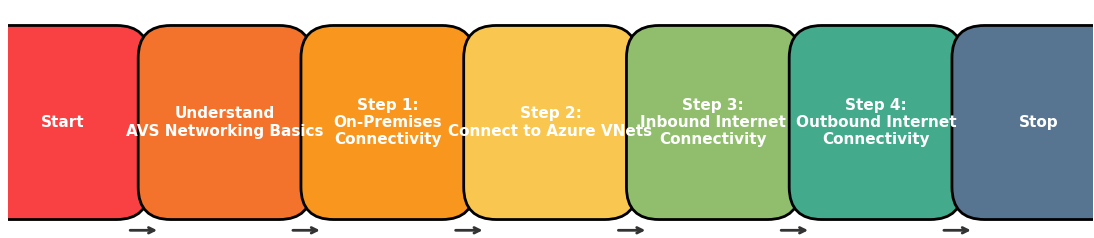
The AVS network design guide encompasses four critical design areas:
- Connectivity with On-Premises Datacenters:
- This area supports a broad set of use cases, including HCX migrations, hybrid applications, and remote vCenter or NSX-T Data Center administration. AVS supports multiple options for hybrid connectivity, such as Azure ExpressRoute circuits and internet-based IPSec virtual private networks
- Connectivity with Azure Virtual Networks:
- AVS runs on bare-metal VMware vSphere clusters that can be connected to native Azure virtual networks via Azure ExpressRoute. This connectivity enables you to build applications that span both environments or use jump box virtual machines in Azure to log in to vCenter (vSphere Client) and NSX-T Manager console for administration purposes
- Inbound Internet Connectivity:
- Inbound internet connectivity allows applications running on AVS to be exposed to the internet via public IP addresses. Internet-facing applications are typically published through security devices such as application delivery controllers, web application firewalls, and next-generation firewalls. Design decisions about inbound connectivity are driven by the placement of these devices
- Outbound Internet Connectivity:
- Outbound internet connectivity is necessary when applications running on AVS need access to public endpoints. Typical use cases include downloading software updates, consuming public websites or APIs, and internet browsing. AVS provides several options for implementing outbound internet connectivity, which may or may not rely on Azure native resources. Security requirements like firewalling and forward proxying typically drive design decisions in this area
Here is an workflow diagram to help visualize the AVS network design steps:
Performance and Reliability
Ensuring performance and reliability at scale is essential for AVS deployments. This involves:
- Network Bandwidth: Adequate bandwidth is necessary to handle the traffic between AVS and other networks.
- Latency: Minimizing latency is crucial for performance-sensitive applications.
- Redundancy: Implementing redundant connections and failover mechanisms to ensure high availability.
Zero-Trust-Based Network Security
Security is a top priority in any network design. AVS networking should follow zero-trust principles, which include:
- Segmentation: Dividing the network into smaller segments to limit the impact of potential security breaches.
- Access Control: Implementing strict access controls to ensure only authorized users and devices can access the network.
- Monitoring: Continuous monitoring and logging of network traffic to detect and respond to security incidents promptly.
Extensibility
Designing your AVS network with extensibility in mind allows for easy expansion of network footprints. This includes:
- Scalability: Ensuring the network can scale to accommodate growing workloads and additional resources.
- Flexibility: Designing the network to support various connectivity options and configurations.
Collaboration and Documentation
Effective collaboration between different departments, such as Cyber Security, IT, and BU, is essential for a successful AVS deployment. Additionally, thorough documentation of the network design and configurations helps maintain consistency and aids in troubleshooting.
Conclusion
Designing Azure VMware networking for beginners involves understanding the basic network segments, ensuring hybrid integration, prioritizing performance and reliability, implementing zero-trust security principles, and planning for extensibility. By following these key takeaways and considering the four critical design areas, you can create a robust and efficient network for your AVS deployment, leveraging the power of Azure and VMware to meet your business needs.
References:
Azure VMware Solution network design guide — Cloud Adoption Framework | Microsoft Learn
메타데이터
- post_id
- bea19d82c99b
- slug
- designing-azure-vmware-networking-for-beginners-bea19d82c99b
- url
- https://medium.com/@kim.vaddi/designing-azure-vmware-networking-for-beginners-bea19d82c99b
- canonical_url
- https://medium.com/@kim.vaddi/designing-azure-vmware-networking-for-beginners-bea19d82c99b
- author_url
- https://medium.com/@kim.vaddi
- status
- ok
- fetched_at
- 2026-07-10 05:19:05


