Databricks: How to connect Tableau to SQL Warehouse or Spark Compute
With Simba Spark ODBC driver, connecting Tableau to SQL Warehouse or Spark compute has been super easy.
Databricks: How to connect Tableau to SQL Warehouse or Spark Compute
With Simba Spark ODBC driver, connecting Tableau to SQL Warehouse or Spark cluster has been super easy.
Requirements:
Tableau Desktop 2021.4 or above
Databricks ODBC Driver 2.6.19 or above
Step1: Create a System DSN
Enter DSN Name, Databricks Host Name, Port 443
Authentication: OAuth2.0 (If you are using a PAT token, refer to the next image)
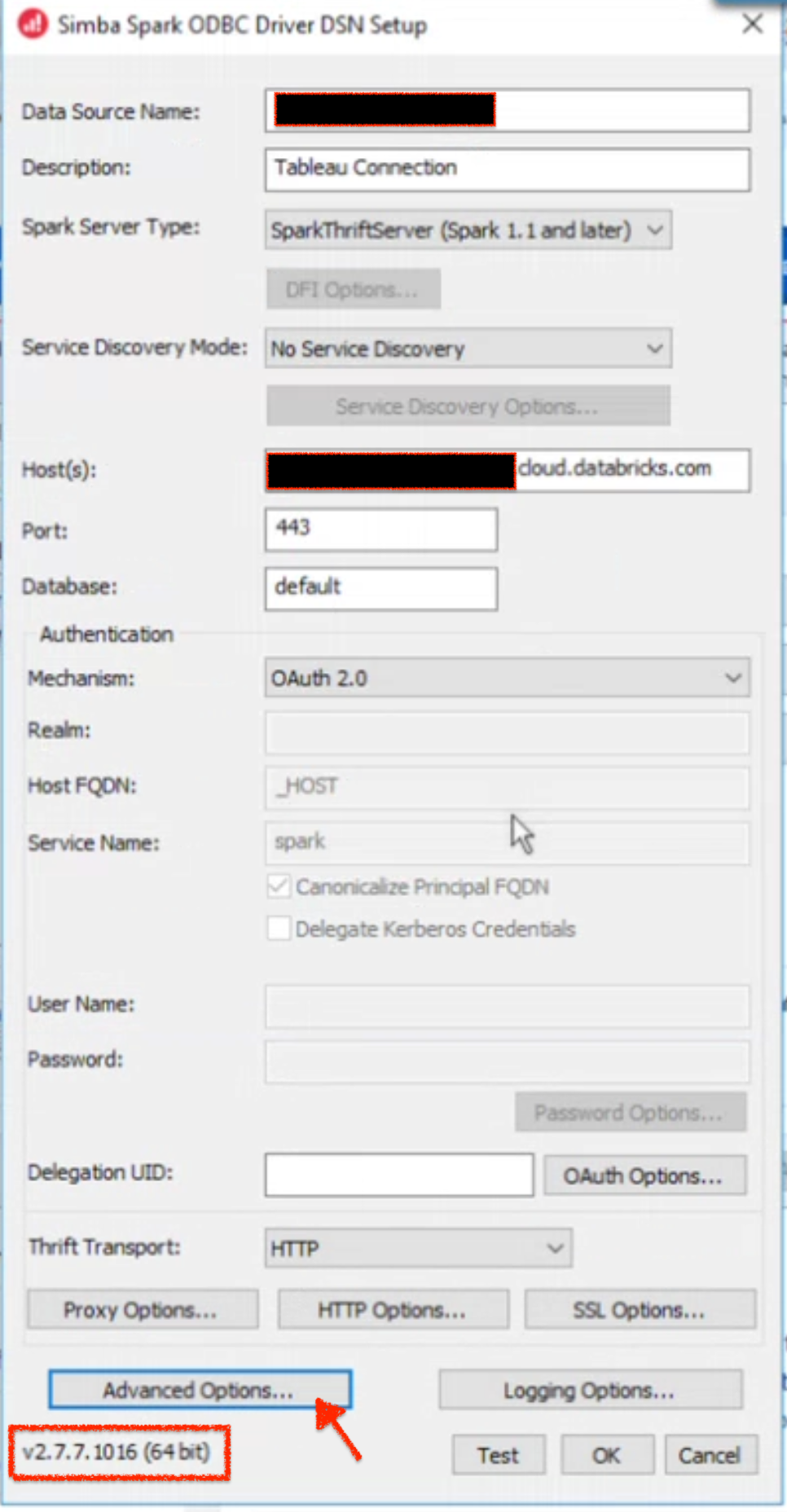
Authentication using PAT Token

Step 2: Set HTTP Options
HTTP Path from SQL Warehouse

HTTP Path from Spark Compute

Click the HTTP Options and copy the HTTP Path from above

Step 3: Advanced Options
This step is crucial if you are using the latest Spark SQL constructs.
Without this setting, the Spark SQL queries using new constructs will fail.
For example
If you are building a new SQL Query in Tableau that uses Array functionality, Tableau won’t be able to query the data without setting the Advances Options.
-- Create a table with multiple regions, countries, and states
CREATE OR REPLACE TABLE locations (
    region ARRAY<STRING>,
    country ARRAY<STRING>,
    state ARRAY<STRING>
);

-- Insert some data into the table
INSERT INTO locations VALUES
(ARRAY('North America', 'Europe'), ARRAY('USA', 'France'), ARRAY('California', 'Texas')),
(ARRAY('Asia', 'Europe'), ARRAY('China', 'Germany'), ARRAY('Beijing', 'Berlin')),
(ARRAY('South America', 'Africa'), ARRAY('Brazil', 'South Africa'), ARRAY('Sao Paulo', 'Cape Town'));

-- Retrieve all the rows
Select * from locations;

-- Query to select the first element of each array using [0] notation
SELECT region[0] AS first_region, country[0] AS first_country, state[0] AS first_state FROM locations;
Advanced Options > Enable Use Native Query.

Once the connection is established, the sky is the limit to unleash creativity and build amazing dashboards.
If you like the article, please clap and share your feedback.
메타데이터
- post_id
- bee7ffe8dfaf
- slug
- databricks-how-to-connect-tableau-to-sql-warehouse-or-spark-compute-bee7ffe8dfaf
- url
- https://medium.com/@gchandra/databricks-how-to-connect-tableau-to-sql-warehouse-or-spark-compute-bee7ffe8dfaf
- canonical_url
- https://medium.com/@gchandra/databricks-how-to-connect-tableau-to-sql-warehouse-or-spark-compute-bee7ffe8dfaf
- author_url
- https://medium.com/@gchandra
- status
- ok
- fetched_at
- 2026-07-09 13:13:48