I Got Tired of Switching Between 8 React Native Debugging Tools, So I Built One Instead
PulseRN is an open-source, local-first desktop debugger for React Native that brings logs, network requests, Redux, navigation…
I Got Tired of Switching Between 8 React Native Debugging Tools, So I Built One Instead
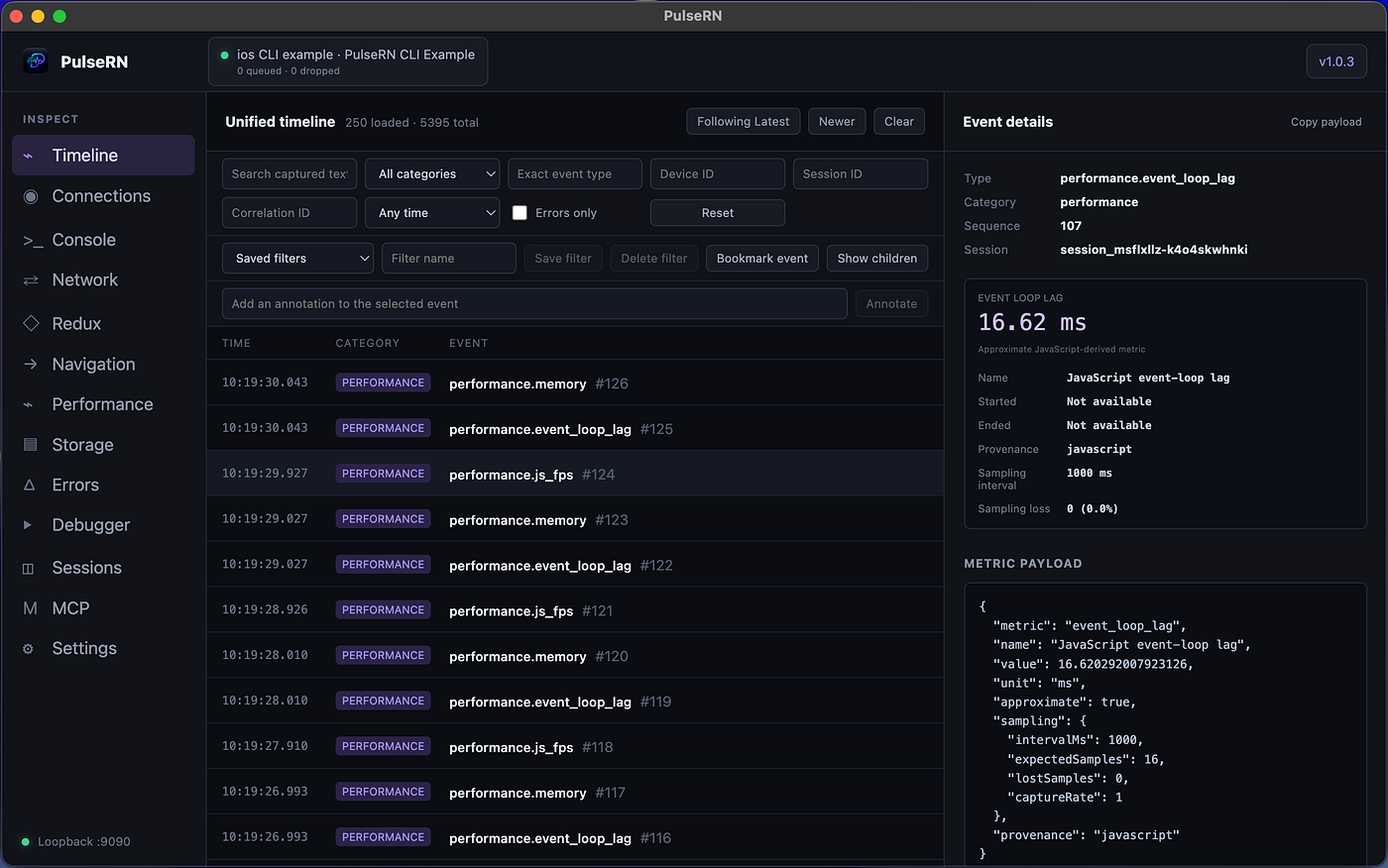
PulseRN is an open-source, local-first desktop debugger for React Native that brings logs, network requests, Redux, navigation, performance, errors, Hermes debugging, and AI workflows into one timeline.
Debugging React Native applications often feels less like debugging and more like solving a mystery.
A user taps a button.
A Redux action is dispatched.
A network request starts.
Navigation changes to another screen.
An authentication refresh kicks in.
A promise gets rejected.
Finally, an error appears.
The information exists — but it’s scattered across the console, network inspector, Redux DevTools, navigation logs, Metro, Hermes debugger, and sometimes even Sentry. By the time you’ve pieced everything together, you’ve spent more time reconstructing the sequence than actually fixing the bug.
After years of building and maintaining large React Native applications, I found myself asking the same question over and over:
Why do I need so many tools just to understand what happened?
So I built PulseRN.
PulseRN is an open-source, local-first desktop debugger for React Native that brings console logs, network requests, Redux actions, navigation events, performance metrics, storage, errors, and Hermes debugging into a single chronological timeline. The idea is simple: bugs are sequences of events, so the debugger should preserve that sequence.
The Problem Isn’t Missing Tools
React Native already has excellent debugging tools.
The challenge isn’t that we’re missing inspectors — it’s that they’re disconnected.
Imagine a checkout flow:
10:14:03  Navigation → Checkout
10:14:05  Redux → checkout/submitted
10:14:05  POST /orders
10:14:06  401 Unauthorized
10:14:06  Redux → auth/refreshRequested
10:14:07  POST /token → Timeout
10:14:07  Checkout Failed
If you only look at the final error, it appears to be a checkout issue.
If you only inspect the failed API call, it looks like a backend problem.
The timeline tells a different story: the session expired, token refresh failed, and checkout never had a chance to recover. That’s the context I wanted to preserve automatically instead of rebuilding manually.
Everything in One Timeline
PulseRN captures multiple debugging signals and displays them in one place.
Instead of jumping between different windows, you can follow the application’s story from start to finish.
Currently, PulseRN supports:
- Console logs
- Network requests (
fetch,XMLHttpRequest, optional Axios) - Redux actions and state changes
- React Navigation events
- Performance signals
- JavaScript errors
- AsyncStorage and MMKV inspection
Because every event shares the same timeline, it’s much easier to understand cause and effect instead of treating each event as an isolated incident.
Built-in Hermes Debugging
Sometimes you need more than a timeline.
Sometimes you need to pause execution, inspect variables, and step through code.
PulseRN includes a Hermes debugger with support for:
- Original TypeScript source maps
- Breakpoints
- Conditional breakpoints
- Watches
- Call stack inspection
- Scope inspection
- Expression evaluation
- Step Into / Step Over / Step Out
The debugger works alongside the event timeline, so you can move seamlessly from “What happened?” to “Why did this happen?” without switching tools.
AI That Uses Evidence Instead of Guessing
AI coding assistants are becoming part of every developer’s workflow, but they usually only see whatever logs you manually paste into the chat.
PulseRN takes a different approach.
It includes a local Model Context Protocol (MCP) server that allows compatible AI clients such as Claude, Cursor, and Codex to request structured debugging evidence instead of raw log dumps.
For example, you can ask:
Diagnose the latest session and explain the highest-confidence failure.
Or:
Find every failed checkout request and correlate it with Redux and navigation events.
Instead of guessing from thousands of log lines, the AI receives structured relationships between events, diagnoses, and supporting evidence.
Local-First by Design
Debugging tools often deal with sensitive information.
That’s why PulseRN is designed to be local-first.
Sessions are stored locally in SQLite, communication stays on the local machine by default, and the SDK supports configurable redaction for fields such as passwords, tokens, cookies, and API keys before data is transmitted.
Getting Started
Getting started only takes a few minutes.
Install the desktop application, add the SDK to your React Native project, configure it during development, and connect your app.
PulseRN works with both Expo Development Builds and bare React Native applications on macOS, Windows, and Linux.
Why I Open-Sourced It
PulseRN started as an internal idea to solve a problem I kept running into while building React Native apps.
As it evolved, I realized many developers were facing the same debugging challenges.
Instead of keeping it private, I decided to open-source the project under the MIT License so the React Native community can use it, contribute to it, and help shape where it goes next.
There’s still plenty to improve, and that’s exactly what makes building in public exciting.
I’d Love Your Feedback
If you’re a React Native developer, I’d love to hear your thoughts.
- Does a unified timeline solve a problem you face?
- What debugging integrations would make it even more useful?
- Is the setup straightforward?
- What would prevent you from trying it on a real project?
⭐ GitHub: https://github.com/maahibhama/PulseRN
📖 Documentation: https://maahibhama.github.io/PulseRN-Site/
If you give PulseRN a try, let me know what works — and especially what doesn’t. That’s the best way to make an open-source debugger better.
메타데이터
- post_id
- beea60bce468
- slug
- i-got-tired-of-switching-between-8-react-native-debugging-tools-so-i-built-one-instead-beea60bce468
- url
- https://medium.com/@maahibhama/i-got-tired-of-switching-between-8-react-native-debugging-tools-so-i-built-one-instead-beea60bce468
- canonical_url
- https://medium.com/@maahibhama/i-got-tired-of-switching-between-8-react-native-debugging-tools-so-i-built-one-instead-beea60bce468
- author_url
- https://medium.com/@maahibhama
- status
- ok
- fetched_at
- 2026-08-17 19:53:35


