Building a Serverless MCP Server on AWS with IAM Authentication
Introduction
Building a Serverless MCP Server on AWS with IAM Authentication

Introduction
AI coding assistants become far more powerful when they can access your company’s internal data. Instead of answering only from their training data, they can query real databases, retrieve internal documentation, and provide context-aware responses based on your actual systems.
The Model Context Protocol (MCP) standardizes how AI agents connect to external data sources. In this article, we explore the architecture of a serverless MCP server on AWS that exposes a DynamoDB database through API Gateway and Lambda, secured with IAM authentication. We then connect Kiro CLI to this server using mcp-proxy-for-aws, enabling the AI assistant to query internal data using the same AWS credentials you already use for daily work.
The complete source code — Terraform infrastructure, Lambda function, seed scripts, and Kiro CLI agent configuration — is available on GitHub: https://github.com/biagolini/TerraformAwsMcpServerlessKiroCli
If you prefer learning by reading code, clone the repo and follow the README. This article focuses on the why and the how behind the architecture.
This article is part of a series exploring Kiro CLI capabilities. Previous articles covered spec-driven development, tool trust, MCP secrets with macOS Keychain, .kiroignore and terminal troubleshooting, and multi windows.
Solution Architecture
The architecture follows a fully serverless pattern with IAM-based authentication:
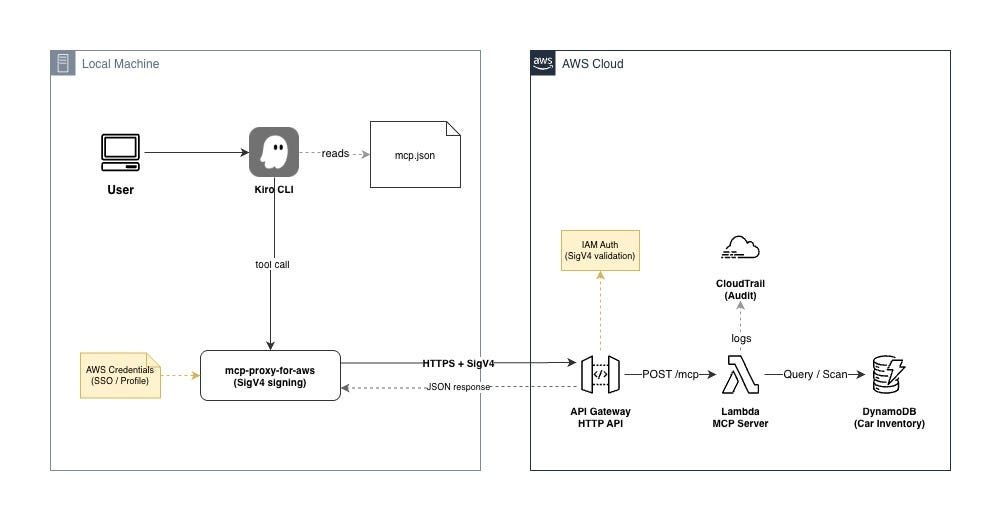
The request flow when a developer asks “Show me available SUVs”:
- Kiro CLI sends the message to the language model
- The model decides to call the
search_cars_by_typeMCP tool - Kiro CLI forwards the tool call to the mcp-proxy-for-aws process
- The proxy signs the HTTP request with SigV4 using local AWS credentials
- API Gateway HTTP API validates the signature and checks IAM permissions
- Lambda processes the MCP request and queries DynamoDB
- Results return through the same chain back to Kiro CLI
- The model formats the data into a human-readable response
The entire round trip takes 1–3 seconds, including Lambda cold start on the first invocation.
Why IAM Authentication?
Traditional MCP servers often use API keys or OAuth tokens. IAM authentication provides distinct advantages for AWS-native environments:
- Zero additional credentials — developers already have AWS credentials configured for daily work
- Unified access control — the same IAM policies that control AWS resource access also control MCP server access
- Automatic credential rotation — AWS SSO provides temporary credentials that rotate automatically
- Universal — EC2 instance roles, ECS task roles, Lambda execution roles, and developer laptops all use the same mechanism
- Auditable — every request is logged in CloudTrail with the caller’s identity
For enterprise teams, this means no separate token management, no secrets to rotate, and no OAuth infrastructure to maintain.
How the MCP Server Works
The Lambda function implements the MCP Streamable HTTP transport using JSON-RPC 2.0. It handles three core MCP methods:
initialize— Handshake — declares server capabilitiestools/list— Returns available tools and their schemastools/call— Executes a tool and returns results
The server exposes three tools:
search_cars_by_type— Query cars by body type using a DynamoDB GSIget_all_available_cars— Scan all available inventoryget_car_details— Get a single car by ID
Each tool returns its result as a JSON text content block inside the standard MCP response envelope. The AI model then interprets the raw data and formats it for the user.
Error Handling Best Practice
The MCP specification defines the isError: true field in tool results for reporting execution failures. When the server returns a clear error message with this flag, the AI model naturally communicates the failure to the user without needing special agent configuration:
{
  "result": {
    "content": [{"type": "text", "text": "Unauthorized: invalid credentials"}],
    "isError": true
  }
}
In our architecture, unauthorized requests are rejected by API Gateway before reaching Lambda (HTTP 403). The mcp-proxy-for-aws propagates this failure to Kiro CLI, and the AI reports it to the user naturally.
Security Architecture
Defense in Depth
The solution implements multiple security layers:
- Transport layer —
mcp-proxy-for-awsrequires valid AWS credentials to even start. Without them, the MCP tools don't appear in the AI agent's tool list. - API Gateway layer — SigV4 signature validation ensures only authenticated AWS identities can reach the endpoint.
- IAM policy layer — The
execute-api:Invokepermission controls which identities can call the API. - Lambda layer — The function has read-only access to DynamoDB (least privilege).
Agent Configuration as Security Boundary
When configuring the Kiro CLI agent, restricting tools to only what's needed prevents the AI from attempting workarounds when the MCP server is unavailable:
{
  "tools": ["read", "@cars-inventory"],
  "allowedTools": ["read", "@cars-inventory"]
}
Without shell access, the agent cannot attempt to discover credentials, iterate over profiles, or bypass the authentication layer. This is a critical best practice — always limit agent tools to the minimum required set.
Universal Access Pattern
The same endpoint works for all consumers without code changes:
- Developer laptop —
aws sso login+ profile - EC2 instance — Instance role (automatic)
- ECS task — Task role (automatic)
- Lambda function — Execution role (automatic)
- CI/CD pipeline — Assumed role
Infrastructure Overview
The Terraform code creates:
- DynamoDB table — Car inventory with
car_idhash key andbody_typeGSI - Lambda function — Python 3.12, MCP server logic
- IAM role — Lambda execution with DynamoDB read-only access
- API Gateway HTTP API —
POST /mcproute withAWS_IAMauthorization
The infrastructure follows a modular structure: infrastructure/ contains the reusable Terraform module, environments/dev/ contains environment-specific configuration. State is stored remotely in S3.
For the complete Terraform code, see the GitHub repository.
Deploy and Test
Prerequisites
- AWS CLI configured with a profile
- Terraform >= 1.0
- uv package manager
- Kiro CLI
- AWS account with permissions to create DynamoDB, Lambda, API Gateway, and IAM resources
Deploy
Clone the repository and navigate to the dev environment folder:
git clone https://github.com/biagolini/TerraformAwsMcpServerlessKiroCli.git
cd TerraformAwsMcpServerlessKiroCli/environments/dev
Copy the example configuration files and fill them with your S3 bucket, region, and AWS profile:
cp backend.hcl.example backend.hcl
cp terraform.tfvars.example terraform.tfvars
Initialize Terraform with the backend configuration:
terraform init -backend-config=backend.hclDeploy the infrastructure:
terraform apply -auto-approveSeed the Database
Set your AWS profile:
export AWS_PROFILE=your-profileRun the seed script to populate DynamoDB with sample car data:
./seed/seed_cars.shGrant API Access
Attach this policy to the IAM identity that will consume the MCP server:
{
  "Version": "2012-10-17",
  "Statement": [
    {
      "Effect": "Allow",
      "Action": "execute-api:Invoke",
      "Resource": "arn:aws:execute-api:<region>:<account-id>:<api-id>/*"
    }
  ]
}
The api-id is output by Terraform.
Test: Side-by-Side Comparison
Open two terminals side by side to demonstrate the IAM authentication in action.
Terminal 1 — With valid credentials:
aws sso login --sso-session your-session-name
export AWS_PROFILE=your-aws-profile
cd test/
kiro-cli chat --agent cars-agent
Terminal 2 — Without credentials:
# Do NOT set AWS_PROFILE
cd test/
kiro-cli chat --agent cars-agent
In both terminals, run /tools to check available tools:
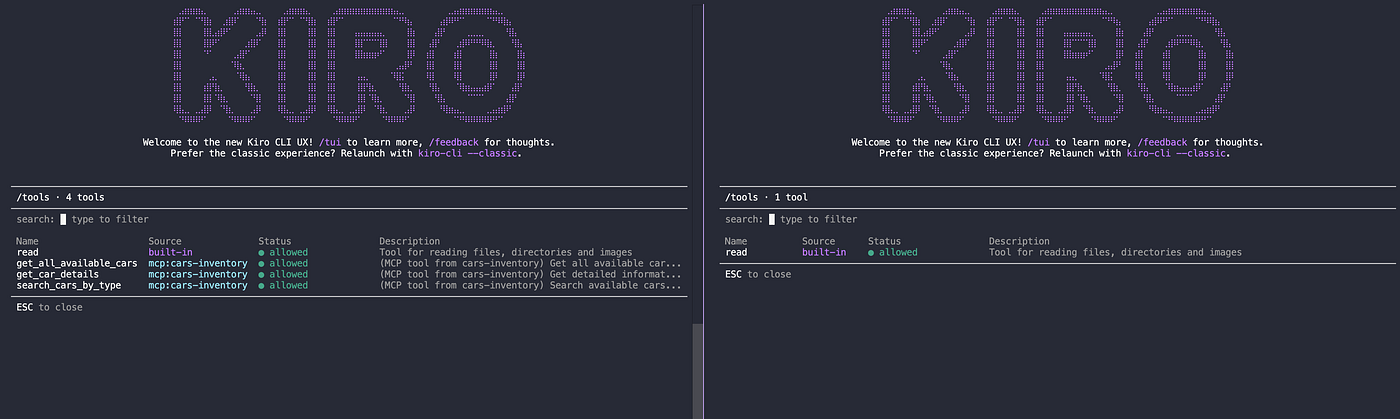
Left: with valid credentials — 4 tools available (read + 3 MCP tools). Right: without credentials — only 1 tool (read). The MCP tools don’t even load without valid AWS credentials.
Then ask “Show me all available SUVs” in both terminals:
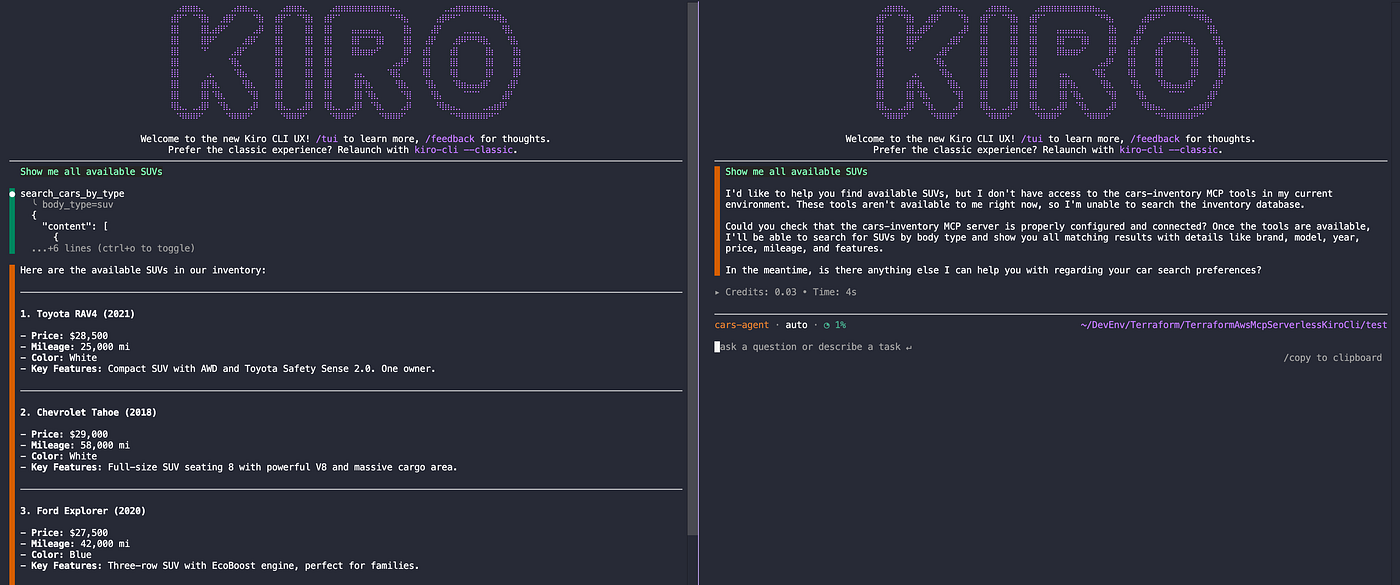
Left: the agent calls search_cars_by_type and returns real inventory data from DynamoDB. Right: the agent reports that the MCP tools are not available and cannot fulfill the request.
This demonstrates that IAM authentication works at the transport layer — without valid credentials, the proxy doesn’t start, the tools don’t appear, and the agent cannot even attempt to access the data.
Enterprise Considerations
Scaling to Production
This proof of concept uses a simple DynamoDB table with ~10 items. For production:
- Add pagination to handle large datasets
- Implement caching with DynamoDB DAX or Lambda-level caching
- Add CloudWatch alarms for latency and error rates
- Consider provisioned concurrency to eliminate cold starts
Access Control Granularity
IAM policies can restrict access at the route level:
{
  "Resource": "arn:aws:execute-api:us-east-1:123456789012:abc123/*/POST/mcp"
}
You can create different permission sets for read-only versus read-write access if you add write tools to the MCP server.
Multi-Environment
Terraform variables make it easy to deploy isolated environments:
terraform apply -var="environment=prod"Each environment gets its own DynamoDB table, Lambda function, and API Gateway.
Conclusion
Building a serverless MCP server on AWS with IAM authentication creates a secure, scalable bridge between AI coding assistants and internal data. The key takeaways:
- IAM unifies access control — the same credential chain works for developers, EC2 instances, ECS tasks, and CI/CD pipelines
- Defense in depth — transport-layer credential validation, API Gateway SigV4, IAM policies, and least-privilege Lambda roles
- Agent tool restriction is critical — limiting tools prevents the AI from attempting workarounds when authentication fails
- MCP
isErrorflag — clear error responses let the AI communicate failures naturally without special configuration
The complete source code is available at: https://github.com/biagolini/TerraformAwsMcpServerlessKiroCli
Stay Connected
If you found this article helpful and want to learn more about AWS, cloud architecture, AI, infrastructure as code, and cloud security, follow the author for future content and tutorials:
- LinkedIn: https://www.linkedin.com/in/biagolini
- Medium: https://medium.com/@biagolini
- GitHub: https://github.com/biagolini
- YouTube (PT-BR): https://www.youtube.com/@BiagoliniTech
Happy building on AWS!
메타데이터
- post_id
- bf15985469ef
- slug
- building-a-serverless-mcp-server-on-aws-with-iam-authentication-bf15985469ef
- url
- https://blog.devops.dev/building-a-serverless-mcp-server-on-aws-with-iam-authentication-bf15985469ef
- canonical_url
- https://blog.devops.dev/building-a-serverless-mcp-server-on-aws-with-iam-authentication-bf15985469ef
- author_url
- https://medium.com/@biagolini
- status
- ok
- fetched_at
- 2026-07-15 11:23:19