The Superhero of AWS Cloud Backend Infrastructure
Understanding the AWS Nitro System: Summarized
The Superhero of AWS Cloud Backend Infrastructure
Understanding the AWS Nitro System: Summarized
As demand for cloud-based compute, storage, and other solutions continues to grow rapidly, there is an increasing need for robust, secure, and highly available cloud infrastructure. In traditional data centers, we relied on physical servers, SAN, NAS, firewalls, and routers. On the software side, we depended on hypervisors like VMware ESXi, Xen, or Hyper-V to manage our environments.
A few years ago, the Big Three cloud providers — AWS, Google, and Azure — were using a similar setup. However, this architecture quickly proved to be insufficiently secure, scalable, or reliable to meet the ever-growing demand for cloud services.
The Problem with Traditional Hypervisors
Traditional hypervisors handled everything: compute, memory, and storage management. This meant that a significant portion of a physical server’s resources — CPU, RAM, and storage — was consumed by the hypervisor itself, rather than by the workloads running on it. This overhead slowed down virtual machines (VMs) and the applications running inside them.
AWS recognized this bottleneck and set out to build a better solution. The result was the Nitro System, developed in partnership with Annapurna Labs of Israel.
What Is the AWS Nitro System?
The Nitro System is AWS’s custom-built virtualization infrastructure. It offloads the heavy lifting of networking, storage, and security management from the host CPU onto dedicated hardware and software components. This allows AWS to give customers access to virtually all of a server’s compute and memory resources — a major leap forward from the traditional hypervisor model.
The Nitro System has two major components:
• Software — comprising the Nitro Hypervisor and Controller Software
• Hardware — comprising Nitro Cards for Networking, Storage, and overall Control
The Nitro Cards: Hardware That Does the Heavy Lifting
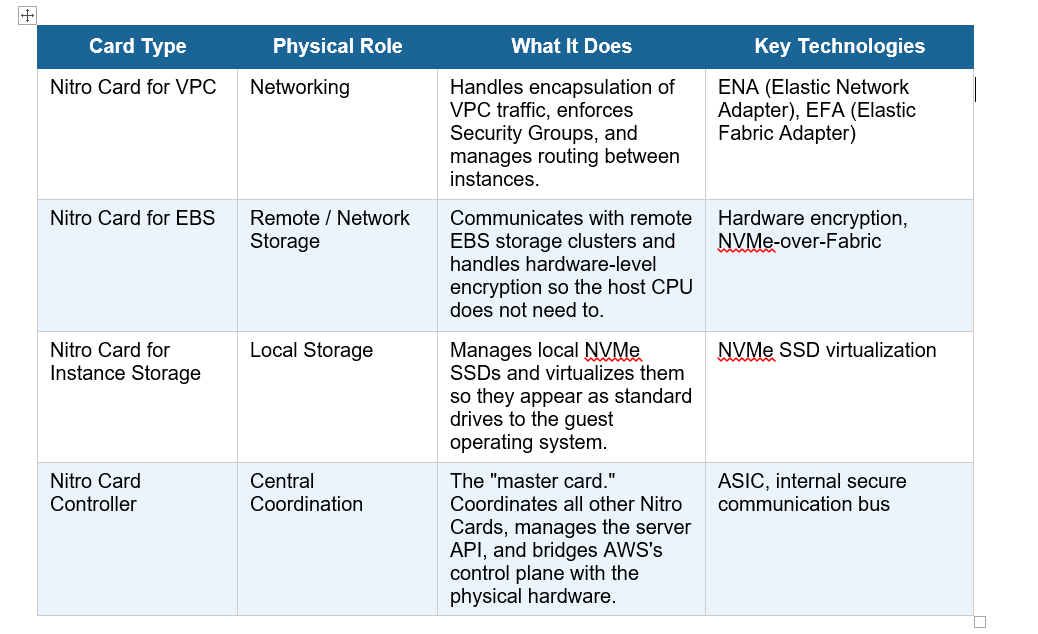
Nitro Cards are purpose-built hardware components that handle specific tasks which traditionally consumed host CPU cycles. Here is a breakdown of each card and its role:
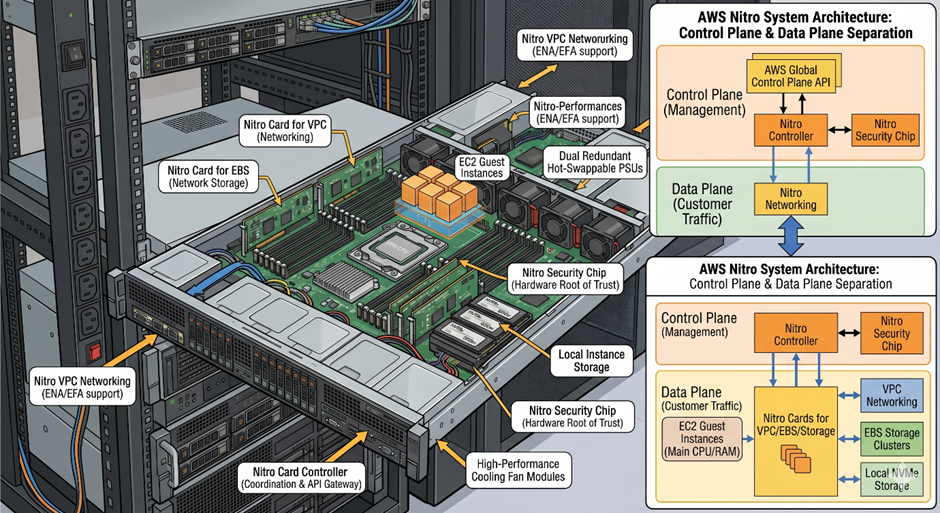
Note: The image included in this article is for reference purposes only. The actual internal hardware architecture may differ. The image was generated by Gemini based on a prompt describing the my best understanding of the physical server architecture.
The Three Pillars of the Nitro Architecture
The Nitro System is built on three foundational pillars, each addressing a critical aspect of cloud infrastructure.
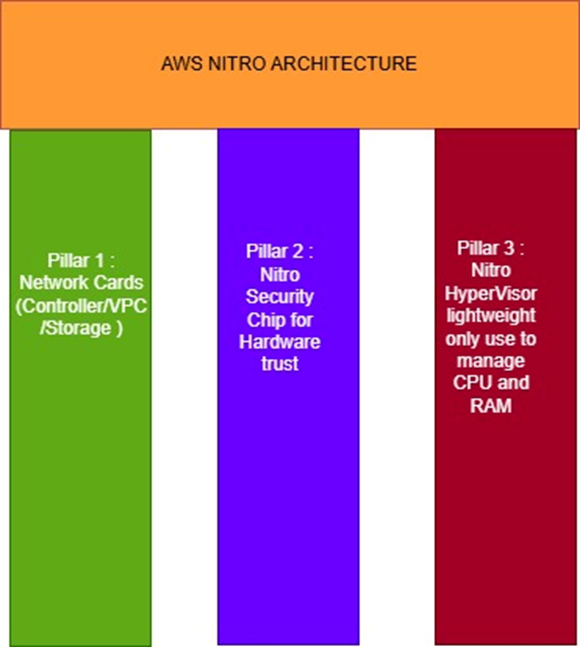
Pillar 1: Nitro Cards
Nitro Cards are the hardware backbone of the Nitro Architecture. They include the VPC Networking Card, the Remote Storage Card, and the Nitro Controller Card. By offloading all I/O operations — including networking, ENI management, NAT, Security Groups, and Network ACLs — to dedicated silicon, these cards free up virtually 100% of the host server’s CPU and RAM for EC2 instances. This is one of the most significant advantages of the Nitro System: customers get the full compute power of the underlying hardware.
Pillar 2: Nitro Security Chip
Security is a first-class citizen in the Nitro design. The Nitro Security Chip is physically integrated onto the server motherboard and is responsible for ensuring that all hardware meets AWS’s strict compliance and security standards. It provides two critical capabilities:
• Hardware Root of Trust — This prevents anyone — including AWS employees — from tampering with the server’s hardware or firmware without detection.
• Secure Boot — Every time a server starts, the Security Chip verifies that every piece of firmware is authentic and has not been altered. If anything is amiss, the boot process is halted.
Pillar 3: Nitro Hypervisor
Unlike traditional hypervisors such as Xen or VMware ESXi, which were responsible for managing networking, storage, CPU, RAM, and VMs simultaneously (consuming 10–30% of server capacity in the process), the Nitro Hypervisor has a single, laser-focused job: managing CPU and memory allocation for EC2 instances. Because all other functions have been offloaded to dedicated Nitro Cards, the Nitro Hypervisor is an extremely lightweight piece of software with a minimal attack surface and near-zero overhead.
The Nitro Controller: The Captain of the Ship
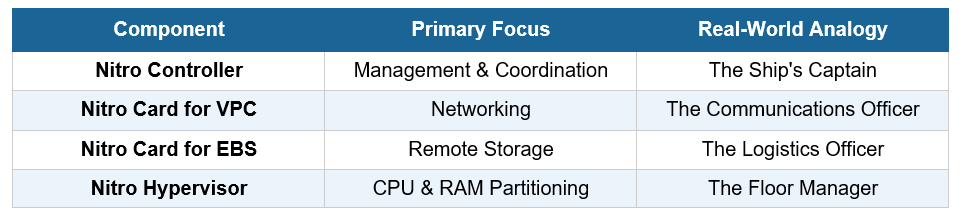
Think of a physical server as a ship sailing through the ocean. The captain is responsible for coordinating every crew member, setting the direction, and ensuring the vessel runs safely and efficiently. The Nitro Controller is that captain.
Built as an Application-Specific Integrated Circuit (ASIC), the Nitro Controller is plugged directly into the server. All other Nitro Cards communicate with it over a secure internal communication bus. It acts as the gateway between AWS’s global control plane and the physical hardware of each server.
The Nitro Controller performs three critical functions:
Resource Orchestration
The Controller tells the Nitro Hypervisor how much CPU and RAM to allocate to each EC2 instance. It instructs the VPC Card which IP addresses, subnets, and Security Groups apply to each instance, and it tells the EBS Card which remote storage volumes are attached.
Hardware Health Monitoring
The Controller continuously monitors the physical health of the server — including temperature, power consumption, fan speed, and hardware error states — and reports this data back to AWS’s management systems.
Kill Switch
If AWS needs to terminate an instance for security or operational reasons, the Nitro Controller can physically cut power to the virtual environment and wipe memory, ensuring complete data sanitization. This is not a software-level operation — it is enforced in hardware.
Nitro System: Component Summary
A Real-World Example: Attaching an EBS Volume
To see all of these components working together, let’s walk through what happens when you attach an EBS volume to a running EC2 instance:
• You click “Attach Volume” in the AWS Management Console.
• The Nitro Controller receives the attach command from the AWS API (the control plane).
• The Controller instructs the Nitro Card for EBS to open a connection to the appropriate remote EBS storage cluster.
• The Nitro Card for EBS presents a virtual NVMe device to your EC2 instance, making the remote disk appear as if it were locally attached.
• Your operating system detects the new disk and begins writing data to it normally.
• The Nitro Card for EBS transparently encrypts all data in hardware before transmitting it across the network to the EBS storage cluster — with zero CPU overhead on your instance.
What is remarkable here is that your EC2 instance — and the application running on it — has no awareness of any of this. From the guest’s perspective, it simply has a new, fast NVMe disk. All of the complexity is handled invisibly by the Nitro hardware stack.
Closing Thoughts
The AWS Nitro System represents a fundamental rethinking of how cloud infrastructure should be built. By separating the data plane (Nitro Cards) from the control plane (Nitro Controller) and stripping the hypervisor down to its bare essentials, AWS created an architecture that is simultaneously more secure, more performant, and more efficient than anything that came before it.
Whether you are a cloud architect, a DevOps engineer, or simply someone who uses AWS services, understanding the Nitro System gives you a deeper appreciation of why AWS EC2 instances are as fast, reliable, and secure as they are.
#AWS #CloudComputing #NitroSystem #CloudInfrastructure #AWSArchitecture #DevOps #TechExpl
메타데이터
- post_id
- bf2f8ecbbcb5
- slug
- the-superhero-of-aws-cloud-backend-infrastructure-bf2f8ecbbcb5
- url
- https://medium.com/@shirke.vighanesh/the-superhero-of-aws-cloud-backend-infrastructure-bf2f8ecbbcb5
- canonical_url
- https://medium.com/@shirke.vighanesh/the-superhero-of-aws-cloud-backend-infrastructure-bf2f8ecbbcb5
- author_url
- https://medium.com/@shirke.vighanesh
- status
- ok
- fetched_at
- 2026-07-11 08:53:43



