Why Encrypt Data Again When Cosmos DB Already Encrypts It?
In the past, I joined a project that encrypted payloads of transmitted data before storing them in Azure Cosmos DB. Azure Key Vault was…
Why Encrypt Data Again When Cosmos DB Already Encrypts It?
In the past, I joined a project that encrypted payloads of transmitted data before storing them in Azure Cosmos DB. Azure Key Vault was also involved. At first glance, the design looked redundant. Cosmos DB already provides encryption at rest. Why were we encrypting data a second time?
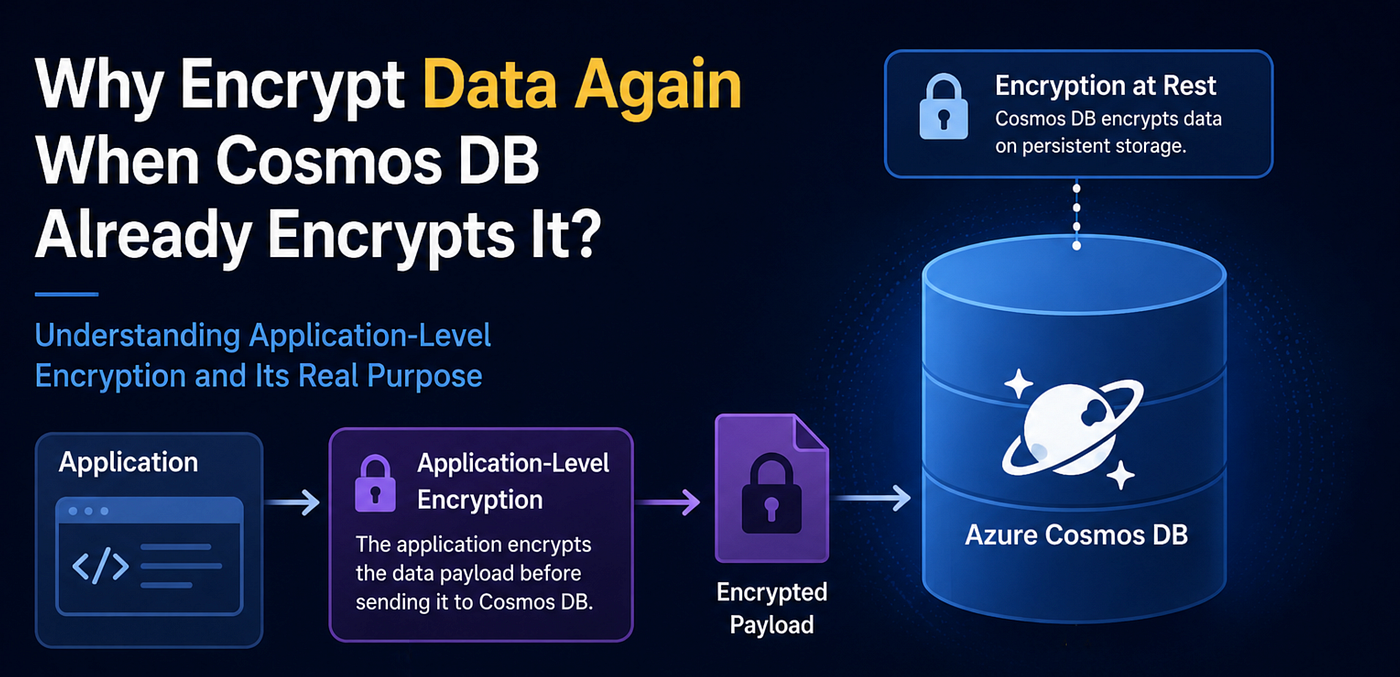
What Cosmos DB Already Gives Us
By default, Cosmos DB encrypts your data before storing it on persistent storage and uses Transport Layer Security (TLS) to protect data transmitted to and from your applications. Cosmos DB also supports customer-managed keys, allowing organisations to use and manage their own encryption keys. Cosmos DB data-plane RBAC allows us to control who can access data, while Azure Key Vault separately controls access to encryption keys. So then, what problem remains?
The Threat Model Changes the Picture
The threat model is an important perspective when distinguishing among security solutions across system components and resources. Individual technical implementations are only a part of specific protection solutions. When you look at the solutions and their threat coverage, you will understand the security requirements of individual technical implementations and their security limitations.
Think of the protection against stolen storage media. Cosmos DB encryption already addresses this threat. But what about protection against access by someone who obtains a database credential? Now the answer becomes less obvious. Then what about sensitive customer data protection from administrators?

Application-level encryption aims to complement the security coverage in those latter two threats, while the compromised application threat is out of scope. This is where payload encryption before storage becomes meaningful. Applications encrypt the data payload before sending it to Cosmos DB, while Cosmos DB itself encrypts the stored data at the storage layer.
Envelope encryption is typically used for payloads that can exceed a few KB. It uses both symmetric and asymmetric cryptography together. The individual payload is encrypted with a randomly generated AES key, and the key is encrypted with a key pair managed in Azure Key Vault before being stored with the payload.
Doesn’t Key Vault Make This Pointless?
But wait. While application-level encryption can reduce database administrators’ and infrastructure operators’ ability to access plaintext data, they would still have access to the keys stored in Azure Key Vault. Then it makes us wonder how it can effectively secure the data from them.
We need to understand that the application-level encryption often isn’t about protecting data from every administrator. Instead, it’s usually about reducing the number of people, systems, and attack paths that can access plaintext.
A useful way to think about it is:

The important point in application-level encryption implementations is that security teams often intentionally separate data access from key access. No single human administrator may have both permissions.
For example:
- The operations team can access Cosmos DB.
- The security team can administer Key Vault.
- Application service principals can access both.
In practice, the security model is often: “A person who can access the database should not automatically be able to read customer data,” rather than: “Nobody in the organisation can ever read customer data.” The latter is nearly impossible because the application itself must eventually decrypt the data.
Once the application has decrypted the data, authorisation determines who is permitted to access it. Keep in mind that application-level encryption does not replace data access control within the application itself.
Now, you may notice that this key access control is another essential part of application-level encryption, and you may now regard the encryption logic as merely a part of the solution.
What This Means for Developers
With those in mind, it becomes clearer what we should care about as developers working on systems with application-level encryption. In practice, the security design appears in three areas of our work: access control, cryptography, and operational activities such as debugging and troubleshooting.
Access Control
- Which identities need Key Vault access?
- Which identities need Cosmos DB access?
- Who should have neither?
Cryptography
- Envelope encryption
- Key rotation
- Metadata fields for indexing
- Deterministic vs randomised encryption
Debugging
- How to inspect encrypted data
- When to build decryption utilities
- Audit requirements
- Operational safeguards
Questions to Ask About Your Implementation
Here, I share a list of enquiries that may help developers evaluate the security implementation.
- Database administrators are NOT given Key Vault decrypt permissions.
- The encryption keys are NOT stored in application settings.
- Indexed search fields are NOT encrypted.
- Decryption utilities are built with audit logging.
- Applications have proper authorisation (to address threats that application-level encryption does not cover).
Afterwards
We started by asking why an application would encrypt data on top of Cosmos DB’s built-in encryption. The answer is that application-level encryption is not merely an additional cryptographic operation. It is part of a broader security design involving threat models, separation of duties, key management, authorisation, and operational controls.
Security solutions rarely exist in isolation. The encryption logic itself is only one component of a larger design. As developers, understanding these objectives and the design helps us make better decisions when implementing features, managing keys, debugging issues, and operating the system, ultimately resulting in building up more effective security in our applications.
Practical Appendix: Decrypting Data During Troubleshooting
At the end, I will leave a note on how to inspect data encrypted with Envelope Encryption using Azure Key Vault, which may be helpful in development and troubleshooting.
The following example illustrates a typical envelope encryption workflow using Azure Key Vault and AES encryption. Actual implementations, algorithms, and operational procedures may differ depending on the system’s security requirements.
Nowadays, software installations are often limited in development environments where security is a priority. So, I tried to only use the utilities that may already be available in Azure development environments.
You’ll need
- PowerShell
- .NET SDK
- Azure CLI
- Azure account
and ensure that your encrypted data contains
- Encrypted AES Key
- Nonce
- Ciphertext (encrypted text data)
- Tag
I assume a Key Vault key capable of unwrapping the AES key and an AES-based payload encryption algorithm. Consult your project’s cryptography design and adjust it as needed.
The decryption operation consists of two phases:
- Decrypt (Unwrap) AES key
- Decrypt Ciphertext
1. Decrypt (Unwrap) AES Key
Run the following commands in PowerShell.
PS> $aesKey = "your encrypted AES Key in Base64"
PS> az login
PS> $key = az keyvault key decrypt - name my-key-vault - vault-name my-key - algorithm RSA-OAEP-256 - value $aesKey | ConvertFrom-Json
NOTE
The decryption key for AES key decryption (unwrap) is stored in the Azure Key Vault service. You cannot obtain it from Azure Key Vault. Instead, you use the Azure Key Vault service to decrypt it.
2. Decrypt Ciphertext
First, create a small utility program.
PS> dotnet new console -n MyDecryptor
PS> cd MyDecryptor
PS> echo "
>> using System.Security.Cryptography;
>> const int key = 0, nonce = 1, ciphertext = 2, tag = 3;
>> var b = Convert.FromBase64String;
>> byte[] c = b(args[ciphertext]), t = b(args[tag]), text = new byte[c.Length];
>> new AesGcm(b(args[key]), t.Length).Decrypt(b(args[nonce]), c, t, text);
>> Console.WriteLine(System.Text.Encoding.UTF8.GetString(text));
>> " > .\Program.cs
PS> dotnet build
Let’s use the AES decryption utility and finish the decryption.
PS> $nonce = "your Nonce in Base64"
PS> $ciphertext = "your Ciphertext in Base64"
PS> $tag = "your Tag in Base64"
PS> dotnet run - $key.result $nonce $ciphertext $tag
Now you should see a decrypted plaintext in your terminal.
Disclaimer
This article reflects my personal views and experiences. It should not be interpreted as an official statement, policy, or position of my employer.
메타데이터
- post_id
- bf5c0bc3d617
- slug
- why-encrypt-data-again-when-cosmos-db-already-encrypts-it-bf5c0bc3d617
- url
- https://medium.com/@ycode/why-encrypt-data-again-when-cosmos-db-already-encrypts-it-bf5c0bc3d617
- canonical_url
- https://medium.com/@ycode/why-encrypt-data-again-when-cosmos-db-already-encrypts-it-bf5c0bc3d617
- author_url
- https://medium.com/@ycode
- status
- ok
- fetched_at
- 2026-08-04 16:40:22



