Android to Android lightweight adb
Android Debug Bridge (adb) was primarily envisioned for development and debugging purposes. It provides a wide pallete of tools which let…
Android to Android lightweight adb
Android Debug Bridge (adb) was primarily envisioned for development and debugging purposes. It provides a wide pallete of tools which let you interact with your phone, TV, emulator or any other more exotic Android beast. Adb usually runs on your computer and connects to other devices via USB or WiFi. But Android phones are computers too, so why not let them join the party?
This is of course a more niche use case and doesn’t make sense if you only use a single Android device, but if you need to interact and check up on multiple devices, get error logs, extract ANR or tombstone info, install APKs, transfer files, do a specific UI interaction etc. this might be useful.
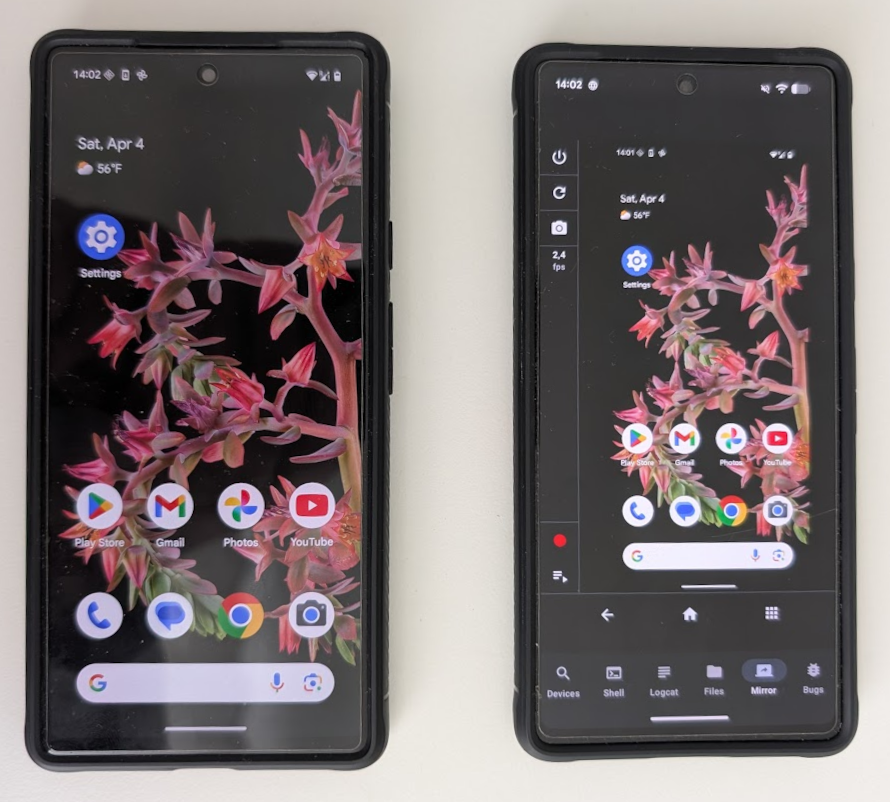
Among the things that I started using regularly is the screen mirroring tool which lets you capture a series of input events and loop them later on. This is an easy way to automate UI interactions without writing any test scripts. This would help developers and testers to reproduce more annoying bugs which require repeating certain actions over and over. Or it could be used for a simpler automation if you always need to do a specific interaction with a test device.
If this got you interested, you can check out the app here. You can run it in unrestricted trial mode without creating an account.
Showcases
Here are a couple of videos where you can see how the app actually works. Most of them show 2 devices, the one which is connecting and the other which is being connected to.
Adb pairing
Adb pairing adds most friction when setting up a new device. It may seem involved if you haven’t done it before, but this should however be a one time configuration. Just make sure that you always allow WiFi debugging on your network, otherwise you might need to toggle it on manually from time to time (e.g. if your router reboots and WiFi is shortly lost on the phone). If you don’t have Developer options available in your Settings app, those are normally unlocked by navigating to About phone section and tapping Build number a couple of times.
[embed]
Also if you want, you can long press on the device to setup a nickname. Connected devices will periodically display current battery level, CPU and RAM usage.
Device remote network access and control is possible if both devices are on the same VPN, but be aware that IP and port info might not be auto-detected when pairing and connecting, and unlike when using a local network the user might need to configure these parameter. VPN setup is beyond the scope of this application and it’s user’s responsibility to set it up, if they need remote network access.
Mirroring
Mirroring lets you observe the screen of another device and issue input events. Macro feature allows you to capture a series of events and replay them later.
[embed]
Bugreport
Bugreport may take a minute or two to be generated, and when it’s completed you can observe detailed stack traces of all relevant threads in the moment of app crash or ANR. This is invaluable data in case of rare app crashes or ANRs and can usually be extracted hours or days after the issue was encountered.
[embed]
File Manager
File manager lets you manage files on another device: browse, delete, upload and download. If you deploy an Android application in APK format, you can also install it.
[embed]
Logcat
Logcat lets you observe live Android device log output from another device. You may select multiple log levels which interest you and there is also a filtering option. Logs can be permanently saved and the screen can be cleared.
[embed]
Shell
Shell lets you run adb shell commands and save or clear the output.
[embed]
Tablet
The app provides a different UI layout on table devices, which let you show multiple selected screens at once.
[embed]
Please keep in mind
The app is still freshly baked and has added complexity that it involves multiple devices, so bugs aren’t easy to find. If you notice any please let me know and I’ll try to improve the situation. Another quirk worth mentioning is that drag-and-drop interaction is clunky and it performs a drag-and-drop interaction after you provided your input. I’m also considering to expand screen mirroring feature to provide Android TV controls, if there will be interest for that.
메타데이터
- post_id
- bfcd238bbf1d
- slug
- android-to-android-lightweight-adb-bfcd238bbf1d
- url
- https://medium.com/@celecavac/android-to-android-lightweight-adb-bfcd238bbf1d
- canonical_url
- https://medium.com/@celecavac/android-to-android-lightweight-adb-bfcd238bbf1d
- author_url
- https://medium.com/@celecavac
- status
- ok
- fetched_at
- 2026-06-10 08:17:25




