RTX 5090 in Blender: Is It Worth the Hype (and the Price)?
It’s 35% faster than the RTX 4090 in Cycles. It has 32GB of VRAM. And you probably can’t buy one. Here’s what the RTX 5090 actually means…
RTX 5090 in Blender: Is It Worth the Hype (and the Price)?
It’s 35% faster than the RTX 4090 in Cycles. It has 32GB of VRAM. And you probably can’t buy one. Here’s what the RTX 5090 actually means for Blender artists in 2026 — and what to do while you wait.
By iRender Team · Last Updated: May 2026
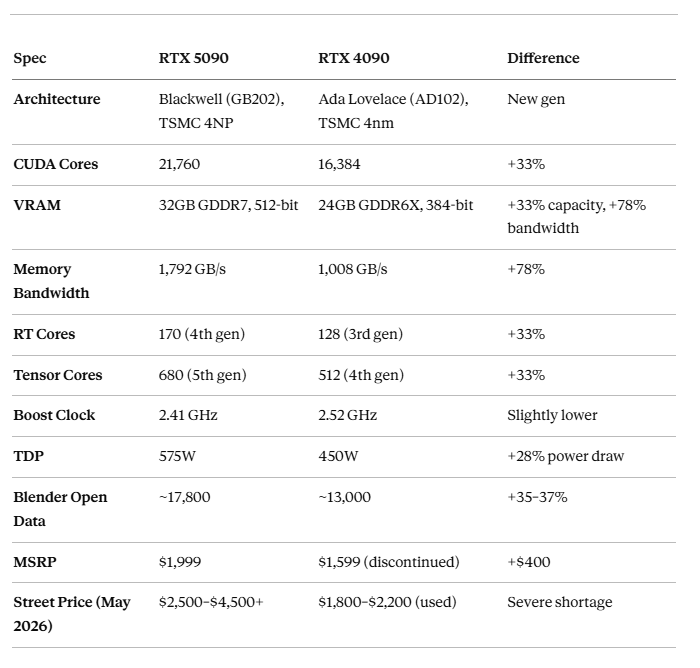
The NVIDIA RTX 5090 scores roughly 17,800 points on Blender Open Data vs the RTX 4090’s ~13,000 — a 35–37% improvement in Cycles GPU rendering. It packs 21,760 CUDA cores, 32GB GDDR7 VRAM (vs 24GB on the 4090), and 1,792 GB/s memory bandwidth. Real-world Cycles render times drop 30–36% on production scenes. The catch: MSRP is $1,999 but street prices run $2,500–$4,500+ due to global shortages, and it draws 575W. For most Blender artists, the RTX 4090 remains the practical choice — whether local or via cloud GPU services — until 5090 supply stabilizes.
How Much Faster Is the RTX 5090 in Blender Cycles — Really?
Let me cut through the marketing: the RTX 5090 is genuinely faster, but it’s not a 2× leap.
In Blender Open Data benchmarks using OptiX, the RTX 5090 scores around 17,800 points compared to the RTX 4090’s ~13,000. That’s a 35–37% improvement. Independent reviewers and production studios report consistent 30–36% faster Cycles render times across various scene complexities. For context, the jump from RTX 3090 to RTX 4090 was roughly 110% — so this generational leap is more modest.
Where the 5090 really shines is scenes that push VRAM limits. The jump from 24GB to 32GB GDDR7 means dense scenes with 8K textures, heavy particle systems, or complex volumetrics that used to crash or fall back to CPU rendering now fit entirely in GPU memory. The 78% bandwidth increase (1,792 vs 1,008 GB/s) also helps — high-res texture streaming and volumetric effects are noticeably smoother.
The AI story is relevant too: 5th-gen Tensor Cores make Blender’s OptiX denoiser run faster, so you can render with fewer samples and still get clean results. In practice, this means the effective speed gap between the 5090 and 4090 can be larger than raw benchmark numbers suggest, because you can get away with lower sample counts.
The honest summary: For a single frame, you’re saving maybe 2–3 minutes on a 7-minute render. Over a 3,000-frame animation, that compounds to saving roughly a full day. Whether that’s worth $2,500+ is a personal calculation.
Can You Actually Buy One? The Availability Problem
This is the part nobody wants to talk about, but it matters more than specs.
The RTX 5090 launched January 30, 2025, at $1,999 MSRP. It sold out globally in under 5 minutes. As of May 2026, the situation hasn’t improved much. Real-world pricing from retailers and secondary markets:
- Partner cards (ASUS, MSI, Gigabyte): $2,500–$3,500 when in stock
- Secondary market / scalpers: $3,500–$4,500+
- Founders Edition at MSRP: Effectively impossible to find
NVIDIA attributes this partly to GDDR7 DRAM shortages. Retailers report receiving only 3–5 units per shipment, with replenishment every 2–4 weeks. If you’re planning a workstation build around the 5090, expect to either pay a significant premium or wait.
The 575W TDP also matters practically. You’ll need at minimum a 1000W PSU, and your case needs 330–350mm of GPU clearance. This isn’t a drop-in upgrade for most existing workstations.
RTX 4090 vs 5090 for Blender: The Practical Decision
Here’s the framework I use when artists ask me which one to get:
Buy the RTX 5090 if: You can find one at or near MSRP, your scenes regularly exceed 24GB VRAM, you render animations of 1,000+ frames weekly, or your time savings at 35% faster directly translate to billable revenue. The extra $400–$2,000 pays for itself within months at studio billing rates.
Stick with the RTX 4090 if: You’re budget-conscious, your scenes fit within 24GB VRAM (most do), you primarily use EEVEE or real-time renderers where GPU differences shrink dramatically, or you can’t find a 5090 at a reasonable price. The RTX 4090 is still an exceptional Blender GPU — it scored 13,000+ on Open Data and handles anything short of the most extreme production scenes.
Use cloud GPUs if: You don’t want to deal with the hardware gamble at all. Cloud rental eliminates the “should I wait for the next GPU?” dilemma. Services like iRender currently offer RTX 4090 servers (1–8 GPUs, from ~$8.20/hour) where you can run Blender directly with your full project. An 8× RTX 4090 cloud setup — which would cost $80,000+ to build locally — rents for about $65/hour and renders faster than a single RTX 5090.
To be transparent: iRender doesn’t have RTX 5090 servers yet. Based on previous GPU transition timelines, cloud providers typically need 6–12 months after consumer launch to deploy at scale. I’d estimate late 2026 or early 2027 for RTX 5090 cloud availability across major providers.
What About Multi-GPU? The Missing NVLink Story
One thing the marketing materials quietly skip: the RTX 5090 dropped NVLink support. The RTX 4090 had an NVLink connector that let two cards share VRAM in supported applications. The 5090 doesn’t.
For Blender Cycles, this matters less than you’d think — Cycles doesn’t pool VRAM across GPUs anyway. Each GPU loads the full scene independently. But if you work in other applications (DaVinci Resolve, certain simulation tools) that used NVLink, this is a genuine regression.
Multi-GPU Cycles rendering still works fine via OptiX. Two RTX 5090s will render roughly 2× as fast as one, with each card using its own 32GB independently. The practical limit remains scene size vs per-GPU VRAM, not inter-GPU communication.
Frequently Asked Questions
Is the RTX 5090 worth upgrading from an RTX 4090 for Blender?
For most artists, no — not at current pricing. The 35% speed improvement is real but doesn’t justify spending $2,500+ when you already own a 4090. The exception: if your scenes regularly hit the 24GB VRAM ceiling (crashing or forcing CPU fallback), the 5090’s 32GB solves a genuine workflow blocker. If you’re upgrading from an RTX 3080 or 3090, the 5090 makes much more sense — that’s a 70–100%+ improvement.
Can I use the RTX 5090 for both Cycles and EEVEE in Blender?
Yes. Both Cycles and EEVEE use the same GPU, and the 5090 works with both. However, the performance gap between the 5090 and 4090 is much smaller in EEVEE because real-time rendering is less compute-bound. In Cycles (path tracing), the 33% more CUDA cores and 78% more bandwidth translate directly to faster renders. In EEVEE (rasterization), the difference is barely noticeable for most scenes.
When will RTX 5090 be available on cloud render farms like iRender?
As of May 2026, most major cloud render farms — including iRender — still run RTX 4090 servers. Some smaller GPU cloud providers (Spheron, RunPod, CloudRift) already offer RTX 5090 instances at $0.62–$0.69/hour for AI workloads, but these aren’t typically configured for 3D rendering with Blender pre-installed. For dedicated render farm setups, expect RTX 5090 availability in late 2026 or early 2027. In the meantime, iRender’s RTX 4090 at ~$8.20/hour handles production Blender workloads well — and an 8× RTX 4090 setup outperforms a single RTX 5090 by a wide margin.
Scale Up Your Blender Projects with iRender Farm
iRender provides a remote machine rental service by offering flexible configurations of 1, 2, 4, 6, and 8 GPU machines using the top-tier RTX 4090. Built with powerful CPUs (AMD Ryzen™ Threadripper™ PRO 3955WX @ 3.9–4.2GHz and AMD Ryzen™ Threadripper™ PRO 5975WX @ 3.6–4.5GHz), 256GB RAM, and 2TB NVMe SSD storage, our machines can handle even the most demanding scenes in your 3D projects.
Our server has pre-installed Blender. We treat your rented machines like your personal workstations — no restrictions apply. This freedom enables you, 3D artists, to realize creative visions without limitations. Moreover, iRender offers an iRender GPU app. In this all-in-one application, you can free your workflow from accessing iRender website, and just have to work on the iRender GPU app. This app is only for Windows users.
[embed]
[embed]
[embed]
[embed]
Enjoy our FREE TRIAL to try our RTX 4090 machines and boost your rendering now!

For more detailed information, please contact us via Live chat 24/7 or WhatsApp: +(84) 912–785–500 or Email: support@irender.net.
메타데이터
- post_id
- bfe41011c03f
- slug
- rtx-5090-in-blender-is-it-worth-the-hype-and-the-price-bfe41011c03f
- url
- https://medium.com/@irenderofficial/rtx-5090-in-blender-is-it-worth-the-hype-and-the-price-bfe41011c03f
- canonical_url
- https://medium.com/@irenderofficial/rtx-5090-in-blender-is-it-worth-the-hype-and-the-price-bfe41011c03f
- author_url
- https://medium.com/@irenderofficial
- status
- ok
- fetched_at
- 2026-06-09 14:34:10