ES8 / ECMAScript2017
3. A Deep Dive into the Latest JavaScript Features — ES8
ES8 / ECMAScript2017
3. A Deep Dive into the Latest JavaScript Features — ES8

The JavaScript has been evolved a lot and one of the widely used language in the world. We are discussing about some core feature of ES8 / ECMAScript 2017 / ECMA2017, the iteration of the ECMAScript standard. Let’s talk about exciting features that can streamline your workflow and enhance your code.
In this article, we’ll delve into some of the key features introduced in ES8:
1. Async Functions and Await
We can add async keyword before function to make then asynchronous. And then we can use await keyword inside it.
By using async await , we can make our code look like synchronous.
async function test() {
    const result = await fetch();
}
Note: You can use **await without `async`** keyword. It is possible after ES13.
For more details: https://medium.com/@opensrc0/es13-ecma-script-2022-28129e07c65a
2. padStart and padEnd
We can add any character at start of string and end of string, to make string of specific length.
const str = "Jio";

str.padStart(5);        // "  Jio"
str.padEnd(5);          // "Jio  "
str.padStart(5, "*");   // "**Jio"
str.padEnd(10, "*");    // "Jio**"
"9".padStart(2, "0");   // 09
3. Object.entries()
It accepts a object, and returns an array container array (tuples).
At the array 0 index, Object Key will be inserted and at the array 1 index, corresponding value will be inserted.
const company = {name:'Reliance', role: 'FE Engineer'};

console.log(Object.entries(company));
// Output [['name', 'Reliance'] , ['role', 'FE Engineer']]
4. Object.values()
It accepts a object, and returns an array containing only the values inside object, separated by comma.
const company = {name:'Reliance', role: 'FE Engineer'};

console.log(Object.values(obj)); // Output ['Reliance', 'FE Engineer']
5. Trailing commas in function parameter
A comma can be added after the last parameter in a function’s parameter. We can also add after the last argument in a function call.
function myFunction(param1, param2, param3,) {
 // function body
}

myFunction(1, 2, 3,)
6. Object.getOwnPropertyDescriptors()
It takes object as argument, and returns an object, which contains all the property description information about the keys, in passed object.
const company = {name:'RELIANCE', team: 'SCM'};

Object.getOwnPropertyDescriptors(obj)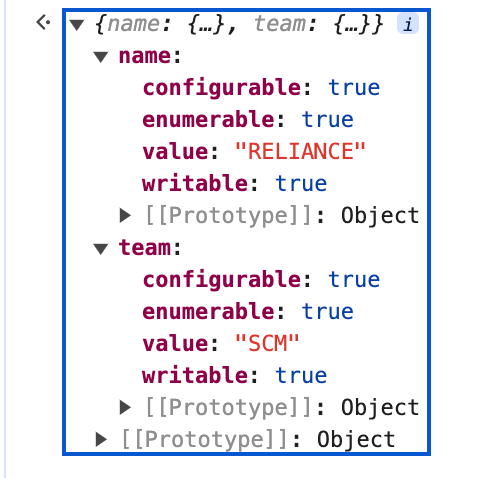
7. Shared Memory and Atomics:
Shared memory allows multiple threads to access the same memory location and communicate with each other.
const sab = new SharedArrayBuffer(4);  // create a shared buffer of 4 bytes
const arr = new Int32Array(sab);       // create an array view of the buffer

Atomics.store(arr, 0, 10);             // set the value of the shared memory
console.log(Atomics.load(arr, 0));     // get the value of the shared memory

Atomics.add(arr, 0, 5);                // add 5 to the value of the shared memory
console.log(Atomics.load(arr, 0));     // get the updated value of the shared memory
Output:
10
15
8. Atomics:
Atomic operations are used to ensure that these threads can access and manipulate shared data without conflicts or race conditions.
Here is a list of atomic operations provided by the Atomics object:
- Atomics.add()
- Atomics.and()
- Atomics.compareExchange()
- Atomics.exchange()
- Atomics.load()
- Atomics.or()
- Atomics.store()
- Atomics.sub()
- Atomics.wait()
- Atomics.wake()
- Atomics.xor()
const sab = new SharedArrayBuffer(4); // create a shared buffer of 4 bytes
const arr = new Int32Array(sab);      // create an array view of the buffer

Atomics.store(arr, 0, 10);            // set the value of the shared memory

Atomics.add(arr, 0, 5);               // add 5 to the value of the shared memory

Atomics.sub(arr, 0, 2);               // subtract 2 from the value of the shared memory

Atomics.or(arr, 0, 0x0F);             // bitwise OR the value of the shared memory with 0x0F

Atomics.and(arr, 0, 0xF0);            // bitwise AND the value of the shared memory with 0xF0

const value = Atomics.load(arr, 0);   // get the updated value of the shared memory

console.log(value); // output: 13     // output the value of the shared memory
Thank you for reading until the end. Before you go, Please consider clapping and following.
Javascript is weird, I like the weird things. Keep Smiling.
Useful Links:
**Read ES6 — Read ES7 — Read ES8 — Read ES9 — Read ES10 — Read ES11**
**Read ES12 — Read ES13 — Read ES14 — Read ES15**
메타데이터
- post_id
- c00aaf549ad8
- slug
- es8-ecmascript-2017-c00aaf549ad8
- url
- https://blog.stackademic.com/es8-ecmascript-2017-c00aaf549ad8
- canonical_url
- https://blog.stackademic.com/es8-ecmascript-2017-c00aaf549ad8
- author_url
- https://medium.com/@opensrc0
- status
- ok
- fetched_at
- 2026-07-24 10:18:17