Windsurf vs Cursor: I rebuilt the same feature twice — here’s how the editors actually change a…
The discovery that surprised me
Windsurf vs Cursor: I rebuilt the same feature twice — here’s how the editors actually change a solo dev’s day
The discovery that surprised me
I assumed Cursor would be the better daily driver and Windsurf the “weekend project” IDE. After two days of rebuilding the same feature twice — once in each editor — I flipped. Windsurf felt calmer for greenfield planning and multi-file changes; Cursor felt sharper for surgical edits and fast feedback loops. Neither was universally “better.” The right one depended on whether I was reshaping a codebase or threading a precise fix through an existing one.
More important: both tools only clicked after I stopped asking for miracles and started working in small, testable steps. Below is the exact, repeatable workflow I used. You can copy it and reproduce my results in under 30 minutes on a small repo.
The test project and rules
I used a small, realistic stack: a minimal web app with a frontend component library, a REST backend, and a couple dozen tests. The task was the same in both editors:
- Rename a model field across backend and frontend (plus migration and tests).
- Add a debounce to a search UI and avoid an extra request on blur.
- Fix a type mismatch that only appears in CI (strict TypeScript).
No code dumps, no “build it all” prompts. I forced myself to work like I do on client projects: plan, make a small change, review the diff, run tests, repeat.
Setup you can replicate in 5 minutes
Cursor
- Install Cursor (desktop). Open your repo.
- Open the chat sidebar. It’s workspace-aware by default.
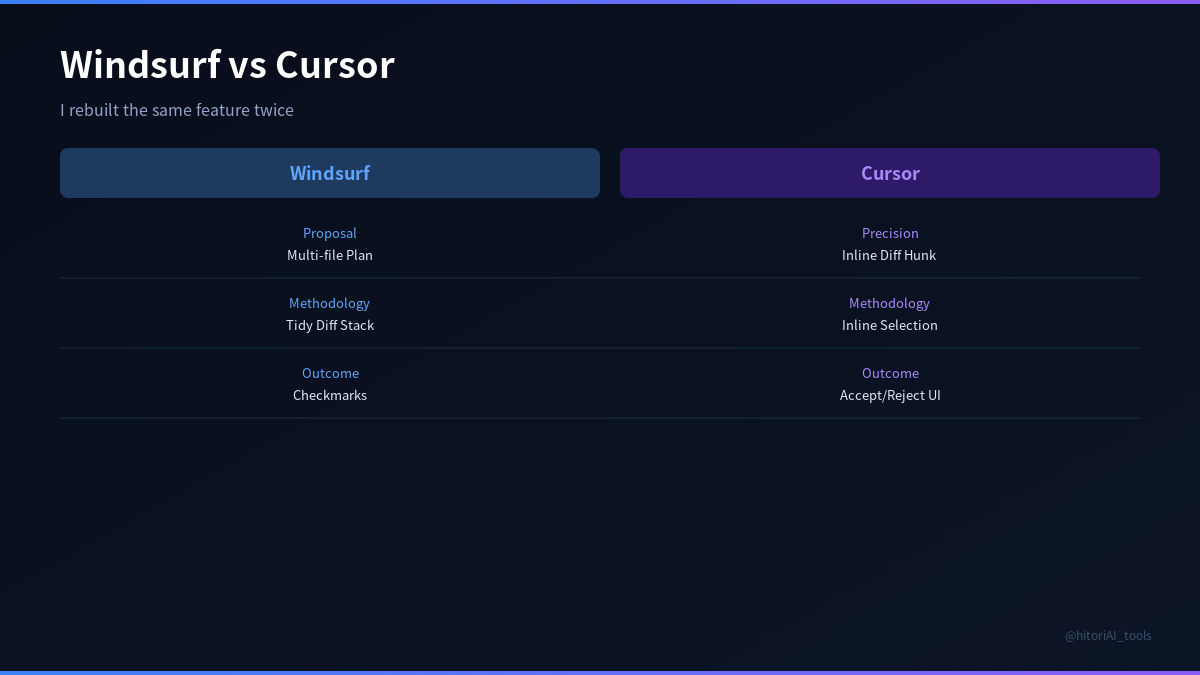
- Use the editor’s inline edit flow: select code, invoke chat from the selection, describe the change, and review a diff before applying. Cursor suggests per-hunk diffs you can accept or reject.
- Reference specific files with @filename in chat to anchor context.
- Use the built-in terminal to run tests between edits.
Windsurf
- Install Windsurf (desktop). Open the same repo.
- Use its workspace-aware chat to outline changes and request multi-file edits. It returns a diff preview across affected files before applying.
- Accept or reject file-by-file. You can re-run with a narrower instruction if the change is too broad.
- Lean on the IDE’s autocomplete to flesh out small glue code once the big change lands.
- Run tests from the integrated terminal after each step.
The 30-minute, step-by-step bake-off
Phase 1 — Plan the rename
Prompt (both editors): “We’re renaming model field userName -> displayName across backend and frontend. List files likely affected based on imports and usage. Propose a minimal-change plan: migration, code updates, and tests to touch.”
- Windsurf behavior: It produced a calm plan and a short file list. When I asked it to start with the migration plus a single backend file, it offered a multi-file diff preview touching only what we agreed.
- Cursor behavior: It listed more potential call sites (some false positives). When I asked for the same minimal set, it generated a focused diff and a sharper explanation of the migration’s side effects.
Counter-intuitive finding: Asking both for the smallest possible change up front reduced later clean-up more than any “be smart” prompt. Vague ambition = wide diffs.
Phase 2 — Apply diffs and run tests
Instruction (both editors): “Apply the agreed edits, show a diff, and stop.”
- Cursor: The per-hunk diff review was excellent. I could accept half a file and reject the rest. It was easy to avoid collateral style changes.
- Windsurf: The file-level diff preview was clean. On the first try it touched one extra helper; I rejected that file and re-ran with a narrower scope. Second try was perfect.
Tests caught one missing import in both runs. Fixing it was a two-line change; I used autocomplete to nudge it in both editors. Cursor’s suggestion showed up a beat faster on my machine; Windsurf’s suggestion was slightly more complete.
Phase 3 — Debounce the search UI
Prompt (both editors): “Implement a 300ms debounce for the search input, prevent extra network requests on blur, and update the unit test that asserts only one request per keystroke batch.”
- Cursor: Great at the local change: I selected the component, asked for a targeted edit, and reviewed the inline diff. It left test updates as a follow-up (which I prefer).
- Windsurf: Proposed updating the component and the test together. The multi-file diff came back coherent on the first attempt.
Limitation you’ll hit: If your component imports are tangled, either editor can introduce a circular import when adding a debounce utility. The fix was to keep the debounce local and resist “extract to util” in the first pass.
Phase 4 — The CI-only type mismatch
Prompt (both editors): “TypeScript error appears in CI only: [describe the error message]. Suspect a different tsconfig path mapping in CI. Propose a minimal diagnostic and a change that compiles locally and in CI.”
- Cursor: Very good at quickly enumerating likely causes and proposing a single-line tsconfig adjustment. It also suggested adding a small script to detect path mismatches.
- Windsurf: Offered a brief checklist and a two-step plan (reproduce locally with CI flags, then tweak config). It generated the config diff and a short README note in one go.
Counter-intuitive finding: Windsurf’s “here’s the plan + commit-sized diff” flow reduced my back-and-forth on cross-cutting config changes. Cursor’s speed was ideal for one-file surgical fixes, but I had to ask explicitly for the doc note.
Where each editor wins (and why)
Cursor wins when…
- You know exactly where to cut. Highlight code, ask for the change, inspect a tight diff, accept/reject hunks. It’s a scalpel.
- You want fast iteration. The chat + inline edit loop is short. I felt comfortable doing five micro-iterations instead of one big leap.
- You’re validating with tests as you go. Cursor’s flow made it natural to run tests after each accepted diff.
Windsurf wins when…
- You’re changing multiple files with a narrative. It’s good at “Let’s do A → B → C” and returning a coherent, multi-file diff you can audit.
- You want the IDE to carry a plan forward. It tended to remember the steps we agreed on and keep subsequent diffs aligned with the plan.
- You’re scaffolding new pieces. Bigger edits (new file + companion test + doc note) landed more smoothly.
Honest limitations (both sides)
- Overreach. If you ask for “fix everything,” both can change too much. Your defense is asking for the smallest viable change and reviewing diffs ruthlessly.
- Path and import hallucinations. On mid-size repos, either editor may propose a non-existent import path. Keep the file tree visible and ask it to use existing imports only.
- Autocomplete temptation. Multi-line completions can sneak API misuse past you. Compile and run tests after every accepted chunk.
- Context size limits. Very large repos still require you to point the model at the right files (use @file references). Don’t assume it “just knows.”
Replicable, tool-agnostic prompts that worked
- Plan small: “Suggest the smallest change that achieves X. List exactly which files you’ll touch and why. Stop after showing a diff.”
- Guard rails: “Do not create new helpers or change lint rules. Use only existing imports. If something is missing, stop and ask.”
- Test-first nudge: “Before editing, show me which tests will fail and how we’ll update them.”
- Explain diffs: “For each file in the diff, summarize the intent in one sentence.”
Speed notes you can evaluate yourself
- Autocomplete feel: On my machine, Cursor’s multi-line suggestions popped earlier; Windsurf’s were slightly more complete. YMMV — try both on the same file.
- Diff review: Cursor’s per-hunk acceptance made precise refactors comfortable. Windsurf’s per-file accept/reject made broader changes easier to police.
- State tracking: Windsurf felt a bit better at remembering the multi-step plan across prompts; Cursor felt better at responding to tiny, localized asks.
Privacy and practicality
- Sensitive code: If your repo is private or regulated, review each tool’s data handling and settings before connecting a client codebase. Assume cloud inference unless you’ve explicitly configured otherwise.
- Telemetry: Both editors have telemetry toggles. If that matters, visit settings first.
A 30-minute head-to-head you can run today
Clone a small repo you don’t mind changing. Set a timer for 30 minutes and do this twice (once per editor):
- Rename a field in one backend file and one frontend file. Ask the editor to plan and apply only those two edits. Review the diff. Run tests.
- Add a 300ms debounce to a search input. Keep it local; no new helpers. Review the diff. Run tests.
- Introduce a harmless type mismatch, then ask the editor to diagnose and propose the smallest config change. Apply, compile, run tests.
Score yourself on three axes: “diff tightness,” “number of test runs to green,” and “how often I had to say no.” You’ll feel the difference between the editors fast.
Which to open first?
- Precise refactor or bugfix in known files → Cursor.
- Multi-file change with a short narrative (edit + test + doc) → Windsurf.
- Blank page/new module → Start in Windsurf for the plan, then switch to Cursor for surgical follow-ups.
Actionable endgame
Don’t choose an editor by vibes. Run the 30-minute bake-off above on your own repo and keep whichever makes your diffs smaller and your tests greener with fewer prompts. Then codify two house rules in a README:
- Always ask for the smallest possible change.
- Never accept a diff you don’t understand (force an explanation per file).
Those two rules did more for my day-to-day speed than any model upgrade. The tool is the assistant; your diff review is the job.
메타데이터
- post_id
- c054b2e6c8a3
- slug
- windsurf-vs-cursor-i-rebuilt-the-same-feature-twice-heres-how-the-editors-actually-change-a-c054b2e6c8a3
- url
- https://medium.com/@altshiftctrl/windsurf-vs-cursor-i-rebuilt-the-same-feature-twice-heres-how-the-editors-actually-change-a-c054b2e6c8a3
- canonical_url
- https://medium.com/@altshiftctrl/windsurf-vs-cursor-i-rebuilt-the-same-feature-twice-heres-how-the-editors-actually-change-a-c054b2e6c8a3
- author_url
- https://medium.com/@altshiftctrl
- status
- ok
- fetched_at
- 2026-06-09 15:37:30