Last weekend I cancelled my ChatGPT subscription and built my own private AI chat portal
The result is a self-hosted web application running on a small Australian VPS, accessible at my own domain, with HTTPS, multi-user…
Last weekend I cancelled my ChatGPT subscription and built my own private AI chat portal
The result is a self-hosted web application running on a small Australian VPS, accessible at my own domain, with HTTPS, multi-user accounts, and access to Claude, DeepSeek, Qwen, Gemini, and several other frontier models through a single interface. The running cost is approximately the price of a coffee per week.
This article explains how it works, why the architecture is worth understanding, and what you will need if you want to build one yourself.
A note before you begin: this project assumes some familiarity with the command line. If you have never used a terminal, you will find parts of the setup difficult. If you are comfortable connecting to a server over SSH and running Docker commands, the setup can be completed in a weekend.
Why I Built It
There were four main reasons:
- To understand how the different frontier models compare when not restricted to a single vendor’s interface.
- To measure the actual cost of paying per token rather than a fixed subscription. In my case, the total was significantly lower than the subscription it replaced.
- To have an environment for experimenting with model customisation, system prompts, and retrieval-augmented generation (RAG).
- To gain practical experience with AI governance, particularly in the context of ISO 42001, the new AI Management System standard.
If none of these reasons apply to you, a commercial subscription such as ChatGPT or Claude will likely suit your needs. This project is intended for those who want to understand the underlying system as well as use it.
The Architecture
The design decision that keeps the cost low is straightforward: the VPS does not run any AI models locally.
There are no GPUs, no local large language models, and no on-server inference. The server’s role is limited to serving a web interface and relaying API requests to cloud providers that host the models. All model computation occurs on the provider’s infrastructure and is billed per token.
The data flow is as follows:
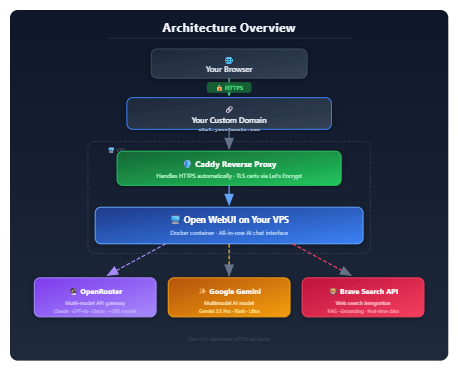
The browser connects to your domain over HTTPS. Caddy, a modern web server, terminates the TLS connection and reverse-proxies traffic to Open WebUI running in a Docker container. Open WebUI handles authentication, chat history, and the user interface, and makes outbound API calls to the provider associated with the selected model.
The stack is intentionally minimal, which is what enables it to run on modest hardware.
Choosing a VPS
Because the server performs no inference, the required specifications are modest:
- vCPUs: 1 to 2. The workload consists of serving a web application.
- RAM: 2 to 4Gb. Open WebUI has a relatively small memory footprint. Note that while a 2 GB VM will run Open WebUI itself, it provides little headroom for anything else on the same host, such as a database, additional services, or a local model
- Storage: 10 to 20 GB. This is sufficient for chat history, configuration files, and container images. There won’t be much room for anything else on the same host though.
- Bandwidth: 500 GB to 1 TB per month is more than adequate for a small group of users.
If you are based in Australia and prefer to keep your traffic within the country for privacy and latency reasons, choose a provider with data centres in Sydney or Melbourne. For my setup, I selected **Onideli**, which offers Australian data centres, reasonable pricing, and a straightforward control panel.
I have not included specific prices, as VPS pricing changes frequently. Check current rates when you are ready to provision your server.
Terminal & SSH Clients
Before you can configure the VPS, you will need an SSH client on your local machine. The appropriate choice depends on your operating system.
Windows
- Windows Terminal with OpenSSH. Windows 11 includes an OpenSSH client, which allows you to connect using
ssh user@your-server-ipfrom PowerShell or the Windows Terminal application. This is the recommended option for new installations. - **PuTTY.** A long-established SSH client for Windows. It remains widely used, particularly in tutorials that predate the inclusion of OpenSSH in Windows.
macOS
- Terminal.app. Included with macOS. Provides a working
sshcommand and is sufficient for most users.
Linux
Most Linux distributions include a terminal application and an OpenSSH client by default. No additional software is required.
Regardless of which client you reach for, configure SSH key authentication instead of passwords. It’s more secure, and it saves you typing your password every time you connect.
Installing Open WebUI
Open WebUI is the primary application in this setup. It is an open-source ChatGPT-style interface that supports multiple users, chat history, model switching, RAG, image generation, and web search integration. It is actively maintained.
The recommended installation process is as follows:
- Provision a VPS with Ubuntu (or another Linux distribution)
- Connect via SSH, update the system packages, create a non-root user, and secure the SSH configuration. (These are standard server hardening steps. If you are not familiar with them, review a guide on securing a Linux server before proceeding.)
- Install Docker and Docker Compose.
- Deploy the Open WebUI container. The official documentation provides a
docker runcommand. Alternatively, you can define the configuration in adocker-compose.ymlfile for easier version control. - Configure your domain’s A record to point to the VPS’s public IP address.
- Install Caddy and create a short Caddyfile that reverse-proxies your domain to the port Open WebUI is running on (typically 3000). Caddy will automatically request and renew Let’s Encrypt certificates.
sudo apt install -y debian-keyring debian-archive-keyring apt-transport-https curl
curl -1sLf 'https://dl.cloudsmith.io/public/caddy/stable/gpg.key' | sudo gpg --dearmor -o /usr/share/keyrings/caddy-stable-archive-keyring.gpg
curl -1sLf 'https://dl.cloudsmith.io/public/caddy/stable/debian.deb.txt' | sudo tee /etc/apt/sources.list.d/caddy-stable.list
sudo apt update && sudo apt install caddy
All the exact commands are not reproduced here, as they may change over time and are documented in the official Open WebUI and Caddy resources. The complete process typically takes about an hour on a clean VPS.
Configuring the AI Providers
Once Open WebUI is running, it needs to be connected to one or more AI providers. This is done by entering API keys into the administrative settings.
Text: OpenRouter
OpenRouter provides a single API that gives access to a wide range of model providers, including Anthropic, OpenAI, DeepSeek, Alibaba (Qwen), Meta, Mistral, and Google. You add credit to your account, generate an API key, and Open WebUI will make the available models selectable from the interface’s model dropdown.
The main advantage of this arrangement is the ability to switch between models such as Claude Sonnet, DeepSeek V3, and Qwen for the same prompt within a single interface. This makes it straightforward to compare model performance for different tasks.
OpenRouter is one of several available options. Alternatives include:
- LiteLLM: a self-hosted proxy that offers more control at the cost of additional configuration.
- Requesty, Portkey, NanoGPT: alternative aggregators with different pricing structures.
- Cloudflare AI Gateway, Vercel AI Gateway, Helicone, Kong AI Gateway: platforms oriented toward observability and enterprise use cases.
I chose OpenRouter because the setup process was quick and it supports the broadest range of models. It is possible to migrate to another provider later if needed.

Images: Google Gemini
For image generation and editing, I connected Google’s Gemini API through Google AI Studio. It supports both generation and in-place editing, which is useful for iterating on an image.
Other options are available, including image models from OpenAI, Grok, and ByteDance, as well as a model called Nano Banana for lightweight image tasks. Each is configured in the same manner: obtain an API key and add it to Open WebUI’s settings.
Web Search: Brave Search API
Open WebUI can integrate a web search provider. When enabled, prompts are augmented with current search results before being sent to the model, which allows responses to include recent information.
The available options include:
- Brave Search API: an independent search index with a privacy-focused approach.
- Google Custom Search: the most widely known option, subject to quota limits.
- SearXNG: an open-source metasearch engine that requires self-hosting.
- SerpAPI: a commercial service that returns Google search results.
I selected the Brave Search API for its independent index and straightforward integration.
The Completed Setup
After the setup is complete, the resulting system provides:
- A private chat interface on a domain under your control
- Automatic HTTPS via Caddy and Let’s Encrypt
- Access to a range of major frontier models through a single interface
- Image generation and editing
- Optional web search integration
- Multi-user accounts, allowing controlled access for family members or colleagues
- Predictable, usage-based costs
For my usage pattern (a few hundred prompts per week, occasional image generation, and web search enabled), the combined monthly cost of the VPS and API providers is approximately the cost of a coffee per week. Actual costs will vary based on model selection and usage volume. Extended conversations with higher-tier models such as Claude Opus will cost more than shorter interactions with less expensive models.
Who This Setup Suits
The project is likely to suit you if:
- You already operate a home server, a Raspberry Pi, a media server, or similar
- You are comfortable with SSH, Docker, and editing configuration files
- You are interested in understanding how the LLM ecosystem is put together
- You want to provide shared access for a small group without paying per user
- You are conscious of where your data is stored and processed
The project is unlikely to suit you if:
- You require enterprise-grade uptime (a single VPS provides no redundancy)
- You have no prior experience with a command-line environment
- You simply want a working chat interface with minimal setup, in which case a commercial subscription is the more practical choice
What Comes Next
The setup described in this article involves a series of AI governance decisions that are not always visible during implementation. These include the choice of AI provider, the location and retention of chat history, provider incident handling, and user transparency regarding which model is responding to a given prompt.
These are the areas addressed by ISO 42001, the AI Management System standard.
The next article I plan to publish will be a companion to this one: the same setup, but framed through the lens of AIMS controls. The focus will shift to how each decision maps to the requirements of the standard from the perspective of a ISO 42001 Lead Implementer.
If you have followed this guide and built the system yourself, the companion article will be more useful, as you will have a working example against which to evaluate the controls.
If you found this useful, give it a few claps 👏 and follow me for more.
Disclosure: This article contains affiliate links. This doesn’t cost you anything extra and helps support my writing.
메타데이터
- post_id
- c09e6c04f375
- slug
- last-weekend-i-cancelled-my-chatgpt-subscription-and-built-my-own-private-ai-chat-portal-c09e6c04f375
- url
- https://medium.com/@davidgilks/last-weekend-i-cancelled-my-chatgpt-subscription-and-built-my-own-private-ai-chat-portal-c09e6c04f375
- canonical_url
- https://medium.com/@davidgilks/last-weekend-i-cancelled-my-chatgpt-subscription-and-built-my-own-private-ai-chat-portal-c09e6c04f375
- author_url
- https://medium.com/@davidgilks
- status
- ok
- fetched_at
- 2026-08-18 10:55:16




