Stop Hand-Juggling JDKs: Automatic Per-Project Java Versions with Jolta
Best in class Java Version Management
Stop Hand-Juggling JDKs: Automatic Per-Project Java Versions with Jolta
Best in class Java Version Management
How I got my java command to always resolve to the right JDK — no shell hooks, no JAVA_HOME gymnastics, no "wait, which version am I on?"
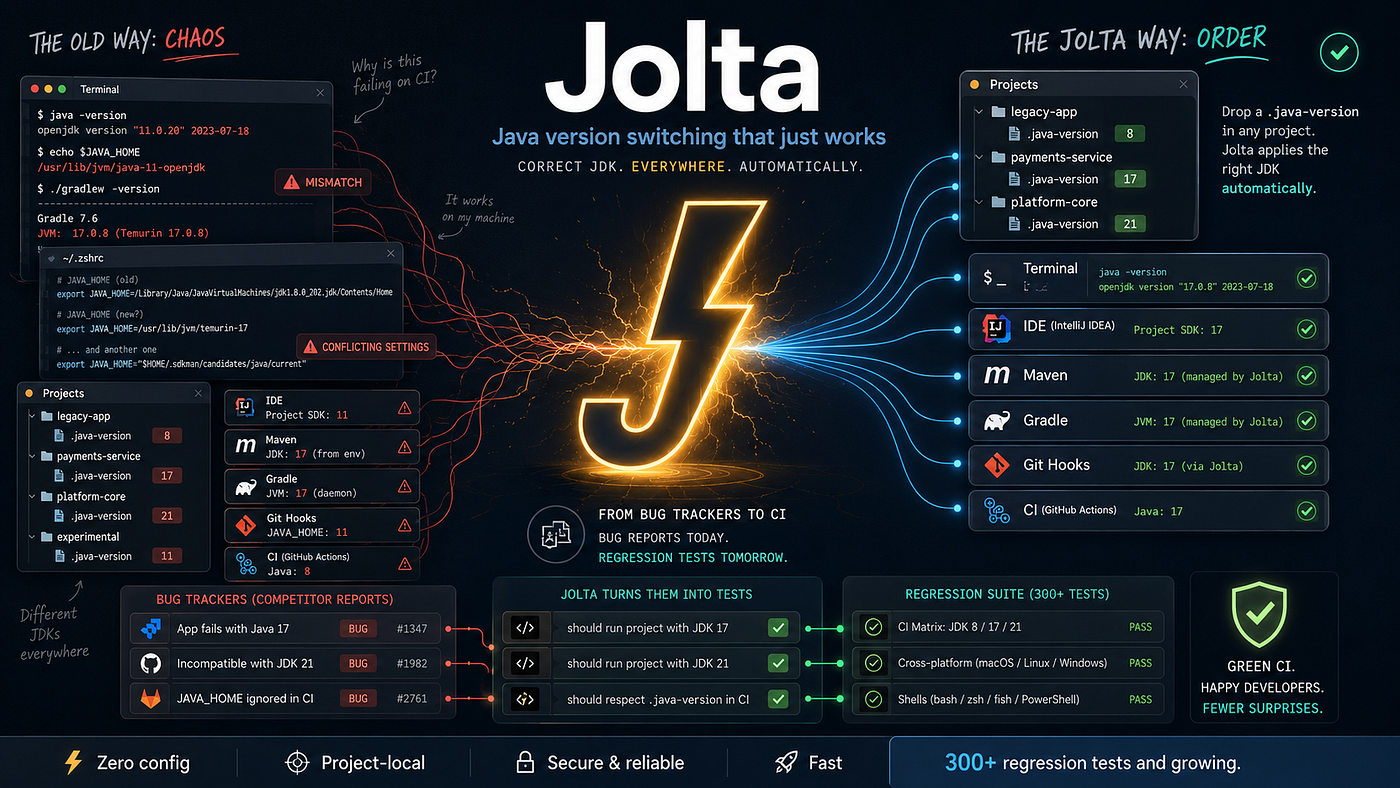
You know the moment. You cd into a service that's pinned to Java 17, run your build, and it explodes with a class-file-version error — because your terminal is still on the JDK 21 you were using in the last project. Or worse, it doesn't error, and you ship something compiled against the wrong toolchain.
If you work across more than one Java codebase, you’ve paid this tax. One service is on 17, a new one is on 21, and there’s a legacy app that will only ever build on 11. Keeping the right JDK active means editing JAVA_HOME by hand, or remembering to run a switch command every single time you move directories. It's a small friction, but it's a constant one, and it fails silently in exactly the ways that cost you an afternoon.
There are good tools for this already — SDKMAN!, jenv, asdf, mise — and if one of them is working for you, that’s a legitimate answer. But I wanted something that leaned all the way into automatic: no command to remember, no shell function to trip over, and native support for Windows, which most of the existing tools treat as an afterthought. So I built Jolta.
Full disclosure up front: Jolta is my own open-source project (MIT-licensed). This is a hands-on guide to using it, including where the older tools might still suit you better.
The idea, borrowed from the Node world
If you’ve used Volta for Node, you already understand Jolta — it’s the same model applied to the JDK. You pin a version once per project, and the correct one is used automatically, because the commands you type (java, javac, jar, jshell…) are actually lightweight shims that resolve the right version at the moment you call them.
The key difference from jenv or asdf: there’s no shell hook and no cd interception. Nothing rewrites your prompt or runs on every directory change. The shims simply walk up the directory tree, find the nearest .java-version file, and dispatch to the JDK it names. Overhead is sub-5ms per invocation, so you never feel it. And if the version a project asks for isn't installed yet, Jolta downloads it on first use.
Here’s the entire experience in three lines:
cd my-service
jolta pin 21
java -version   # → OpenJDK 21, automatically, from now on
The third line is optional … you can go right to executing gradle or whatever. That’s it. There’s no step four.
Installing Jolta
macOS (Homebrew):
brew install OneAppPlatform/tap/jolta
jolta setup
Linux or macOS (one-liner)
curl -fsSL https://raw.githubusercontent.com/OneAppPlatform/jolta/main/install.sh | shWindows: download the executable from the releases page and run jolta setup.
The jolta setup step installs the shims and wires up your shell (or PATH, on Windows). Run it once. Jolta ships as a single dependency-free Rust binary that acts as both the CLI and the shims, so there's nothing else to install and nothing to keep in sync.
jolta doctordoctor checks that the shims are found before your system JDK, that your shell is configured, and that Jolta can reach the vendor download mirrors. It's the first thing to run if anything looks off later.
Pinning a version per project
Inside any project, pin the version it should use:
cd payments-service
jolta pin 21
This writes a .java-version file to the project root containing 21. Commit that file — now every teammate (and your CI) who has Jolta gets the exact same JDK with no extra setup. From this point on, any Java command you run inside that directory tree resolves to 21:
java -version
# openjdk version "21..."
Walk into a different project and it just works:
cd ../legacy-billing
jolta pin 11
java -version
# openjdk version "11..."
No switching command in between. The shim reads the nearest .java-version each time.
Choosing a distribution
Sometimes you don’t just care about the major version — you care about the distribution (your employer standardizes on Corretto, say, or you need GraalVM for native image work). Pin it explicitly:
jolta pin corretto@21
jolta pin graalvm@21
jolta pin temurin@17
Jolta supports Temurin, Corretto, GraalVM, Oracle, Zulu, Liberica, Sapmachine and GraalCE.
Setting a global defaults
For everything outside a pinned project, set a fallback so a bare shell isn’t stuck on your system JDK:
jolta default 21jolta vendor correttoHow Jolta decides which JDK to use
When you run a Java command, Jolta resolves the version in this order:
- An explicit environment variable, if you’ve set one for a one-off.
- The project’s
.java-versionfile, found by walking up from your current directory. - Your global default (
jolta default …). - The system JDK, as a last resort.
This is predictable and easy to reason about: the closer and more specific the instruction, the higher it wins. Need to run a single command under a different JDK without changing anything permanent? Use exec:
jolta exec 17 -- ./gradlew buildThat runs your build with JAVA_HOME set to 17 for that command only, then leaves your environment exactly as it was.
Downloading, browsing, and upgrading
You rarely need to install JDKs manually — pinning a version you don’t have triggers a download on first use. But you can be explicit:
jolta catalog          # browse available versions and distributions
jolta install 21       # download a specific one ahead of time
jolta install corretto@17
Point-release maintenance is a first-class feature, not an afterthought. Keeping up with security patch releases (21.0.4 → 21.0.5, and so on) is one command:
jolta upgrade          # move pinned versions to their latest point release
jolta update           # refresh Jolta's knowledge of what's available
And when a version has outlived its usefulness, clean it up rather than letting old JDKs pile up on disk.
Migrating from jenv, asdf, or SDKMAN! — without rewriting anything
This is the part I’m most deliberate about, because “try my tool” shouldn’t mean “redo your config.”
- If you already use jenv or asdf, your projects already contain
.java-versionfiles. Jolta reads the same format, so it's effectively a drop-in — install it, runsetup, and your existing pins just work. - If you’re on SDKMAN!, Jolta recognizes its
.sdkmanrcfiles, so projects configured for SDKMAN! are understood without conversion.
You can adopt Jolta on one machine or one project and leave everything else untouched.
Where the other tools might still be the better call
I’d rather you pick the right tool than my tool, so here’s the honest boundary:
- SDKMAN! manages far more than JDKs — Gradle, Maven, Kotlin, Scala, and the rest of the JVM toolchain. If you want a single tool for your whole ecosystem, that breadth is real and Jolta doesn’t try to match it.
- mise and asdf are polyglot across many languages. If you’re also juggling Node, Python, and Ruby versions, one manager for all of them may beat a Java-specific tool.
- Those projects are mature and battle-tested. Jolta is young, and “young” means you should kick the tires before you trust it with your whole team.
Where Jolta earns its place: it’s the most hands-off of the bunch for the specific job of per-project JDK switching, it adds no shell-hook latency, it treats Windows as first-class, and it stays compatible with the config files the others already use — so trying it is low-risk.
A realistic day with Jolta
bash
# Monday morning, jumping between three services
cd ~/work/payments        # .java-version says 21 → java is 21
./gradlew test
cd ~/work/legacy-billing # .java-version says 11 → java is 11
mvn verifycd ~/work/new-graphql # pinned corretto@21 → the right distro, auto-downloaded once
./gradlew bootRun# A one-off, without disturbing anything
jolta exec 17 -- ./gradlew someOldTask# Patch Tuesday: bump everything to the latest point releases
jolta upgradeNot once did I touch JAVA_HOME or run a switch command. That's the whole point.
Try it
Jolta is open source under the MIT license. If you try it, the most valuable thing you can do is file an issue with your real multi-JDK setup — where the resolution surprised you, which distributions you need, what would have to be true for you to switch.
If you’ve been quietly resetting JAVA_HOME for years, give the automatic version a weekend. Worst case, your .java-version files still work with whatever you were using before.
Jolta is my own project. If this saved you some friction, a star on the repo genuinely helps other people find it.
메타데이터
- post_id
- c0a4ee9571fb
- slug
- stop-hand-juggling-jdks-automatic-per-project-java-versions-with-jolta-c0a4ee9571fb
- url
- https://medium.com/techtrends-digest/stop-hand-juggling-jdks-automatic-per-project-java-versions-with-jolta-c0a4ee9571fb
- canonical_url
- https://medium.com/techtrends-digest/stop-hand-juggling-jdks-automatic-per-project-java-versions-with-jolta-c0a4ee9571fb
- author_url
- https://medium.com/@pdxgeek
- status
- ok
- fetched_at
- 2026-08-01 22:13:31