Python — Part 3
Dictionary methods in Python:
Python — Part 3
Dictionary methods in Python:
Example: update()

Example: clear()

Example: pop()

Example: popitem() -> removes the last key-value pair.

Example: del to delete a key-value or complete dictionary. Here we are deleting the dictionary.

[embed]List: Python | Curated by Aditya Kumar | Medium Python · 4 stories on Mediummedium.com
Example: using del to delete the key.

for Loop with else in Python:
Example: a basic example of for loop with else.

Example: another example.

Example:

Example: using for … if … else. Clearly, else will execute only when the for loop completed successfully.
Exception Handling in Python:
What is an Exception?
An exception is an error that occurs while the program is running, which stops the normal flow of execution.
Example:
x = 10 / 0 # ZeroDivisionError
Output:
ZeroDivisionError: division by zero
Why Exception Handling?
Without handling exceptions:
· The program crashes
· Remaining code does not execute
With exception handling:
· Program continues gracefully
· Errors are managed properly
Basic try–except: Use try to write risky code and except to handle errors.
try:
x = 10 / 0
except:
print(“An error occurred”)
Example:

Example: code to print the multiplication table.

Example: what if we give string as the input in the above example? The program will show an error.

Example: using try…except to handle the error.

Example: we can omit the “exception as e”

Example: catching specific exceptions

Example: we can add multiple “except”.

Summary:
· try block contains code that may cause an error
· except block handles the error if it occurs
· Program does not crash when exception is handled
· Always catch specific exceptions, not generic ones
· Multiple except blocks can handle different errors
· else runs only if no exception occurs
· finally runs whether an exception occurs or not
· Use Exception as e to get error details
· raise is used to create custom errors
· Keep try blocks short and focused
Finally Keyword in Python:
What is finally?
The finally block is used with try–except and always executes, whether:
· an exception occurs
· no exception occurs
· an exception is handled or not
Basic Syntax
try:
# risky code
except:
# error handling
finally:
# cleanup code (always runs)
Example: a basic example.

Example: finally is always executed even if try or except executed.

Why Use finally?
· To close files
· To release resources
· To disconnect databases
· To ensure cleanup code always runs
Important Points
· finally executes even if return is used
· finally executes even if an exception is not handled
· Only skipped if the program forcibly terminates
· finally is used to run cleanup code that must execute no matter what happens in try or except.
Raising custom errors in Python:
What Is a Custom Error?
A custom error (custom exception) is a user-defined error that you create to represent specific problems in your program.
Why Raise Custom Errors?
· To make errors more meaningful
· To improve code readability
· To handle application-specific rules
· To separate logic errors from system errors
Using raise (Basics)
You can raise a built-in exception manually.
age = -5
if age < 0:
raise ValueError(“Age cannot be negative”)
Example: a basic example.

Example: Handling Custom Exceptions with try–except

Summary:
· Custom errors are user-defined exceptions created for specific problems
· They are created by inheriting from Exception
· Use raise to trigger a custom error
· Custom errors make code clearer and more meaningful
· They must be defined before use
· Use try–except to handle custom errors gracefully
· Unhandled custom errors show a traceback (expected behavior)
· Name custom errors clearly (e.g., InvalidAgeError)
Short hand if else statements:
What Is Shorthand if–else?
A shorthand if–else (also called ternary operator) allows you to write an if–else condition in one line.
Basic Syntax
value_if_true if condition else value_if_false
Example: a basic example.

Example: multiple conditions

Enumerate Function in Python:
What is enumerate()?
enumerate() is a built-in Python function used to loop over an iterable while keeping track of the index. Instead of manually counting indexes, enumerate() does it automatically.
Basic Syntax
enumerate(iterable, start=0)
· iterable → list, tuple, string, etc.
· start → starting index (default is 0)
Example: old way

Example: a basic example printing the index number and the text at that index.

Example: enumerating with custom start index

Example: enumerate with the string.

Example:

Summary:
· enumerate() is a built-in Python function
· It returns index and value while looping
· Used with lists, tuples, strings, and other iterables
· Default starting index is 0
· start parameter can change the starting index
· Makes code cleaner than manual indexing
· Returns pairs as (index, item) tuples
· Commonly used in for loops
Virtual Environment in Python:
What Is a Virtual Environment?
A virtual environment (venv) is an isolated Python environment where you can install packages without affecting the global Python installation.
Why Use a Virtual Environment?
· Avoids package version conflicts
· Keeps projects independent
· Makes projects portable
· Prevents breaking system Python
Example Problem (Without venv)
· Project A needs Django 2.2
· Project B needs Django 4.x
· Installing one breaks the other
Creating a Virtual Environment:
Step 1: Open Terminal / Command Prompt
python -m venv myenv
myenv = environment name

To activate:

Deactivating the Virtual Environment

Installing the module named ‘requests’:

Checking installed packages:

Sharing a Virtual Environment (requirements.txt)

Deleting a Virtual Environment: Just delete the folder:
Myenv/
Summary:
· A virtual environment is an isolated Python workspace
· It prevents dependency and version conflicts
· Each project should have its own virtual environment
· Created using python -m venv env_name
· Must be activated before installing packages
· Packages installed inside venv do not affect global Python
· Deactivate using deactivate
· Use requirements.txt to share dependencies
· Virtual environment folders should not be committed to Git
How import works in Python:
What Is import in Python?
import is used to load code from another module (file) so you can use its functions, variables, or classes.
Example: importing a module.

Example: importing specific items

Example: Import Everything (Not Recommended)

Example: importing with alias

Example: using ‘dir’ to know the function inside the module.

Example: importing your own file(modules)
A.py:

B.py:

How Python Finds a Module (Import Search Path)
Python searches in this order:
-
Current directory
-
Built-in modules
-
Installed packages
-
Paths in sys.path
if name == “main” in Python:
What Is name?
· name is a special built-in variable in Python
· It tells how the Python file is being executed
Key Values of name:

Why Use if name == “main”?
· To control code execution
· Code inside this block runs only when file is executed directly
· Prevents code from running when file is imported
Let’s us first understand the issue without it:
Aditya.py:

Main2.py:

Clearly, when main2.py was run, it printed the output twice, once because of “Aditya.welcome()” and one because “welcome()” was called in Aditya.py.
What if we commend out “Aditya.welcome()”? Only once it will print.

But, is this the solution? No, it means that every function inside the Aditya.py will get executed if main2.py was run.
Solution:


Real-World Use Case
· Python scripts often contain functions, classes, and test code
· Use if name == “main” to run test/demo code only when needed
os Module in Python:
What Is the os Module?
· os is a built-in Python module for interacting with the operating system
· Lets you perform tasks like:
o File and directory management
o Environment variables
o Process management
Importing the module:

Example: Creating a folder using the os module.

Example: code to check if a folder exists in our folder or not.

Example: to rename

Example: to print the list of the folders in a specific folder.

Example: Current Working Directory

Example: Creating and Removing Directories

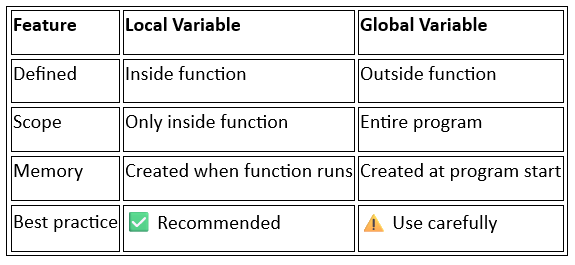
Local vs Global Variables in Python:
What is a Variable?
A variable is a name that stores a value in memory.
x = 10
What is Scope?
Scope defines where a variable can be accessed in your program.
Python mainly uses:
· Local scope
· Global scope
Local Variables: A local variable is created inside a function and can be used only within that function.
def my_function():
x = 10 # local variable
print(x)
my_function()
Global Variables: A global variable is created outside all functions and can be accessed anywhere in the program.
x = 20 # global variable
def my_function():
print(x)
my_function()
print(x)
Example: local variable.

Example: global variable.

Example: local variable get preference over the global variable if there name be same.

Example: using ‘global’ keyword

Why Avoid Too Many Global Variables?
Using many global variables can:
· Make code hard to debug
· Cause unexpected changes
· Reduce readability
File IO in Python:
What is File I/O?
File I/O means:
· Input → Reading data from a file
· Output → Writing data to a file
Files allow data to be stored permanently, unlike variables (temporary).
Types of Files
Python mainly works with:
-
Text files → .txt, .csv, .log
-
Binary files → .jpg, .pdf, .exe

Example: opening the file.

Example: reading the content of myfile.txt

Common File Modes

Example: if we open a file which doesn’t exists in ‘w’ mode, then that file automatically get created.

Example: writing in the file.

Example: appending in the file.

Example: the number of times we run the code, the number of times it get appended.

Example: Using with Statement (Best Practice): Automatically closes the file.

read(), readlines() and other methods:
Before reading, a file must be opened in read mode (r).
read()
· Reads entire file content as one single string
· Can also read a specific number of characters
Example: basic reading of the file.

Example: reading the first ten characters.

readline()
· Reads one line at a time
· Cursor moves to the next line automatically
Example: basic use of readline()

readlines()
· Reads all lines at once
· Returns a list of strings
Example: a basic example of readlines()

Example: File Cursor Methods: tell() — Returns current cursor position.

Example: seek() -> Moves cursor to a specific position.

Comparison Table

Summary:
· read() → Reads the entire file (or given number of characters) and returns a single string.
· readline() → Reads one line at a time and returns it as a string.
· readlines() → Reads all lines at once and returns them as a list of strings.
· File iteration (for line in file) → Reads the file line-by-line efficiently using minimal memory.
· tell() → Returns the current position of the file cursor.
· seek(pos) → Moves the file cursor to the specified position.
· write() → Writes a string to the file and returns the number of characters written.
· writelines() → Writes a list of strings to the file without adding newlines automatically.
· close() → Closes the file and frees system resources.
· with open() → Automatically opens and closes the file safely (best practice).
Contact Me: 📧 Email: adii.utsav@gmail.com 🔗 LinkedIn: https://www.linkedin.com/in/aditya-kumar-3241b6286/ 💻 GitHub: https://github.com/Rememberful
메타데이터
- post_id
- c0e5b6f0d391
- slug
- python-part-3-c0e5b6f0d391
- url
- https://medium.com/@adii.utsav/python-part-3-c0e5b6f0d391
- canonical_url
- https://medium.com/@adii.utsav/python-part-3-c0e5b6f0d391
- author_url
- https://medium.com/@adii.utsav
- status
- ok
- fetched_at
- 2026-07-13 06:23:13






