Autodocumentation with Sphinx, Azure DevOps and Confluence
Intro
Documentation with Sphinx, Azure DevOps and Confluence

A developer submerged by sheets and docs
Write techinical documentation is always a boring task the reality is that all of us hate doing it. However, writing exhaustive documentation (and keep it up to date!) could literally save your life when you need to implement a change, fix a bug or maintain someone else’s project.
How can we automate documentation as much as possible in order to focus on what really matters?
Let’s find out how we automated the production of documentation in our development workflow and how is integrated in our CI/CD pipelines.
Let’s look at the key ingredients of this recipe:
- Sphinx: is an open-source documentation generation tool specifically designed for Python projects, although it can be used for other programming languages as well. Sphinx helps developers create professional-looking documentation by allowing them to write documentation content in a markup language called reStructuredText (or in some cases, Markdown) and then automatically converting it into various output formats, such as HTML, PDF, and plain text.
- Azure DevOps: we use Azure DevOps to build CI/CD pipelines using YAML configuration file but you can use other similar services.
- Confluence: is a collaborative workspace and documentation platform developed by Atlassian. We use it to store all documentation, wiki and notes.
Talk is cheap, show me the code!
Create a Confluence account
- Create an account on Confluence
- Create an API token
- Get the following informations that will be used to publish on Confluence:
- **confluence_server_user**: user@domain.com
- confluence_space_key: is then name you can get from a url like this https://firm.atlassian.net/wiki/spaces/CONFLUENCE_SPACE_KEY/overview
- confluence_server_pass: password for the account
- confluence_server_url: https://firm.atlassian.net/wiki/
Config Sphinx in your project
First of all, you need just a little bit of setup inside your project folder with these steps:
- Docstring: insert docstrings to all parts of your code. You can choose the format of the docstring you prefer like numpy or google (just use extension sphinxcontrib-napoleon).
💡 You can add docstring in quick way if you use autoDocstring extension for VSCode 2. Install these dependencies in your environment (we use poetry as dependencies manager in python)
- sphinx: sphinx library
- sphinxcontrib-napoleon: extension to parse google style docstring
- myst-parser: extension to parse markdown file used for documentation
- sphinxcontrib-confluencebuilder: extension to publish on Confluence
- sphinx-autoapi: generate documentation by parsing source code and docstring
- Set up basic Sphinx documentation by running this command in your shell.
sphinx-quickstartYou should now have a docs folder in your project tree:
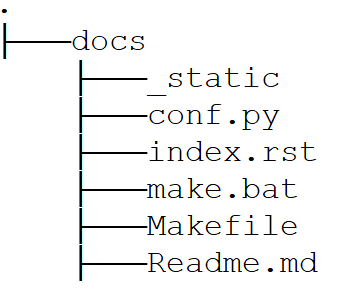
- _static: add a logo image or other stuff.
- conf.py: sphinx configuration file
- index.rst: root document for sphinx. In the toc tree you can add other files but all files generated by sphinx-autoapi are automatically added to it.
- Makefile and make.bat: you can also execute the build of the documentation locally with these files both Windows and Unix system.
- Readme.md: you can add as many markdown file as you want to enrich your docs. Just add it in the toc tree of index.rst
Set conf.py in your project
The most important file for sphinx is conf.py. This is our setup but you can adapt to your needs.
import os
import sys

sys.path.insert(0, os.path.abspath('../../'))

project = 'Title of yout project'
copyright = '2023, Your firm'
author = 'John Doe'

extensions = [
    'sphinx.ext.napoleon',
    'autoapi.extension',
    'sphinx_copybutton',
    'myst_parser',
    'sphinxcontrib.confluencebuilder',
]
source_suffix = {
    '.rst': 'restructuredtext',
    '.md': 'markdown',
}

html_theme = 'classic'
html_title = 'Your project title'
html_static_path = ['_static']
html_logo = '_static/your_logo.png'
html_show_sourcelink = True

autoapi_generate_api_docs = True
autoapi_type = 'python'
autoapi_dirs = ['../src']
autoapi_add_toctree_entry = True
autoapi_file_pattern = '*.py'

confluence_editor = 'v2'
confluence_publish = True
confluence_page_hierarchy = True
confluence_prev_next_buttons_location = 'bottom'
confluence_space_key = os.getenv('confluence_space_key')
confluence_parent_page = 'My parent page'
confluence_server_url = os.getenv('confluence_server_url')
confluence_server_user = os.getenv('confluence_server_user')
confluence_server_pass = os.getenv('confluence_server_pass')
confluence_global_labels = ['projects', 'data']
confluence_publish_prefix = 'ing'
Just two pieces of advice regarding the above parameters:
💡 confluence_parent_page: with this parameter you can specify a parent page name where to publish your documentation. Especially useful when you want to categorize a specific document.
💡 confluence_publish_prefix: is a parameter that if specified add a prefix to all pages published on Confluence. This could be useful since it prevents unwanted overwrite of pages with identical name under the same space.
Set up Azure DevOps CICD pipeline
Now it’s time to setup our Azure DevOps CI/CD pipeline by adding the stage of documentation.
But before to dive in how to configure the pipeline it’s necessary to set the credentials of Confluence in order to let them available during the execution of the CI/CD pipeline.
One of the best way to do that is to store them into AzureDevOps pipeline library and define a variable group. In this way, if you need to change a value (e.g password expired) you don't have to modify all pipelines.
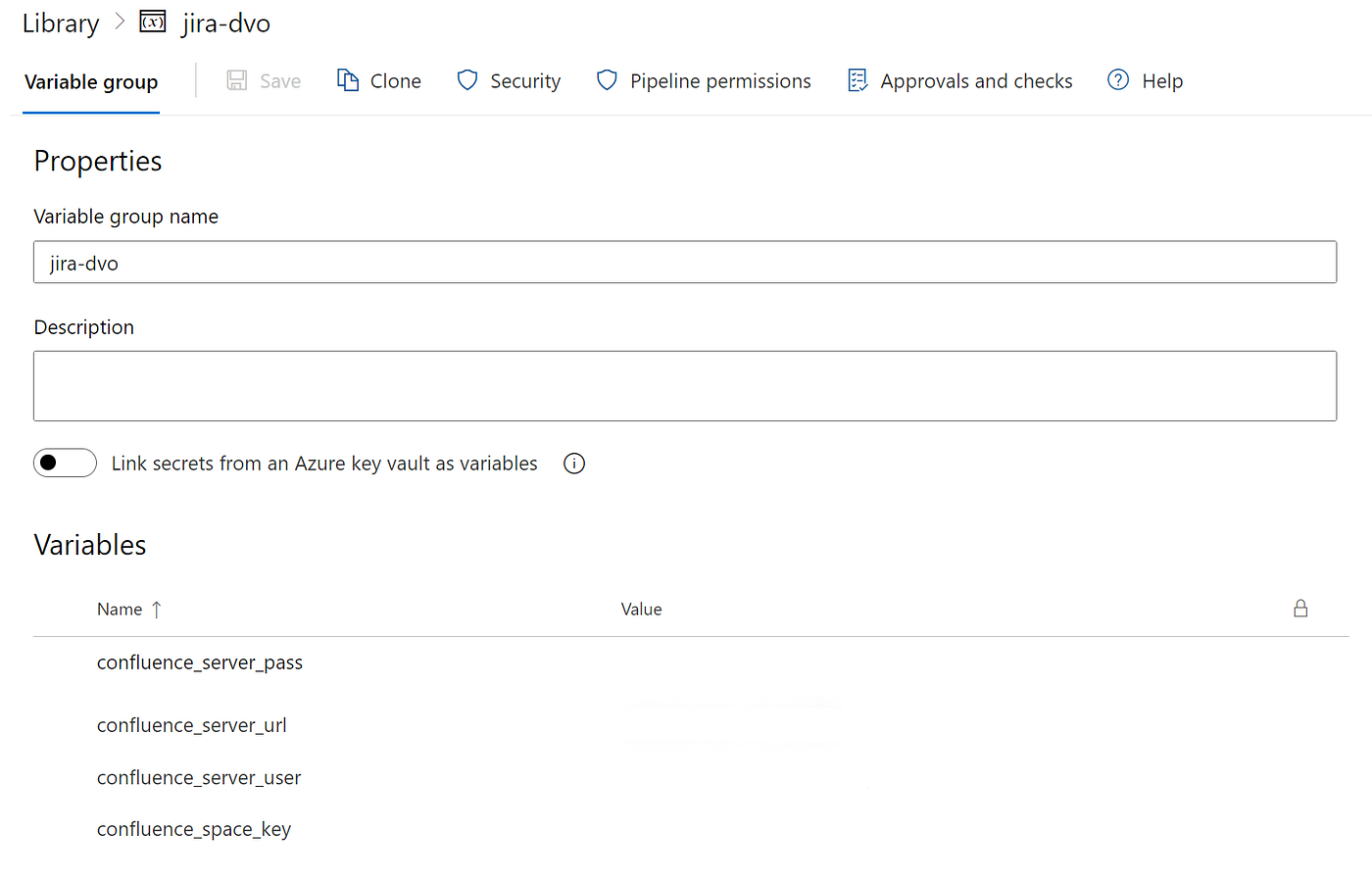
The following configuration is related to the stage of documentation. All stages of our pipelines are configured by using template that are imported in the main yaml that define the Azure pipeline.
As you may notice the last steps are used to produce an artifact that is the sphinx static html site. This allows users in your organization who don’t have an account on Confluence to anyhow read the documentation.
💡 I suggest to configure the pipeline in order to trigger this stage whenever a change is pushed on the main branch so the documentation is updated only when the modification is effective.
💡 You can host a static website for free on Azure Storage. You could leverage this to build your own docs site by automatically uploading the html artifact into the storage.
steps:
  - task: UsePythonVersion@0
    inputs:
      versionSpec: '3.9'
      architecture: 'x64'
    displayName: 'Use Python 3.9'

  - script: |
      pip install poetry
    displayName: 'Install poetry'

  - script: |
      poetry install --only cicd-docs --sync
    displayName: 'Install python docs dependencies'

  - task: CmdLine@2
    inputs:
      script: poetry run make html
      workingDirectory: '$(Build.SourcesDirectory)/docs/'
    displayName: 'Compile documentation'

  - task: CmdLine@2
    inputs:
      script: |
        poetry run sphinx-build -D confluence_space_key=$(confluence_space_key)
                            -D confluence_server_user=$(confluence_server_user)
                            -D confluence_server_pass=$(confluence_server_pass)
                            -D confluence_server_url=$(confluence_server_url)
                            -b confluence . _build/confluence -E -a
     workingDirectory: '$(Build.SourcesDirectory)/docs'
    displayName: 'Publish on Confluence space'

  - task: CopyFiles@2
    inputs:
      SourceFolder: '$(Build.SourcesDirectory)/docs/_build/html'
      TargetFolder: '$(Build.ArtifactStagingDirectory)'
      Contents: '**'
    displayName: 'Copy documentation files to artifact directory'

  - task: PublishBuildArtifacts@1
    inputs:
      PathtoPublish: '$(Build.ArtifactStagingDirectory)'
      ArtifactName: 'docs'
      publishLocation: 'Container'
    displayName: 'Publish documentation as artifact'
Conclusion
That’s all folks! Now you are ready to publish high quality code documentation simply by pushing your changes.
Last tip: 💡 In order to ensure the correctness of your docstring you can use a pre-commit checker like **pydocstyle.**
메타데이터
- post_id
- c19b8a0442f0
- slug
- autodocumentation-with-sphinx-azure-devops-and-confluence-c19b8a0442f0
- url
- https://medium.com/@davideairaghi/autodocumentation-with-sphinx-azure-devops-and-confluence-c19b8a0442f0
- canonical_url
- https://medium.com/@davideairaghi/autodocumentation-with-sphinx-azure-devops-and-confluence-c19b8a0442f0
- author_url
- https://medium.com/@davideairaghi
- status
- ok
- fetched_at
- 2026-07-14 09:34:12


