Why Web Scraping Fails in Production: Proxies Are Only One Layer
Web scraping works locally but fails in production when scale exposes proxy, timing, fingerprint, and data validation issues.
Why Web Scraping Fails in Production: Proxies Are Only One Layer
Web scraping can work perfectly in local tests and still break in production. Here’s why scale exposes data, proxy, timing, fingerprint, and monitoring problems.

A web scraping setup that works on your laptop can still fail the moment you deploy it.
Locally, everything looks fine:
- requests return data
- proxies work
- pages load
- errors seem manageable
Then production starts.
Suddenly:
- success rates drop
- proxies get blocked
- timeouts increase
- retries pile up
- fields go missing
- jobs become unstable
Most people blame the proxy pool.
Sometimes they’re right.
But often, proxies are only one layer of the problem.
Why does web scraping fail in production?
Web scraping fails in production when a scraper succeeds in small tests but breaks under real-world scale, timing, concurrency, website changes, proxy limits, fingerprint checks, or weak monitoring.
In simple terms:
Local success does not guarantee production stability.A scraper can return HTTP 200, parse a page, and still produce bad data.
That is why production scraping requires more than “working requests.” It needs system design, validation, monitoring, and controlled traffic behavior.
The 5 Core Categories of Production Web Scraping Failure
Production web scraping usually fails across five layers:
- Data layer — missing fields, wrong values, selector drift
- Request layer — rate limits, retries, concurrency, timing
- Proxy layer — blocked IPs, poor rotation, latency, target-specific failures
- Fingerprint layer — headers, TLS, browser profile, session mismatch
- Monitoring layer — shallow logs, no validation, late alerts
If you only fix one layer, the system can still fail.
That is why adding more proxies does not always solve production scraping problems.
Local Web Scraping vs Production Web Scraping
Local web scraping usually means:
- low request volume
- manual testing
- slow execution
- fewer concurrent requests
- less repetition
Production web scraping usually means:
- scheduled jobs
- parallel workers
- higher request volume
- repeated target access
- shared infrastructure
- tighter error handling
That difference matters.
A target website may ignore 20 test requests.
It may not ignore 20,000 structured requests.
Example: Local Test vs Production Run
A scraper can pass a small local test and still fail once the same logic runs at production scale.
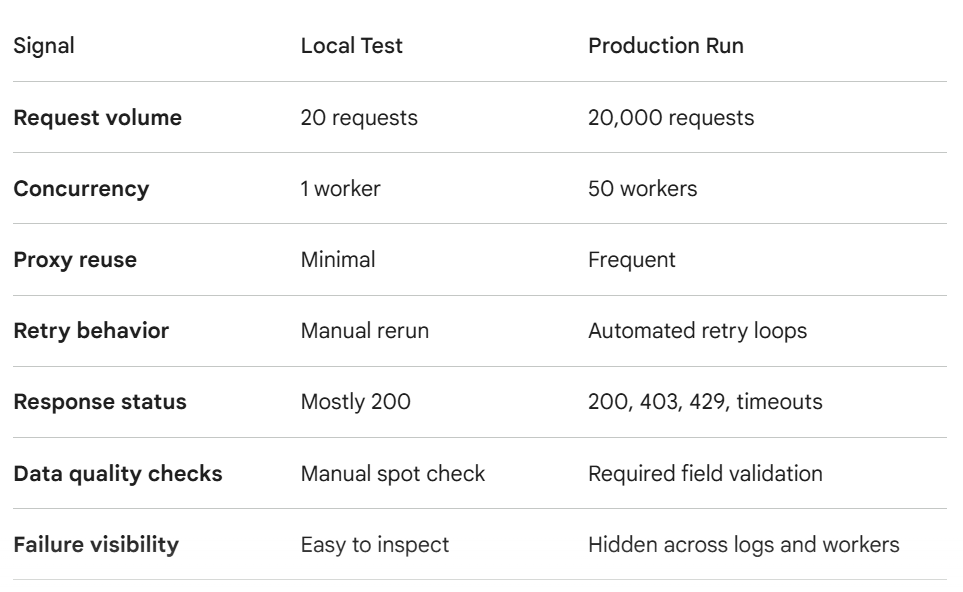
The important difference is not just volume. Production changes the behavior pattern. Requests become more repetitive, retries multiply traffic, proxies are reused under pressure, and small data issues become pipeline-wide problems.
Failure Layer #1: Silent Data Corruption
The most dangerous production failures are not always crashes.
Sometimes the scraper returns HTTP 200, parses the page, and stores data, but the data is incomplete or wrong.
This can happen when:
- selectors still match but the page meaning changes
- a product page returns partial content
- a soft block returns a fake or reduced page
- JavaScript content does not fully render
- required fields disappear without triggering errors
This is worse than a loud failure because the pipeline keeps running while the data quality decays.
A scraper that “runs successfully” is not always scraping successfully.
Fix: Validate the Data, Not Just the Request
Do not treat HTTP 200 as proof that scraping worked.
Validate:
- required field presence
- expected record count
- response size changes
- duplicate rate
- null-value rate
- price or value ranges
- HTML template changes
- captcha or soft-block signatures
A production scraper should fail loudly when data quality drops.
Quietly saving bad data is worse than stopping the job.
def validate_product_record(record):
    required_fields = ["title", "price", "url"]

    for field in required_fields:
        if not record.get(field):
            return False

    if record.get("price") and record["price"] <= 0:
        return False

    if "captcha" in record.get("html_text", "").lower():
        return False

    return True
This kind of validation prevents a scraper from treating a technically successful request as a successful scrape. In production, the goal is not just to complete requests. The goal is to collect usable data.
Failure Layer #2: Concurrency Changes Everything
Concurrency is one of the biggest reasons web scraping fails after deployment.
Locally, you may send requests one at a time.
In production, you may run:
20 workers × 10 requests each = 200 active requestsThat changes the traffic pattern completely.
Suddenly:
- the same proxy may be reused too often
- the same endpoint may get hammered
- retries may overlap
- rate limits trigger faster
Concurrency doesn’t just make web scraping faster.
It makes detection easier.
Fix: Control Request Pressure
Do not only count total requests.
Track:
- requests per proxy
- requests per domain
- requests per endpoint
- concurrent sessions
- retry volume
A production web scraping system should know when to slow down.
If it only knows how to retry, it will eventually attack the target by accident.
Failure Layer #3: Proxy Rotation Breaks Under Load
Proxy rotation looks simple in local tests.
Pick proxy. Send request. Switch proxy.
But production adds pressure.
A weak rotation system can cause:
- uneven proxy usage
- repeated hits from the same IP
- no cooldown between uses
- overloaded proxies
- synchronized traffic bursts
That is how a “rotating” setup still behaves like a bot.
Fix: Treat Proxies Like Resources
A production proxy pool should track:
- active requests per proxy
- success rate
- latency
- recent errors
- cooldown time
- target-specific blocks
Do not treat every proxy equally.
A slow, blocked, or overloaded proxy should not receive the same traffic as a healthy one.
This is also why proxy quality matters. A stronger proxy pool can reduce friction, but it still needs proper rotation, cooldowns, target-specific scoring, and monitoring.
Failure Layer #4: Retries Create Hidden Traffic Spikes
Retries are supposed to improve reliability.
But bad retries can destroy a production web scraping workflow.
Example:
100 requests fail
Each retries 3 times
Total traffic becomes 400 requests
If retries happen instantly, you create a traffic spike.
From the target site’s perspective, your scraper suddenly became more aggressive.
That often leads to:
- 403 errors
- 429 errors
- timeouts
- temporary bans
More retries can make the original problem worse.
Fix: Use Backoff and Jitter
A better retry strategy includes:
- retry limits
- exponential backoff
- random jitter
- proxy health updates
- error-specific handling
A timeout should not be handled the same way as a 403.
A 429 should usually slow the system down.
A connection refused error may mean the proxy should be removed.
Different errors need different responses.
Failure Layer #5: Headers and Fingerprints Stay Too Consistent
Production traffic creates repetition.
If every request uses:
- same headers
- same user-agent
- same TLS fingerprint
- same browser profile
- same timing pattern
then different proxy IPs may not help.
The traffic still looks coordinated.
Websites can cluster requests by behavior, not only IP.
If you want to understand the connection-level side of this problem, this guide on TLS fingerprinting explains why requests can still look automated even when proxies and headers seem correct.
Fix: Align the Whole Identity
A request identity should make sense across layers:
Proxy location + headers + TLS fingerprint + browser profile + session behaviorIf your IP says Germany but your timezone says Manila, your language says en-US, and your timing is perfectly robotic, the system looks fake.
The goal is not random chaos.
The goal is realistic consistency.
One session should look like one believable user environment.
Failure Layer #6: Local Environment Is Different From Production
A local machine and production server often look different.
Production may run on:
- cloud infrastructure
- containers
- headless browsers
- different DNS routes
- different operating systems
- different TLS libraries
That changes how requests look.
Even if your code is the same, the environment is not.
A scraper tested locally with one TLS stack may behave differently once deployed in a container or cloud server.
Fix: Test From the Same Environment You Deploy
Do not only test locally.
Test from:
- the same server region
- the same container image
- the same proxy setup
- the same browser version
- the same concurrency level
Production-like testing catches problems earlier.
If you deploy from cloud infrastructure, test from cloud infrastructure.
If you scrape with headless browsers in production, test with the same headless browser configuration.
Failure Layer #7: Monitoring Is Too Shallow
Many web scraping systems only log:
success / failThat is not enough.
A production workflow needs visibility into why something failed.
You should track:
- status codes
- proxy used
- latency
- retry count
- target endpoint
- response size
- block indicators
- captcha events
- timeout frequency
Without this, debugging becomes guesswork.
And guesswork gets expensive fast.
Fix: Build Error Intelligence
Group failures by cause.
For example:

This helps you fix the right layer instead of blindly replacing proxies.
Failure Layer #8: Success Rate Is Measured Too Late
Many teams only notice failure after a job breaks.
That is too late.
You need early warning signals.
Watch for:
- rising latency
- increasing retry count
- smaller response size
- more redirects
- captcha pages
- soft blocks
- partial content
Web scraping does not usually go from healthy to dead instantly.
It usually degrades first.
Fix: Monitor Degradation, Not Just Failure
Track rolling metrics:
success rate over 5 minutes
success rate over 1 hour
success rate by proxy
success rate by target
success rate by browser profile
Also track data quality over time:
null-value rate
duplicate rate
field coverage
average response size
expected record count
template change rate
This tells you when a system is getting worse before it completely fails.
Failure Layer #9: The Proxy Pool Is Not Target-Aware
A proxy may work on one website and fail on another.
That means a global proxy score is not enough.
Example:
Proxy A works on Site 1
Proxy A fails on Site 2
If your system only tracks overall success, it may keep sending traffic to a proxy that is bad for one specific target.
That creates repeated failures.
Fix: Track Target-Specific Proxy Health
A stronger system tracks proxy performance by target.
For each proxy, record:
- success rate per domain
- block rate per domain
- average latency per domain
- last successful request per domain
- recent error type per domain
This is how you avoid sending known-bad proxies back into the same target.
Proxy quality is not universal.
It is target-specific.
When Proxies Are the Problem
Sometimes the proxy pool really is the issue.
Proxies may fail because they are:
- too slow
- overused
- already blocked
- unstable
- missing HTTPS support
- poorly rotated
But even then, production stability depends on the whole system.
A better proxy pool helps.
It does not replace proper request pacing, validation, retries, fingerprint alignment, and monitoring.
Production Web Scraping Checklist
Before deploying, check:
✅proxy health tracking ✅target-specific proxy scoring ✅ request rate limits ✅ concurrency caps ✅ retry backoff ✅ timeout handling ✅ required-field validation ✅ response size monitoring ✅ selector drift detection ✅ header consistency ✅ TLS/browser fingerprint alignment ✅ session persistence ✅ production-like testing ✅ detailed logging
If you skip these, your web scraping setup may work in testing and fail in production.
Frequently Asked Questions
Why does web scraping work locally but fail in production?
Because production changes request volume, concurrency, timing, environment, repetition, proxy usage, and detection patterns.
Are proxies enough for production web scraping?
No. Proxies help with IP rotation, but production web scraping also needs timing control, fingerprint alignment, retries, monitoring, and session management.
Why do retries make web scraping worse?
Retries can multiply traffic during failures. Without backoff and jitter, retries create spikes that trigger rate limits and blocks.
How do I know if the proxy is the problem?
Check whether errors follow specific proxies or specific targets. Proxy-side failures often include timeouts, connection refused errors, or repeated failures from the same IPs.
What should I monitor in production web scraping?
Track success rate, status codes, latency, retries, proxy usage, target-specific failures, response size, required field coverage, null rates, and block indicators.
Final Take
Web scraping usually fails in production because the system is only built to send requests, not to detect bad responses, adapt to changing pages, or monitor data quality.
Proxies matter, but they are only one layer. A reliable scraping setup also needs validation, retry rules, session control, target-specific logic, and monitoring.
The goal is not just to avoid blocks. The goal is to know when the data is actually usable.
메타데이터
- post_id
- c1c6ee3ea36c
- slug
- why-web-scraping-fails-in-production-c1c6ee3ea36c
- url
- https://medium.com/@proxiesthatwork/why-web-scraping-fails-in-production-c1c6ee3ea36c
- canonical_url
- https://medium.com/@proxiesthatwork/why-web-scraping-fails-in-production-c1c6ee3ea36c
- author_url
- https://medium.com/@proxiesthatwork
- status
- ok
- fetched_at
- 2026-06-28 14:26:31