Why React? Day 2: Understanding React Hooks with Simple Examples
In last blog, we explored how React uses Components like LEGO bricks to build modern web applications.
Why React? Day 2: Understanding React Hooks with Simple Examples
In last blog, we explored how React uses Components like LEGO bricks to build modern web applications.
But there was still one major problem.
Back in the early days of React, if a component needed to remember information — like:
- whether dark mode is ON or OFF,
- how many items are in a cart,
- or whether a user is logged in,
developers had to write something called Class Components.
Class Components were powerful, but they were also:
- longer,
- harder to understand,
- full of confusing syntax,
- and difficult for beginners to learn.
Then React introduced one of its biggest game-changing features:
Hooks
Hooks completely transformed how developers write React applications.
They made React code:
- shorter,
- cleaner,
- easier to manage,
- and much more readable.
Let’s understand Hooks in the simplest way possible.
What Exactly Is a Hook?
A Hook is simply a special function provided by React that allows functional components to use React features like:
- memory (state),
- side effects,
- lifecycle behavior,
- and more.
The most common use of Hooks is giving a component the ability to remember data.
In React, this memory is called State.
A Simple Real-Life Analogy
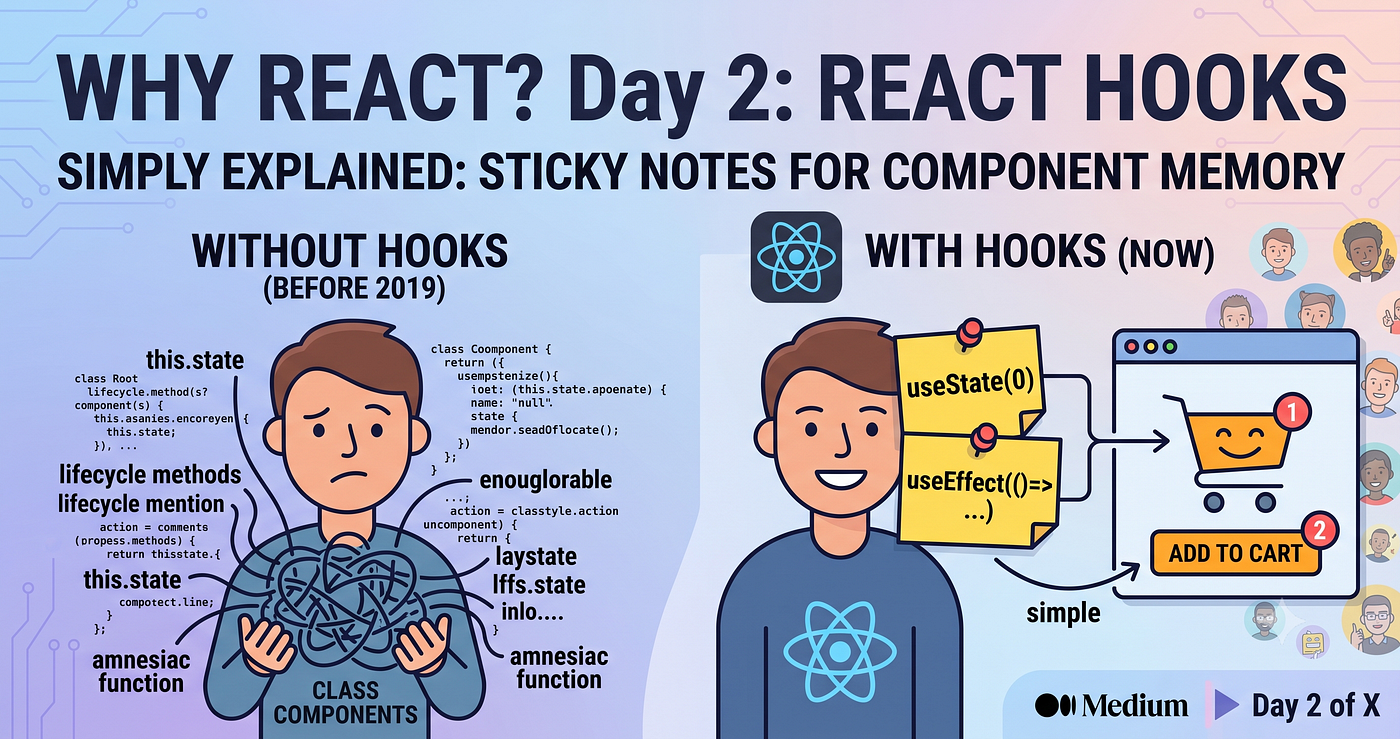
Imagine a normal JavaScript function as a person with short-term memory loss.
Every time the function runs again, it completely forgets what happened before.
Now imagine attaching a sticky note to that function.
Whenever the function runs, it looks at the sticky note and remembers the important information.
That sticky note is exactly what a React Hook provides.
Real-World Example: Amazon Shopping Cart
Think about the shopping cart icon on Amazon.
At first, the cart shows:
🛒 0 Items
Now you add a pair of shoes.
The number changes:
🛒 1 Item
Then you add headphones.
Now it becomes:
🛒 2 Items
The website needs a way to remember the current cart count.
This is where React’s most popular Hook comes in:
useState()
Here’s a simple example:
import React, { useState } from 'react';function AmazonCart() { // Create memory starting at 0
const [cartCount, setCartCount] = useState(0); return (
<div>
<p>🛒 Items in Cart: {cartCount}</p> <button onClick={() => setCartCount(cartCount + 1)}>
Add to Cart
</button>
</div>
);
}How This Works Behind the Scenes
useState(0)
This tells React:
“Create memory for this component and start the value at 0.”
cartCount
This variable stores the current value from memory.
If the cart has 2 items, cartCount becomes 2.
setCartCount
This function updates the memory.
Whenever the button is clicked:
setCartCount(cartCount + 1)React updates the value and automatically refreshes the UI.
That is why the cart number changes instantly on the screen.
Why Hooks Became So Popular
When Hooks were introduced, React development became dramatically simpler.
Here are the biggest reasons developers loved them.
1. Cleaner Code
Before Hooks, related logic often had to be split into different lifecycle methods.
This made components harder to read and maintain.
Hooks allow related logic to stay together in one clean place.
The result:
- better readability,
- easier debugging,
- and less confusion.
2. Reusable Logic
Imagine you create logic to detect whether the user is online or offline.
With Hooks, you can package that logic into a reusable custom Hook like:
useOnlineStatus()Now you can reuse the same logic anywhere:
- Navbar,
- Chat app,
- Checkout page,
- Dashboard,
- everywhere.
This saves huge amounts of development time.
3. Less Boilerplate
Hooks removed the need for bulky Class Components.
Developers could now write everything using simple JavaScript functions.
This reduced:
- unnecessary code,
- complexity,
- and learning difficulty.
React development suddenly became much more beginner-friendly.
Conclusion
Hooks are the feature that made React modern, clean, and developer-friendly.
They allow components to:
- remember data,
- respond to changes,
- reuse logic,
- and handle complex behavior easily.
Instead of writing heavy Class Components, developers can now use simple Hooks like:
useState()to build powerful applications with minimal code.
If you are learning React today, Hooks are the industry-standard way of building modern applications.
And once you start using them, React becomes far more enjoyable to work with.
메타데이터
- post_id
- c1fa676ebbba
- slug
- why-react-day-2-understanding-react-hooks-with-simple-examples-c1fa676ebbba
- url
- https://javascript.plainenglish.io/why-react-day-2-understanding-react-hooks-with-simple-examples-c1fa676ebbba
- canonical_url
- https://javascript.plainenglish.io/why-react-day-2-understanding-react-hooks-with-simple-examples-c1fa676ebbba
- author_url
- https://medium.com/@devdevarakonda677
- status
- ok
- fetched_at
- 2026-06-17 12:55:42