Part 5: Custom RecyclerView Layouts, Predictive Animations, and Shift to Compose
Hijack layout logic, master dual-pass predictive animations, and compare RecyclerView virtualization with Compose LazyColumn runtime.
Part 5: Extending RecyclerView: Custom Layout Managers, Predictive Animations, and the Shift to Compose

Extending RecyclerView: Custom Layout Managers, Predictive Animations, and the Shift to Compose
Not a Medium Member? “Read For Free”
👉 Part 4: The Science of Updates: DiffUtil, ListAdapter, and Partial Rebinding Mechanics
🧠 TL;DR (Too Long; Didn’t Read)
- Custom
LayoutManager: Gives you absolute control over layout bounds, measurement passes, and custom virtualization mechanics at the cost of manual view-recycling responsibilities. - Predictive Animations: Achieved via a dual-pass layout pipeline (Pre-Layout and Post-Layout) that allows an
ItemAnimatorto map positional vectors even for views off-screen. - Stable IDs: Shifts identity tracking from transient adapter positions to fixed domain keys, reducing unnecessary item rebinding.
- The Compose Era:
LazyColumncompletely replaces traditional view recycling with composition reuse and structural recomposition skipping via the Compose runtime slot table.
There comes a time in every senior Android engineer’s career when standard implementations like LinearLayoutManager and GridLayoutManager hit a wall. Whether you are building a Tinder-style swipeable card stack, a circular WearOS menu, or a bidirectional spreadsheet timeline, standard virtualization structures break down.
To break past these constraints, you must assume direct control over RecyclerView's layout logic.
Welcome to the grand finale of our architectural deep-dive series. Today, we are conquering the absolute limits of RecyclerView customization. We will dissect the multi-pass layout pipeline required to build a custom LayoutManager, map out the dual-pass mechanics of predictive animations, and finish with a balanced, low-level comparison between classical View virtualization and Jetpack Compose's modern LazyColumn.
1. Real-World Use Cases: When Standard Managers Fail
We don’t build custom LayoutManagers just for algorithmic practice; we build them when the visual hierarchy demands unique spatial transformations.
The Tinder Swipe Stack
- Instead of positioning items sequentially along a linear axis, a card stack layout manager forces views to anchor to the exact same screen center coordinates. It scales downstream items slightly downward and manages an explicit Z-index layout order. When a top card is swiped away, the layout manager intercepts the drag gesture and smoothly animates the transformation vector of the underlying card up the stack hierarchy.
The Dual-Axis Financial Spreadsheet
- Standard managers only virtualize along a single axis (vertical or horizontal). If you are building a massive financial ledger with hundreds of locked columns and rows, you must rewrite the layout engine to intercept scroll deltas along both the X and Y axes concurrently, recycling view containers dynamically as they cross any of the four viewport boundaries.
2. Deep Dive: Architectural Responsibilities of a Custom LayoutManager
When you extend LayoutManager, you assume full responsibility for a dedicated layout subsystem. You are no longer just configuring components; you are manually coordinating measurement, structural positioning, scrolling offsets, and an aggressive memory eviction strategy.
The framework gives you a blank canvas via a single, critical entry point: onLayoutChildren(recycler: RecyclerView.Recycler, state: RecyclerView.State).
The Core Execution Lifecycle
Whenever the data set changes or the parent view is initialized, onLayoutChildren() is invoked. If you do not handle this lifecycle correctly, your list will either render blank or leak off-screen ViewHolder instances.
The layout cycle requires a structured implementation pattern:
- Withhold and Scrap: At the beginning of the pass, you must call
detachAndScrapAttachedViews(recycler). This temporarily shifts all currently visibleViewHolderinstances into theAttached Scrapcache. It holds them in an ephemeral pool so they can be surgically re-attached or recycled. - Determine View Bounds: Compute the current viewport boundaries (
getWidth()minus padding,getHeight()minus padding). - The Fill Loop: Iterate through your adapter items using
recycler.getViewForPosition(index). TheRecyclerhandles fetching a cached view or inflating a new one under the hood. - Measure and Layout: Manually call
measureChildWithMargins()to calculate the child's dimensions, followed bylayoutDecoratedWithMargins()to fix its structural coordinate bounds on screen.
Continuous Virtualization: Handling Scroll Offsets
Virtualization must be maintained when a user scrolls. If the user scrolls down by 50 pixels, you must intercept the pixel delta inside scrollVerticallyBy(dy, recycler, state) or scrollHorizontallyBy(dx, recycler, state).
[ User Scroll Gesture (dy) ]
             │
             ▼
[ Offset Visible Children via offsetChildrenVertical(-dy) ]
             │
             ▼
[ Recycle Out-of-Bounds Views (Scrap/Recycle Pool) ]
             │
             ▼
[ Fill New Viewport Gaps via Recycler.getViewForPosition() ]
Implementation: A Simplified Custom Cascading Stack Layout
Production Note: The following implementation is a structural demonstration. A fully production-ready
LayoutManagerrequires handling complex scrolling boundaries, complete fill logic loops during continuous scrolling, reverse layout support, and view state restoration.
class CascadingStackLayoutManager : RecyclerView.LayoutManager() {

    // Enable vertical scrolling
    override fun canScrollVertically(): Boolean = true

    override fun generateDefaultLayoutParams(): RecyclerView.LayoutParams {
        return RecyclerView.LayoutParams(
            RecyclerView.LayoutParams.MATCH_PARENT,
            RecyclerView.LayoutParams.WRAP_CONTENT
        )
    }

    override fun onLayoutChildren(recycler: RecyclerView.Recycler, state: RecyclerView.State) {
        // Step 1: Handle safe exits or structural resets
        if (itemCount == 0) {
            removeAndRecycleAllViews(recycler)
            return
        }

        // Step 2: Push current active views into temporary Attached Scrap
        detachAndScrapAttachedViews(recycler)

        // Step 3: Define stacking configurations
        val overlapOffset = 60 // Pixel distance between stacked elements
        var currentTop = paddingTop

        // Step 4: Simple fill loop for visible items (bounded for demonstration)
        val maxVisibleCards = minOf(itemCount, 4)
        for (i in 0 until maxVisibleCards) {
            // Fetch view from the recycling engine
            val child = recycler.getViewForPosition(i)
            addView(child)

            // Measure child respecting layout parameters and parent constraints
            measureChildWithMargins(child, 0, 0)

            val width = getDecoratedMeasuredWidth(child)
            val height = getDecoratedMeasuredHeight(child)

            // Layout the child spatially
            layoutDecoratedWithMargins(
                child,
                paddingLeft,
                currentTop,
                paddingLeft + width,
                currentTop + height
            )

            // Cascade downward
            currentTop += overlapOffset
        }
    }

    override fun scrollVerticallyBy(
        dy: Int,
        recycler: RecyclerView.Recycler,
        state: RecyclerView.State
    ): Int {
        if (childCount == 0 || dy == 0) return 0

        // 1. Physically shift all active child views by the scroll delta
        offsetChildrenVertical(-dy)

        // 2. Perform manual boundary reclamation (Recycling)
        recycleOutOfBoundsViews(recycler)

        // 3. In a full production implementation, you would trigger your fill loop here
        return dy
    }

    private fun recycleOutOfBoundsViews(recycler: RecyclerView.Recycler) {
        val viewportBottom = height - paddingBottom

        // Loop backwards through attached views to safely remove items that scrolled off-screen
        for (i in childCount - 1 downTo 0) {
            val child = getChildAt(i) ?: continue
            // Check if the top bound of the child has completely passed the viewport bottom
            if (getDecoratedTop(child) > viewportBottom) {
                removeAndRecycleView(child, recycler)
            }
        }
    }
}
3. Advanced Animation Pipelines: Demystifying Predictive Animations
When an item is deleted from a list, standard layouts simply snap the surrounding items into their new positions. Predictive animations allow deleted or inserted items to slide gracefully onto or off the screen, even if those items originate from far outside the visible viewport boundaries.
To execute this effect, your custom LayoutManager must explicitly override supportsPredictiveItemAnimations() to return true, and implement a synchronized Dual-Pass Layout Scheme coordinating directly with an ItemAnimator.
The Two-Pass Layout Architecture
When a structural change occurs, LayoutManager.onLayoutChildren() executes twice in rapid succession within a single frame cycle to calculate disappearing positions:
- The Pre-Layout Pass: The
RecyclerView.State.isPreLayout()flag returnstrue. During this pass, theLayoutManagersets up the UI's old state. If an item is slated for deletion, it is laid out as normal. Crucially, you must also lay out disappearing views and items that are currently off-screen (but are about to become visible once the deletion happens), positioning them in their initial off-screen locations. - The Post-Layout Pass: The
RecyclerView.State.isPreLayout()flag returnsfalse. The layout manager sets up the UI's new state. The deleted item is now omitted, and the incoming off-screen views are laid out in their final visible coordinates.
The ItemAnimator Handshake
By comparing the coordinates of every ViewHolder across these two discrete passes, ItemAnimator automatically maps out the spatial delta vectors. If a view moved from (0, 1200) in Pre-Layout to (0, 800) in Post-Layout, the animator generates a translation animation to smoothly slide it up, maintaining UI continuity.
4. Stable IDs Integration: Preserving ViewHolder Identity
Activating adapter.setHasStableIds(true) changes how the system tracks item identities, switching the reference mapping from temporary list positions to explicit, domain-level unique keys.
Structural Remapping Mechanism
Normally, RecyclerView links an item's identity directly to its current adapter position. When an item shifts positions during an update or animation, that link breaks, forcing the framework to treat it as structurally dirty.
When stable IDs are active, you must override getItemId(position: Int) to return a completely unique, unchangeable Long value representing that specific entity (e.g., a database primary key hash).
class SecureCryptoAdapter : RecyclerView.Adapter<SecureCryptoAdapter.ViewHolder>() {
    init {
        setHasStableIds(true)
    }

    private var items = emptyList<CoinItem>()

    // Map identity explicitly to an immutable, unique domain identifier
    override fun getItemId(position: Int): Long = items[position].id.hashCode().toLong()

    override fun onBindViewHolder(holder: ViewHolder, position: Int) {
        holder.bind(items[position])
    }
}
The Architectural Reality of Stable IDs
Crucial Clarification: Setting stable IDs does not guarantee that
onBindViewHolder()will be skipped entirely. If the underlying data changes, if the view is explicitly reattached, or if localized payloads require an update, a rebind will still occur. Instead, stable IDs help preserveViewHolderstructural identity across dataset changes, significantly reducing unnecessary rebinding and layout flashing during generic reloads.
5. The Architectural Showdown: RecyclerView vs. Jetpack Compose LazyColumn
As modern Android development transitions toward declarative design patterns, classical View virtualization is being replaced by Jetpack Compose’s LazyColumn. While LazyColumn eliminates thousands of lines of layout boilerplate, it operates on a fundamentally different runtime model.
Explicit View Recycling vs. Composition Re-use
**RecyclerView(Explicit Allocation):** Operates via physicalViewreferences bound tightly to concrete object wrappers (ViewHolder). It heavily relies on mutating existing object states via data binding to skip layout initialization overhead. Allocation boundaries are explicit and structurally managed via theRecycledViewPool.**LazyColumn(Composition Reuse): LazyColumn replaces traditional view recycling with composition reuse and recomposition skipping. It relies on the Compose Runtime's Slot Table** architecture. When an item scrolls out of view, its node composition is held or skipped, and as a new item emerges, the slot table re-substitutes parameters into existing layout nodes via smart recomposition loops, completely bypassingViewinitialization overhead.
Technical Architectural Matrix
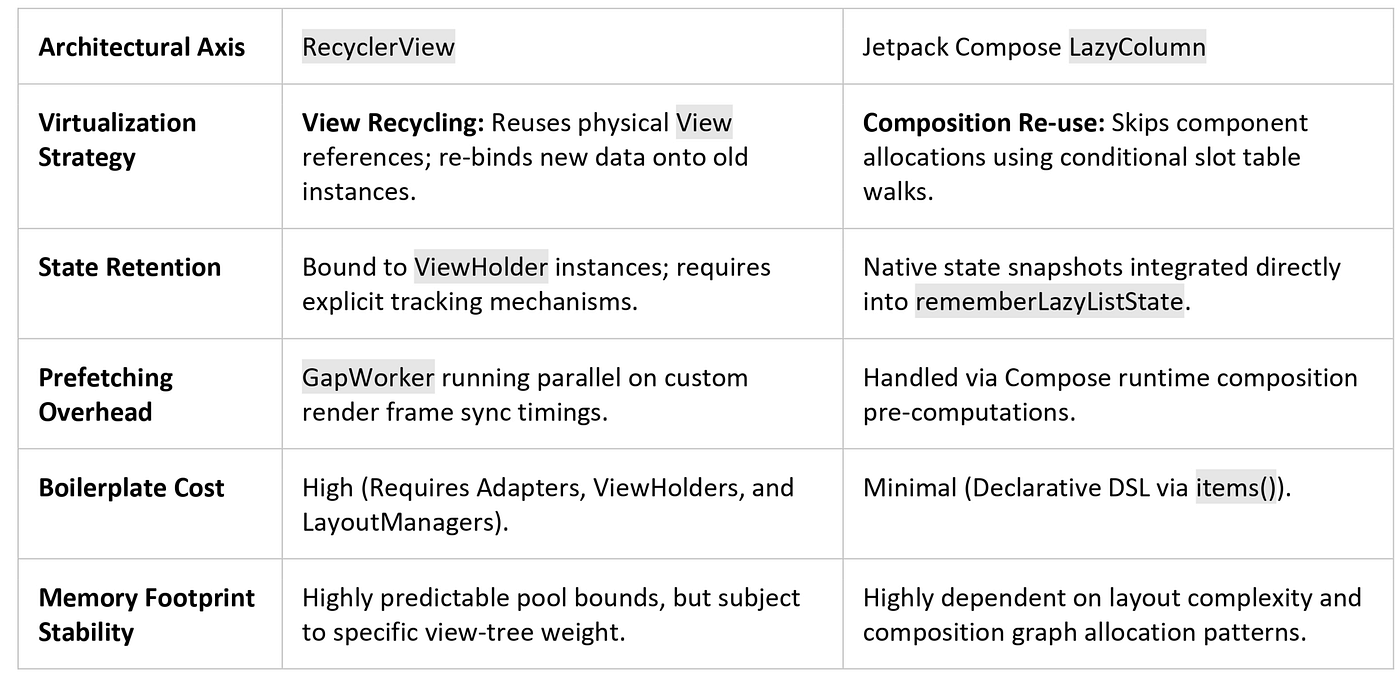
Technical Architectural Matrix
6. Strategic Decision Guide: When to Use What
                            Is your list architecture standard?
                                            │
                     ┌──────────────────────┴──────────────────────┐
                     ▼ YES                                         ▼ NO
      Are you working in a pure                          Do you require multi-axis
       Compose codebase?                                 virtualization or custom physics?
             │                                                     │
     ┌───────┴───────┐                                     ┌───────┴───────┐
     ▼ YES           ▼ NO                                  ▼ YES           ▼ NO
[ LazyColumn ]   [ RecyclerView ]                     [ Custom          [ Compose
                                                       LayoutManager ]   Custom Layout ]
Choose RecyclerView When:
- You are engineering highly specialized canvas layout mechanics requiring pixel-precise multi-axis bounds recycling.
- You are operating in a legacy codebase where allocating composition contexts would add unacceptable rendering overhead.
Choose LazyColumn When:
- You are building standard horizontal, vertical, or grid lists within a pure declarative Jetpack Compose app architecture.
- Development velocity, ease of state handling, and reduction of structural boilerplate are your leading priorities.
Common Anti-Patterns That Kill Custom Layouts
- Failing to check
isPreLayout()inside custom LayoutManagers: If your custom code ignores the pre-layout pass condition,ItemAnimatorwill not receive the coordinate deltas it needs, breaking predictive animations. - Allocating new objects inside the custom layout fill loop: Instantiating helper objects or layout bounds rectangles inside
onLayoutChildren()or during scroll offsets triggers garbage collection churn mid-scroll, causing severe jank. - Returning unstable hashes inside
getItemId(): Returning volatile values like random IDs or list positions while using stable IDs can causeRecyclerViewto map items to the wrong caches, leading to visual bugs and broken animations.
Production Checklist for Advanced Lists
- [ ] Manually Clean Up Layout Blocks: Always call
detachAndScrapAttachedViews()at the start ofonLayoutChildren()to clear your layout state safely. - [ ] Profile Custom Measure Passes: Use the Android Studio Profiler to verify that custom child measurements do not trigger cascading, nested measure passes.
- [ ] Enforce Domain-Level Unique IDs: Verify that your data models expose stable, immutable identifiers suitable for
getItemId(). - [ ] Optimize Compose Interop View Composition: When nesting
ComposeViewinside a traditionalViewHolder, explicitly callsetViewCompositionStrategy(DisposeOnViewTreeLifecycleDestroyed)to avoid composition memory leaks.
Technical Interview Core Prep
What is the fundamental operational difference between Pre-Layout and Post-Layout passes inside a LayoutManager?
The Pre-Layout pass (state.isPreLayout == true) runs first to record the initial spatial baseline of the visible views before mutations are applied. It intentionally lays out items that are about to be destroyed or pushed off-screen, along with incoming views that are currently outside screen bounds. The Post-Layout pass runs immediately after to record the final structural layout state. The difference between these two positional passes allows ItemAnimator to compute structural animation delta vectors.
Why does implementing stable IDs help optimize RecyclerView performance during generalized data reloads?
Without stable IDs, RecyclerView establishes item identity solely via structural positions inside the adapter array. A complete data reload invalidates these linkages, forcing a comprehensive rebinding. Enabling stable IDs maps item tracking directly to static, immutable domain identifiers (Long), allowing the layout processor to find matched cached frames inside the scrap layers and safely bypass redundant initialization loops.
🙋 Frequently Asked Questions (FAQs)
Why does my custom LayoutManager stop rendering items after a dataset change?
This typically happens because detachAndScrapAttachedViews(recycler) was called, but the fill loop failed to re-add those views using addView(child) and layoutDecoratedWithMargins(). If the layout calculations exit prematurely before rebuilding the visible screen area, the viewport will remain completely empty.
How does LazyColumn match the performance of explicit View recycling?
LazyColumn minimizes layout overhead by utilizing a technique called Structural Recomposition Skipping. If the immutable data arguments passed to a list item composable match the previous values exactly, the Compose runtime skips executing that function entirely. It reads the pre-computed layout nodes directly from the slot table, matching the speed of a traditional ViewHolder rebind.
Can I run predictive animations inside a custom LayoutManager?
Yes, but you must write your layout code to explicitly support it. Your LayoutManager must inspect state.isPreLayout(), determine where items used to be located before modifications occurred, and lay out the extra off-screen elements accordingly so the framework can map the transition animations correctly.
💬 Let’s Discuss!
- What structural hurdles have you encountered when attempting to migrate complex, highly-customized nested scrolling lists from
RecyclerViewover to Jetpack Compose'sLazyColumn? - Have you profiled the memory footprint differences between an explicit
RecycledViewPooland a Compose slot table layout under high data churn? What were your findings?
Mental Model Summary
RecyclerView is an incredibly resilient, flexible piece of architecture. By taking direct control of its layout, tracking, and animation systems, you can build custom, high-performance user experiences that match native platform standards. As you look ahead to Jetpack Compose and LazyColumn, understanding these core concepts—virtualization, state tracking, and layout constraints—will help you write fast, efficient UI code across both modern and declarative design patterns.
References & Further Reading
📱 Go Beyond Using Jetpack Compose
If you’re building on Android, understanding what happens under the hood separates developers who use Compose from those who master it. I highly recommend “Mastering Jetpack Compose Internals”. It’s a deep, architecture-first walkthrough of the composition tree, the slot table, snapshot state, and the runtime that powers modern Android UI — capped off with a full case study building a real app called Mosaic.
- E-book: Available on Google Play
- Kindle Edition: Available on Amazon
- Also available in Paperback & Hardcover
메타데이터
- post_id
- c21b49bcee93
- slug
- part-5-custom-recyclerview-layouts-predictive-animations-and-shift-to-compose-c21b49bcee93
- url
- https://blog.stackademic.com/part-5-custom-recyclerview-layouts-predictive-animations-and-shift-to-compose-c21b49bcee93
- canonical_url
- https://blog.stackademic.com/part-5-custom-recyclerview-layouts-predictive-animations-and-shift-to-compose-c21b49bcee93
- author_url
- https://medium.com/@sivavishnu0705
- status
- ok
- fetched_at
- 2026-07-25 23:20:03