Stop the Complex SFTP Struggle: How Porta SFTP Server Keeps It Simple and Rock-Solid.
Organizations in various industries require reliable and secure methods for transferring files. The Secure File Transfer Protocol (SFTP) is…
Stop the Complex SFTP Struggle: How Porta SFTP Server Keeps It Simple and Rock-Solid. See How to Install / Use It.
Organizations in various industries require reliable and secure methods for transferring files. The Secure File Transfer Protocol (SFTP) is a standard protocol for this purpose, and different servers offer various approaches to management and security. This article examines the features and design philosophy of the Porta SFTP Server, an on-premise, desktop-based solution. Note that you do not need to be so technically savvy to get started or to manage it, and that’s what make it so special.
Desktop-centric design
Unlike SFTP servers that rely on a web-based administrative interface, Porta SFTP Server is managed through a standalone desktop application. This design eliminates the need for a web server component to manage configurations or user accounts. For some administrators, this could be a simpler model to deploy and maintain, as it avoids potential security concerns associated with browser-based panels, such as cross-site scripting (XSS) or SQL injection vulnerabilities.
The desktop interface allows for direct management of the server. The software is intentionally built without APIs or plugins, which can reduce the attack surface. This focus on core functionality is a primary characteristic of its design.
Security-focused architecture
By design, Porta SFTP Server only support SFTP (Secure File Transfer Protocol) and SCP (Secure Copy Protocol). This is to fully enable data encryption in transit. The server’s security foundation is built on Apache Mina SSHD, an open-source library with an active development community. This provides a vetted and scalable base for the server’s SSH and SFTP functions.
Security features supported by Porta SFTP Server include:
- Authentication: Supports both username/password with strong hashing (HMAC SHA-512) and public key authentication, offering administrators multiple options for user security.
- Intrusion Prevention: For Linux environments, the server can augment its built-in IP filtering with
fail2banfor intrusion prevention. It delegates the IP-banning action to thefail2banservice, enhancing the system's firewall-level defense against malicious IP addresses. - Access Control: The server includes IP filtering and brute-force protection to prevent unauthorized access attempts.
- Logging: Comprehensive logging features track client activity, providing a record for auditing purposes.
Operational reliability and features
Reliability is a key consideration for file transfer services. As an on-premise solution, Porta SFTP Server allows organizations to maintain control over their data within their own network perimeter. This can be beneficial for compliance and data ownership requirements.
Key operational characteristics and features include:
- User Management: The free edition offers unlimited user and connection support.
- Platform Compatibility: It can be run on Windows, Linux, and cloud-based virtual machines (VMs) like Azure and AWS.
- Compliance: The server’s feature set and on-premise nature may align with the needs of businesses operating in regulated sectors, such as healthcare.
How to install?
Go to: Best Free Portable SFTP Server — Download Now, then download the Free Edition. Note that you need the Java 17 Runtime Environment / JRE.

Once you put your email address, you will receive the temporary link to download the encrypted zip file. Extract and you should have the following files.

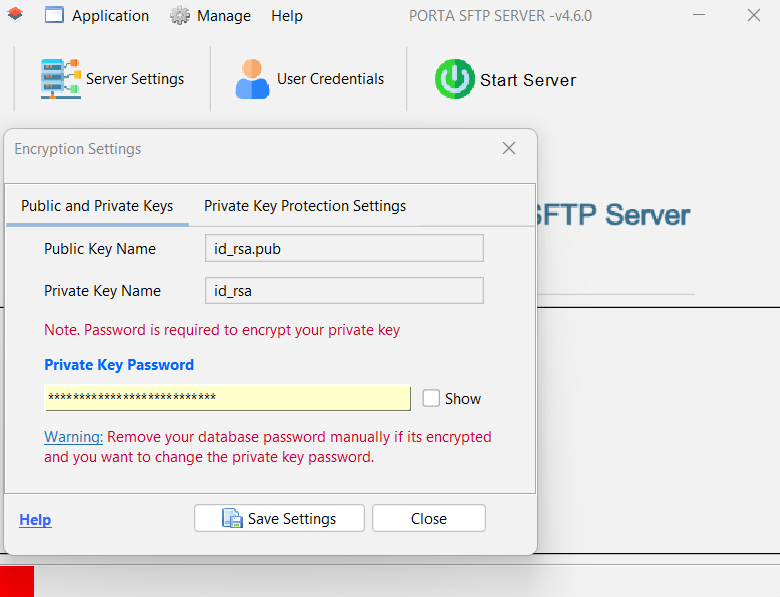
Once you double click the executable / .jar file, the following form will ask you for the private key password.
After that you can go to manage user, create username and use password or public key only.

Note. When you are using public key authentication, the public key file name should be in a format that follows the convention [username]_[other_suffix].pub and should be put in the AUTHORIZED_KEYS folder.
For example,

Now, you/client can go to WinSCP, put the username, go to advanced->authentication, and select the private key then save.

When the client logged-in, the logs should generate the following.

And that’s all, easy and simple to use!
Conclusion
The Porta SFTP Server represents a specific choice in the landscape of secure file transfer solutions. For organizations that prioritize a straightforward, desktop-centric management model and a reduced attack surface, its design may be a compelling alternative to more complex, web-dependent solutions. Its focus on core functionality, combined with robust security features and optional fail2ban integration on Linux, provides a reliable platform for handling secure file transfers. Evaluating whether this approach is the right fit will depend on an organization's specific operational and security requirements.
메타데이터
- post_id
- c24be6fef321
- slug
- organizations-in-various-industries-require-reliable-and-secure-methods-for-transferring-files-c24be6fef321
- url
- https://medium.com/@yoxeha5256/organizations-in-various-industries-require-reliable-and-secure-methods-for-transferring-files-c24be6fef321
- canonical_url
- https://medium.com/@yoxeha5256/organizations-in-various-industries-require-reliable-and-secure-methods-for-transferring-files-c24be6fef321
- author_url
- https://medium.com/@yoxeha5256
- status
- ok
- fetched_at
- 2026-06-24 11:06:28




