Building Production-Ready AI Agents with Python: CrewAI vs AutoGen vs LangChain
A technical comparison between CrewAI, AutoGen, and LangChain through the lens of an AWS Architect.
Building Production-Ready AI Agents with Python: CrewAI vs AutoGen vs LangChain
A technical comparison between CrewAI, AutoGen, and LangChain through the lens of an AWS Architect.
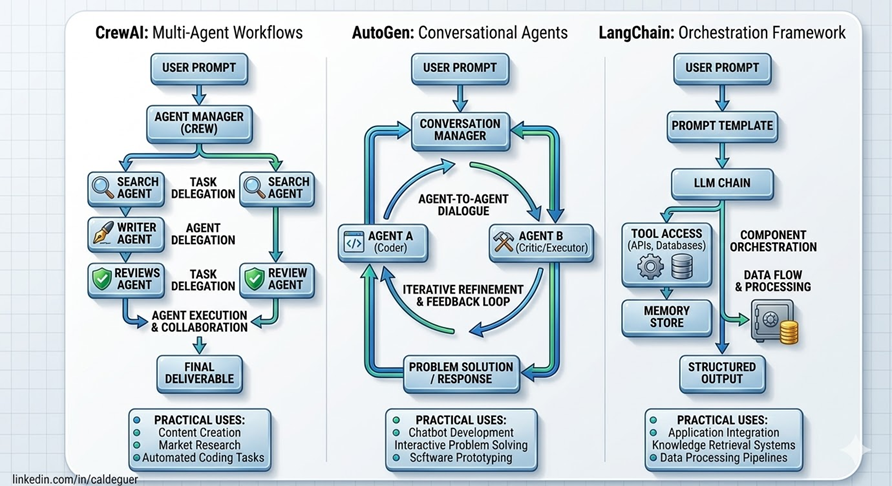
The rise of AI agents is everywhere.
From demos on Twitter to prototypes on GitHub, everyone seems to be building “autonomous systems.” But there’s a gap most people ignore:
Building an AI agent is easy. Running it in production is the real challenge.
The transition from isolated prompt engineering toward the construction of autonomous agentic systems represents the most significant shift in distributed systems architecture since the advent of microservices. The industry has largely abandoned the simplistic view of large language models (LLMs) as mere content generators, instead viewing them as the cognitive engines within complex execution loops capable of planning, tool invocation, and state tracking. While early demonstrations of agents focused on minimal scripts running locally, the contemporary challenge for the AWS Architect is to assemble production-ready systems that are scalable, observable, and economically viable.
As an AWS Architect, this article focuses on what actually matters:
- Choosing the right framework
- Designing scalable architectures
- Shipping real systems, not demos
AI agents are not scripts. They are distributed systems.
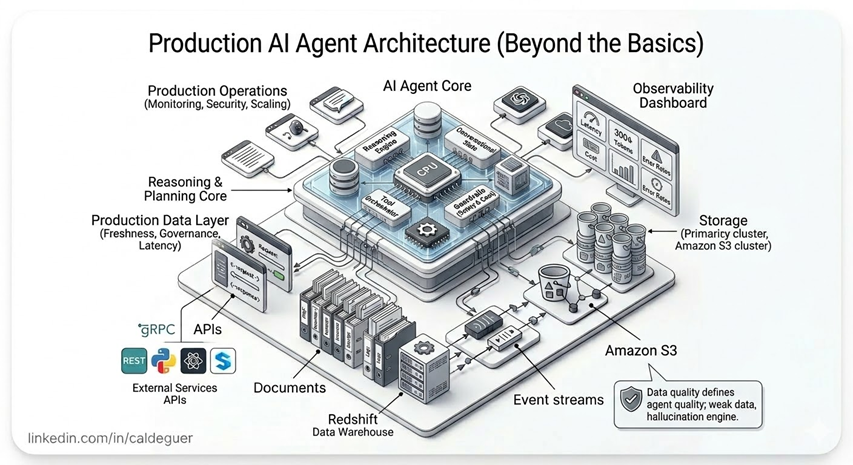
🧱 A Modern AI Agent Architecture (AWS View)
A production-ready AI agent is not a single component — it is a layered, distributed system where each part plays a critical role in reliability, scalability, and cost efficiency.
Let’s break it down beyond the basics.
1. Data Layer — The Source of Truth
This is where your agent gets context from.
It is often underestimated, but in real systems, data quality defines the quality of agents.
Typical components:
- APIs (internal & external services)
- Documents (PDFs, knowledge bases, logs)
- Event streams (real-time signals from systems)
- Data lakes and storage:
- Amazon S3 (primary storage)
- Data warehouses (e.g., Redshift)
Key architectural concerns:
- Data freshness (real-time vs batch)
- Data access latency
- Data governance and security
👉 Insight: If your data layer is weak, your agent becomes a hallucination engine.
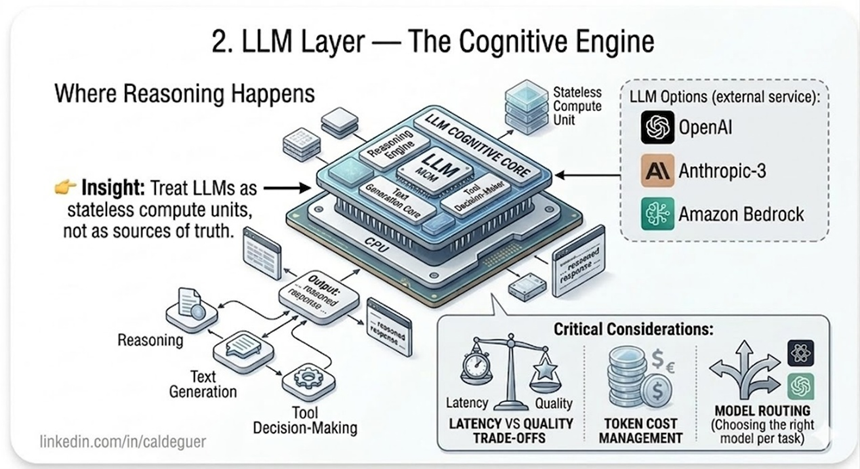
2. LLM Layer — The Cognitive Engine
This is where reasoning happens.
The LLM is not your system — it is just one component inside it.
Options typically include:
- OpenAI (GPT models)
- Anthropic (Claude)
- Amazon Bedrock (multi-model access)
Key responsibilities:
- Reasoning
- Text generation
- Tool decision-making
Critical considerations:
- Latency vs quality trade-offs
- Token cost management
- Model routing (choosing the right model per task)
👉 Insight: Treat LLMs as stateless compute units, not as sources of truth.
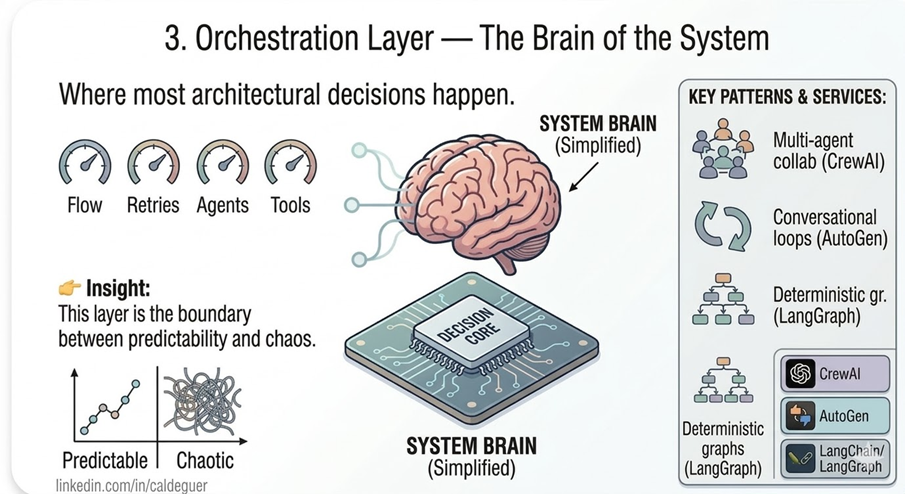
3. Orchestration Layer — The Brain of the System
This is where most architectural decisions happen.
Frameworks like:
- CrewAI
- AutoGen
- LangChain / LangGraph
Responsibilities:
- Managing execution flow
- Coordinating agents or steps
- Handling retries, loops, and failures
- Integrating tools and APIs
Design patterns:
- Multi-agent collaboration (CrewAI)
- Conversational loops (AutoGen)
- Deterministic graphs (LangGraph)
👉 Insight: This layer defines whether your system is predictable or chaotic.
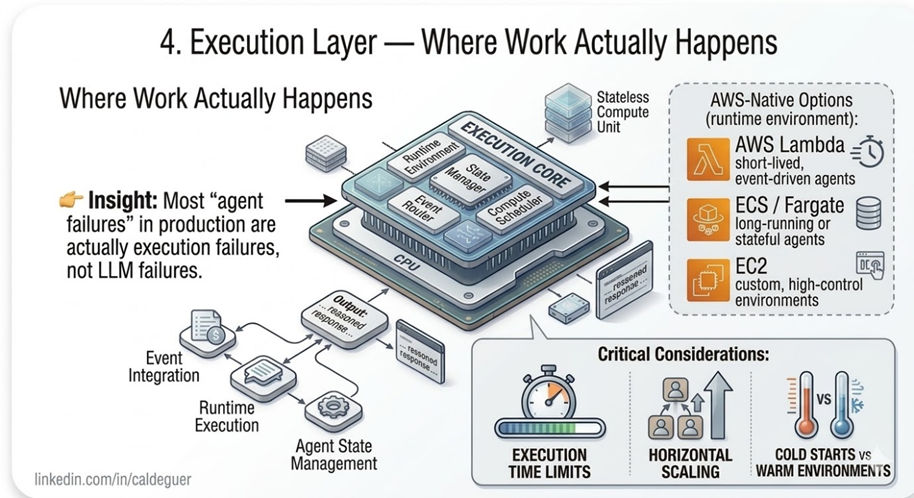
4. Execution Layer — Where Work Actually Happens
This is the runtime environment where your agents operate.
AWS-native options:
- AWS Lambda → short-lived, event-driven agents
- ECS / Fargate → long-running or stateful agents
- EC2 → custom, high-control environments
Key considerations:
- Execution time limits
- Horizontal scaling
- Cold starts vs warm environments
👉 Insight: Most “agent failures” in production are actually execution failures, not LLM failures.
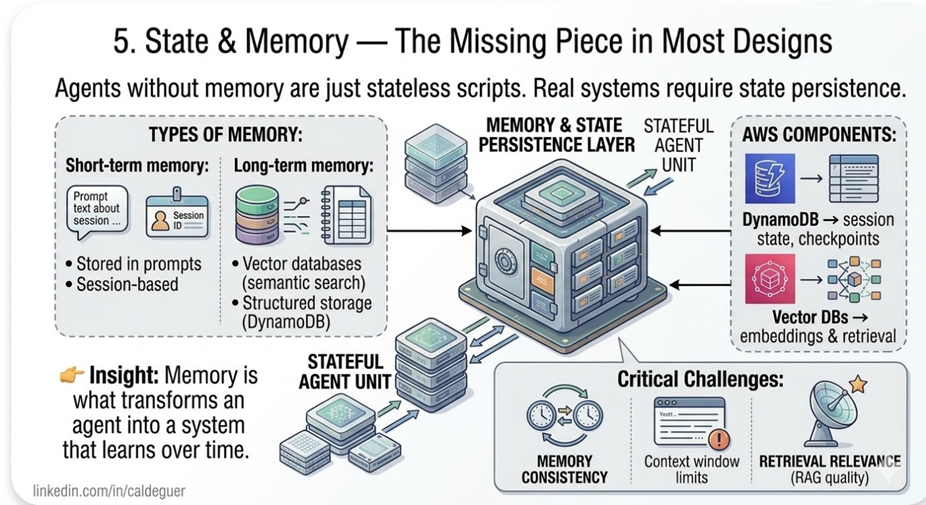
5. State & Memory — The Missing Piece in Most Designs
Agents without memory are just stateless scripts.
Real systems require state persistence.
Types of memory:
- Short-term memory:
- Stored in prompts
- Session-based
- Long-term memory:
- Vector databases (semantic search)
- Structured storage (DynamoDB)
AWS components:
- DynamoDB → session state, checkpoints
- Vector DBs → embeddings & retrieval
Key challenges:
- Memory consistency
- Context window limits
- Retrieval relevance (RAG quality)
👉 Insight: Memory is what transforms an agent into a system that learns over time.
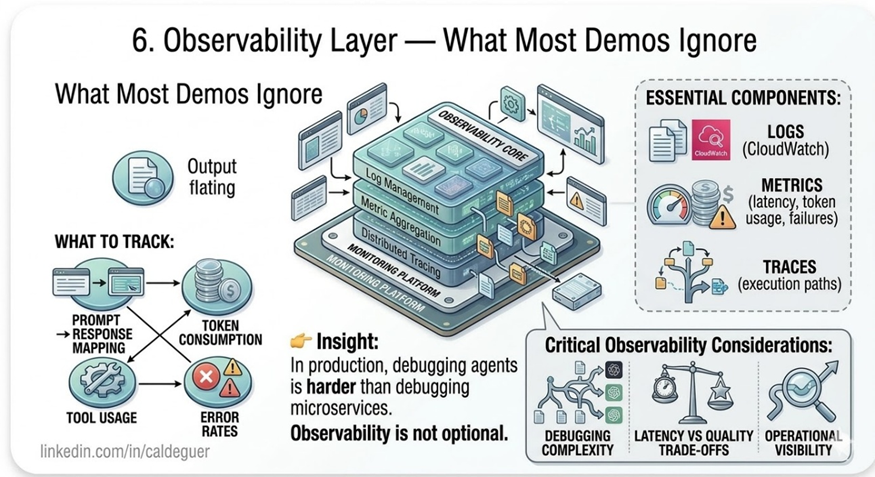
6. Observability Layer — What Most Demos Ignore
If you can’t see what your agent is doing, you can’t operate it.
Essential components:
- Logs (CloudWatch)
- Metrics (latency, token usage, failures)
- Traces (execution paths)
What to track:
- Prompt → response mapping
- Token consumption
- Tool usage
- Error rates
👉 Insight: In production, debugging agents is harder than debugging microservices.
Observability is not optional.
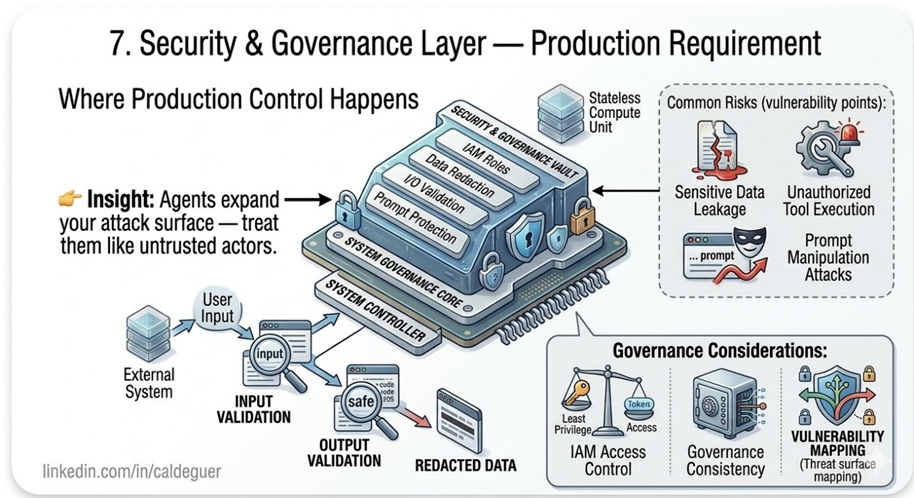
7. Security & Governance Layer — Production Requirement
AI agents introduce new risks.
Core controls:
- IAM roles (least privilege)
- Input/output validation
- Prompt injection protection
- Data redaction
Common risks:
- Sensitive data leakage
- Unauthorized tool execution
- Prompt manipulation attacks
👉 Insight: Agents expand your attack surface — treat them like untrusted actors.
Code Example
🧩 CrewAI — Declarative Multi-Agent Workflow
from crewai import Agent, Task, Crew

 # Define agents
 researcher = Agent(
 role="Researcher",
 goal="Search and extract key insights about AWS Bedrock",
 backstory="Cloud engineer specialized in AI services",
 verbose=True
 )

 writer = Agent(
 role="Writer",
 goal="Write a concise technical summary",
 backstory="Senior technical writer",
 verbose=True
 )

 reviewer = Agent(
 role="Reviewer",
 goal="Validate accuracy and clarity",
 backstory="Principal architect",
 verbose=True
 )

 # Define tasks
 research_task = Task(
 description="Find the most relevant information about AWS Bedrock",
 agent=researcher
 )

 write_task = Task(
 description="Create a clear summary based on the research",
 agent=writer
 )

 review_task = Task(
 description="Review and improve the summary",
 agent=reviewer
 )

 # Orchestrate
 crew = Crew(
 agents=[researcher, writer, reviewer],
 tasks=[research_task, write_task, review_task],
 verbose=True
 )

 result = crew.run()
 print(result)
You define who does the work, not how the flow works.
🧠 AutoGen — Conversational Loop with Tooling
from autogen import AssistantAgent, UserProxyAgent, GroupChat, GroupChatManager

# Define agents with clear technical roles
assistant = AssistantAgent(
    name="assistant",
    system_message="Research AWS Bedrock and draft a detailed technical summary."
)

reviewer = AssistantAgent(
    name="reviewer",
    system_message="Validate the technical accuracy of the AWS summary. If there are errors, request corrections. If it is accurate, say 'TERMINATE'."
)

user = UserProxyAgent(
    name="user",
    human_input_mode="NEVER",
    is_termination_msg=lambda x: "TERMINATE" in x.get("content", "")
)

# Orchestration via GroupChat to share context
groupchat = GroupChat(
    agents=[user, assistant, reviewer],
    messages=[],
    max_round=10
)

manager = GroupChatManager(groupchat=groupchat)

# Initiate the collaborative workflow
user.initiate_chat(
    manager,
    message="Perform research on AWS Bedrock, generate a summary, and ensure the reviewer validates it."
)
👉 Key insight: You design interaction loops, not pipelines.
🔗 LangChain + LangGraph — Explicit Control Flow
from typing import TypedDict
from langgraph.graph import StateGraph, START, END
from langchain_openai import ChatOpenAI

# 1. Define the State Schema
class AgentState(TypedDict):
    research: str
    summary: str
    final: str

llm = ChatOpenAI(model="gpt-4o")

# 2. Define Nodes (Technical Functions)
def research_node(state: AgentState):
    # Simulates the research phase for AWS Bedrock
    response = llm.invoke("Research AWS Bedrock and provide technical key features.")
    return {"research": response.content}

def summarize_node(state: AgentState):
    # Uses the research data stored in the state
    response = llm.invoke(f"Summarize the following research into a technical article: {state['research']}")
    return {"summary": response.content}

def review_node(state: AgentState):
    # Acts as the final architectural gate
    response = llm.invoke(f"Critically review this summary for technical accuracy: {state['summary']}")
    return {"final": response.content}

# 3. Build the Graph
workflow = StateGraph(AgentState)

workflow.add_node("research", research_node)
workflow.add_node("summarize", summarize_node)
workflow.add_node("review", review_node)

# 4. Define Explicit Edges
workflow.add_edge(START, "research")
workflow.add_edge("research", "summarize")
workflow.add_edge("summarize", "review")
workflow.add_edge("review", END)

# 5. Compile and Execute
app = workflow.compile()
result = app.invoke({"research": "", "summary": "", "final": ""})

print(result["final"])
👉 Key insight: You control every step of execution and state.
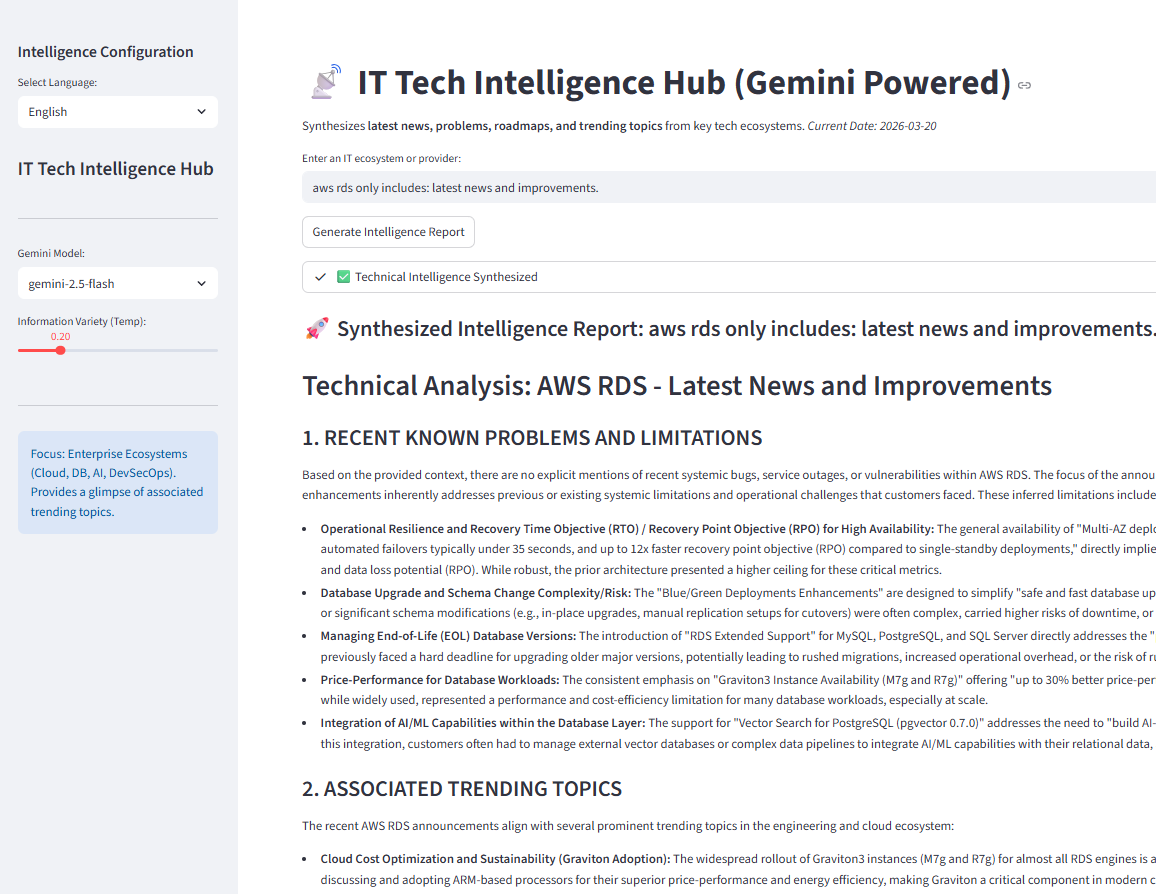
🎁 Bonus Pack: IT Tech Intelligence Hub (PoC)
To move from theory to practice, we have included the code for a functional Minimum Viable Product (MVP) that demonstrates the power of decoupled intelligent architectures.
What is it? An application developed with Streamlit and CrewAI that acts as a technical intelligence orchestration hub, eliminating manual information searching.
How does it work? Upon entering an ecosystem (e.g., “AWS” or “Kubernetes”), a sequential flow of two advanced AI agents (powered by Gemini 1.5) is set in motion:
- Strategic Agent: Synthesizes provider announcements, changes, and roadmaps.
- Technical Agent: Analyzes the previous context and delves into recent bugs, CVEs, and trends in engineering forums.
Key Highlights of this PoC:
- Agile interface in Streamlit with full AI control.
- Sequential Multi-Agent orchestration with shared context.
- Code refactored to English (engineering standard) but with native bilingual support (English/Spanish) in both the UI and the generated report.
- Structured output in Markdown is ready to download.
This PoC is tangible proof that it is possible to build high-density, scalable, and secure technical synthesis tools using serverless components and AI agents. source: ai-CrewAI-IT-Info.py · caldeguer / python · GitLab
🧩 Final Thoughts
There is no “best” framework. Only trade-offs.
CrewAI, AutoGen, and LangChain solve different problems. But the real differentiator is not the framework. It’s the architecture behind it.
The future of AI is not just smarter models. It’s a better system.
🔥 Final Takeaway
Most developers choose frameworks based on simplicity.
Architects choose based on failure modes.
If your system fails, can you debug it? If it scales, can you control it? If it runs for hours, can you resume it?
That’s where the real difference lies.
And most importantly:
Think like a systems architect, not just a prompt engineer.
메타데이터
- post_id
- c26762fe6de6
- slug
- building-production-ready-ai-agents-with-python-crewai-vs-autogen-vs-langchain-c26762fe6de6
- url
- https://medium.com/@roybincg/building-production-ready-ai-agents-with-python-crewai-vs-autogen-vs-langchain-c26762fe6de6
- canonical_url
- https://medium.com/@roybincg/building-production-ready-ai-agents-with-python-crewai-vs-autogen-vs-langchain-c26762fe6de6
- author_url
- https://medium.com/@roybincg
- status
- ok
- fetched_at
- 2026-06-27 07:40:21





