We Made Our Mendix Database 156x Faster Using View Entities
Written by: Remco van der Gaag, Pim van der Noll
We Made Our Mendix Retrieves 156x Faster Using View Entities
Written by: Remco van der Gaag, Pim van der Noll
Feature in Action: View Entities
This writing is accompanied with a feature in action published on the Mendix market place: View entities experience app
Why We’re Writing This
Groundbreaking new features added to the Mendix platform often take some time to make their way into production environments. View entities are one of those features — they can significantly improve performance and reduce complexity when working with large datasets or performing complex calculations involving multiple counts, sums, and averages.
To help you understand view entities step by step, we created a Mendix application that demonstrates several data retrieval scenarios. We compare the traditional approach — retrieving and calculating data, then storing it in non-persistent entities — with retrieving the same datasets using a view entity. Time measurements for each step show the actual execution time.
The goal of this article is to encourage you to rethink how you design logic, tables, and calculations. Instead of following older approaches, consider using OQL queries and view entities. While it may feel a bit less “low-code,” this method can drastically reduce the number of extra tables and microflows needed in your application, while significantly improving performance.
We know there are plenty more questions and comparisons to make for view entity usage (e.g. calculated attributes, direct associations vs. association tables, etc.), but we had to stop increasing the scope somewhere.
TL;DR
- Use view entities when your logic involves multiple retrieves that aggregate or combine data from different (large) tables.
- Check out the View Entity Showcase Experience App in the Mendix Marketplace — it includes multiple examples of view entities in action.
- Use advanced or complex OQL and view entities only when you have a solid understanding of OQL, your domain model, data, and volume. A deep understanding of your domain model is essential for creating correct OQL queries.
Our Experience
We’ve drafted this article based on our experience with Mendix Studio Pro up to version 11.6.3. We do not use SQL or OQL daily, we are not experts in this subject matter, and it’s also not a prerequisite.
If you’re not familiar with SQL or OQL, tools like Maia or AI assistants such as ChatGPT, Copilot, or Claude can help you generate and understand your OQL queries. In fact, ChatGPT includes a specialized model, the Mendix OQL Expert GPT, which has been able to create working OQL queries from the start.
You can ask questions like “Explain my query, especially the JOINs” and get clear, detailed explanations — perfect for deepening your understanding of your domain model and data.
Starting with Mendix 11, you can enable Maia for OQL under the Maia tab in Edit Preferences. For simple and straightforward OQL queries, it works perfectly.
What Are View Entities
A view entity in Mendix represents a dynamic table retrieved using a stored OQL (Object Query Language) query. It’s like a database view, and can be used like a regular persistent entity in pages and microflows. Results aren’t stored separately — the query executes each time the view entity is accessed, ensuring the data is always up to date.
You can use view entities in microflows and pages like any other entity. To preview results, use the “Run Query” button in the OQL query editor — your app needs to be running at that time.
If you have feedback about view entities, you can send it to Mendix directly: docs.mendix.com/refguide/view-entities-feedback
When to Use View Entities
Use view entities when your logic involves multiple retrieves that aggregate or combine data from different (large) tables:
- Large amounts of records in your database that you want to use in your logic
- Multiple aggregates
- Multi-tenancy scenarios
- Replacing calculated attributes
- Multi-language use cases (dynamic retrieval of content)
- Possible replacement of non-persistent entities in the context of published REST endpoints
Security
When app security is set to Production, you can configure access rules on the entity. Read access only affects the in-memory query result, not the underlying entities.
View entity access levels don’t respect underlying entity permissions — this can result in unsecure data retrieves if you’re not careful! At the same time, it’s also an opportunity: you can expose very specific datasets without giving any access to the underlying data. We share a best practice for this later in this article.
What Is OQL and How to Use It in Mendix
OQL (Object Query Language) is a way to ask an object-based database (like the Mendix database) for information. Think of it like talking to the data using your application’s objects (like Customer or Order) instead of tables. You write queries using object names and their properties (e.g., customers where city = “Paris”). It works like SQL but uses objects, so it feels more natural in object-oriented programs.
When first diving into OQL as a Mendix developer, it can be quite overwhelming. Even when you think you know what you’re doing, a mistake is easily made — especially when aggregating and joining different tables.
Your app must use OQL version 2 to create view entities. This can be enabled in App Settings > Runtime, or when dragging a new view entity onto the domain model.
You can write queries using an OQL editor directly in Studio Pro, with autocomplete suggestions (though the autocomplete still needs some improvement).
- Queries can start with either a SELECT or a FROM clause
- Supported clauses: FROM, JOIN, WHERE, GROUP BY, HAVING, SELECT, ORDER BY, LIMIT, OFFSET
- ORDER BY is only needed when using LIMIT or OFFSET (e.g. for subsets like “top 5 customers”)
More information about the OQL editor and how to use it in Mendix: docs.mendix.com/refguide/view-entities/#oql-editor and docs.mendix.com/refguide/oql
After writing the query, use the ‘Run Query’ button to see a live preview of the results. Your app must be running to use this button. It gives you a direct example result (a subset of the complete result) — very useful for trial and error!
Associations and Attributes
You can create one-way navigable associations from view entities to source entities (just like non-persistent entities) by including the source entity’s ID in the SELECT clause. For an example, see the OQL for Employee_VE_AssociationConstrained.
Renaming attributes in view entities works differently than you might be used to: to rename an attribute, update your OQL query using the AS [name] clause — e.g. SELECT Name AS Firstname renames the attribute ‘Name’ to ‘Firstname’. The same approach is used to rename associations.
Examples in Our Feature in Action App
The best way to learn something new is to discuss it with others, learn by doing, teach others, or use it right away.
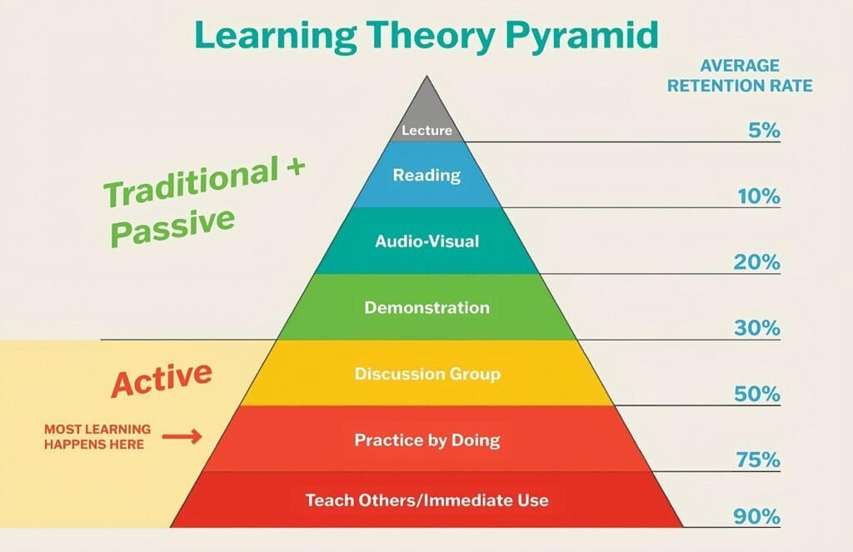
We created a showcase app in Mendix to demonstrate view entities in action, step by step, so you can learn directly how they work, change them, and experiment. We start simply, but increase the complexity of the OQL with each step, ending with multiple solutions for the same result in step 5.
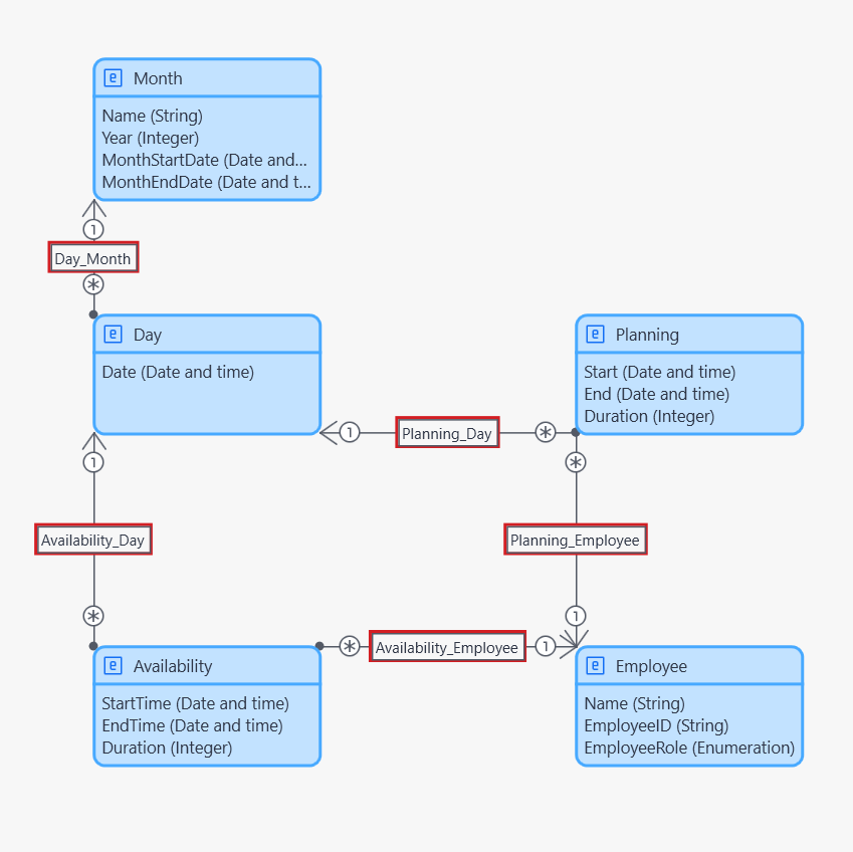
The domain model represents employee scheduling and availability — tracking which employees are available or planned for work on specific days, grouped by employee role. It contains these core entities:
- Employee — represents each staff member; has a role (like Nurse, Doctor, Director, etc.)
- EmployeeRole (attribute) — an enumeration on Employee that categorizes the employee’s role
- Day — represents a calendar day (e.g., 2025–11–05); used to link both Availability and Planning
- Availability — captures how long (in minutes) an employee is available on a given day
- Planning — captures how long (in minutes) an employee is actually scheduled (planned) to work on a given day
It also contains the view entities and non-persistent entities for every step in the scenarios described below. For each scenario we created two solutions with an identical outcome:
- As a view entity, based on an OQL query
- As a non-persistent entity, based on a microflow
You can use them side by side: they generate exactly the same outcomes. The microflow equivalent will help you understand what the OQL for the matching view entity does.
Step 1 — Show All Availabilities
This example isn’t really suitable for a view entity or its non-persistent equivalent — we included it simply to show the most basic version of a view entity. Instead, for a scenario like this, use a database retrieve activity in your flows or pages. This is underlined by the performance measurements.
View entity: Step1_VE. Non-persistent equivalent: see microflow SUB_Step1.
Step 2 — Show Availability with the Associated Employee Name
Here we combine data from two entities into one result. While a view entity does the retrieval slightly more efficiently, it wouldn’t be the first thing to come to mind for a scenario like this.
Alternative: for pages, use Xpath in data grids; in microflows, you need a non-persistent object to combine attributes from entities.
View entity: Step2_VE. Non-persistent equivalent: see microflow SUB_Step2.
Step 3 — Amount of Availabilities per Role
Here we calculate the number of availabilities per employee role. The alternative solution in the app introduces a nice little trick for looping over ENUM values.
Alternative: you need a microflow with a non-persistent entity to facilitate this in logic and pages.
View entity: Step3_VE. Non-persistent equivalent: see microflow SUB_Step3. Alternative: SUB_Step3_Alternative.
Step 4 — Total Availability Duration per Role per Day
Here we calculate the sum of all availabilities per role per day. While retrieving the view entity data in SUB_Step4_Measure, we also introduce the default Xpath constraint on the retrieve action for the first time, to make sure we don’t calculate for all dates — only the ones we actually need.
Alternative: you need a microflow with a non-persistent entity to facilitate this in logic and pages.
View entity: Step4_VE. Non-persistent equivalent: see microflow SUB_Step4.
Step 4a — With a WHERE Clause
Here we expand the OQL of step 4. We don’t retrieve all availabilities — we exclude the director role, which constrains and speeds up the query.
Alternative: you need a microflow with a non-persistent entity to facilitate this in logic and pages, with a constraint on an attribute.
Alternative 2: instead of creating a view entity with a hard-constrained WHERE clause on the EmployeeRole, the same result could also be achieved using the Xpath constraint on the retrieve action. This would only be a valid solution if users are allowed to retrieve all roles.
View entity: Step4a_VE. Non-persistent equivalent: see microflow SUB_Step4a.
Step 5 — Total Availability Duration and Total Planning Duration per Role per Day
Here we combine the data of three entities and add two aggregates across two entities. You need to fully understand how JOINs work (INNER, OUTER, LEFT, and RIGHT) — complexity quickly spirals out of control because you’ll often see unexpected results, and it takes longer to create and correct the OQL.
We’ve included an alternative that gives the exact same result as Step5_VE, but is a lot less efficient — actually worse than using a non-persistent entity. This shows that you need to fully understand what you’re doing in more complex situations. We’ve also added a second alternative that showcases a different way of building complex queries, while keeping each individual query simple.
Alternative: you need a microflow with a non-persistent entity to facilitate this in logic and pages.
View entity: Step5_VE. Non-persistent equivalent: SUB_Step5. Alternative 1: Step5_VE_Inefficient. Alternative 2: Step5_WithSUBS, Step5_SUBAvailability, Step5_SUBPlanning.
Timings
For each step we measured the time used for the data retrieval. You can experiment with and view these timings in the application yourself. Below is an overview of the timings we found for every view entity and its equivalent microflow implementation, based on 250,000 availability records and 1,000 employees. The scale is logarithmic.
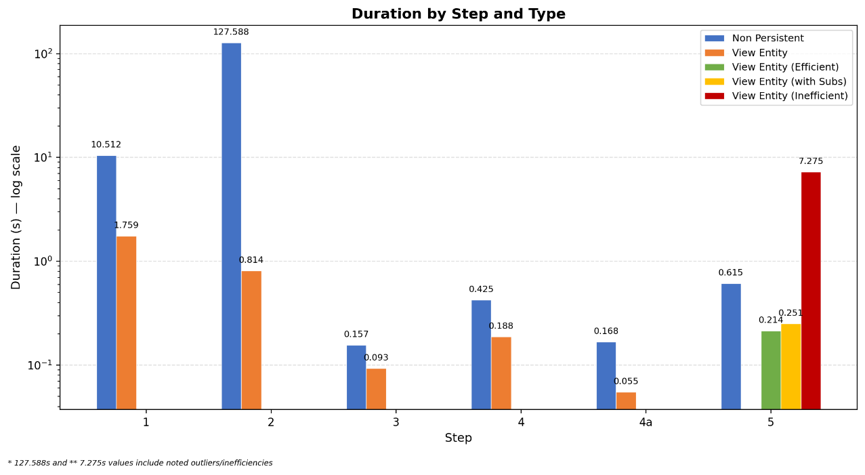
The scale on the y-axis is logarithmic!
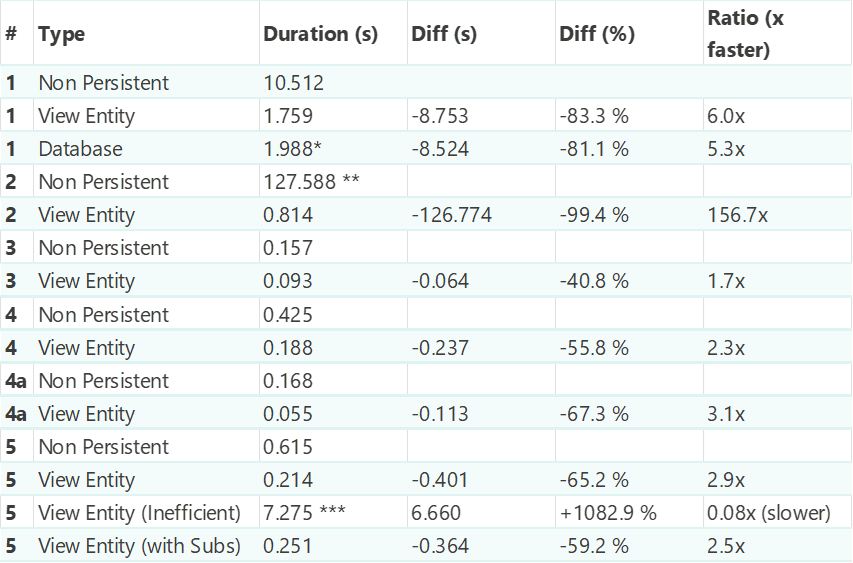
* The database retrieve is actually slower than the view entity, most likely due to the inherent retrieval of the association ID columns.
** Longest-running non-persistent measurement (all records are retrieved and added, record by record, to a non-persistent list).
*** Inefficient view entity variant, slower than non-persistent: the difference is an INNER JOIN on every employee, then filtered — very inefficient (think of it as a loop over every employee for every record).
Best Practices
When new features are introduced, new best practices arise too. Here are the first ones we’ve identified.
Security access rules
In most cases, view entities should follow the same access rule constraints as the tables they’re joined with. This ensures a consistent and secure way to retrieve data through view entities. While the documentation examples often suggest using WHERE statements to limit data, configuring an access rule is simpler — you just need to make sure the relevant associations are properly set to use constraints.
The showcase app contains an example of an unsecure view entity that shows all employees for a ‘Sales’ user role, while the persistent entity is correctly constrained to only employees with the ‘Sales’ role. We’ve also included a view entity that constrains data over an association — a fairly limited example, but the concept is powerful for constraining data based on the actual user/account entity, if your domain model supports it.
Subquery advice
- If you have multiple subqueries in your domain model, it’s possible to reference other view entities (see entity Step5_WithSUBS for an example).
- If you get unexpected results from a query with multiple joins or subqueries, ask ChatGPT (or your preferred AI) to explain the results, or split your view entity into multiple view entities.
- If you expect to reuse the data from OQL subqueries, split up your view entity accordingly.
Hard to debug and analyze
The log node ConnectionBus_Retrieve displays the OQL queries from your view entity along with the parsed SQL, while Datastorage_QueryPlan shows the query plan used for the resulting SQL. However, when these log nodes are enabled, the volume of data generated makes it nearly impossible to locate your specific OQL, SQL, or query plan. If you have tips for analyzing this data effectively, we’d love to hear them!
OQL can be challenging and quickly becomes complex. As you build larger queries or combine more tables, you’ll need a deep understanding of your domain model and the data stored in your database. Start small, expand gradually, and keep track of the changes you make to your query (notepad, a chat with your favorite AI, etc.). Regularly validate your results, reviewing both the output and the number of records returned — and remember to measure performance too.
One advantage of Mendix’s visual development over writing raw OQL queries is visibility, even with very large record sets. In Mendix, you can immediately spot inefficient patterns, like looping over all employees multiple times. With OQL, that visibility disappears: an inefficient join won’t reveal itself in the query itself — only in the performance you get afterward.
When you start with view entities, based on our experience, expect to invest at least half a day to understand and build your first implementation in your project.
메타데이터
- post_id
- c2bbba36e7ac
- slug
- we-made-our-mendix-database-156x-faster-using-view-entities-c2bbba36e7ac
- url
- https://medium.com/@remco.van.der.gaag/we-made-our-mendix-database-156x-faster-using-view-entities-c2bbba36e7ac
- canonical_url
- https://medium.com/@remco.van.der.gaag/we-made-our-mendix-database-156x-faster-using-view-entities-c2bbba36e7ac
- author_url
- https://medium.com/@remco.van.der.gaag
- status
- ok
- fetched_at
- 2026-07-28 01:14:14