Linux and Windows Environment Optimization Possibilities for High-End Audio Playback
In the world of computer audio, the demand for deterministic, low-jitter playback has become increasingly prominent in recent years. While…
Linux and Windows Environment Optimization Possibilities for High-End Audio Playback
In the world of computer audio, the demand for deterministic, low-jitter playback has become increasingly prominent in recent years. While bit-perfect output is now available in many playback applications, real-time behavior, scheduling predictability, and the minimization of system noise still show significant differences across various operating systems and configurations. I have already written about this in three articles regarding the development of the bpplay playback application, and Part 3 already included a rough comparison across different platforms.
It is important to clarify that bpplay is not merely a simple or minimalist playback application. It was intentionally designed as a minimalist reference tool.
Its purpose is not to compete with feature-rich players such as Roon, Audirvana, or HQPlayer, which offer extensive functionality including library management, streaming integration, DSP processing, and a graphical user interface.
Instead, bpplay deliberately strips away these layers in order to provide the shortest, most transparent, and most deterministic signal path possible from the local audio file all the way to the DAC.
This minimalism is not a limitation or a lack of features — it is a conscious design philosophy.
By minimizing software layers, background processes, and kernel intervention, bpplay aims to let the audio reach the sound card with the least possible alteration, added noise, or timing uncertainty.
In this sense, bpplay functions less as a conventional music player and more as a reference instrument. It allows users to precisely observe and measure what format, what routing, and what degree of software and system intervention the audio signal undergoes before reaching the hardware. It allows users to track precisely what format, what path, and what degree of software and kernel intervention the audio undergoes before reaching the sound card.
This article aims to provide an objective comparison of the extent to which a high-end audio system can be optimized in Linux and Windows environments. On the Linux side, the baseline is bpplay and bptune running on a minimal Debian Server installation, while on the Windows side, we examine the most commonly used versions (Windows 11, Windows Server, as well as Windows IoT Enterprise and Embedded).
Important Limitation: Local Files vs. Streaming
One of the core optimization strategies of bpplay is loading the entire playback material into RAM and locking it using the mlockall() call to prevent any paging attempts by the operating system. This approach ensures that no disk access occurs during playback, which significantly reduces system noise and improves determinism.
Consequently, the optimization opportunities and results presented in this article primarily apply to the playback of local files (WAV, FLAC, AIFF, DSF).
In the case of streaming (e.g., Roon, UPnP/DLNA, Tidal Connect, Qobuz, or streaming from a local server), several optimization elements can only be partially applied or not at all:
- Pre-loading the entire material into RAM is generally not feasible (depending on the provider’s API).
- The efficiency of gapless playback and deterministic scheduling may decrease.
- While the benefits of IRQ and CPU isolation remain, the overall degree of system determinism will be lower.
- The proprietary buffering and scheduling mechanisms of certain streaming software may partially overwrite the optimizations performed by bpplay/bptune.
However, it should be noted that the degree of compromise is generally smaller when streaming from a local server (for example, using Logitech Media Server with UPnP/DLNA) compared to commercial streaming services such as Tidal or Qobuz, where API restrictions and proprietary buffering mechanisms impose stricter limitations.
In summary: The extreme optimization presented in this article yields the greatest impact during the playback of local files. For streaming-based use cases, the differences between Linux and Windows are generally smaller.
The Linux Reference: Debian Server + bpplay + bptune
Linux-based extreme optimization is currently one of the most advanced approaches in the field of deterministic audio playback. The baseline environment is a minimized Debian Server installation with the PREEMPT_RT real-time kernel patch applied.
The key optimization elements include:
- Kernel-level isolation (isolcpus, nohz_full, rcu_nocbs)
- Memory locking (mlockall)
- Real-time scheduling (SCHED_FIFO priority 99)
- IRQ isolation (bptune dac-irq — isolate — persist)
- Minimization of system activity (disabling irqbalance, governor = performance, disabling USB autosuspend)
Among these optimizations, the IRQ isolation feature (bptune dac-irq — isolate — persist) is particularly powerful. It allows the audio interrupt request to be physically routed to a dedicated CPU core. This provides a level of direct hardware control that is difficult to achieve on Windows, where Deferred Procedure Calls (DPCs) from various drivers can unpredictably interfere with audio timing.
Together, these tools provide highly predictable time frames for the sound card driver and the audio subsystem. In practice, this results in low and stable jitter, as well as excellent gapless playback capabilities, especially with native DSD and high sampling frequencies.
Overview of Windows Versions
- Windows 11 Home and Pro: The average consumer versions. They support WASAPI Exclusive and ASIO modes; however, the kernel utilizes general-purpose scheduling, and deeper kernel-level isolation is not possible.
- Windows 11 Pro for Workstations: Provides better support for CPU Sets and Isolated Cores features, and enables more robust memory management.
- Windows Server 2022 / 2025 (Server Core): Offers a minimized installation option with fewer background processes. It provides better support for CPU and memory isolation, though the audio stack is not installed by default, and support for certain USB audio drivers may be limited.
- Windows IoT Enterprise and Windows Embedded: The most customizable options. With proper image building, very low system load can be achieved, and they offer stronger support for Core Isolation and CPU Sets features.
Detailed Comparison

It is important to note that even the most optimized Windows environments — including Windows IoT Enterprise and well-tuned Server Core installations — cannot match the level of IRQ and DPC handling achievable on Linux. While these Windows editions provide improved support for CPU Sets and process isolation, they remain constrained by the fundamental architecture of the NT kernel, where Deferred Procedure Calls (DPCs) from various drivers can still introduce unpredictable timing variations. In contrast, Linux with the PREEMPT_RT patch and tools such as bptune enables direct, hardware-level routing of audio interrupts to dedicated CPU cores, offering a degree of determinism that is inherently difficult to achieve on Windows.
Practical Differences and Compromises
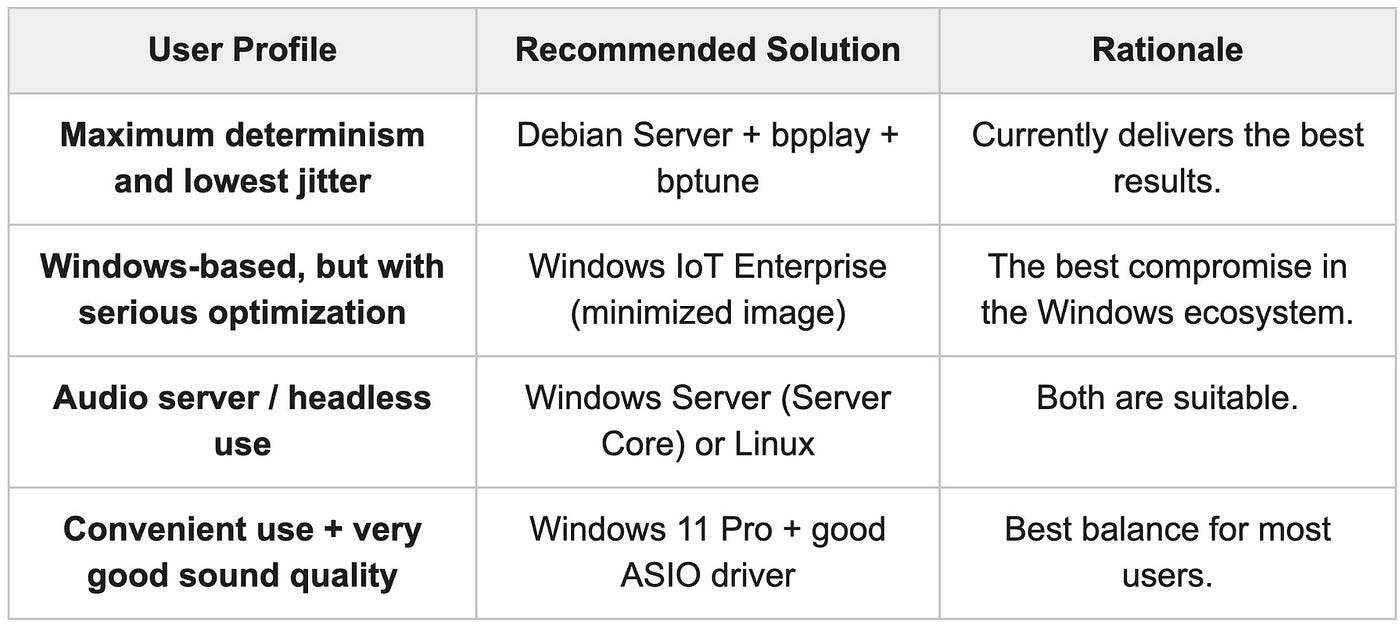
The most significant differences emerge in jitter predictability and stability, the reliable use of native DSD, and keeping system load minimal and predictable. In these categories, the Linux configuration currently delivers the best results.
On Windows, IoT Enterprise and well-optimized Server Core versions can come the closest; however, even in these cases, compromises must be made regarding determinism and long-term stability.
What Can Be Realistically Achieved on Windows?
- Windows 11 Home/Pro: Acceptable to good quality for everyday use.
- Windows 11 Pro for Workstations: Capable of more serious optimization, often yielding “good enough” results.
- Windows Server (Server Core): A very high level can be achieved, especially with a minimized installation.
- Windows IoT Enterprise / Embedded: Currently the best Windows-based alternative, but its installation and maintenance are significantly more complex.
Even the most highly optimized Windows environments do not fully achieve the level of predictability and low jitter provided by a properly configured Debian + PREEMPT_RT + bpplay + bptune system.
Summary and Recommendation
Windows “Firefighting”: Fidelizer, Audiophile Optimizer, and Companions
If the user cannot or does not want to get used to the command-line Linux or the Windows Server and IoT devices’ world, they might try to optimize classic Windows versions (Home/Pro) using third-party audio utilities. The most popular solutions are Fidelizer, Audiophile Optimizer (AO), and occasionally JPLAY.
These programs essentially attempt to mimic three things that the Debian + bptune environment performs natively:
- Retuning process priorities: They elevate music playback threads into Windows’ highest real-time class (MMCSS — Multimedia Class Scheduler Service), pushing other operating system tasks into the background.
- Stopping system services: They drastically strip down Windows background processes (network discovery, print spools, telemetry) to reduce CPU load and electrical noise.
- Crushing DPC Latency: They attempt to prevent background drivers from unexpectedly interrupting the audio stream at a software level.
The system-level limitation: While these utilities can deliver measurable and audible improvements compared to an unoptimized Windows installation, they ultimately provide only symptomatic treatment. They attempt to mitigate the consequences of Windows’ general-purpose scheduling and DPC behavior, but they cannot fundamentally alter the architecture of the NT kernel in the way that the PREEMPT_RT patch and kernel-level parameters do on Linux.
They cannot overwrite the fundamental architecture of the Windows NT kernel. Windows does not transform into a true, deterministic real-time operating system because of them. They cannot provide the deep, close-to-hardware core and IRQ isolation that the Linux PREEMPT_RT patch delivers, leaving microsecond timing uncertainties (jitter) at a higher level.
It is worth highlighting that while on Windows the developer is helpless against the dreaded DPC (Deferred Procedure Call) latency — as a poorly written Wi-Fi or graphics card driver can interfere with the timing of the audio stream at any moment — under Linux, the audio IRQ can be physically diverted out of their way using
bptune. This is one of Linux's ultimate weapons.
About the Costs
Software License Costs
- Linux: Completely free.
- Windows:
- Windows 11 Pro: a few tens of thousands of HUF
- Windows Server: more expensive (licensing is more complex).
- Windows IoT Enterprise: special license, often cheaply available only under OEM or volume licensing.
Time as a Cost
- Linux: Requires a significant upfront time investment. Installing the
PREEMPT_RTkernel, configuring kernel parameters, troubleshooting. If something breaks (e.g., after a kernel update), it has to be reconfigured. Putting together the first stable system can take 10–30 hours. - Windows: Much less time. Installing Windows 11 Pro and setting up a good ASIO driver can be done in a few hours. With IoT Enterprise, it takes more time (image building), but still less than Linux.
Hardware Costs
- Linux: Works well even on cheaper machines. An older i5/i7 PC or even a Raspberry Pi 5 can be considered (though the extreme optimization of
bpplayis more limited on the RPi). - Windows: Generally requires better hardware for the same performance (especially if you use Server or IoT Enterprise).
Long-Term Costs
- Linux: Once properly configured, it is relatively stable and cheap to maintain. Fewer update-related issues.
- Windows: Regular Windows updates can sometimes ruin the optimization (e.g., a new driver, new kernel behavior). This occasionally requires extra troubleshooting.
Debian ARM Platform — Opportunities and Limitations
In previous sections of this article, the Linux side focused primarily on Intel-based Debian systems as the current reference for bpplay’s extreme optimization. However, it is worth examining the ARM-based Debian platform in more detail, as an increasing number of users are looking for low-power, quiet, or even passively cooled solutions. This chapter provides an objective assessment of what can realistically be achieved on ARM architecture when using bpplay and its associated optimization tools.
Current State of ARM Platforms
The most widely used and best-supported ARM single-board computer is currently the Raspberry Pi 5, although other platforms such as the Radxa Rock 5B or Khadas VIM series can also be considered. Debian can be installed on these devices, and bpplay can run in principle, as its ALSA backend is generic. However, the full optimization chain — particularly the bptune fine-tuning tools — faces significant limitations on ARM.
Advantages of the ARM Platform
From an audiophile perspective, the ARM architecture offers several notable advantages:
- Very low power consumption: A Raspberry Pi 5 typically consumes between 5–10 W under full system load, significantly lower than Intel i5/i7-based systems.
- Easy passive or very quiet cooling: Due to low heat generation, it is much simpler to implement completely passive or extremely low-noise cooling solutions.
- Low cost and small physical size: A complete ARM-based system can be built much more cheaply and compactly than its Intel counterpart.
- Lower heat and electromagnetic interference: In theory, this can be more favorable from a system noise perspective.
These characteristics make the ARM platform particularly attractive when silent or passive operation is a priority.
Serious Limitations on the ARM Platform
Despite the above advantages, the ARM architecture presents several significant drawbacks that directly impact extreme optimized bpplay usage:
- One of the most critical limitations is IRQ isolation. The bptune dac-irq — isolate — persist function, which allows the audio interrupt to be routed to a dedicated CPU core, is largely optimized for the x86 architecture. On ARM platforms, this functionality is either unavailable or works only partially. As a result, one of the most effective jitter-reduction techniques available on Linux cannot be fully utilized.
Additionally, the PREEMPT_RT real-time kernel patch is not officially supported on most ARM SBCs, including the Raspberry Pi 5. Manual compilation is required, which introduces stability risks and significantly increases the complexity of long-term maintenance.
The USB audio stack on ARM platforms generally delivers weaker performance than on x86. Native DSD support is often problematic or only stable in DoP mode, which is a notable disadvantage for users working with high-resolution DSD material.
Finally, single-thread performance on ARM CPUs is typically lower than that of current Intel Core i5/i7 processors. Since the bpplay playback thread is inherently single-threaded, this difference can negatively affect playback determinism and jitter performance.
Realistic Expectations on ARM
On an ARM-based Debian system, the following can realistically be achieved:
- Acceptable sound quality for PCM playback.
- Very good passive or extremely quiet operation.
- Low power consumption and low operating costs.
However, significant compromises must be expected in several areas:
- The amount and long-term stability of jitter generally lag behind Intel-based systems.
- Native DSD playback is often limited or unreliable.
- Extreme optimization (full IRQ isolation and complete PREEMPT_RT functionality) cannot be implemented, or only to a limited extent.
- System maintenance and long-term stability are generally more challenging than on Intel platforms.
Comparison with the Intel Platform
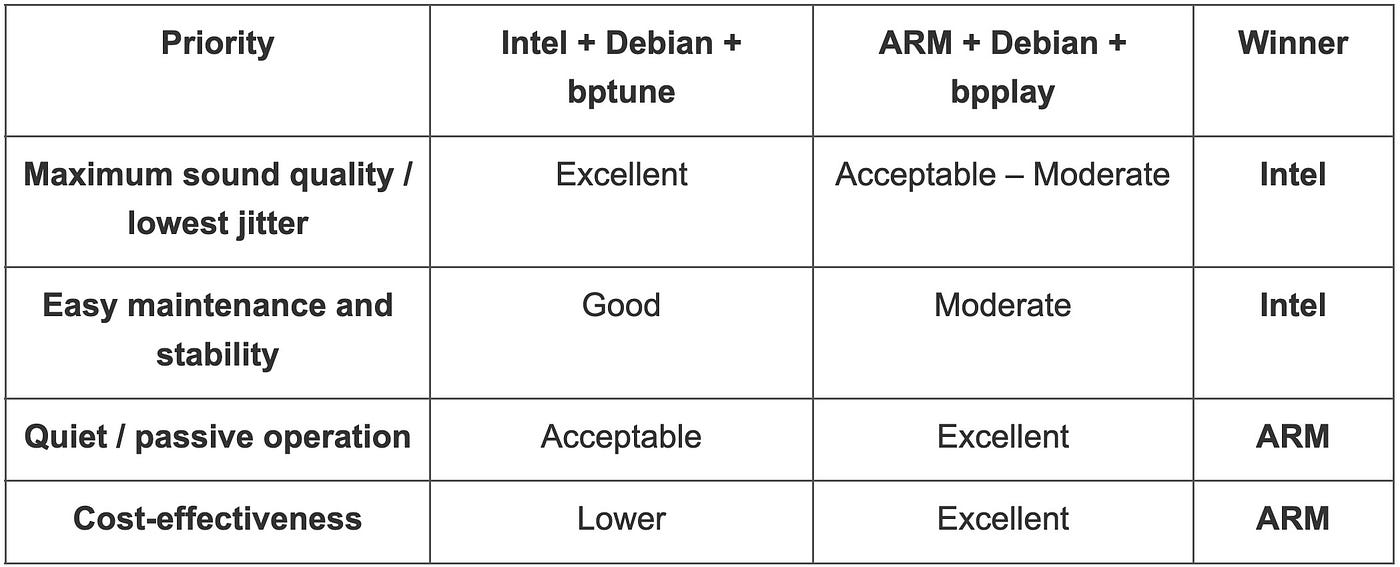
The following table summarizes how the ARM platform compares to the Intel + Debian reference, based on the priorities established earlier in this article:
Summary
The Intel + Debian (+ bptune) combination remains the stronger choice when maximum sound quality and maintainability are the primary concerns. The ARM platform (particularly the Raspberry Pi 5) is only recommended if silent or passive operation becomes significantly more important, and the user is willing to accept compromises regarding maximum determinism, real-time capability, and reliable native DSD support.
For ARM-based systems, the Raspberry Pi 5 currently represents the most practical option for Debian + bpplay usage. However, it is important to recognize that the degree of extreme optimization achievable will remain more limited than on x86 architecture.
During the optimization of high-end computer audio, we often face the question of whether it is “worth it” to choose the Linux route.
The answer heavily depends on individual priorities. Those looking for the greatest possible determinism, predictability, and “real-time” performance will find that the Linux (Intel CPU) solution currently delivers the best results. At the same time, a level of optimization is now achievable in Windows IoT Enterprise and Server editions that produces satisfying or very good results in many cases.
Ultimately, both platforms are capable of high-quality bit-perfect playback. The question is rather where the line is drawn for a given user, where further optimization and the experimentation that comes with it are no longer worth the invested time and energy.
메타데이터
- post_id
- c2e6c8c1fee0
- slug
- linux-and-windows-environment-optimization-possibilities-for-high-end-audio-playback-c2e6c8c1fee0
- url
- https://medium.com/@mediaengineering/linux-and-windows-environment-optimization-possibilities-for-high-end-audio-playback-c2e6c8c1fee0
- canonical_url
- https://medium.com/@mediaengineering/linux-and-windows-environment-optimization-possibilities-for-high-end-audio-playback-c2e6c8c1fee0
- author_url
- https://medium.com/@mediaengineering
- status
- ok
- fetched_at
- 2026-07-13 06:23:13