5 Claude Code Hacks That Put You Ahead of 90% of Developers (Most People Miss All of Them)
You are probably using Claude Code like a slow chatbot. Here is what changes when you actually know the tool.
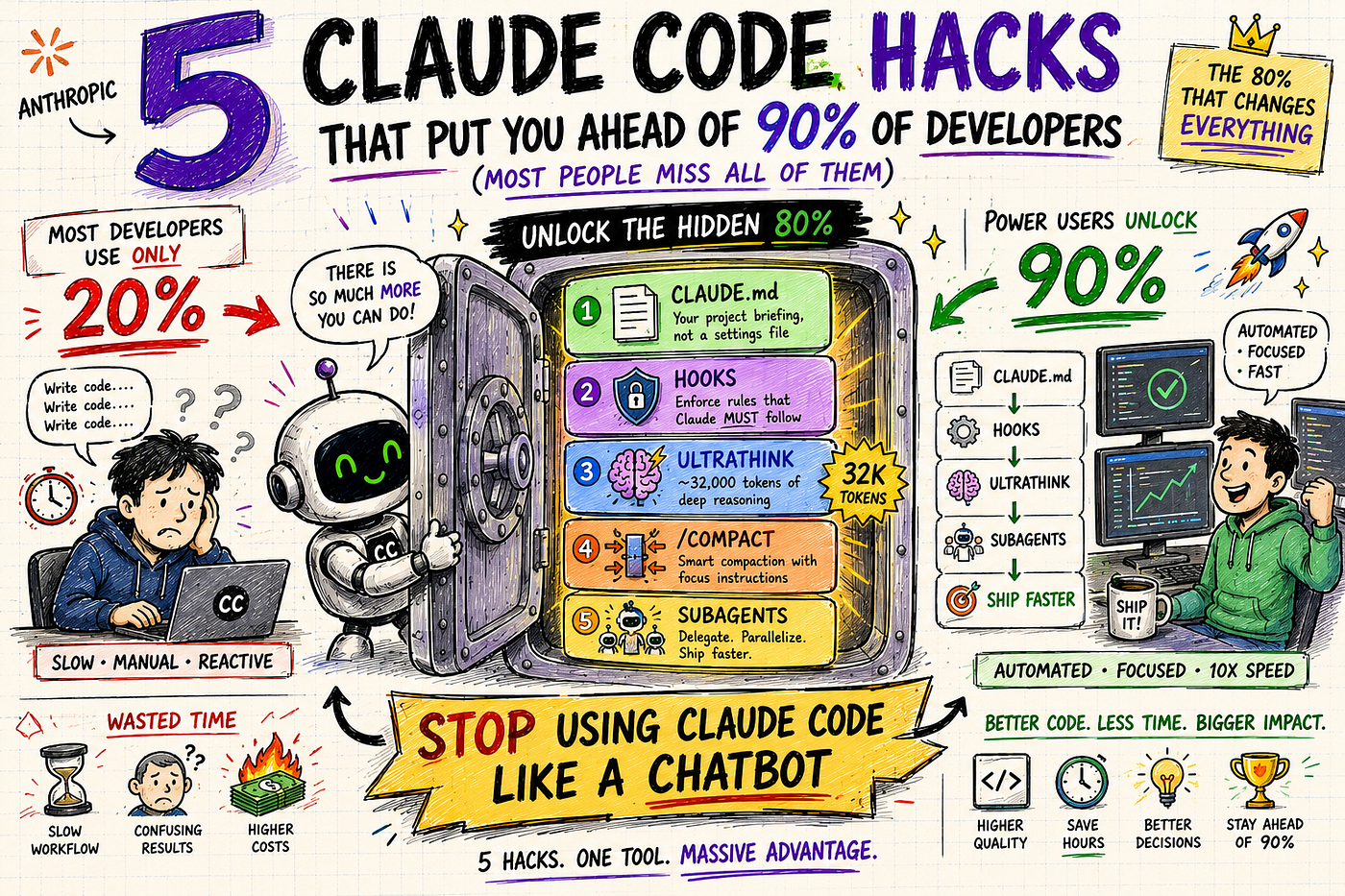
Photo from AI
5 Claude Code Hacks That Put You Ahead of 90% of Developers (Most People Miss All of Them)
You are probably using Claude Code like a slow chatbot. Here is what changes when you actually know the tool.
Type “ultrathink” into Claude.ai’s web chat and nothing happens. It is just a word in your prompt.
Type it into Claude Code’s terminal, and you just gave the model roughly 32,000 tokens to reason through your problem before it responds to you.
That gap between what Claude Code can actually do and what most developers know it can do is where these five hacks live.
Most developers who use Claude Code use it in the loop: type a prompt, Claude changes a file, type another prompt. That is the chatbot pattern. It is about 20% of what the tool does.
The other 80% is not hidden exactly. It is just underdocumented.
Here it is.
If you want more such information about AI, consider subscribing to my newsletter, where you will get noise-free AI information every week
Link for the newsletter: Newsletter
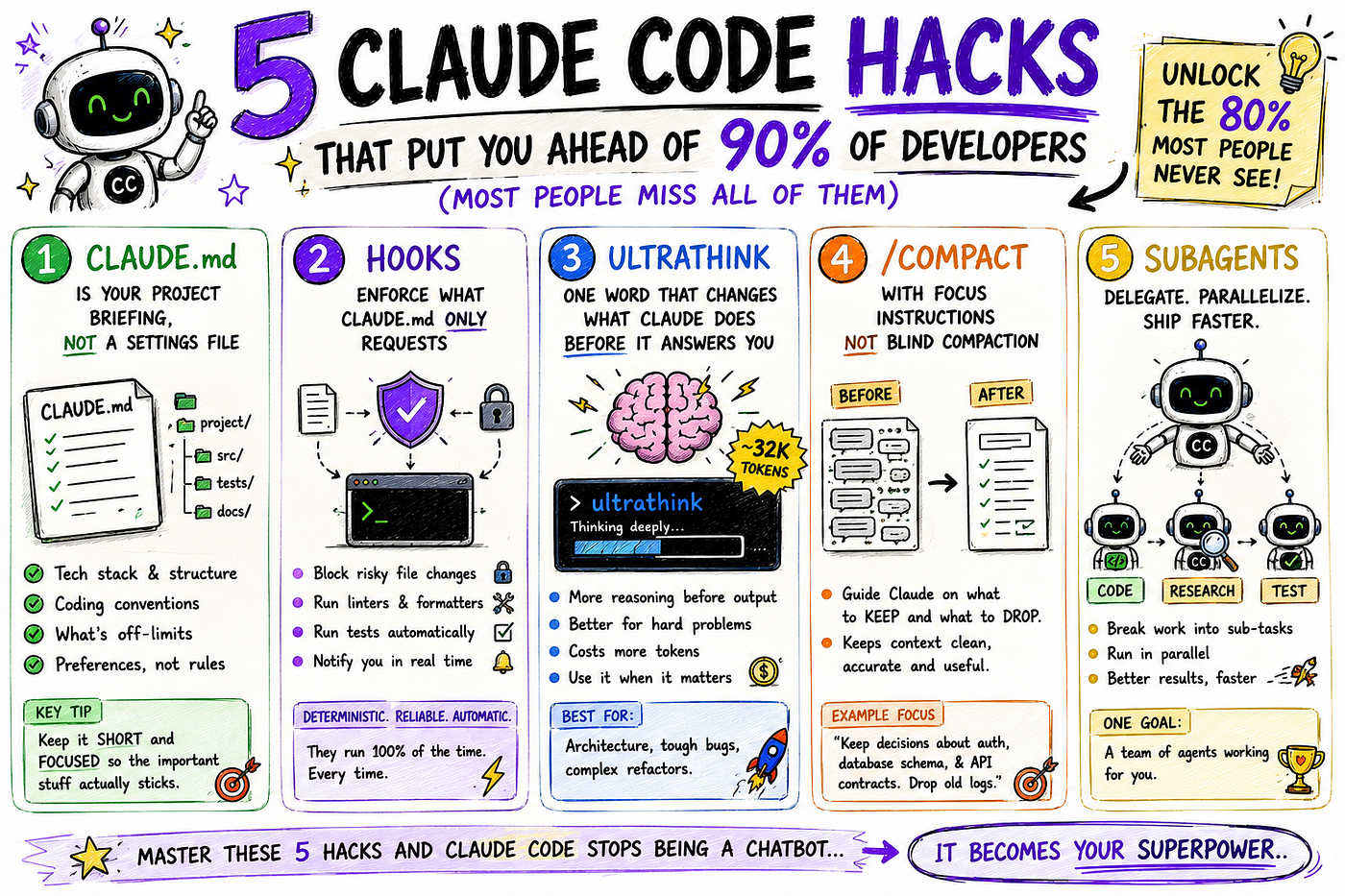
Photo from AI
Hack 1: CLAUDE.md is your project briefing, not a settings file
This is the most common piece of advice about Claude Code. Create a CLAUDE.md file. Put your project info in it. Claude reads it at the start of every session.
The part most tutorials skip: what you put in it matters enormously, and most developers put in too much.
CLAUDE.md instructions are advisory. Claude follows them roughly 80% of the time. That number is not a guess. Anthropic’s own best practices documentation says that if Claude already does something correctly without an instruction, delete that instruction. It is noise.
The right way to use CLAUDE.md is to treat it like a briefing you would give a new contractor. Tech stack, project structure, what is off-limits, coding conventions. Not policies. Not rules. Those go somewhere else (we get there in Hack 2).
A few practical tests before adding any line to CLAUDE.md:
- “If I remove this, will Claude make a mistake?” If not, remove it.
- “Can this go in a separate file that Claude reads only when needed?” If yes, move it there and reference it with
@filename. - “Is this a rule or a preference?” Rules go in hooks. Preferences go here.
When CLAUDE.md gets too long, instructions buried at the bottom start getting ignored. Shorter is not laziness. It is how you make sure the important stuff actually sticks.
CLAUDE.md is for preferences. Hooks are for rules that cannot be broken.
Hack 2: Hooks enforce what CLAUDE.md only requests
This is the one that changes how you think about controlling Claude Code.
Every instruction in CLAUDE.md is a request. Claude reads it, tries to follow it, and occasionally does not. That is fine for style preferences. It is not fine for “never force-push to main” or “always run the linter after editing a file.”
Hooks solve this.
They are deterministic. They fire 100% of the time, no exceptions. Not because Claude decided to comply. Because they are code, not instructions.
Claude Code hooks run at specific points in the agent’s lifecycle: before a tool runs, after it completes, when you submit a prompt, and when Claude finishes responding. The most useful one for most teams is the Stop hook, which runs whenever Claude finishes a turn and waits for your next input.
That hook runs after every Claude response. No instruction needed. No hoping Claude remembered. Every edit automatically goes through the linter; errors are returned to the session, and Claude fixes them.
The four things hooks can do for you practically:
- Send a desktop notification when Claude is waiting on permission so you can step away
- Block writes to sensitive files like
.envor.git/before they happen - Run formatters the moment Claude finishes writing any file
- Run your test suite and feed failures back into the session automatically
Hooks go in .claude/settings.json. They can be shell scripts, Python scripts, or HTTP calls. Once they are set up, they work silently in the background on every session without you thinking about them.
Hack 3: ultrathink is one word that changes what Claude does before it answers you
When you ask Claude Code a question normally, it reads your prompt and starts generating a response. The thinking and the output happen in the same stream.
Extended thinking separates those two phases.
Claude reasons through the problem first, explores approaches, considers edge cases, and only then writes a response. You see better reasoning because the model actually did the reasoning before committing to an answer.
Claude Code has trigger phrases that allocate different amounts of thinking budget:
- “think” or “think about it” = basic level
- “think hard” or “think deeply” = more
- “ultrathink” = roughly 32,000 tokens of pre-response reasoning
One word. Anywhere in your prompt.
The caveat: this only works in Claude Code’s terminal. Type “ultrathink” into claude.ai’s web chat and nothing happens. It is a Claude Code-specific feature, not a general Claude trick.
Two honest things to know before reaching for it:
Extended thinking costs more tokens than a standard response. For personal projects, the difference is negligible. For team usage across dozens of tasks a day, it adds up. Use it for problems that deserve it: architecture decisions, bugs that have already cost you hours, refactors touching critical paths.
And it does not help on simple tasks. Renaming a variable with ultrathink just takes longer and costs more. Match thinking level to problem complexity.
Do not add ultrathink to every prompt. Save it for the problems that have already cost you time.
Hack 4: /compact with focus instructions instead of blind compaction
This is the smallest change in this list and the one that improves daily work the most.
Claude Code has a context window, a limit on how much it holds in working memory at once. Long sessions fill it up. Performance degrades. /compact Compresses the conversation history to make room.
Most people run /compact and accept whatever summary Claude produces. The session continues, but Claude has lost track of the specifics that mattered.
The better version:
/compact focus on the auth refactor and the schema changes we made to users tableThat single addition tells Claude what to preserve when it compresses. Instead of a generic summary of the whole session, you get a focused one that keeps the decisions that matter and drops the back-and-forth that does not.
The difference in session continuity is noticeable from the first time you try it.
A few things worth including as focus points:
- Which files were changed and why
- Errors that appeared and how they were resolved
- Decisions made (chose Postgres over Redis, chose not to add an index yet)
- What is still in progress
The compact summary becomes the “memory” for the rest of the session. Give it good inputs and it produces something Claude can actually use.
Hack 5: Subagents keep your main session clean while the real work happens elsewhere
This is the architectural one. It takes the longest to set up and pays back the most.
When Claude Code does exploratory work inside your main session, reading dozens of files to understand the codebase, running searches to trace a bug, scanning test output, all of that fills your context window. By the time Claude finishes exploring, your context is half-full with file contents that were only needed for research.
Subagents fix this by isolating the work.
A subagent is a separate Claude instance with its own context window, system prompt, and tool permissions.
You define it in .claude/agents/.
When Claude encounters a task that matches the subagent's description, it delegates automatically. The subagent does the work, returns a summary, and the logs and file dumps stay out of your main thread.
# .claude/agents/code-reviewer.md
---
name: code-reviewer
description: Reviews code quality and security. Use proactively after code changes.
model: claude-sonnet-4-6   # cheaper model handles reviews, not Opus
tools:
  - Read
  - Glob
  - Grep
---

You are a senior code reviewer. Focus on security vulnerabilities, edge cases the
implementation might miss, and anything that contradicts the team's conventions.
Return a numbered list of specific issues with line references.
Once that file exists, Claude Code automatically routes review tasks to the subagent. The review happens in an isolated context, returns a summary, and your main session stays focused on building.
The part that matters more than parallelization: subagents prevent context contamination from failed approaches.
When Claude tries something and it does not work, the failed attempts accumulate in context. They pull future responses in the wrong direction. Pushing exploratory work into a subagent means your main session never sees those dead ends.
A few common subagent uses that actually work:
- Read-only codebase exploration (maps the repo without modifying your main context)
- Verification (separate agent checks whether the implementation actually solves the problem)
- Code review (route to a cheaper model; Opus stays on the main work)
- Log analysis (sift through long outputs and returns the relevant parts)
Putting it together
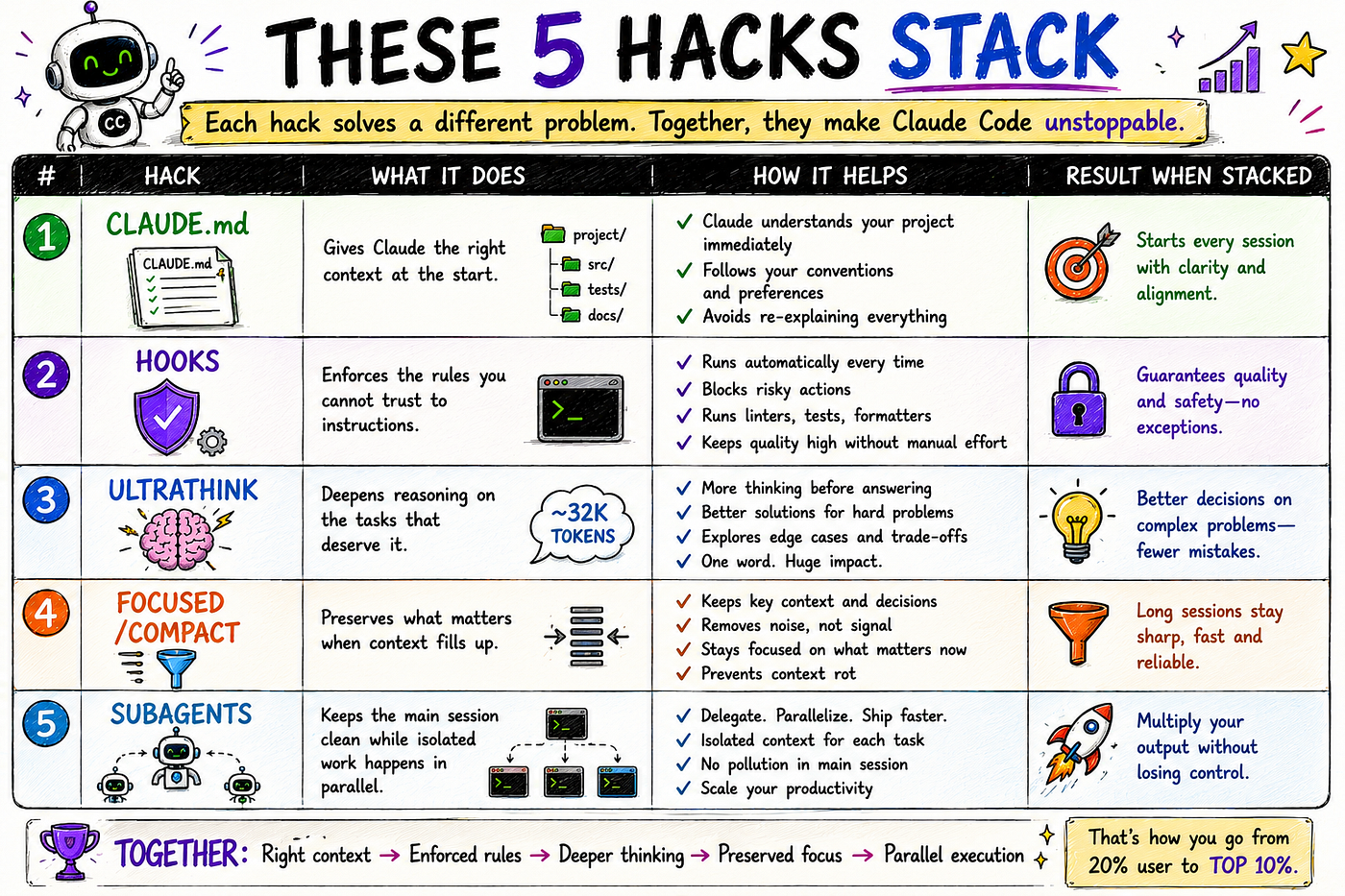
Photo from AI
Most developers use one or two of these. Getting all five working together is when Claude Code stops feeling like a smarter autocomplete and starts feeling like a configured system you actually trust.
What to do today
Step 1: Open your CLAUDE.md and remove every line Claude follows without it. Ruthlessly.
Step 2: Pick one rule that must always apply. Move it to a hook. Test it.
Step 3: Find one hard problem you have this week. Add "ultrathink" before it.
Step 4: Next time you /compact, add what to focus on. Compare the result.
Step 5: Create one subagent for code review. Point it at a cheaper model.
Start with Step 1. Most CLAUDE.md files are at least 30% instructions Claude does not need. Cutting those out alone makes the ones that remain more reliable.
References
- Claude Code Best Practices (Official Anthropic Engineering Blog) https://www.anthropic.com/engineering/claude-code-best-practices
- Claude Code Hooks, Subagents and Power Features https://dev.to/vibehackers/claude-code-hooks-subagents-power-features-the-complete-guide-2026-c71
- Claude Code Advanced Best Practices 2026 (SmartScope) https://smartscope.blog/en/generative-ai/claude/claude-code-best-practices-advanced-2026/
- Claude Ultrathink: 5 Hidden Thinking Levels Explained https://findskill.ai/blog/claude-ultrathink-extended-thinking/
- Claude Code Guide 2026: 25 Features (MarkTechPost) https://www.marktechpost.com/2026/06/14/claude-code-guide-2026-25-features-with-examples-demo/
- Prompting Best Practices (Official Claude API Docs) https://platform.claude.com/docs/en/build-with-claude/prompt-engineering/extended-thinking-tips
메타데이터
- post_id
- c2e89cf8ad23
- slug
- 5-claude-code-hacks-that-put-you-ahead-of-90-of-developers-most-people-miss-all-of-them-c2e89cf8ad23
- url
- https://medium.com/ai-engineering-simplified/5-claude-code-hacks-that-put-you-ahead-of-90-of-developers-most-people-miss-all-of-them-c2e89cf8ad23
- canonical_url
- https://medium.com/ai-engineering-simplified/5-claude-code-hacks-that-put-you-ahead-of-90-of-developers-most-people-miss-all-of-them-c2e89cf8ad23
- author_url
- https://medium.com/@yadavdivy296
- status
- ok
- fetched_at
- 2026-06-21 22:26:41