HR Lesson: It’s possible to use AI while keeping your company data safe
As HR professionals, we are gatekeepers. We’ve all heard about the EU AI Act and it’s our responsibility to stay vigilant with AI…
HR Lesson: Building with AI while keeping company data safe
As HR professionals, we are gatekeepers. We’ve all heard about the EU AI Act and it’s our responsibility to stay vigilant with AI especially around GDPR and the risk of sensitive company data leaking.
I was last Saturday morning listening to a French podcast when a HR Director was re-insisting. “Don’t feed confidential data into LLMs.” and amen to that!
But, how can we eliminate risk here, without risking holding ourselves back? We are living in an era driven by the urge to automate, reinventing HR with the help of AI. And let´s speak openly, we’re all beginning to feel that pressure.
The question is: how do we do this safely? Will our confidential data be fed into a ChatGPT or other LLMs in any case?
First, let´s demystify what an AI can do for us
It’s simple to put the following in the same AI basket when you are not working everyday with it:
- One-shot prompt ➡ A single instruction to an LLM that produces an immediate output (e.g., “summarize this text”).
- Workflow ➡ A sequence of rule-based, predefined steps executed by an automation framework (Zapier, Make, n8n, etc.). In my experience, workflows are often more complex to build than AI-powered ones, beacause they rely a lot on codes. This is where I often use AI for “vibe coding.”
- AI-Powered Workflow ➡ Essentially the same orchestration than the above definition, except that we will add a step where LLM will be used ( e.g., to extract, summarize, refine, or improve the output).
- AI Agent ➡ A system where the AI itself drives the process, decides, rather than being just a single step in a workflow. At this stage, you get more sofisticated tools like Langchain, LangGraph, AutoGen.
Then, there is also the concept of RAG, which deals with retrieving stuff... Let´s not go deeper here, it´s not my domain. And to be clear, I don´t create AI Agents either.
So, back to the key question: Will our confidential data be fed into a ChatGPT or other LLMs in any case? The answer is no, if you build and control your own Worflows.
Let me explain with two examples.
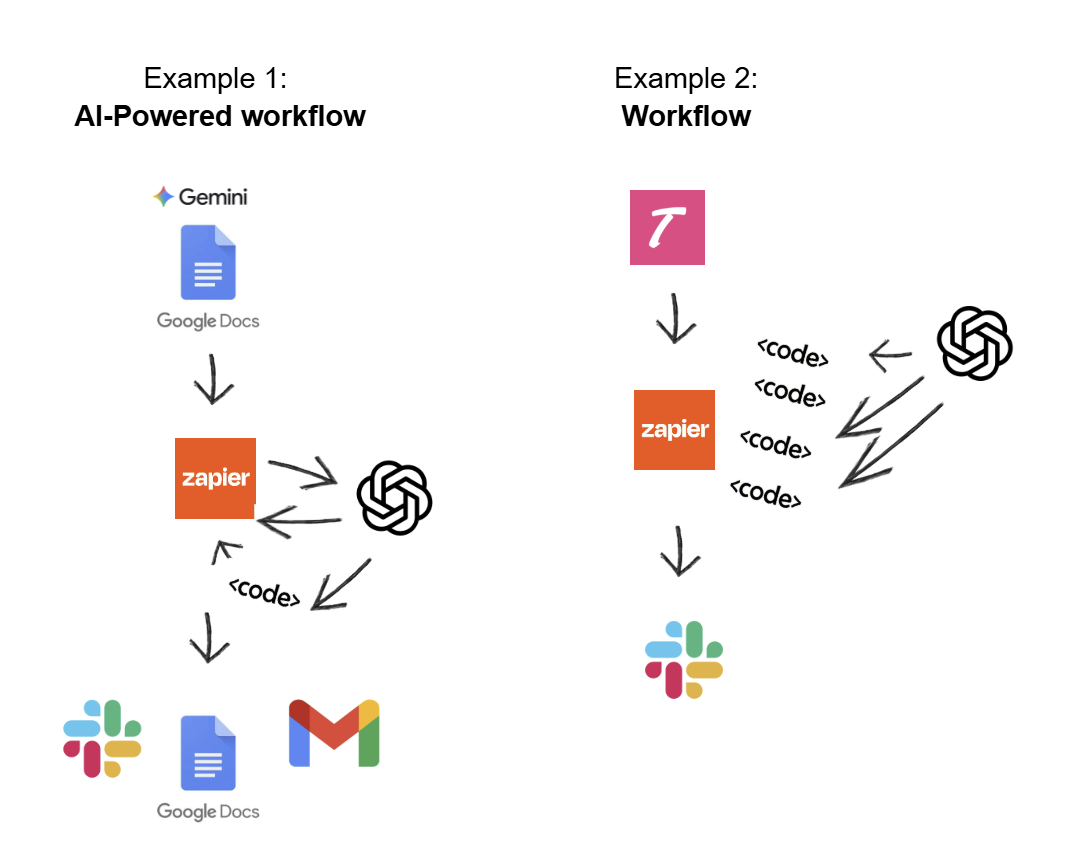
Example 1 — Without sensitive data: I built an AI-Powered Workflow to generate a cool suite of automated tools from an Intake Meeting Recording input
Scenario:
Say, I’m going to an intake meeting, preparing questions about the team and the project focus. If it’s simply a Hiring Manager presenting their team, the projects they’re working on, and what they’re looking for, diving into the profile´s hardskills: that’s information the candidate should also know. Nothing confidential here.
From this perspective, a transcript of an intake meeting, as long as it doesn’t contain confidential data, is perfectly fine to use as input for an LLM step. And even if it’s processed by a third-party tool, what’s the real risk if we’ve already cleaned out the sensitive parts? And yes, you can always manually remove sections if needed.
Approach:
Here’s how I would create my AI-Powered Workflow:
- Extract the transcript (from Gemini, in my case).
- Connect it with an automation tool (Zapier).
- Run some code steps (easily done with vibe coding: prompt what you want, generate a Python snippet, and inject it into a Zap step).
- Add an LLM step, feed in the transcript, apply your template formatting, and that’s where the magic happens.
And remember, in the AI-Powered workflow, the LLM is only one piece of your work, you control your orchestrations and the data that will be used.
Result:
Each time I upload a new recording titled “Follow-up of Intake Meeting,” the workflow kicks in it grabs the transcript, combines it with my template, and then I can create whatever I need. Need a pitch interview kit? Done. Need a sourcing strategy? It pulls all the keywords from the call, generates additional ones, builds a Boolean, and explains each technical requirement step for continuous learning. Need a follow-up intake summary to send to the Hiring Manager? Done.
You can generate endless tools… as long as you don’t feed confidential data into the LLM.
Example 2 — With sensitive data: I built a Workflow to extract hiring data from my ATS to generate weekly reportings
Scenario:
Now let’s take a more sensitive scenario where LLMs should be banned: candidate weekly reporting.
Imagine creating a clean Weekly Hiring Metrics Report, where the most important hiring data is pulled from our ATS, summarized, and automatically shared in a dedicated Slack hiring channel for the Hiring Manager and their team.
This tailored report helps us quickly see whether the process is on track and highlights areas that require attention.
For example:
- If the number of recruiter interview rejections is too high, it may indicate bias, meaning we’re rejecting too many candidates unfairly, or suggest that we need to improve our sourcing strategy to pre-select stronger candidates. If it’s too low, it could mean we’re not filtering candidates effectively, in which case we may need to revisit the role definition with the Hiring Manager and, once again, adjust our sourcing strategy.
- If the test drop-off rate is high, it signals a need to investigate why candidates disengage and explore improvements in the assessment stage.
But let´s agree, this involves confidential data, so, we are not going to feed this sensitive input in an LLM. Only automation through code.
Approach:
Here’s how we could create a Workflow:
- Start with your ATS (whatever it is). Go to integrations, generate your API key.
- Connect the ATS to an automation tool (in my case, Zapier)
- Build your flow. Every Friday, the workflow runs across all jobs and delivers metrics automatically.
- Create your codes (go your way with vibe-coding) when it comes to codes, I prefer small modular scripts instead of one giant block of code. One script per active candidates, rejections, totals, sentiment analysis (on track, needs vigilance, etc.) That way, if one script breaks, it’s easier to debug.
- Choose how you’d like to receive the data (for me, it’s Slack hiring channels).
Result:
We now have a tailored weekly snapshot of the key hiring data for each role, presented at a glance. This improves transparency with Hiring Managers, making it easier to understand the process and encouraging immediate feedback and discussions with the team. It’s a strong example of eliminating repetitive administrative tasks while strengthening human connection.
The key here is: we used AI to create this workflow, but no confidential data is ever exposed to an LLM.
In conclusion
Soon, new jobs will appear. We’ll face a new generation of roles like RecOps = Recruiter + Operations (to follow in the footsteps of the titles creations of DevOps, MLOps, and MarOps). This wave has already started.
Now with Vibe coding, pandora´s box is offically open. For those that can, let’s keep control by managing the HR workflows ourselves. BUT let´s not forget: Yes to AI, no to data leaks.
Let’s open source our findings. I’d be happy to collaborate on how we can proactively build this community together: feel free to PM me!
We are living in a wonderful era.
Diane
메타데이터
- post_id
- c2ea3c548d83
- slug
- hr-lesson-its-possible-to-use-ai-while-keeping-your-company-data-safe-c2ea3c548d83
- url
- https://medium.com/@drocher/hr-lesson-its-possible-to-use-ai-while-keeping-your-company-data-safe-c2ea3c548d83
- canonical_url
- https://medium.com/@drocher/hr-lesson-its-possible-to-use-ai-while-keeping-your-company-data-safe-c2ea3c548d83
- author_url
- https://medium.com/@drocher
- status
- ok
- fetched_at
- 2026-07-16 09:05:46