Connect to Snowflake Open Catalog from watsonx.data Spark
In this blog, we will explore how to connect to Snowflake Open Catalog from watsonx.data using Spark. For detailed instructions on setting…
Connect to Snowflake Open Catalog from watsonx.data Spark
In this blog, we will explore how to connect to Snowflake Open Catalog from watsonx.data using Spark. For detailed instructions on setting up Snowflake Open Catalog, please refer to the official documentation here: https://other-docs.snowflake.com/en/opencatalog/overview
Snowflake Open Catalog offers an implementation of the Iceberg REST Catalog, which is distinct from the traditional Snowflake Catalog. Unlike Snowflake’s native catalog, Snowflake Open Catalog is designed specifically for managing Iceberg tables. It supports two types of catalogs: external and internal.
- External Catalog: This is a read-only catalog that is not managed by Snowflake Open Catalog itself. Instead, it syncs data from an external catalog, enabling Snowflake to access and query Iceberg tables stored outside of its environment.
- Internal Catalog: This catalog is fully managed by Snowflake Open Catalog. It allows users to perform full CRUD (Create, Read, Update, Delete) operations on Iceberg tables directly within Snowflake.
With Snowflake Open Catalog, users can seamlessly integrate and manage Iceberg tables, giving them flexibility in how they work with both externally and internally managed catalog. Service connections we create on snowflake side to connect from external engines.
Steps for submitting spark application in WXD native spark with Snowflake open catalog:
- Sample Python Application(sample_open_catalog.py) for Snowflake Open Catalog CRUD operations on Iceberg Tables with watsonx.data Spark Integration.
from pyspark.sql import SparkSession

def init_spark():
  spark = SparkSession.builder.appName("snowflake-open-catalog-test").getOrCreate()
  sc = spark.sparkContext
  return spark,sc

def main():
  spark,sc = init_spark()
  spark.sql("USE <catalog_name>")
  spark.sql("SHOW NAMESPACES").show()
  spark.sql("CREATE NAMESPACE IF NOT EXISTS <namespace/schema>").show()
  spark.sql("CREATE TABLE IF NOT EXISTS <catalog_name>.<namespace/schema>.<table-name>(ID INTEGER) USING ICEBERG").show()
  spark.sql("SHOW TABLES from <catalog_name>.<namespace/schema>").show()
  spark.sql("INSERT INTO <catalog_name>.<namespace/schema>.<table-name> VALUES(1)").show()
  spark.sql("SELECT * from <catalog_name>.<namespace/schema>.<table-name>").show()
  spark.stop()

if __name__ == '__main__':
main()-
Upload sample_open_catalog.py file on bucket.
-
In the documentation https://cloud.ibm.com/docs/watsonxdata?topic=watsonxdata-smbit_nsp_1#nsppk_preq_1, while submitting the pyspark application in watsonx.data use below request body for snowflake open catalog.
{
  "application_details": {
    "application": "<bucket-file-path>",
    "conf": {
      "spark.hadoop.fs.s3a.bucket.<bucket-name-1>.endpoint": "<bucket-endpoint>",
      "spark.hadoop.fs.s3a.bucket.<bucket-name-1>.access.key": "<access_key>",
      "spark.hadoop.fs.s3a.bucket.<bucket-name-1>.secret.key": "<secret_key>",
      "spark.sql.catalog.<catalog_name>.uri": "https://<open_catalog_account_identifier>.snowflakecomputing.com/polaris/api/catalog",
      "spark.sql.catalog.<catalog_name>.warehouse": "iceberg_open_spec",
      "spark.sql.catalog.<catalog_name>.scope": "PRINCIPAL_ROLE:<principal_role_name>",
      "spark.sql.catalog.<catalog_name>.type": "rest",
      "spark.sql.catalog.<catalog_name>": "org.apache.iceberg.spark.SparkCatalog",
      "spark.sql.defaultCatalog": "<catalog_name>",
      "spark.sql.extensions": "org.apache.iceberg.spark.extensions.IcebergSparkSessionExtensions",
      "spark.sql.catalog.<catalog_name>.credential": "<client_id>:<client_secret>",
      "spark.sql.catalog.<catalog_name>.s3.access-key-id": "<access_key>",
      "spark.sql.catalog.<catalog_name>.s3.secret-access-key": "<secret-key>",
      "spark.sql.catalog.<catalog_name>.client.region": "<target_s3_region>",
      "spark.sql.defaultCatalog": "<catalog_name>"
    }
  }
}
Explanation of the Configuration Replacer:
- bucket-name-1 : bucket where you uploaded the sample_open_catalog.py file.
- bucket-file-path: Path where you uploaded file on bucket. eg: s3a://bucket-name/sample_open_catalog.py
- catalog-name : Specifies the name of the catalog to connect to in snowflake open catalog.
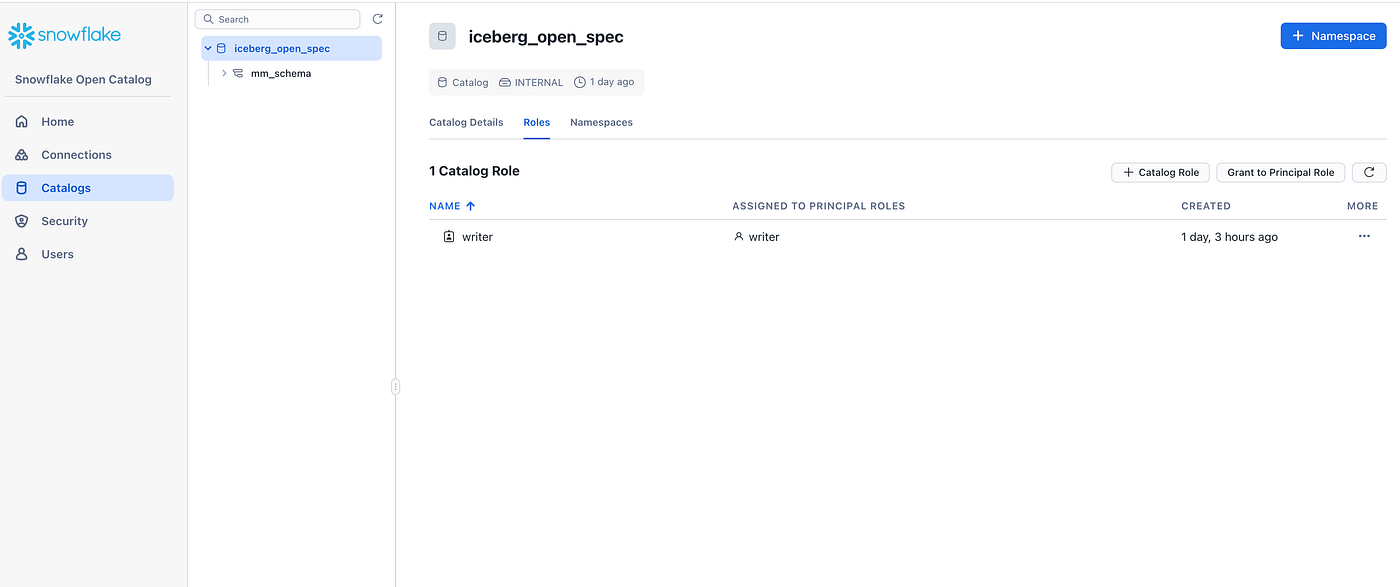
example-> catalog-name is iceberg_open_spec
4. client_id: Specifies the client ID for the service principal to use. client_secret: Specifies the client secret for the service principal to use.

Service connection gives client-id:client-secret
5. open_catalog_account_identifier: Specifies the account identifier for your Open Catalog account. Depending on the region and cloud platform for the account, this identifier might be the account locator by itself (for example, xy12345) or include additional segments. For more information, see Using an account locator as an identifier.
6. principal_role_name: Specifies the principal role that is granted to the service principal.

principal_role_name is writer
You can then assign the principal role to the catalog role.

Writer principal role granted to catalog writer role
7. target_s3_region: Specifies the region code where the S3 bucket containing your Apache Iceberg tables is located. For the region codes, see AWS service endpoints and refer to the Region column in the table.
Results:

Submitted pyspark application

Spark Application Finished successfully
Spark driver logs
24/12/10 14:23:50 WARN NativeCodeLoader: Unable to load native-hadoop library for your platform... using builtin-java classes where applicable
24/12/10 14:23:51 WARN MetricsConfig: Cannot locate configuration: tried hadoop-metrics2-s3a-file-system.properties,hadoop-metrics2.properties
SLF4J: Failed to load class "org.slf4j.impl.StaticLoggerBinder".
SLF4J: Defaulting to no-operation (NOP) logger implementation
SLF4J: See http://www.slf4j.org/codes.html#StaticLoggerBinder for further details.
24/12/10 14:23:52 WARN ConfigurationHelper: Option fs.s3a.connection.establish.timeout is too low (5,000 ms). Setting to 15,000 ms instead
24/12/10 14:23:57 WARN SparkConf: Note that spark.local.dir will be overridden by the value set by the cluster manager (via SPARK_LOCAL_DIRS in mesos/standalone/kubernetes and LOCAL_DIRS in YARN).
24/12/10 14:24:02 WARN COSAPIClient: file status spark/spark350/spark-events returned 404
24/12/10 14:24:02 WARN COSAPIClient: file status spark/spark350/spark-events/eventlog_v2_app-20241210142359-0000 returned 404
24/12/10 14:24:03 WARN COSAPIClient: file status spark/spark350/spark-events/eventlog_v2_app-20241210142359-0000 returned 404
+---------+
|namespace|
+---------+
|mm_schema|
+---------+

++
||
++
++

++
||
++
++

24/12/10 14:24:17 WARN SizeEstimator: Failed to check whether UseCompressedOops is set; assuming yes

[Stage 0:>                                                          (0 + 1) / 1]
24/12/10 14:24:19 WARN GarbageCollectionMetrics: To enable non-built-in garbage collector(s) List(scavenge), users should configure it(them) to spark.eventLog.gcMetrics.youngGenerationGarbageCollectors or spark.eventLog.gcMetrics.oldGenerationGarbageCollectors
24/12/10 14:24:19 WARN GarbageCollectionMetrics: To enable non-built-in garbage collector(s) List(global, scavenge), users should configure it(them) to spark.eventLog.gcMetrics.youngGenerationGarbageCollectors or spark.eventLog.gcMetrics.oldGenerationGarbageCollectors


+---------+---------------+-----------+
|namespace|      tableName|isTemporary|
+---------+---------------+-----------+
|mm_schema|spark_wxd_table|      false|
+---------+---------------+-----------+

[Stage 1:>                                                          (0 + 1) / 1]


++
||
++
++

[Stage 2:>                                                          (0 + 1) / 1]


[Stage 3:>                                                          (0 + 1) / 1]


+---+
| ID|
+---+
|  1|
|  1|
|  1|
|  1|
|  1|
|  1|
+---+

24/12/10 14:24:37 WARN COSAPIClient: file status spark/spark350/spark-events/eventlog_v2_app-20241210142359-0000/appstatus_app-20241210142359-0000 returned 404
24/12/10 14:24:37 WARN COSAPIClient: file status spark/spark350/spark-events/eventlog_v2_app-20241210142359-0000/appstatus_app-20241210142359-0000 returned 404
In snowflake we can see table created from WXD spark
We can query this table from where ever we want using any external engine which snowflake catalog supports.
메타데이터
- post_id
- c2f72bd3d102
- slug
- connect-to-snowflake-open-catalog-from-watsonx-data-spark-c2f72bd3d102
- url
- https://medium.com/@hemant.marve/connect-to-snowflake-open-catalog-from-watsonx-data-spark-c2f72bd3d102
- canonical_url
- https://medium.com/@hemant.marve/connect-to-snowflake-open-catalog-from-watsonx-data-spark-c2f72bd3d102
- author_url
- https://medium.com/@hemant.marve
- status
- ok
- fetched_at
- 2026-08-05 03:06:48




