Log Parsing for Security Engineers: Building the Foundation for Reliable Threat Detection
A practical guide to parsing, normalizing, and validating security logs for reliable SIEM threat detection.
Log Parsing for Security Engineers: Building the Foundation for Reliable Threat Detection
A security product starts sending logs to your SIEM. Event volume looks healthy, but every event is still a single text string. There is no source IP, no username, no normalized outcome, and detection rules cannot reliably use the data.
The logs were collected, but they are not detection ready.
This is where the processing pipeline matters.

The process of transforming raw logs into detection-ready data.
The Log Processing Pipeline
Each stage has a specific responsibility:
- Collection: Delivers raw logs to the SIEM.
- Identify Structure: Determines the log format — such as JSON, CEF, Syslog, Key-Value, or XML — so the correct parsing method can be selected.
- Parsing: Extracts meaningful fields from the raw event.
- Normalization: Standardizes field names, values, and data types across different products.
- Enrichment: Adds context such as asset information, identity ownership, or threat intelligence.
- Detection: Applies detection logic and analytics to the structured data.
Although these terms are related, they serve different purposes:
- Parsing extracts a value such as
src_ip="192.0.2.10"from the raw event. - Normalization maps fields such as
src_ip,client_ip, andremote_addrto a common schema and standardizes their values. - Enrichment adds context that was not present in the original event, such as asset ownership or threat intelligence.
- Classification identifies the event family, such as a VPN authentication event.
- Categorization assigns a consistent analytical meaning, such as authentication failure.
Each stage depends on the one before it. A detection is only as reliable as the data it receives. Incorrect field mappings, inconsistent values, or wrong data types can silently break detections, investigations, dashboards, and correlation rules.
Anatomy of a Raw Log
Before writing a parser, understand the structure of the event.
<134>1 2026-07-28T10:15:20Z vpn01.example.local auth 2481 LOGIN - user="user01" src_ip="192.0.2.10" action="login" result="failed"- Syslog priority (facility and severity) :
<134> - RFC5424 version :
1 - Event timestamp :
2026-07-28T10:15:20Z - Hostname :
vpn01.example.local - Application :
auth - Process ID :
2481 - Message ID :
LOGIN - Structured Data :
- - Event payload :
user="..."
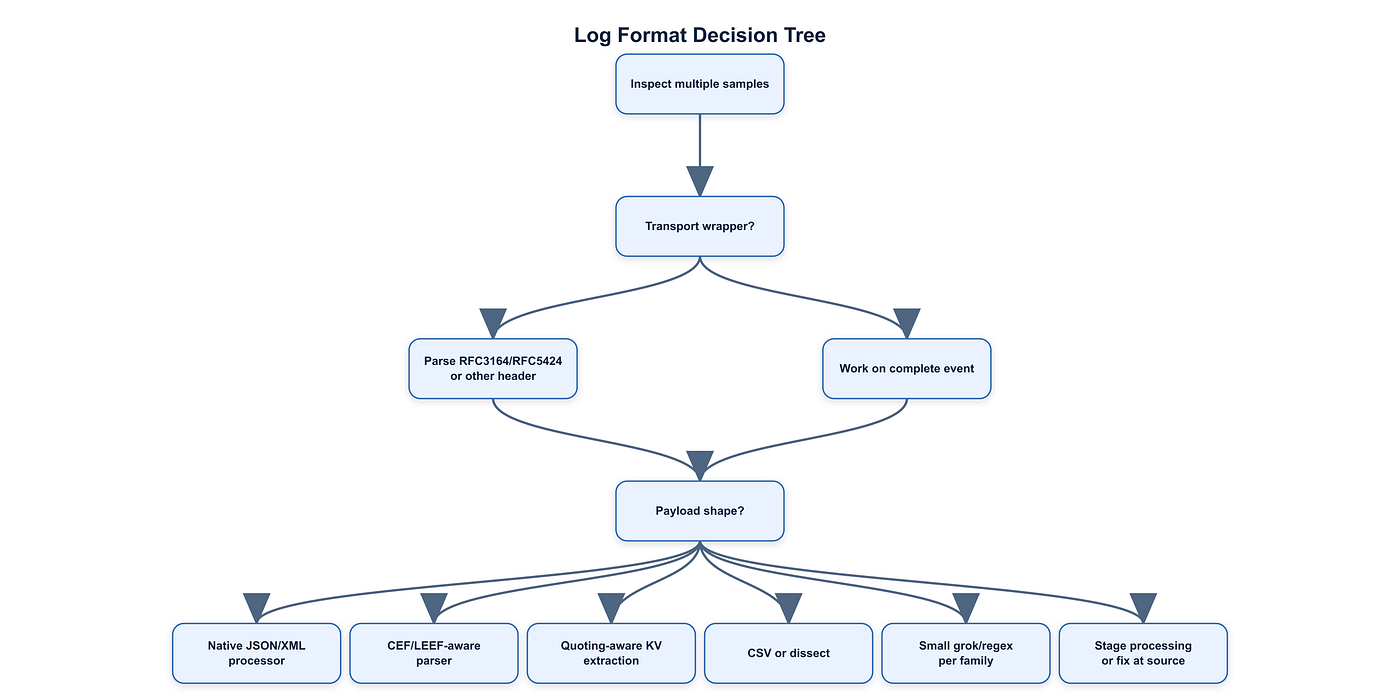
Common Log Formats and Choosing the Right Parsing Strategy
Not every log should be parsed in the same way. The first step is identifying its format and selecting the appropriate parsing method.
Normalized Log Fields
Different security products describe the same information using different field names. For example, one vendor may use src_ip, another client_ip, and another remote_addr.

Selecting a parsing strategy based on the structure of the log.

The parsing method should match the structure of the data. JSON should be handled by a JSON parser rather than regular expressions, while CEF and LEEF should be processed by format-aware parsers.
Normalized Log Fields
Different products often describe the same information using different field names. One vendor may use src_ip, another client_ip, and another remote_addr.
Normalization maps these variations into a common schema so detections, dashboards, investigations, and correlation rules can work consistently across multiple data sources.
Common normalized fields include:
- Source: IP, Port, MAC Address, Hostname
- Destination: IP, Port, MAC Address, Hostname
- User: Username, Domain, SID
- Process: Name , Path, PID, Command Line
- Network: Protocol, URL, DNS, User Agent
- Time: Event Time, Ingestion Time
- Status: Success, Failure
- Action: Allow, Deny, Block, Login, Logout
- Category: Authentication, Firewall, DNS, EDR, IDS/IPS
- Severity: Critical, High, Medium, Low
- Log Level: Info, Warning, Error, Debug
These fields become the common language used by detection rules, correlation engines, dashboards, and threat hunters.
Note: CEF and LEEF are log formats, not normalization schemas. Common normalization models include Elastic Common Schema (ECS), Splunk Common Information Model (CIM), Microsoft Sentinel ASIM, and vendor-specific data models.
Syslog (RFC3164 / RFC5424) : Network devices, Linux, firewalls
Not every log should be parsed the same way. The first step is identifying its format, then selecting the appropriate parsing method.
Before writing a parser, identify the log format. Different formats require different parsing strategies, and using the wrong approach often leads to fragile parsers.
- JSON : Cloud services, APIs, EDRs
- XML : Windows applications, enterprise software
- Key-Value (KV) : Firewalls, VPNs, proxies
- CEF : Security products, ArcSight, Sentinel
- LEEF : IBM QRadar integrations
- CSV / Delimited : Legacy applications, exports
- Plain Text : Custom applications
- Multiline : Stack traces, application logs
The parser should always match the structure of the log. For example, JSON should be parsed with a JSON parser rather than regular expressions, while CEF and LEEF should be handled by format-aware parsers.
Practical Example: Parsing SSH Logs with Fluent Bit
In this example, SSH authentication logs are collected from a Debian server, parsed with Fluent Bit, and sent to Elasticsearch.
The logs are collected from the Linux systemd journal using:
_SYSTEMD_UNIT=ssh.service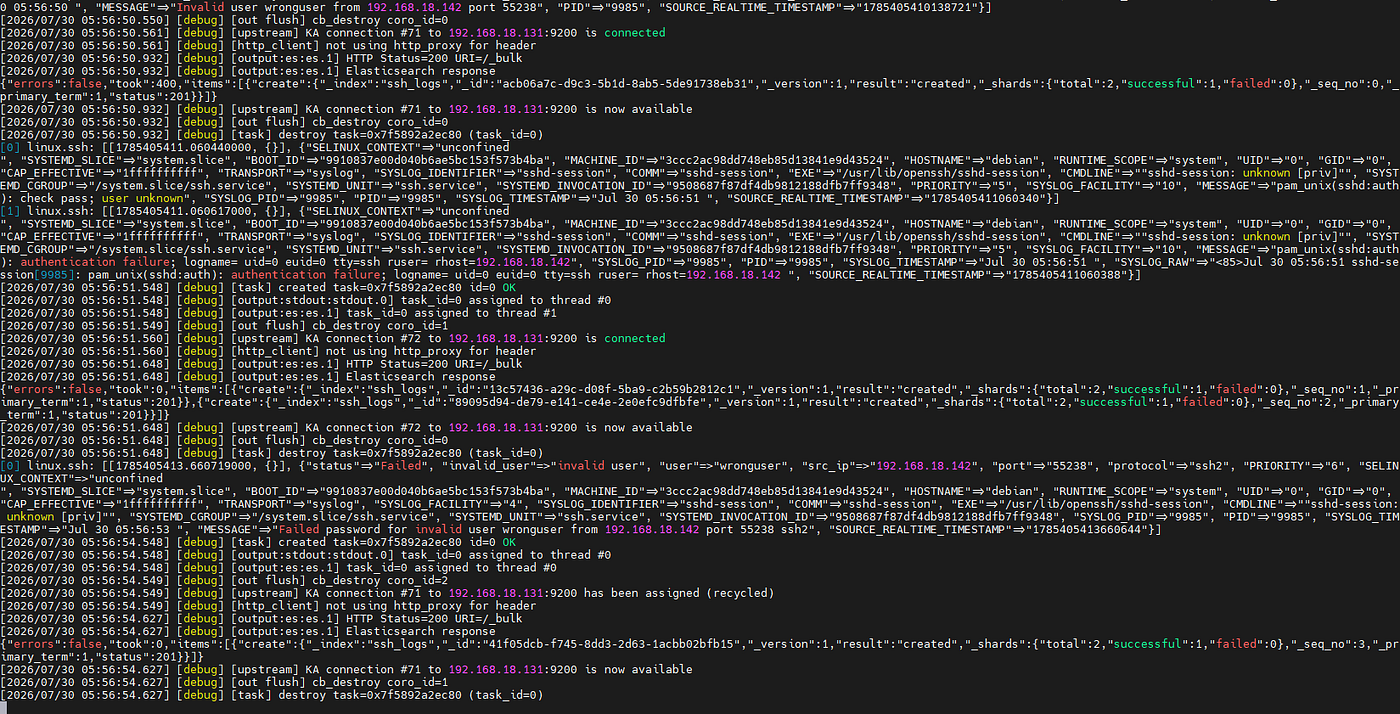
SSH Logs Parsing Process
A typical SSH event looks like this:
Failed password for invalid user wronguser from 192.168.18.142 port 55238 ssh2What Log Type Is This?
This event is plain text / unstructured text.
It is not JSON, CEF, LEEF, XML, or key-value data. The information appears in fixed text positions:
Failed password for <user> from <source_ip> port <port> <protocol>What Is Fluent Bit? Fluent Bit is a lightweight log collector and processor. https://docs.fluentbit.io/manual
mainly using 2 files one for parser other for config
Fluent Bit Configuration
[SERVICE]
    Flush                     1
    Log_Level                 debug
    Daemon                    Off
    Parsers_File              /home/linuxmachine/parser-bit.conf

[INPUT]
    Name                      systemd
    Tag                       linux.ssh
    Systemd_Filter            _SYSTEMD_UNIT=ssh.service
    Read_From_Tail            On
    Strip_Underscores         On

[FILTER]
    Name                      parser
    Match                     linux.ssh
    Key_Name                  MESSAGE
    Parser                    sshparser
    Reserve_Data              On
    Preserve_Key              On

[OUTPUT]
    Name                      stdout
    Match                     linux.ssh

[OUTPUT]
    Name                      es
    Match                     linux.ssh
    Host                      elastic_ip
    Port                      9200
    Index                     ssh_logs
    HTTP_User                 user_name
    HTTP_Passwd               password
    Suppress_Type_Name        On
    Generate_ID               On
    Retry_Limit               False
    tls                       On
    tls.verify                Off
parser-bit.conf
[PARSER]
    Name                      sshparser
    Format                    regex
    Regex                     ^(?<status>Failed|Accepted)\s+password\s+for\s+(?:(?<invalid_user>invalid user)\s+)?(?<user>\S+)\s+from\s+(?<src_ip>(?:\d{1,3}\.){3}\d{1,3})\s+port\s+(?<port>\d+)\s+(?<protocol>\S+).*$
The named capture groups become structured fields:
- status : Failed
- invalid_user : invalid user
- user : wronguser
- src_ip : 192.168.18.142
- port :
55238 - protocol : ssh2
Parsed Data In The SIEM
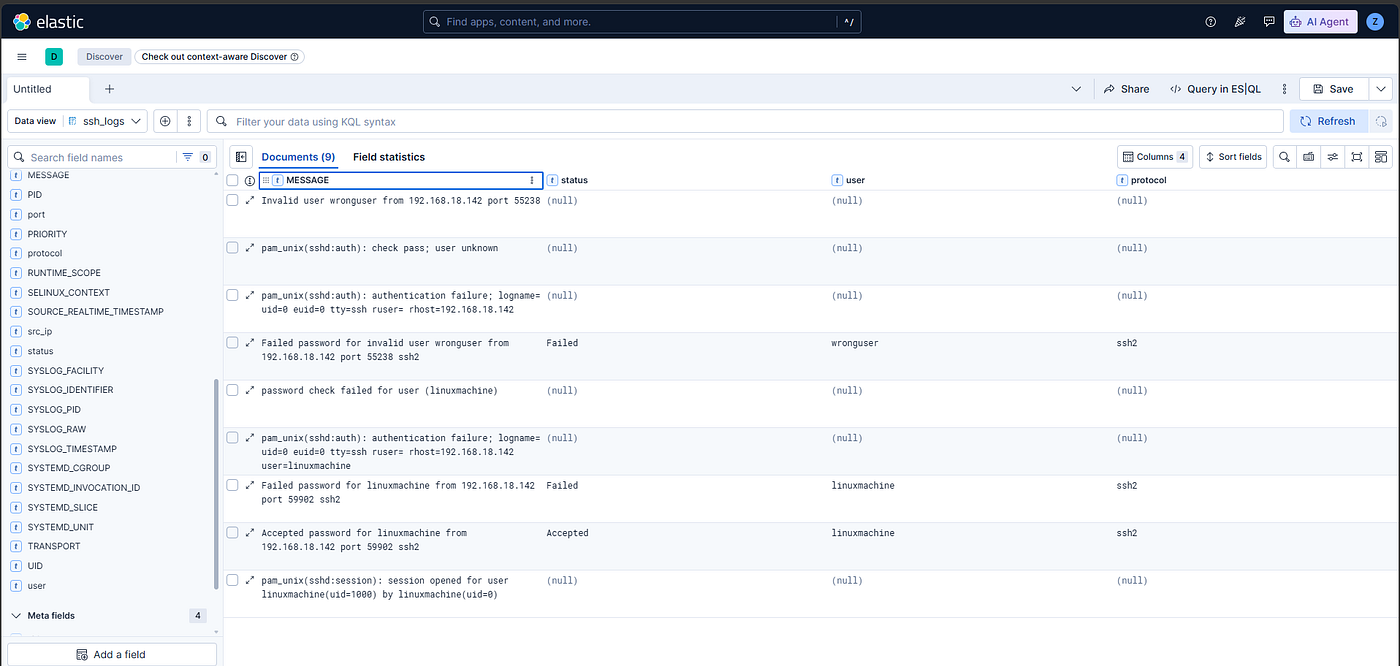
After parsing:
{
  "status": "Failed",
  "invalid_user": "invalid user",
  "user": "wronguser",
  "src_ip": "192.168.18.142",
  "port": "55238",
  "protocol": "ssh2"
}
This is a message-family-specific parser, not a parser for every SSH log.
Conclusion
Collecting logs is only the first step. Reliable threat detection depends on correctly identifying the log format, extracting meaningful fields, and normalizing the resulting data.
Reliable parsing creates data that detections can trust.
메타데이터
- post_id
- c34e71b01b9a
- slug
- log-parsing-for-security-engineers-building-the-foundation-for-reliable-threat-detection-c34e71b01b9a
- url
- https://medium.com/@0xzyadelzyat/log-parsing-for-security-engineers-building-the-foundation-for-reliable-threat-detection-c34e71b01b9a
- canonical_url
- https://medium.com/@0xzyadelzyat/log-parsing-for-security-engineers-building-the-foundation-for-reliable-threat-detection-c34e71b01b9a
- author_url
- https://medium.com/@0xzyadelzyat
- status
- ok
- fetched_at
- 2026-08-03 18:15:54




