WhatsApp CRM Integration in Odoo for Better Lead Management
Today, many customers prefer WhatsApp for quick communication. They ask about products, prices, services, order updates, meetings, and…
WhatsApp CRM Integration in Odoo for Better Lead Management
Today, many customers prefer WhatsApp for quick communication. They ask about products, prices, services, order updates, meetings, and support through WhatsApp because it is fast and simple. But for a sales team, managing WhatsApp chats separately from CRM can become difficult. Leads may get missed, follow-ups may be delayed, and important customer messages may remain outside the sales pipeline.
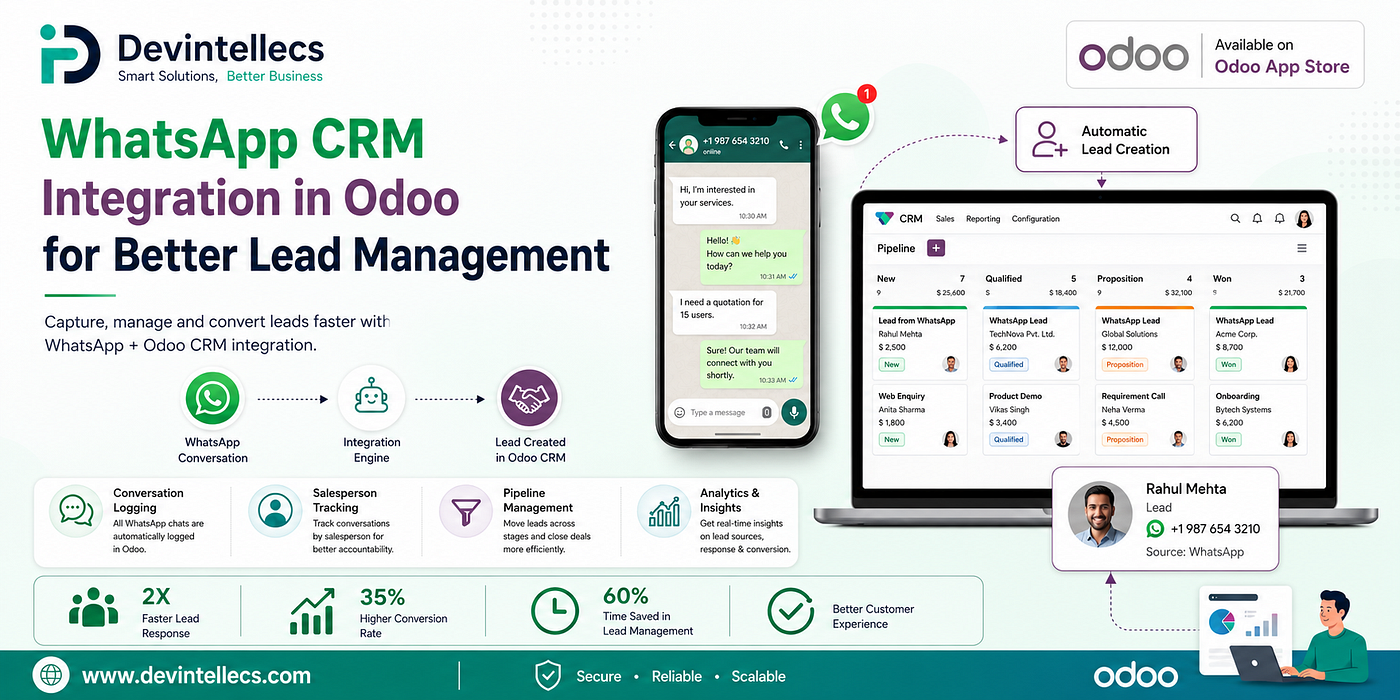
WhatsApp CRM Integration in Odoo
**WhatsApp CRM Integration in Odoo** solves this problem by connecting WhatsApp conversations with Odoo CRM. It helps businesses create leads, track chats, send automated messages, manage salesperson activities, and monitor performance from one place. This makes lead management easier, faster, and more organized.
Automatic Lead Creation
One of the most useful features of WhatsApp CRM Integration in Odoo is automatic lead creation. When a new customer sends a WhatsApp message for the first time, the system can automatically create a CRM lead or opportunity.
The lead can include important details such as customer name, phone number, source, tags, sales team, and salesperson. This saves time because the sales team does not need to create leads manually for every new WhatsApp inquiry.
For example, if a customer sends a message asking about a product, Odoo can directly open a lead in CRM. The salesperson can then follow up from the same record and manage the complete sales process properly.
Duplicate-Safe Matching
Duplicate leads can make the sales pipeline messy. If the same customer sends multiple WhatsApp messages and a new lead is created every time, the team may get confused. They may not know which lead is active or who is already handling the customer.
Duplicate-safe matching helps avoid this issue. If a contact already has an open lead, the WhatsApp chat is linked to that existing lead instead of creating another one. This keeps the CRM pipeline clean and avoids repeated records.
It also helps salespeople work with the correct lead and continue the conversation without losing context.
Stage-Based Auto Messages
In a sales process, every pipeline stage needs different communication. A new lead may need a welcome message, a qualified lead may need a proposal message, and a won deal may need a thank-you message.
With stage-based auto messages, businesses can set WhatsApp templates for different CRM stages. When a lead reaches a selected stage, the system can automatically send the right WhatsApp message.
This helps maintain timely communication with customers. It also reduces manual follow-up work for the sales team and makes the sales process more consistent.
Customer and Salesperson Templates
Some updates are useful for customers, while some are useful for internal salespeople. This integration allows businesses to choose separate WhatsApp templates for the customer and the assigned salesperson at each stage.
Customer and Salesperson Templates
For example, when a lead moves to the proposal stage, the customer can receive a proposal message, while the salesperson can receive an internal reminder to follow up. This keeps both sides informed and helps the team manage the lead more carefully.
Separate templates make communication more flexible and useful for different users.
Delay and Conditions
Not every message should be sent immediately. Sometimes a business may want to wait for a few minutes before sending a stage message. This feature allows users to set a delay before the WhatsApp template is sent.
Businesses can also add conditions. For example, they may want to send a special follow-up message only for high-value leads or only for leads from a specific source. This helps make communication more targeted.
With delay and conditions, businesses can avoid unnecessary messages and send WhatsApp updates only when they are truly needed.
Anti-Spam Guard
Customers do not like receiving the same message again and again. Repeated messages can look unprofessional and may reduce customer trust.
The anti-spam guard helps prevent this problem. The same stage template will not be sent twice to the same lead within a day. This means customers are not flooded with repeated WhatsApp messages.
It keeps communication clean, controlled, and customer-friendly.
Conversation Logging
A major benefit of WhatsApp CRM Integration in Odoo is that WhatsApp conversations are saved inside the lead record. Incoming and outgoing messages are posted to the lead’s chatter, so the sales team can view the full conversation history.
Messages can be color-coded by direction, making it easy to identify which messages came from the customer and which were sent by the team. The first message can also be saved in the notes, helping salespeople understand the original customer requirement quickly.
This improves transparency and makes it easier for any team member to continue the conversation.
WhatsApp CRM Dashboard
A good dashboard helps managers understand how well the sales team is performing. The WhatsApp CRM dashboard gives clear insights into WhatsApp-based leads and sales activities.
CRM WhatsApp Analytics Dashboard
Businesses can track WhatsApp leads, conversion rate, average deal value, won revenue, pipeline funnel, and WhatsApp template delivery and read rates. This helps managers see how many leads are coming from WhatsApp and how many are converting into sales.
With this dashboard, teams can make better decisions and improve their lead management strategy.
Salesperson Leaderboard
Sales teams need performance tracking. The salesperson leaderboard shows which salesperson is winning the most WhatsApp leads and revenue.
It ranks salespeople based on important numbers such as conversion rate and won revenue. This helps managers identify top performers and understand where improvement is needed.
The leaderboard also motivates the sales team to follow up better and close more deals.
Leads Panel in Discuss
Odoo Discuss is useful for managing conversations. With the leads panel in Discuss, users can see linked CRM leads directly inside each WhatsApp chat.
The panel can show lead stage, owner, expected revenue, and priority. With one click, users can open the linked lead and check full details.
This saves time because the salesperson does not need to search for the CRM lead separately. The WhatsApp chat and CRM record stay connected.
Send a Template from a Lead
Salespeople can send an approved WhatsApp template directly from a CRM lead. Once the template is sent, the conversation links back to that lead automatically.
This helps send standard messages such as welcome notes, follow-ups, meeting reminders, proposals, deal updates, and feedback requests. It keeps communication professional and properly recorded inside Odoo.
Create a Lead from a Chat
Sometimes, a salesperson may be chatting with a customer in Discuss and realize that the conversation should become a CRM lead. In such cases, they can use the lead command inside the WhatsApp conversation to create a lead on the spot.
The chat is attached to the new lead, so the team does not lose any previous conversation. This makes lead creation faster and easier.
Per-Account Lead Rules
A business may have different WhatsApp accounts for different teams, branches, or services. Per-account lead rules allow users to decide how leads should be created for each WhatsApp account.
For each account, users can define whether the system should create leads or opportunities. They can also set default priority, sales team, salesperson, source, stage, and tags.
This gives businesses better control and helps route WhatsApp inquiries to the right team automatically.
Ready-Made CRM Templates
The integration also includes ready-made CRM WhatsApp templates. These can include welcome messages, follow-up messages, proposal messages, meeting reminders, deal-won messages, nurture messages, and feedback messages.
These templates save time and give the sales team a starting point for professional communication. Businesses can approve and use them based on their sales process.
Conclusion
WhatsApp CRM Integration in Odoo by Devintellecs helps businesses manage WhatsApp inquiries in a smarter and more organized way. It connects WhatsApp chats with CRM leads, reduces manual work, avoids duplicate records, and keeps all customer communication in one place.
With features like automatic lead creation, duplicate-safe matching, stage-based messages, conversation logging, dashboard, salesperson leaderboard, Discuss lead panel, template sending, chat-to-lead creation, and per-account rules, businesses can improve their complete lead management process.
For any company that uses WhatsApp for sales communication, this integration can make follow-ups faster, customer handling easier, and CRM data more organized. This app is available on the Odoo App Store by Devintellecs.
메타데이터
- post_id
- c35ccdd49f24
- slug
- whatsapp-crm-integration-in-odoo-for-better-lead-management-c35ccdd49f24
- url
- https://medium.com/@devintellecs/whatsapp-crm-integration-in-odoo-for-better-lead-management-c35ccdd49f24
- canonical_url
- https://medium.com/@devintellecs/whatsapp-crm-integration-in-odoo-for-better-lead-management-c35ccdd49f24
- author_url
- https://medium.com/@devintellecs
- status
- ok
- fetched_at
- 2026-06-24 11:06:28



