AWS S3 vs. DynamoDB: Choosing the Right Tool for Your Cloud Storage Needs
As your applications grow, the need for effective storage solutions increases. AWS offers various services to meet different storage needs…
AWS S3 vs. DynamoDB: Choosing the Right Tool for Your Cloud Storage Needs
As your applications grow, the need for effective storage solutions increases. AWS offers various services to meet different storage needs, with Amazon S3 and Amazon DynamoDB being two of the most popular. Each service has its own strengths, so it’s important to know when to use one over the other.
In this article, we will explore the differences between these two services, provide real-world use cases, and share best practices to help you choose the right service for your needs.
Key Differences Between Amazon S3 and DynamoDB
Amazon S3 (Simple Storage Service) is an object storage service primarily designed for handling large, unstructured data. When storing data in S3, you organize it into buckets, where each file is treated as an individual object with a unique key. This makes it a perfect fit for scenarios where large files, such as media (videos, images), backups, or logs, need to be stored. Amazon S3 is optimized for bulk storage, providing scalable throughput, although it is generally used for data that does not require frequent access.
Pricing for S3 is based on the amount of data stored, as well as the types of requests made, such as PUT, GET, and DELETE operations. Because S3 is highly available, it’s an excellent solution for use cases that require durable storage for files accessed on demand.
Use Case of S3
Amazon S3 would be ideal for storing lecture recordings, research papers, and project submissions. These files are large and need to be stored long-term, but they don’t require frequent access. For instance, students may upload large project files at the end of each semester, and these files need to be stored securely in the cloud. S3 offers a cost-effective solution to manage this bulk storage with scalable access when students or faculty need to retrieve the files.
Amazon DynamoDB, on the other hand, is a NoSQL database service that focuses on providing low-latency, real-time access to structured data. It uses a key-value or document data model, making it well-suited for scenarios where small but highly structured data needs to be retrieved or updated quickly, such as user profiles, session data, or real-time analytics. DynamoDB is designed to handle frequent read/write operations with consistently low latency, even under heavy loads. The service allows developers to provision throughput capacity (for reads and writes), meaning you only pay for the capacity you actually need. As a result, DynamoDB is ideal for use cases where real-time data access is critical to the application’s performance.
Use Case of DynamoDB
DynamoDB is perfect for managing student profiles and attendance records. These records are accessed often by students and faculty, and DynamoDB allows quick and easy updates. For instance, when a student wants to check their attendance or view their grades, DynamoDB retrieves the information instantly, making it a great choice for real-time access to important data.
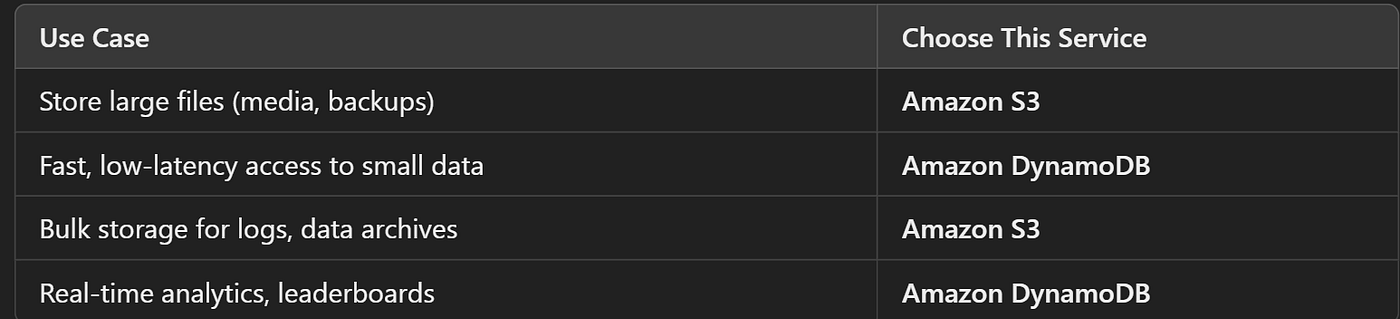
Choosing Service based upon use cases.
Let us look into java code for each examples discussed for both S3 as well as DynamoDB.
Uploading Project Files to Amazon S3
import com.amazonaws.AmazonServiceException;
import com.amazonaws.SdkClientException;
import com.amazonaws.auth.profile.ProfileCredentialsProvider;
import com.amazonaws.services.s3.AmazonS3;
import com.amazonaws.services.s3.AmazonS3ClientBuilder;

import java.io.File;

public class S3ProjectUpload {

    public static void uploadSemesterProjectToS3(String bucketName, String projectFileName, String filePath) {
        AmazonS3 s3Client = AmazonS3ClientBuilder.standard()
                .withCredentials(new ProfileCredentialsProvider()) //Credentials to connect
                .withRegion("us-east-2")  // Choose the appropriate region
                .build();

        try {
            File file = new File(filePath);
            s3Client.putObject(bucketName, projectFileName, file);
            System.out.println("Project uploaded successfully!");
        } catch (AmazonServiceException e) {
            System.err.println("Failed to upload the project: " + e.getErrorMessage());
        } catch (SdkClientException e) {
            System.err.println("Failed to connect to S3: " + e.getMessage());
        }
    }

    public static void main(String[] args) {
        uploadSemesterProjectToS3("college-semester-project-bucket", "final_sem_project.pdf", "cbit/dept/cic/final/cse5_036.pdf"); //path is just taken as setion and rollnum
// you can use aws lambdas as well and connect both dynamodb as well as lambdas,
//create lambda function and call the function to upload to S3.
 //You can write custom exceptions to be thrown based on use case.
    }
}
The ProfileCredentialsProvider() in AWS SDK for Java is a class used to load AWS credentials from a local configuration file, typically located in the .aws/credentials file on your local system. This file contains access keys and secret keys that allow your Java application to authenticate and interact with AWS services, such as S3, DynamoDB, etc.
The AmazonS3ClientBuilder simplifies the process of creating and configuring the S3 client by using a builder pattern, allowing you to specify things like the region, credentials, and other configuration options in a clean and concise way.
The putObject method in the AWS SDK for Java is used to upload an object (such as a file or data) to an Amazon S3 bucket. This method is part of the AmazonS3 client and allows you to specify the bucket name, the key (or filename) for the object, and the data you want to upload.
Managing Student Profiles in DynamoDB
Here, we will be adding and updating the student data . DynamoDB consists of tables with items each in JSON format. Let us have STUDENT table in DynamoDB with ID as primary key through which we can fetch and update the data.
{
    "StudentId": "CIC26",
    "Name": "M.C.V.Reddy",
    "Age": 22,
    "Courses": ["IoT", "Block Chain"],
    "GPA": 9.18,
    "IsActive": false, //graduated from college.
    "Metadata": {
        "EnrolledDate": "2020-09-04",
        "GraduationDate": "2024-06-30"
    }
}
Let us code for adding student data.
We create a student model class and fill the data by creating an object to it.
Remember we have to send JSON data to DB, so we then convert the class to JSON using Jackson mapper.
@JsonProperty is used to map the class member to exact JSON object.
@Builder is a Lombok property used to set the values after objects without explicitly calling setters and we can set values improving code readability and maintainability.
You can also use JSON serialiser and Gson() library for data models conversion.
@Data
@Builder
public class Student {
    @JsonProperty("StudentId")
    private String studentId;

    @JsonProperty("Name")
    private String name;

    @JsonProperty("Age")
    private int age; // age value maps with "Age" JSON object.

    @JsonProperty("Courses")
    private List<String> courses;

    @JsonProperty("GPA")
    private double gpa;

    @JsonProperty("IsActive")
    private boolean isActive;

    @JsonProperty("Metadata")
    private Metadata metadata;
}
@Data
@Builder
public static class Metadata {
@JsonProperty("EnrolledDate")
private String enrolledDate;
@JsonProperty("GraduationDate")
private String graduationDate;
}Let us create class and code for adding above data to DB.
import com.amazonaws.services.dynamodbv2.AmazonDynamoDB;
import com.amazonaws.services.dynamodbv2.AmazonDynamoDBClientBuilder;
import com.amazonaws.services.dynamodbv2.document.DynamoDB;
import com.amazonaws.services.dynamodbv2.document.Item;
import com.amazonaws.services.dynamodbv2.document.Table;
import com.fasterxml.jackson.core.JsonProcessingException;
import com.fasterxml.jackson.databind.ObjectMapper;

import java.util.List;

public class DynamoDBExample {
    private static final String TABLE_NAME = "Students";
    private AmazonDynamoDB client;
    private DynamoDB dynamoDB;
    private ObjectMapper objectMapper;

    public DynamoDBExample() {
        client = AmazonDynamoDBClientBuilder.standard().withRegion("us-west-2").build();
        dynamoDB = new DynamoDB(client);
        objectMapper = new ObjectMapper();
    }

    // Method to add a new student by serializing the object to JSON
    public void addStudent(Student student) {
        Table table = dynamoDB.getTable(TABLE_NAME);

        try {
            // Convert student object to JSON string
            String jsonString = objectMapper.writeValueAsString(student);

            // Create a new item from the JSON string and push it to DynamoDB
            Item item = Item.fromJSON(jsonString);
            table.putItem(item);
            System.out.println("Student added successfully: " + jsonString);
        } catch (JsonProcessingException e) {
            System.err.println("Failed to convert student to JSON: " + e.getMessage());
        } catch (Exception e) {
            System.err.println("Failed to add student: " + e.getMessage());
        } //can add custom exceptions based on use case.
    }


}
Adding student data
public static void main(String[] args) { //you can use this with aws lambdas
        DynamoDBExample dbExample = new DynamoDBExample();

        // Create a new student object using the builder pattern
        Student student = Student.builder()
                .studentId("CIC26")
                .name("M.C.V.Reddy")
                .age(22)
                .courses(List.of("IoT", "Block Chain")) //list of courses.
                .gpa(9.18)
                .isActive(true)
                .metadata(Student.Metadata.builder() //metadata object
                        .enrolledDate("2020-09-04")
                        .graduationDate(null) // not graduated yet
                        .build())
                .build();

        // Add a new student
        dbExample.addStudent(student);
    }
Let us fetch Enrolled date for added student data.
Try catch is added here to handle exceptions while fetching null data i.e data not present in DB
// Method to fetch a student's enrolled date by StudentId
    public String getStudentEnrolledDate(String studentId) {
        Table table = dynamoDB.getTable(TABLE_NAME); //Students
        try {
            // Fetch the item from DynamoDB based on StudentId
            Item item = table.getItem("StudentId", studentId);
            if (item != null) {
                // Extract the Metadata as a JSON string
                String metadataJson = item.getJSON("Metadata"); // retrives metadata JSON
                Metadata metadata = objectMapper.readValue(metadataJson, Metadata.class);
                return metadata.getEnrolledDate(); //returns enrolled date
            } else {
                System.out.println("Student not found with StudentId: " + studentId);
                return null;
            }
        } catch (Exception e) {
            System.err.println("Failed to fetch student enrolled date: " + e.getMessage()); //printing error message thrown
            return null;
        }
}
public static void main(String[] args) { //you can use this with aws lambdas
DynamoDBExample dbExample = new DynamoDBExample();
String enrolledDate = dbExample.getStudentEnrolledDate("CIC26"); //primary key
if (enrolledDate != null) {
System.out.println("Enrolled Date: " + enrolledDate);
}
}Let us modify the student GPA
// Method to update a student's GPA by StudentId
    public void updateStudentGPA(String studentId, double newGPA) {
        Table table = dynamoDB.getTable(TABLE_NAME);
        try {
            // Fetch the item from DynamoDB based on StudentId
            Item item = table.getItem("StudentId", studentId);
            if (item != null) {
                // Update the GPA
                item.withNumber("GPA", newGPA);
                table.putItem(item); // Save the updated item back to the table
                System.out.println("Updated GPA for StudentId " + studentId + " to " + newGPA);
            } else {
                System.out.println("Student not found with StudentId: " + studentId);
            }
        } catch (Exception e) {
            System.err.println("Failed to update GPA: " + e.getMessage());
        }
    }
public static void main(String[] args) { //you can use this with aws lambdas
DynamoDBExample dbExample = new DynamoDBExample();
// Fetch and print the enrolled date for a specific student
String enrolledDate = dbExample.getStudentEnrolledDate("CIC26");
if (enrolledDate != null) {
System.out.println("Enrolled Date: " + enrolledDate);
}
// Update the student's GPA
dbExample.updateStudentGPA("CIC26", 9.5); // Change GPA to 9.5
// Verify the update by fetching the enrolled date again
enrolledDate = dbExample.getStudentEnrolledDate("CIC26");
if (enrolledDate != null) {
System.out.println("Enrolled Date: " + enrolledDate);
}
}Next Steps
As you continue to explore AWS services, take some time to experiment with features like versioning in S3, which helps you track and restore previous versions of your files. In DynamoDB, try using its advanced querying capabilities to efficiently retrieve data based on your needs.
Also go through various read, write modes and provisioned throughput concepts.
Integrating both services into your applications can create a smooth flow of data storage and retrieval, enhancing the overall performance and scalability of your projects.
Happy coding, and enjoy your journey with AWS!
메타데이터
- post_id
- c36aa9af8950
- slug
- aws-s3-vs-dynamodb-choosing-the-right-tool-for-your-cloud-storage-needs-c36aa9af8950
- url
- https://medium.com/@viswasmc238/aws-s3-vs-dynamodb-choosing-the-right-tool-for-your-cloud-storage-needs-c36aa9af8950
- canonical_url
- https://medium.com/@viswasmc238/aws-s3-vs-dynamodb-choosing-the-right-tool-for-your-cloud-storage-needs-c36aa9af8950
- author_url
- https://medium.com/@viswasmc238
- status
- ok
- fetched_at
- 2026-07-13 18:14:32


